
Development
Plugin
managedcode-dotnet-skills
Stop explaining .NET to your AI. Start building. We've all been there: asking Claude to use Entity Framework, only to get EF6 patterns in a .NET 8 project. Explaining to Copilot that Blazor Server and Blazor WebAssembly aren't the same thing.

Plugin Signal88/100Strong
maintained99
capable100
documented75
adopted57
Install
$ npx -y skills add managedcode/dotnet-skills --agent claude-code
Stats
483
Stars
36
Forks
Active
Maintenance
C#
Language
MIT
License
4d ago
Last commit
6mo ago
Created
Repo: managedcode/dotnet-skills
In this plugin
- skills
- aspnet-core
- aspire
- azure-functions
- blazor
- entity-framework6
- entity-framework-core
- maui
- mlnet
- microsoft-agent-framework
- minimal-apis
- astro-developer
- configuring-opentelemetry-dotnet
- convert-blazor-server-to-webapp
- dotnet-webapi
- minimal-api-file-upload
- dotnet-maui-doctor
- maui-app-lifecycle
- maui-collectionview
- maui-data-binding
- maui-dependency-injection
- maui-safe-area
- maui-shell-navigation
- maui-theming
- orleans
- semantic-kernel
- sharpconsoleui
- signalr
- webgpu-threejs-tsl
- uno-platform
- wcf
- wpf
- web-api
- winforms
- winui
- worker-services
- workflow-foundation
- grpc
- archunitnet
- libvlc
- mcp
- mvvm
- managedcode-communication
- managedcode-markitdown
- managedcode-mimetypes
- managedcode-orleans-graph
- managedcode-orleans-signalr
- managedcode-storage
- microsoft-extensions-ai
- microsoft-extensions
- netarchtest
- create-datadriven-aspnetcore
- optimizing-ef-core-queries
- sep
- xtwitter-scraper
- architecture
- code-review
- dotnet
- legacy-aspnet
- mcaf
- mixed-reality
- technology-selection
- csharp-scripts
- dotnet-pinvoke
- nuget-trusted-publishing
- vectorization
- author-component
- collect-user-input
- configure-auth
- coordinate-components
- create-blazor-project
- fetch-and-send-data
- plan-ui-change
- support-prerendering
- use-igniteui-blazor
- use-js-interop
- system-text-json-net11
- exp-mock-usage-analysis
- exp-test-maintainability
- migrate-mstest-v1v2-to-v3
- migrate-mstest-v3-to-v4
- migrate-nunit-to-mstest
- migrate-vstest-to-mtp
- migrate-xunit-to-mstest
- migrate-xunit-to-xunit-v3
- dotnet-aot-compat
- migrate-dotnet10-to-dotnet11
- migrate-dotnet8-to-dotnet9
- migrate-dotnet9-to-dotnet10
- migrate-nullable-references
- thread-abort-migration
- csharp-refactoring
- setup-local-sdk
- project-setup
- coverlet
- mstest
- nunit
- assertion-quality
- code-testing-agent
- code-testing-extensions
- coverage-analysis
- crap-score
- detect-static-dependencies
- filter-syntax
- find-untested-sources
- generate-testability-wrappers
- grade-tests
- migrate-static-to-wrapper
- mtp-hot-reload
- platform-detection
- run-tests
- scaffold-dotnet-test-project
- test-analysis-extensions
- test-anti-patterns
- test-gap-analysis
- test-smell-detection
- test-tagging
- testability-obstacle
- writing-mstest-tests
- playwright-visual-testing
- stryker
- tunit
- xunit
- analyzer-config
- asynkron-profiler
- biome
- csharpier
- chous
- chrome-devtools-mcp
- code-analysis
- codeql
- complexity
- eslint
- fsharp
- fsi
- format
- graphify-dotnet
- htmlhint
- metalint
- meziantou-analyzer
- modern-csharp
- analyzing-dotnet-performance
- android-tombstone-symbolication
- apple-crash-symbolication
- clr-activation-debugging
- dotnet-trace-collect
- dump-collect
- microbenchmarking
- binlog-failure-analysis
- binlog-generation
- build-parallelism
- build-perf-baseline
- build-perf-diagnostics
- check-bin-obj-clash
- copy-to-output-directory
- directory-build-organization
- eval-performance
- extension-points
- including-generated-files
- incremental-build
- item-management
- msbuild-antipatterns
- msbuild-modernization
- property-patterns
- resolve-project-references
- target-authoring
- convert-to-cpm
- template-authoring
- template-comparison
- template-discovery
- template-instantiation
- template-smart-defaults
- template-validation
- profiling
- quality-ci
- quickdup
- resharper-clt
- reportgenerator
- roslynator
- sonarjs
- stylecop-analyzers
- stylelint
- cloc
- pvanalyze
- webhint
- agents
- AGENT
- optimizing-dotnet-performance.agent
- build-perf.agent
- msbuild-code-review.agent
- msbuild.agent
- template-engine.agent
- test-migration.agent
- code-testing-builder.agent
- code-testing-fixer.agent
- code-testing-generator.agent
- code-testing-implementer.agent
- code-testing-linter.agent
- code-testing-planner.agent
- code-testing-researcher.agent
- code-testing-tester.agent
- test-quality-auditor.agent
- testability-migration.agent
What's inside
Skill(184 skills)
/aspnet-coreBuild, debug, modernize, or review ASP.NET Core applications with correct hosting, middleware, security, configuration, logging, and deployment patterns on current .NET. USE FOR: working on ASP.NET Core apps, services, or middleware; changing auth, routing, configuration,/aspireBuild, upgrade, and operate Aspire 13.5.x C# or TypeScript application hosts with the current CLI, AppHost, ServiceDefaults, integrations, dashboard, testing, MCP, and deployment patterns for distributed apps. USE FOR: Aspire.AppHost.Sdk, Aspire.Hosting.*,/azure-functionsBuild, review, or migrate Azure Functions in .NET with correct execution model, isolated worker setup, bindings, DI, and Durable Functions patterns. USE FOR: working on Azure Functions in .NET; migrating from the in-process model to the isolated worker model; adding Durable
- /blazor
- /entity-framework6
- /entity-framework-core
- /maui
- /mlnet
- /microsoft-agent-framework
- /minimal-apis
- /astro-developer
- /configuring-opentelemetry-dotnet
- /convert-blazor-server-to-webapp
- /dotnet-webapi
- /minimal-api-file-upload
- /dotnet-maui-doctor
- /maui-app-lifecycle
- /maui-collectionview
- /maui-data-binding
- /maui-dependency-injection
- /maui-safe-area
- /maui-shell-navigation
- /maui-theming
- /orleans
- /semantic-kernel
- /sharpconsoleui
- /signalr
- /webgpu-threejs-tsl
- /uno-platform
- /wcf
- /wpf
- /web-api
- /winforms
- /winui
- /worker-services
- /workflow-foundation
- /grpc
- /archunitnet
- /libvlc
- /mcp
- /mvvm
- /managedcode-communication
- /managedcode-markitdown
- /managedcode-mimetypes
- /managedcode-orleans-graph
- /managedcode-orleans-signalr
- /managedcode-storage
- /microsoft-extensions-ai
- /microsoft-extensions
- /netarchtest
- /create-datadriven-aspnetcore
- /optimizing-ef-core-queries
- /sep
- /xtwitter-scraper
- /architecture
- /code-review
- /dotnet
- /legacy-aspnet
- /mcaf
- /mixed-reality
- /technology-selection
- /csharp-scripts
- /dotnet-pinvoke
- /nuget-trusted-publishing
- /vectorization
- /author-component
- /collect-user-input
- /configure-auth
- /coordinate-components
- /create-blazor-project
- /fetch-and-send-data
- /plan-ui-change
- /support-prerendering
- /use-igniteui-blazor
- /use-js-interop
- /system-text-json-net11
- /exp-mock-usage-analysis
- /exp-test-maintainability
- /migrate-mstest-v1v2-to-v3
- /migrate-mstest-v3-to-v4
- /migrate-nunit-to-mstest
- /migrate-vstest-to-mtp
- /migrate-xunit-to-mstest
- /migrate-xunit-to-xunit-v3
- /dotnet-aot-compat
- /migrate-dotnet10-to-dotnet11
- /migrate-dotnet8-to-dotnet9
- /migrate-dotnet9-to-dotnet10
- /migrate-nullable-references
- /thread-abort-migration
- /csharp-refactoring
- /setup-local-sdk
- /project-setup
- /coverlet
- /mstest
- /nunit
- /assertion-quality
- /code-testing-agent
- /code-testing-extensions
- /coverage-analysis
- /crap-score
- /detect-static-dependencies
- /filter-syntax
- /find-untested-sources
- /generate-testability-wrappers
- /grade-tests
- /migrate-static-to-wrapper
- /mtp-hot-reload
- /platform-detection
- /run-tests
- /scaffold-dotnet-test-project
- /test-analysis-extensions
- /test-anti-patterns
- /test-gap-analysis
- /test-smell-detection
- /test-tagging
- /testability-obstacle
- /writing-mstest-tests
- /playwright-visual-testing
- /stryker
- /tunit
- /xunit
- /analyzer-config
- /asynkron-profiler
- /biome
- /csharpier
- /chous
- /chrome-devtools-mcp
- /code-analysis
- /codeql
- /complexity
- /eslint
- /fsharp
- /fsi
- /format
- /graphify-dotnet
- /htmlhint
- /metalint
- /meziantou-analyzer
- /modern-csharp
- /analyzing-dotnet-performance
- /android-tombstone-symbolication
- /apple-crash-symbolication
- /clr-activation-debugging
- /dotnet-trace-collect
- /dump-collect
- /microbenchmarking
- /binlog-failure-analysis
- /binlog-generation
- /build-parallelism
- /build-perf-baseline
- /build-perf-diagnostics
- /check-bin-obj-clash
- /copy-to-output-directory
- /directory-build-organization
- /eval-performance
- /extension-points
- /including-generated-files
- /incremental-build
- /item-management
- /msbuild-antipatterns
- /msbuild-modernization
- /property-patterns
- /resolve-project-references
- /target-authoring
- /convert-to-cpm
- /template-authoring
- /template-comparison
- /template-discovery
- /template-instantiation
- /template-smart-defaults
- /template-validation
- /profiling
- /quality-ci
- /quickdup
- /resharper-clt
- /reportgenerator
- /roslynator
- /sonarjs
- /stylecop-analyzers
- /stylelint
- /cloc
- /pvanalyze
- /webhint
Agent(17 agents)
AGENTSpecialist orchestration agent for .NET Aspire work. Use when the problem is clearly about AppHost design, ServiceDefaults, first-party versus CommunityToolkit/Aspire integrations, dashboard and testing, `DistributedApplicationTestingBuilder`, `WebApplicationFactory`optimizing-dotnet-performance.agentAnalyzes .NET code for performance bottlenecks, recommends concrete optimizations, and guides benchmarking. Scans for ~50 anti-patterns across async, memory, strings, collections, LINQ, regex, serialization, and I/O. Use when reviewing .NET code performance, optimizing hotbuild-perf.agentAgent for diagnosing and optimizing MSBuild build performance. Runs multi-step analysis: generates binlogs, analyzes timeline and bottlenecks, identifies expensive targets/tasks/analyzers, and suggests concrete optimizations. Invoke when builds are slow or when asked to optimize
- msbuild-code-review.agent
- msbuild.agent
- template-engine.agent
- test-migration.agent
- code-testing-builder.agent
- code-testing-fixer.agent
- code-testing-generator.agent
- code-testing-implementer.agent
- code-testing-linter.agent
- code-testing-planner.agent
- code-testing-researcher.agent
- code-testing-tester.agent
- test-quality-auditor.agent
- testability-migration.agent
Badges



README
dotnet-skills
Stop explaining .NET to your AI. Start building.
We've all been there: asking Claude to use Entity Framework, only to get EF6 patterns in a .NET 8 project. Explaining to Copilot that Blazor Server and Blazor WebAssembly aren't the same thing. Watching Codex generate Startup.cs for a Minimal API project.
This catalog fixes that. A growing catalog covering the entire .NET ecosystem—from ASP.NET Core to Orleans, from MAUI to Semantic Kernel. Install them once, and your AI agent actually knows modern .NET.
Browse the complete catalog on skills.managed-code.com →
Interactive Control Center
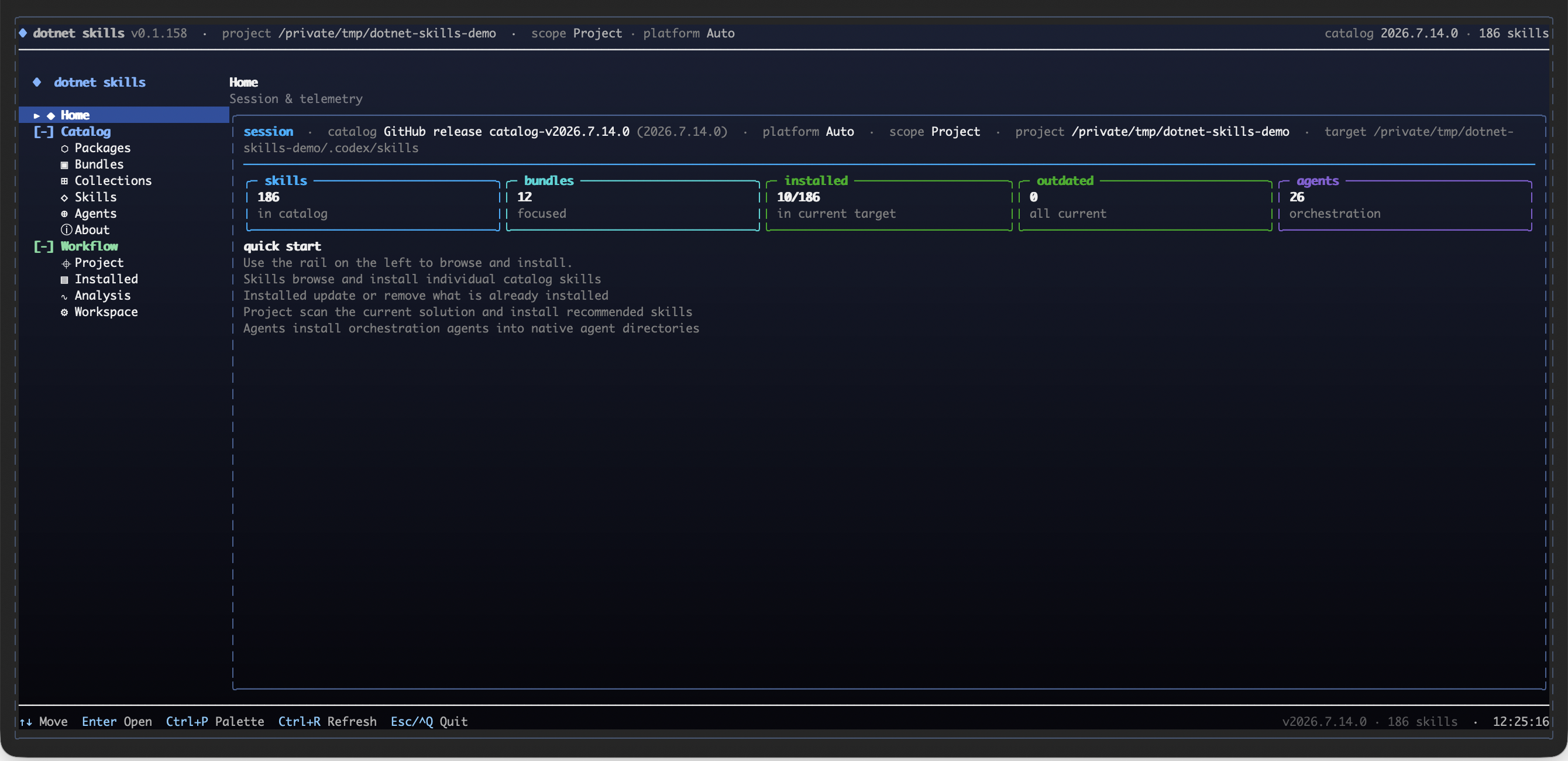
Run dotnet skills to open the full-screen control center for catalog browsing, project-aware recommendations, installation, updates, and agent management.
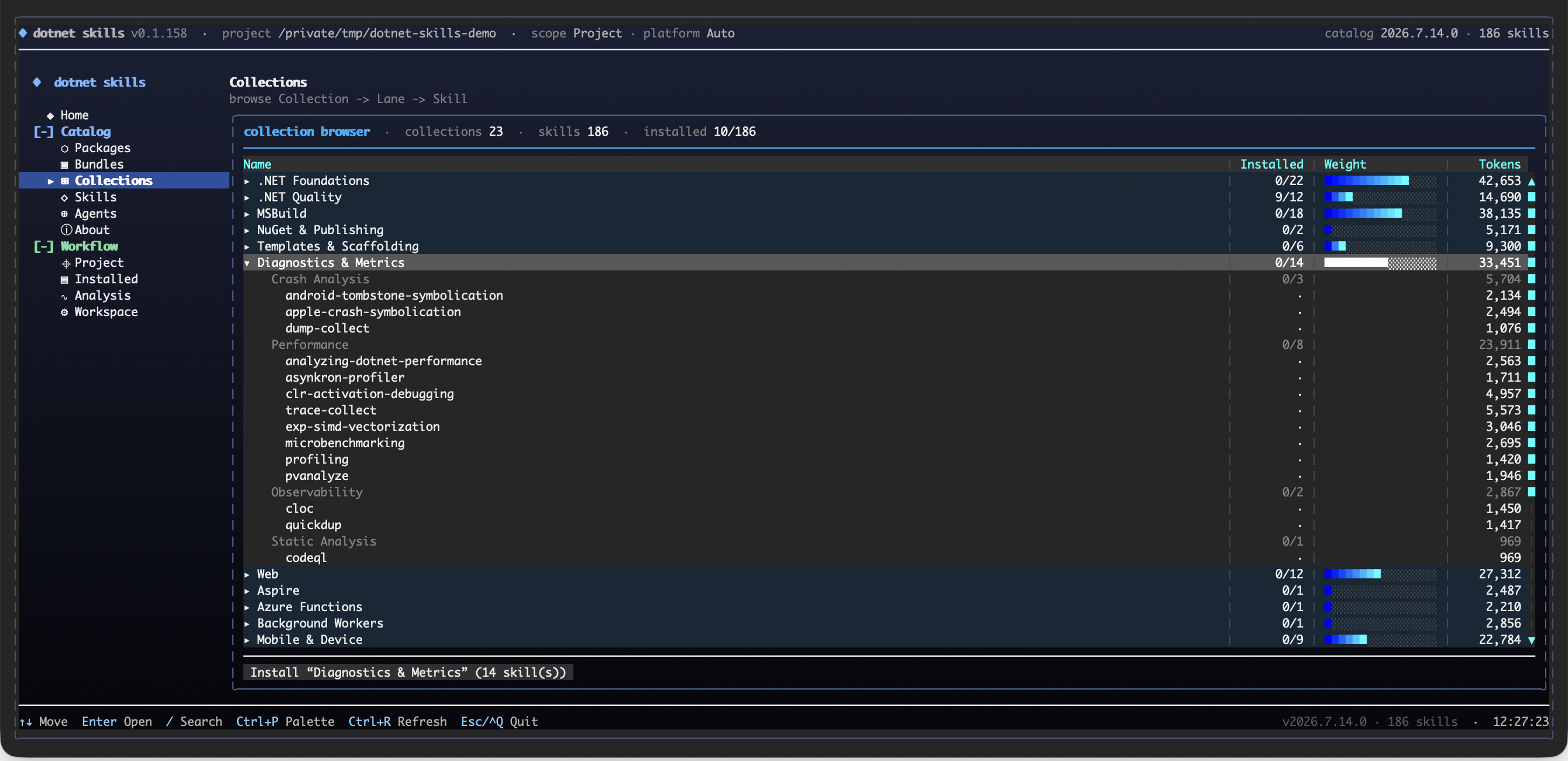
Explore the catalog as Collection -> Lane -> Skill, with installed coverage, token weight, and an install action kept visible while you browse.
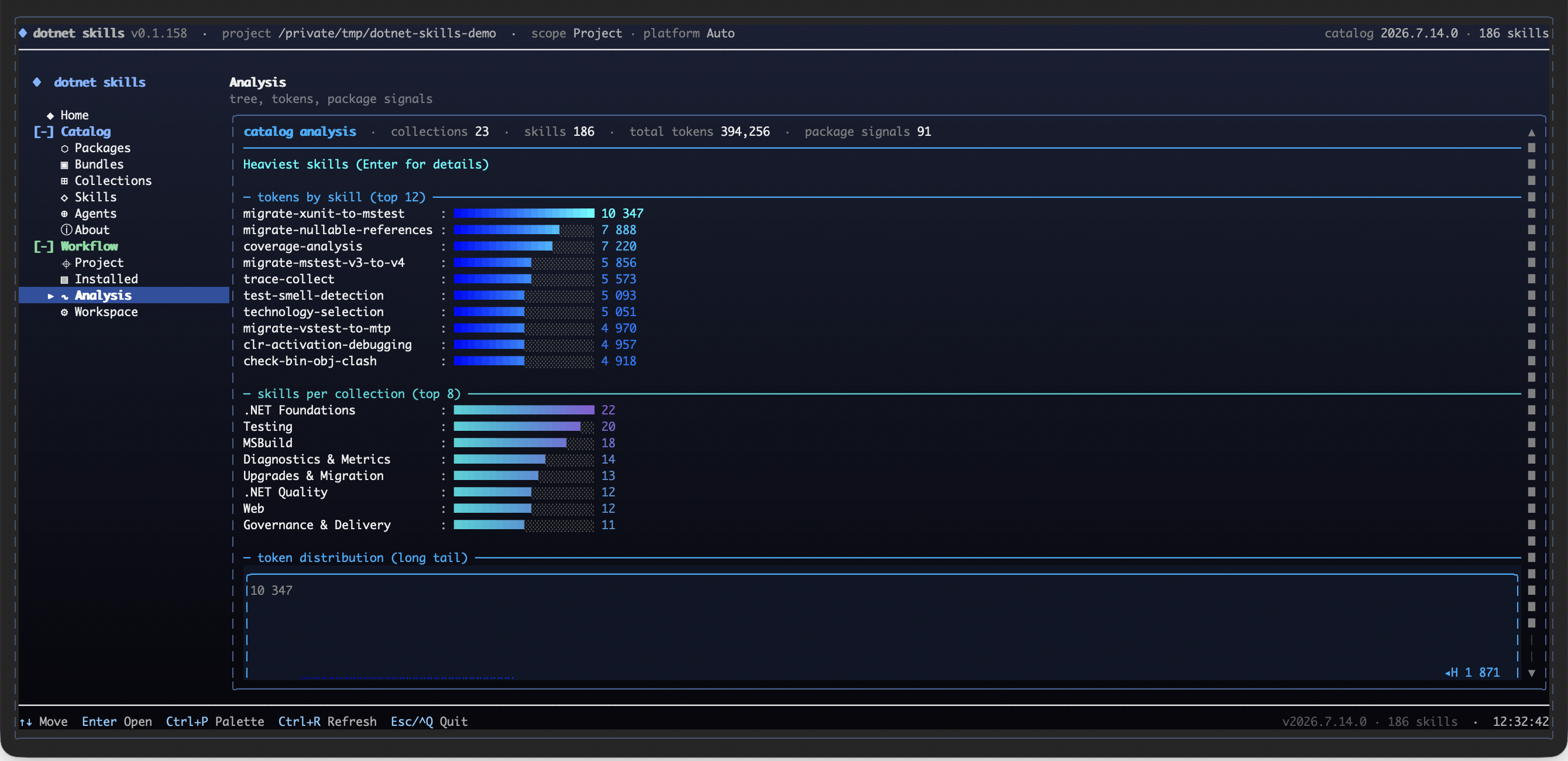
Use the analysis surface to compare the heaviest skills, collection sizes, package signals, and the catalog's token distribution before installing.
Why This Matters
- No more outdated patterns. Skills are maintained by the community and track official Microsoft documentation.
- Works everywhere. Same skills for Claude, Copilot, Gemini, Codex, and Junie.
- Community-driven. Missing a skill for your favorite library? Add it and help everyone.
Your favorite .NET library deserves a skill. If you maintain an open-source project or just love a framework that's missing, contribute it. Let's make AI agents actually useful for .NET developers.
Quick Start
dotnet tool install --global dotnet-skills

# choose one dedicated agent launcher
dotnet tool install --global dotnet-agents
dotnet tool install --global agents

dotnet skills                               # open the interactive control center
dotnet skills version                       # show current tool version and latest NuGet version
dotnet skills --version                     # alias for the same version view
dotnet skills list                          # show installed and available skills
dotnet skills bundle list                   # show focused bundles by collection and workflow
dotnet skills list --local                  # only installed skills in the current target
dotnet skills recommend                     # suggest skills from local .NET and browser UI signals
dotnet skills install --auto                # install skills from local .NET and browser UI project signals
dotnet skills install --auto --prune        # remove stale auto-managed skills that no longer match the project
dotnet skills install bundle quality        # install a focused .NET quality bundle
dotnet skills install mcaf                  # install the opt-in MCAF governance skill
dotnet skills install bundle orleans        # install the Orleans workflow bundle
dotnet skills install aspire orleans        # install skills
dotnet skills catalog tokens --catalog-root . # export per-skill token counts as JSON
dotnet skills remove aspire                 # remove one installed skill
dotnet skills remove bundle quality         # remove every skill from a focused bundle
dotnet skills remove collection distributed # remove every skill from a collection
dotnet skills remove --all                  # remove installed catalog skills from the target
dotnet skills update                        # refresh installed catalog skills
dotnet skills install blazor --agent claude # install for a specific agent
dotnet agents list                          # show bundled orchestration agents
dotnet agents install router --auto         # install agents to shared or detected agent folders
agents list                                 # same agent-only catalog via the plain standalone command
agents install router --auto                # same agent install flow without the dotnet-prefixed launcher
Commands
| Command | Description |
|---|---|
dotnet skills | Open the interactive control center with direct skill browsing, collections, analysis, bundles, and install preview |
dotnet skills version | Show the current installed tool version and check whether NuGet has a newer release |
dotnet skills list | Show the current inventory, compare project/global scope when relevant, and keep the remaining catalog as a compact collection summary |
dotnet skills bundle list | Show the focused bundles that expand into related skills by collection or workflow |
dotnet skills recommend | Scan local *.csproj, package.json, and browser UI files, propose relevant skills, and let you decide what to install |
dotnet skills install --auto | Inspect local *.csproj, package.json, and browser UI files, detect strong project signals, and install matching skills automatically |
dotnet skills install --auto --prune | Remove stale auto-managed skills that no longer match the current project's NuGet packages or app-model signals |
dotnet skills install <skill...> | Install one or more skills |
dotnet skills install bundle <bundle...> | Install one or more focused bundles such as quality, frontend-quality, or orleans |
dotnet skills catalog tokens --catalog-root . | Export the tokenizer model name plus per-skill token counts as JSON |
dotnet skills remove <skill...> | Remove one or more installed catalog skills by skill id or alias |
dotnet skills remove bundle <bundle...> | Remove every installed skill mapped to one or more focused bundles |
dotnet skills remove collection <collection...> | Remove every installed skill in one or more collections |
dotnet skills remove --all | Remove every installed catalog skill from the selected target |
dotnet skills update [skill...] | Update installed catalog skills to the selected catalog version |
dotnet skills sync | Download latest catalog |
dotnet skills where | Show install paths |
dotnet agents list | List available orchestration agents |
dotnet agents install <agent...> | Install orchestration agents |
dotnet agents install router --auto | Install agents to all detected platforms |
dotnet agents remove <agent...> | Remove installed agents |
dotnet agents where | Show resolved shared or platform agent install paths |
agents list | List available orchestration agents through the standalone agents tool |
agents install <agent...> | Install orchestration agents through the standalone agents tool |
agents where | Show resolved agent install paths through the standalone agents tool |
Use --agent to target a specific agent platform, --scope to choose global or project install. Use dotnet skills list --installed-only or the shorter dotnet skills list --local when you only want the installed inventory, or --available-only when you want the detailed collection-by-collection breakdown of the remaining catalog. The default list view stays compact: it shows the current target inventory, compares project/global scope when that comparison is meaningful, and keeps the remaining catalog as a short collection summary instead of dumping one giant description table. The CLI renders rich terminal tables by default so you can quickly see installed versions, update candidates, install commands, and when a newer dotnet-skills, dotnet-agents, or agents package is available on NuGet. dotnet skills --version, dotnet agents --version, and agents --version are shortcuts for the version view.
dotnet-skills remains the skill-first CLI and still supports dotnet skills agent ... for compatibility. The dedicated agent-only surface is published in both forms: dotnet-agents for dotnet agents ... and agents for agents .... Both top-level list, install, remove, and where commands target orchestration agents directly.
The interactive shell behind bare dotnet skills is the main control center: its primary catalog row now mirrors the public site with Packages, Bundles, Collections, Skills, Agents, and About, then layers CLI-only lifecycle surfaces such as Project, Installed, Analysis, and Workspace underneath. Inside that control center you still get direct individual-skill picking, Collection -> Lane -> Skill browsing, package-entry analysis, token hotspots, a full tree view, and install preview before files are written.
The public catalog is the canonical browse surface for Packages, Bundles, Collections, Skills, Agents, and About. It uses the same shared navigation manifest and collection taxonomy as the CLI.
dotnet skills bundle list shows the ready-made focused bundles. Bundle installs are bulk shortcuts for related skill sets, so dotnet skills install bundle quality, dotnet skills install bundle frontend-quality, or dotnet skills install bundle orleans install every skill mapped to that focused bundle in one pass. MCAF is one opt-in governance skill and installs directly with dotnet skills install mcaf.
dotnet skills install --auto inspects local *.csproj, package.json, and browser UI files, detects NuGet packages plus strong .NET and frontend framework signals, and installs the matching skills for that project automatically. Add dotnet skills install --auto --prune when you also want to remove stale auto-managed skills that no longer match the current project. Protected diagnostic skills and graphify-dotnet are not pruned.
dotnet skills recommend is a scan-only command: it inspects local .NET projects plus Astro, React, Blazor, and other browser UI signals, proposes a skill list, and prints the install command you can run if you agree with the recommendations. It does not install anything automatically.
The bare dotnet skills usage view and help path also perform the automatic self-update check, so an outdated tool still tells you to upgrade before it renders the command table.
Use dotnet skills version --no-check, dotnet agents version --no-check, or agents version --no-check when you only want the local installed tool version without calling NuGet. Set DOTNET_SKILLS_SKIP_UPDATE_CHECK=1, DOTNET_AGENTS_SKIP_UPDATE_CHECK=1, or AGENTS_SKIP_UPDATE_CHECK=1 if you want to suppress automatic update notices during normal command startup.
Local Preview
When you want to preview the generated docs and public site locally:
python3 scripts/generate_catalog.py --validate-only
python3 scripts/generate_pages.py
The README stays intentionally compact. The generated catalog site is written to artifacts/github-pages/ with the same shared Packages / Bundles / Collections / Skills / Agents / About navigation that the public site and CLI home surface use.
Install Surface
Public bundle installs use bundle, not package. The focused bundle surface is intentionally small:
foundationsqualityfrontend-qualityarchitecture-coretesting-basetesting-xunit
File tree
Showing a partial view of a very large repo.
FAQ
managedcode-dotnet-skills is a Claude Code plugin with 184 hand-picked skills for development work, indexed on Flowy. Install it with the command on its page. It includes aspnet-core, aspire, azure-functions. Its skills do not fire on their own yet. Request auto-invocation to have Flowy route them as you prompt. Free and open source.
- What is managedcode-dotnet-skills?
- Stop explaining .NET to your AI. Start building. We've all been there: asking Claude to use Entity Framework, only to get EF6 patterns in a .NET 8 project. Explaining to Copilot that Blazor Server and Blazor WebAssembly aren't the same thing.
- How do I install managedcode-dotnet-skills?
- Run these in Claude Code: npx -y skills add managedcode/dotnet-skills --agent claude-code. Then prompt normally.
- Does managedcode-dotnet-skills auto-invoke its skills?
- Not yet. It is indexed on Flowy as a plain plugin. Request auto-invocation on its page and Flowy will route its skills for you as you prompt.
- Is managedcode-dotnet-skills free?
- Yes. Flowy is free and open source, with nothing gated. You can read every skill in full before you install.
Is this plugin yours?
Claim it with GitHubSubmit a pluginPromote it