
VerifiedPlugin
claude-usage
Pro and Max subscribers get a progress bar. This gives you the full picture. Claude Code writes detailed usage logs locally — token counts, models, sessions, projects — regardless of your plan.
1 command2.2k
 @phuryn
69 PM skills and 42 chained workflows across 9 plugins. Claude Code, Cowork, and more. From discovery to strategy, execution, launch, growth, and shipping AI-built code. Designed for Claude Code and Cowork. Skills compatible with other AI assistants.
> /plugin marketplace add phuryn/pm-skills
Repo: phuryn/pm-skills
What's inside





69 PM skills and 42 chained workflows across 9 plugins. Claude Code, Cowork, and more. From discovery to strategy, execution, launch, growth, and shipping AI-built code.
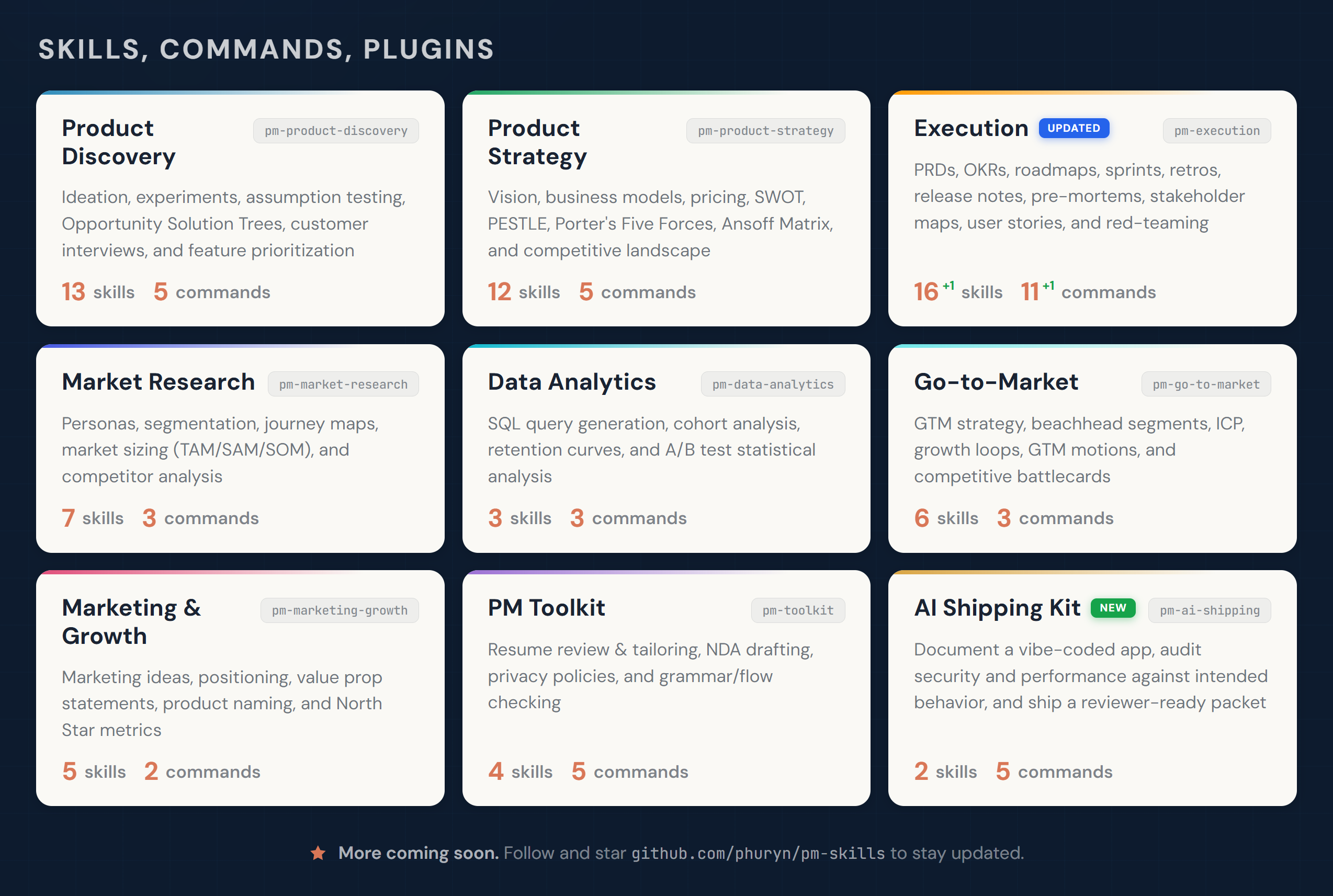
Designed for Claude Code and Cowork. Skills compatible with other AI assistants.
New idea? → /discover
Need strategic clarity? → /strategy
Writing a PRD? → /write-prd
Planning a launch? → /plan-launch
Defining metrics? → /north-star
If this project helps you, ⭐ the repo.
Generic AI gives you text. PM Skills Marketplace gives you structure.
Each skill encodes a proven PM framework — discovery, assumption mapping, prioritization, strategy — and walks you through it step by step. You get the rigor of Teresa Torres, Marty Cagan, and Alberto Savoia built into your daily workflow, not sitting on a bookshelf.
The result: better product decisions, not just faster documents.
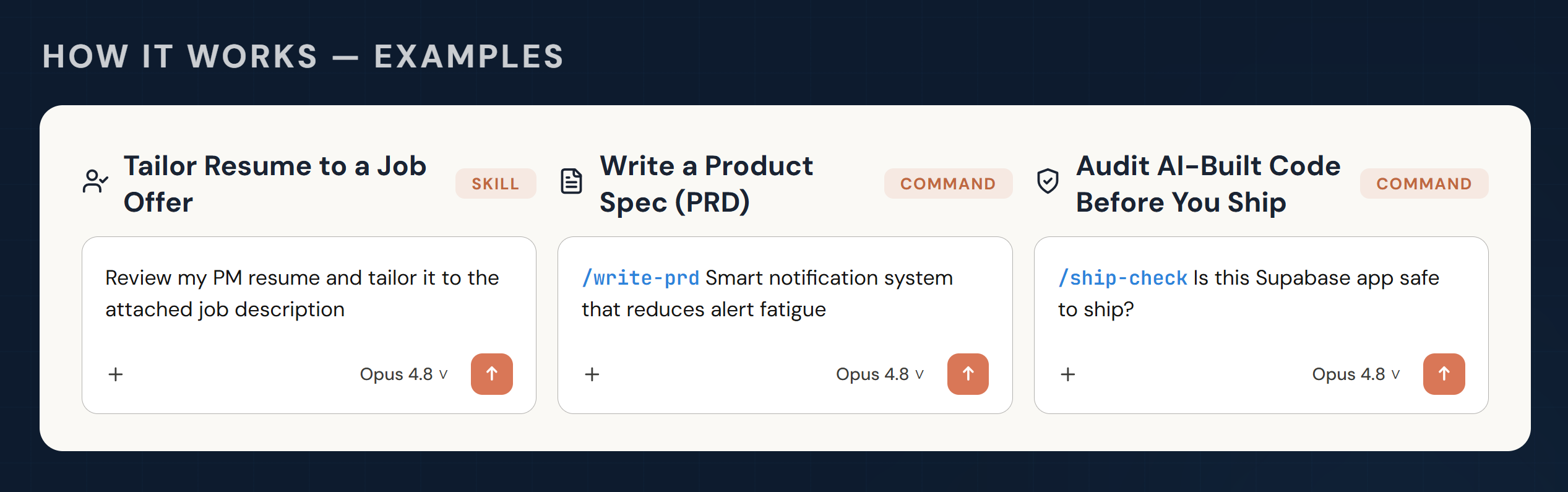
Skills are the building blocks of the marketplace. Each skill gives Claude domain knowledge, analytical frameworks, or a guided workflow for a specific PM task. Some skills also work as reusable foundations that multiple commands share.
Skills are loaded automatically when relevant to the conversation — no explicit invocation needed. If needed (e.g., prioritizing skills over general knowledge), you can force loading skills with /plugin-name:skill-name or /skill-name (Claude will add the prefix).
Commands are user-triggered workflows invoked with /command-name. They chain one or more skills into an end-to-end process. For example, /discover chains four skills together: brainstorm-ideas → identify-assumptions → prioritize-assumptions → brainstorm-experiments.
Plugins group related skills and commands into installable packages. Each plugin covers a PM domain — discovery, strategy, execution, and so on. Installing the marketplace gives you all 9 plugins at once.
Commands use skills. Some skills serve multiple commands. Some skills (like prioritization-frameworks or opportunity-solution-tree) are standalone references that Claude draws on whenever relevant — no command needed.
Commands are designed to flow into each other, matching the PM workflow. After any command completes, it suggests relevant next commands — just follow the prompts.
phuryn/pm-skillsAll 9 plugins install automatically. You get both commands (/discover, /strategy, etc.) and skills.
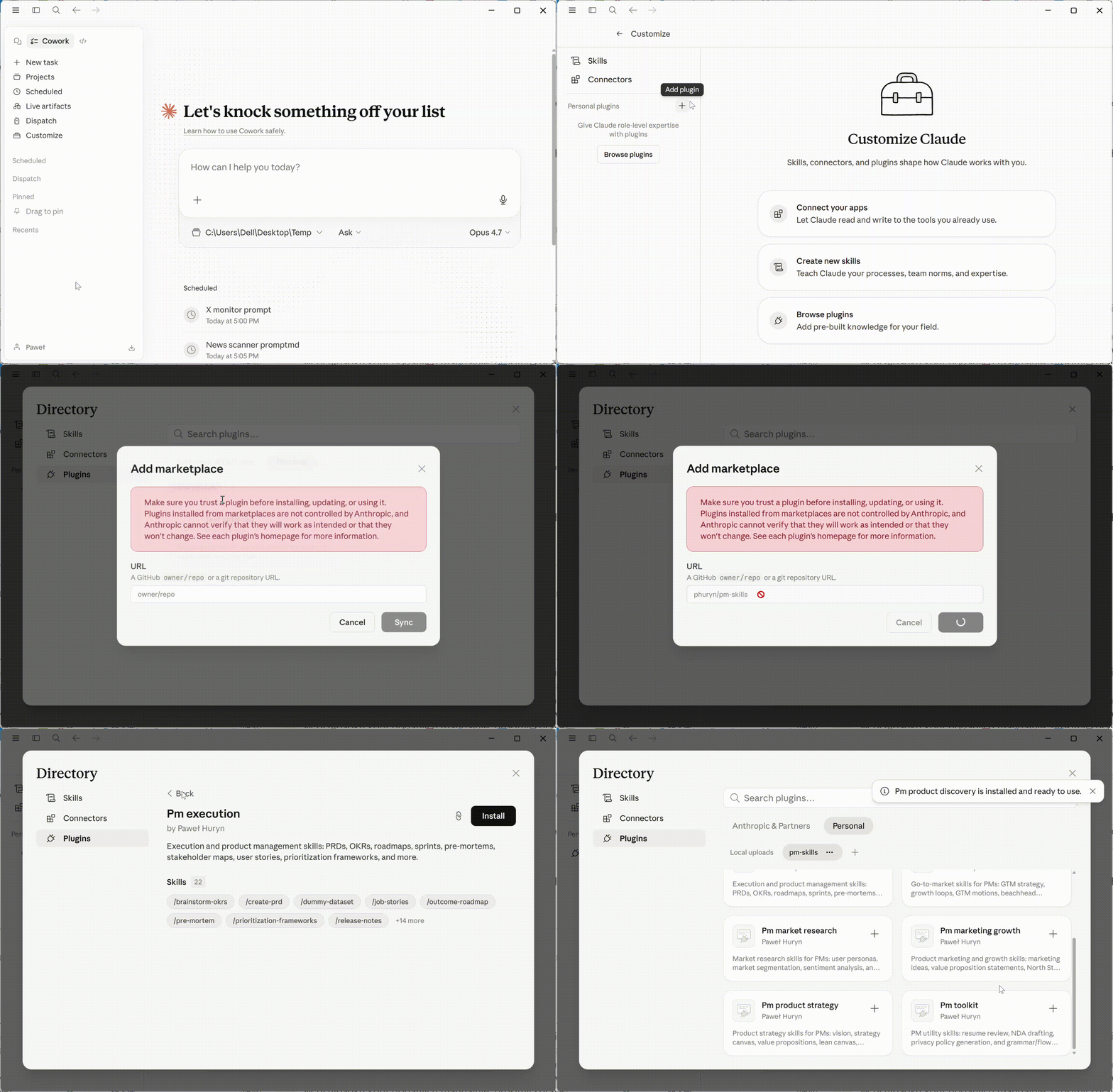
# Step 1: Add the marketplace
claude plugin marketplace add phuryn/pm-skills

# Step 2: Install individual plugins
claude plugin install pm-toolkit@pm-skills
claude plugin install pm-product-strategy@pm-skills
claude plugin install pm-product-discovery@pm-skills
claude plugin install pm-market-research@pm-skills
claude plugin install pm-data-analytics@pm-skills
claude plugin install pm-marketing-growth@pm-skills
claude plugin install pm-go-to-market@pm-skills
claude plugin install pm-execution@pm-skills
claude plugin install pm-ai-shipping@pm-skills
Codex reads the same plugin marketplace file as Claude Code, so you can install PM Skills natively — no conversion or file-copying needed:
# Step 1: Add the marketplace
codex plugin marketplace add phuryn/pm-skills

# Step 2: Install the plugins you want
codex plugin add pm-toolkit@pm-skills
codex plugin add pm-product-strategy@pm-skills
codex plugin add pm-product-discovery@pm-skills
codex plugin add pm-market-research@pm-skills
codex plugin add pm-data-analytics@pm-skills
codex plugin add pm-marketing-growth@pm-skills
codex plugin add pm-go-to-market@pm-skills
codex plugin add pm-execution@pm-skills
codex plugin add pm-ai-shipping@pm-skills
What you get: every skill (the PM frameworks), available to Codex and invocable by name. Install whole plugins rather than cherry-picking individual skills — a workflow usually relies on several skills that ship together.
What's different from Claude Code: the /slash commands (/discover, /write-prd, …) install but don't run as Codex slash commands — Codex plugins don't expose commands. To run a workflow, just describe the steps in plain language, for example:
Run product discovery on [your idea]: brainstorm options, map assumptions, prioritize the risky ones, then design experiments — pause between each step.
Optional — let Codex turn the workflows into skills. Because the command files ship inside each installed plugin, you can ask Codex to convert the ones you use most:
Read the command files in the pm-execution plugin and create equivalent Codex skills for the workflows I use most often.
This is a best-effort, model-driven conversion (some Claude-specific command syntax won't translate), but it's a quick way to get the guided workflows on Codex without leaving the CLI.
The skills/*/SKILL.md files follow the universal skill format and work with any tool that reads it. Commands (/slash-commands) are Claude-specific.
| Tool | How to use | What works |
|---|---|---|
| Gemini CLI | Copy skill folders to .gemini/skills/ | Skills only |
| OpenCode | Copy skill folders to .opencode/skills/ | Skills only |
| Cursor | Copy skill folders to .cursor/skills/ | Skills only |
| Kiro | Copy skill folders to .kiro/skills/ | Skills only |
# Example: copy all skills for OpenCode (project-level)
for plugin in pm-*/; do
  mkdir -p .opencode/skills/
  cp -r "$plugin/skills/"* .opencode/skills/ 2>/dev/null
done

# Example: copy all skills for Gemini CLI (global)
for plugin in pm-*/; do
  cp -r "$plugin/skills/"* ~/.gemini/skills/ 2>/dev/null
done
Skills (13):
brainstorm-ideas-existing — Multi-perspective ideation for existing products (PM, Designer, Engineer)brainstorm-ideas-new — Ideation for new products in initial discoverybrainstorm-experiments-existing — Design experiments to test assumptions for existing productsbrainstorm-experiments-new — Design lean startup pretotypes for new products (Alberto Savoia)identify-assumptions-existing — Identify risky assumptions across Value, Usability, Viability, and Feasibilityidentify-assumptions-new — Identify risky assumptions across 8 risk categories including Go-to-Market, Strategy, and Teamprioritize-assumptions — Prioritize assumptions using an Impact × Risk matrix with experiment suggestionsprioritize-features — Prioritize a feature backlog based on impact, effort, risk, and strategic alignmentanalyze-feature-requests — Analyze and categorize customer feature requests by theme and strategic fitopportunity-solution-tree — Build an Opportunity Solution Tree (Teresa Torres) — outcome → opportunities → solutions → experimentsinterview-script — Create a structured customer interview script with JTBD probing questionssummarize-interview — Summarize an interview transcript into JTBD, satisfaction signals, and action itemsmetrics-dashboard — Design a product metrics dashboard with North Star, input metrics, and alert thresholdsCommands (5):
/discover — Full discovery cycle: ideation → assumption mapping → prioritization → experiment design/brainstorm — Multi-perspective ideation (ideas|experiments × existing|new)/triage-requests — Analyze and prioritize a batch of feature requests/interview — Prepare an interview script or summarize a transcript (prep|summarize)/setup-metrics — Design a product metrics dashboardExamples:
Skills:
What are the riskiest assumptions for our AI writing assistant idea?Help me build an Opportunity Solution Tree for improving user activationPrioritize these 12 feature requests from our enterprise customers [attach CSV]Commands:
/discover AI-powered meeting summarizer for remote teams/brainstorm experiments existing — We need to reduce churn in our onboarding flow/interview prep — We're interviewing enterprise buyers about their procurement workflowProduct strategy, vision, business models, pricing, and macro environment analysis. Covers the full strategic toolkit from vision crafting through competitive landscape scanning.
Skills (12):
product-strategy — Comprehensive 9-section Product Strategy Canvas (vision → defensibility)startup-canvas — Startup Canvas combining Product Strategy (9 sections) + Business Model — an alternative to BMC and Lean Canvas for new productsproduct-vision — Craft an inspiring, achievable, and emotional product visionvalue-proposition — 6-part JTBD value proposition (Who, Why, What before, How, What after, Alternatives)lean-canvas — Lean Canvas business model for startups and new productsbusiness-model — Business Model Canvas with all 9 building blocksmonetization-strategy — Brainstorm 3–5 monetization strategies with validation experimentspricing-strategy — Pricing models, competitive analysis, willingness-to-pay, and price elasticityswot-analysis — SWOT analysis with actionable recommendationspestle-analysis — Macro environment: Political, Economic, Social, Technological, Legal, Environmentalporters-five-forces — Competitive forces analysis (rivalry, suppliers, buyers, substitutes, new entrants)ansoff-matrix — Growth strategy mapping across markets and productsCommands (5):
/strategy — Create a complete 9-section Product Strategy Canvas/business-model — Explore business models (lean|full|startup|value-prop|all)/value-proposition — Design a value proposition using the 6-part JTBD template/market-scan — Macro environment analysis combining SWOT + PESTLE + Porter's + Ansoff/pricing — Design a pricing strategy with competitive analysis and experimentsExamples:
Skills:
Compare Lean Canvas vs Business Model Canvas vs Startup Canvas for my marketplace startupDesign a value proposition for our AI writing assistant targeting non-native English speakersRun a Porter's Five Forces analysis for the project management SaaS marketCommands:
View @phuryn’s profilePro and Max subscribers get a progress bar. This gives you the full picture. Claude Code writes detailed usage logs locally — token counts, models, sessions, projects — regardless of your plan.
@phurynA second brain for product managers. Plain markdown files in a folder on your laptop. Claude reads them before answering, writes to them after, sweeps them every Friday. No vector DB. No cloud. No agent memory tricks. You manage one product.
@phurynFAQ
pm-skills is a Claude Code plugin with 69 hand-picked skills for productivity work, indexed on Flowy. Install it with the command on its page. It includes code-review, intended-vs-implemented, shipping-artifacts. Its skills do not fire on their own yet. Request auto-invocation to have Flowy route them as you prompt. Free and open source.
Is this plugin yours?
Claim it with GitHubSubmit a pluginPromote it