
pm-brain
A markdown-based second brain for product managers and product leads. It stores plain markdown notes in a local folder that Claude reads before answering and updates afterward, with a weekly review sweep.
1 skill9 commands+1961
 @phuryn
Reads the usage logs Claude Code writes locally to show token counts, models, sessions, and projects, regardless of your plan.
$ brew tap phuryn/claude-usage https://github.com/phuryn/claude-usage

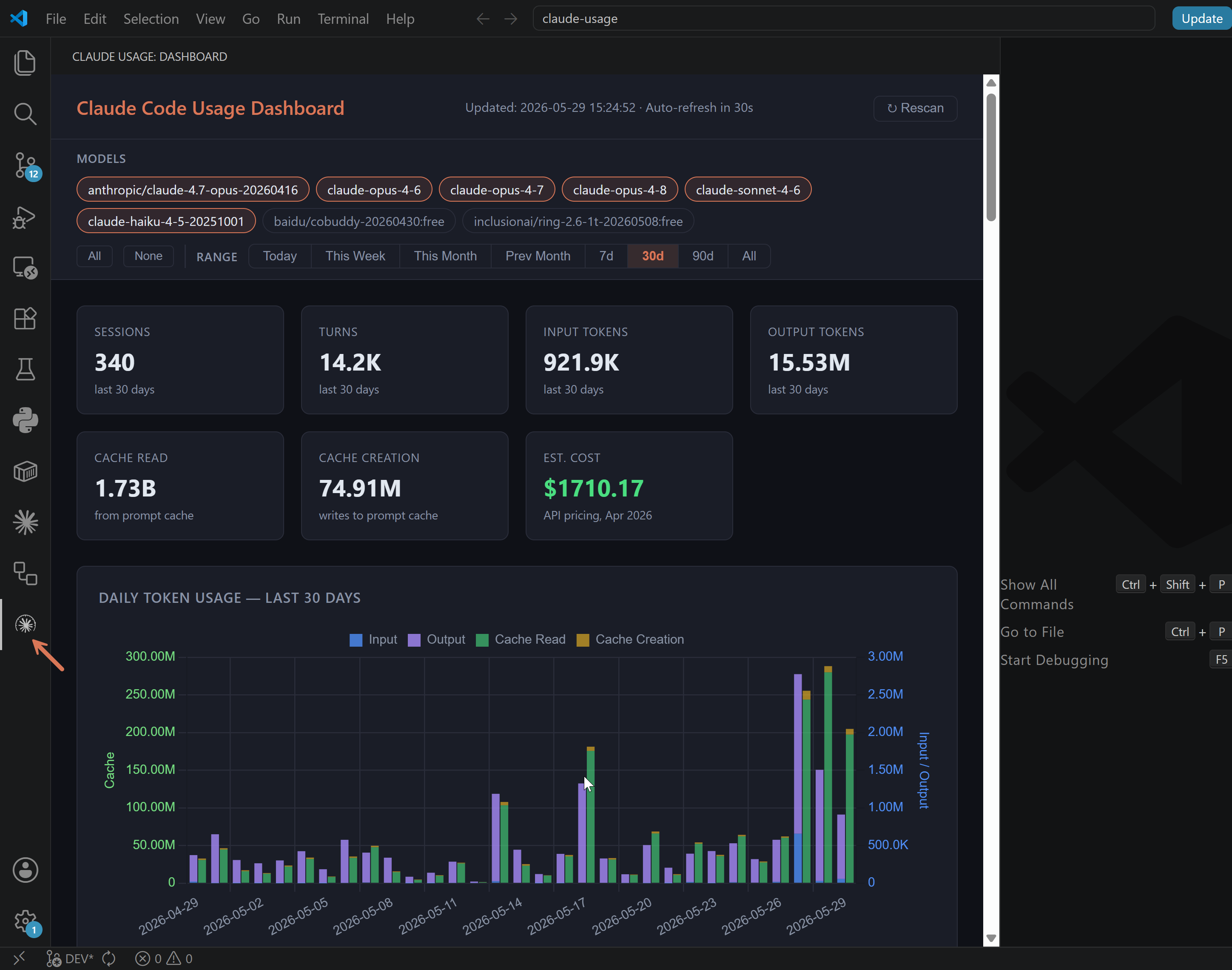
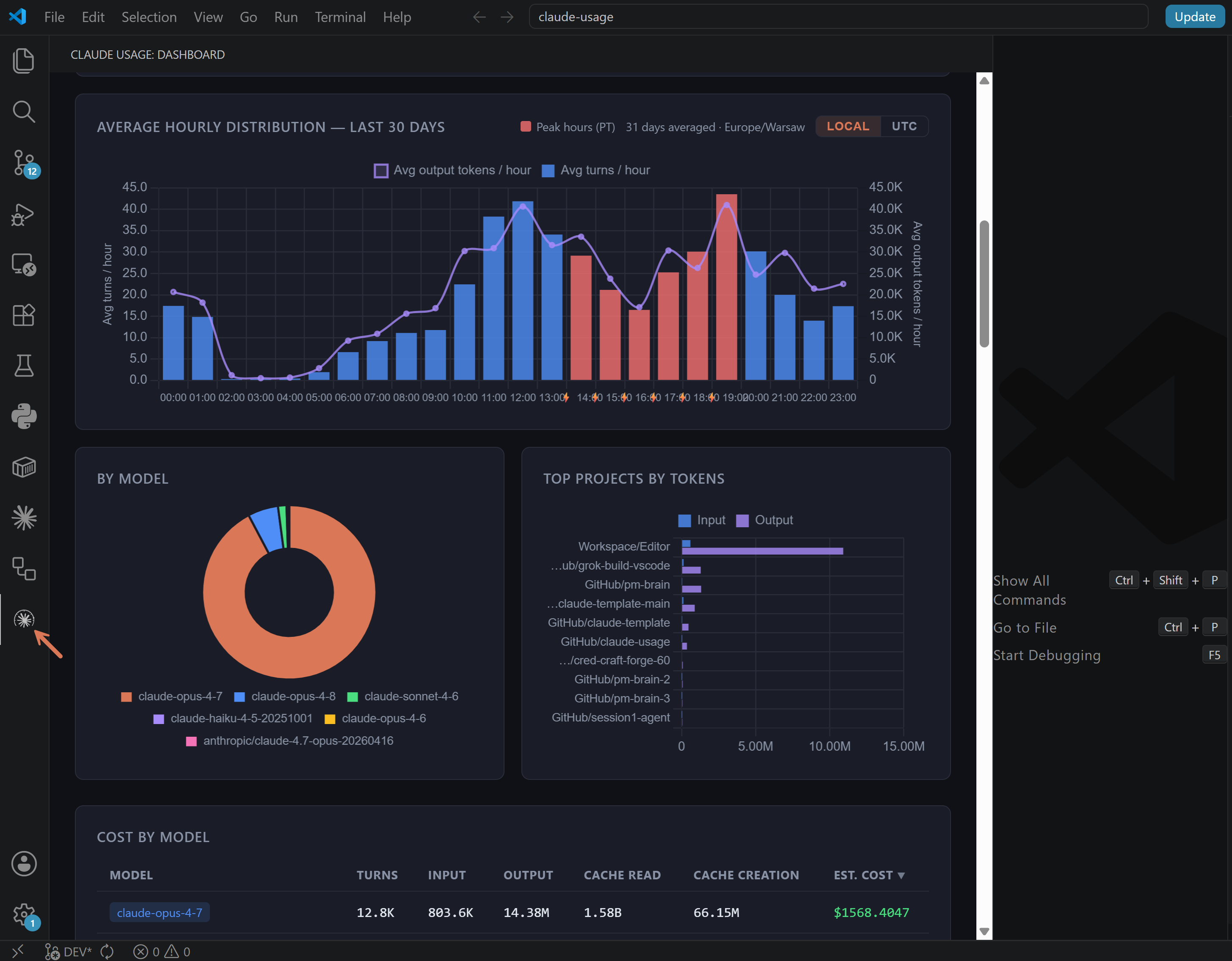


Pro and Max subscribers get a progress bar. This gives you the full picture.
Claude Code writes detailed usage logs locally — token counts, models, sessions, projects — regardless of your plan. This dashboard reads those logs and turns them into charts and cost estimates. Works on API, Pro, and Max plans.
Available as a web app (python cli.py dashboard) and as a VS Code extension.
Created by: The Product Compass Newsletter
Works on API, Pro, and Max plans — Claude Code writes local usage logs regardless of subscription type. This tool reads those logs and gives you visibility that Anthropic's UI doesn't provide.
Captures usage from:
claude command in terminal)Not captured:
sqlite3, http.server, json, pathlib)Anyone running Claude Code already has Python installed.
No pip install, no virtual environment, no build step.
brew tap phuryn/claude-usage https://github.com/phuryn/claude-usage
brew install phuryn/claude-usage/claude-usage
claude-usage dashboard
Homebrew has disabled installing a formula from an arbitrary raw URL, so tap the repo first (thanks @adrianlungu for the working incantation in #46).
After install, the claude-usage command is on your PATH and accepts the same subcommands as python cli.py (scan, today, stats, dashboard).
uv tool install git+https://github.com/phuryn/claude-usage
claude-usage dashboard
Installs the claude-usage command without a clone (works with pipx too: pipx install git+https://github.com/phuryn/claude-usage). The tool stays dependency-free — this only adds packaging metadata, no third-party runtime deps (#144).
git clone https://github.com/phuryn/claude-usage
cd claude-usage
python3 cli.py dashboard
git clone https://github.com/phuryn/claude-usage
cd claude-usage
python cli.py dashboard
git clone https://github.com/phuryn/claude-usage
cd claude-usage
bash scripts/run-docker.sh
Opens the dashboard at http://localhost:9898.
The script builds the image, then runs the container with:
~/.claude mounted read-only — the container can read your transcripts but cannot modify themclaude-usage-data) for the SQLite database — persisted across restarts, isolated from your home directoryOn macOS/Linux, use
python3instead ofpythonin all commands below. If you installed via Homebrew, replacepython cli.pywithclaude-usage.
# Scan JSONL files and populate the database (~/.claude/usage.db)
python cli.py scan

# Show today's usage summary by model (in terminal)
python cli.py today

# Show the last 7 days (per-day breakdown + by-model totals)
python cli.py week

# Show all-time statistics (in terminal)
python cli.py stats

# Scan + open browser dashboard at http://localhost:8080
python cli.py dashboard

# Custom host and port
python cli.py dashboard --host 0.0.0.0 --port 9000

# Environment variables are also supported
HOST=0.0.0.0 PORT=9000 python cli.py dashboard

# Scan a custom projects directory
python cli.py scan --projects-dir /path/to/transcripts
The scanner is incremental — it tracks each file's path and modification time, so re-running scan is fast and only processes new or changed files.
By default, the scanner checks both ~/.claude/projects/ and the Xcode Claude integration directory (~/Library/Developer/Xcode/CodingAssistant/ClaudeAgentConfig/projects/), skipping any that don't exist. Use --projects-dir to scan a custom location instead.
Claude Code writes one JSONL file per session to ~/.claude/projects/. Each line is a JSON record; assistant-type records contain:
message.usage.input_tokens — raw prompt tokensmessage.usage.output_tokens — generated tokensmessage.usage.cache_creation_input_tokens — tokens written to prompt cachemessage.usage.cache_read_input_tokens — tokens served from prompt cachemessage.model — the model used (e.g. claude-sonnet-4-6)scanner.py parses those files and stores the data in a SQLite database at ~/.claude/usage.db.
dashboard.py serves a single-page dashboard on localhost:8080 with Chart.js charts (loaded from CDN). It auto-refreshes every 30 seconds and supports model filtering and a date-range dropdown with bookmarkable URLs. A sticky section nav jumps between sections, and every chart/table can be collapsed (remembered across reloads). The bind address and port can be configured with the --host and --port flags, or the HOST and PORT environment variables (defaults: localhost, 8080).
Costs are calculated using Anthropic API pricing as of June 2026 (claude.com/pricing#api).
Only models whose name contains fable, mythos, opus, sonnet, or haiku are included in cost calculations. Local models, unknown models, and any other model names are excluded (shown as n/a).
| Model | Input | Output | Cache Write | Cache Read |
|---|---|---|---|---|
| claude-fable-5 | $10.00/MTok | $50.00/MTok | $12.50/MTok | $1.00/MTok |
| claude-mythos-5 | $10.00/MTok | $50.00/MTok | $12.50/MTok | $1.00/MTok |
| claude-opus-4-8 | $5.00/MTok | $25.00/MTok | $6.25/MTok | $0.50/MTok |
| claude-opus-4-7 | $5.00/MTok | $25.00/MTok | $6.25/MTok | $0.50/MTok |
| claude-opus-4-6 | $5.00/MTok | $25.00/MTok | $6.25/MTok | $0.50/MTok |
| claude-sonnet-4-6 | $3.00/MTok | $15.00/MTok | $3.75/MTok | $0.30/MTok |
| claude-haiku-4-5 | $1.00/MTok | $5.00/MTok | $1.25/MTok | $0.10/MTok |
Note: These are API prices. If you use Claude Code via a Max or Pro subscription, your actual cost structure is different (subscription-based, not per-token).
If you'd rather see the dashboard inside your editor, the same UI is available as a VS Code extension. Same data, same charts, embedded as an activity-bar sidebar.
Install from the VS Code Marketplace →
The Python sources are bundled inside the .vsix, so the only end-user requirement is Python 3.8+ on your PATH. After install, click the gauge icon in the activity bar — the server spawns automatically and the dashboard renders in the sidebar.
See vscode-extension/README.md for settings, commands, discovery order, and local-install instructions.
| File | Purpose |
|---|---|
scanner.py | Parses JSONL transcripts, writes to ~/.claude/usage.db |
dashboard.py | HTTP server + single-page HTML/JS dashboard |
cli.py | scan, today, stats, dashboard commands |
Formula/claude-usage.rb | Homebrew formula — install with brew tap phuryn/claude-usage then brew install phuryn/claude-usage/claude-usage |
vscode-extension/ | VS Code extension — embeds the dashboard inside VS Code |
Dockerfile | Container image definition |
scripts/run-docker.sh | Build and run the dashboard in Docker with a read-only ~/.claude mount |
Stars on GitHub
View @phuryn’s profileA markdown-based second brain for product managers and product leads. It stores plain markdown notes in a local folder that Claude reads before answering and updates afterward, with a weekly review sweep.
@phurynGives product managers step-by-step help with discovery, prioritization, strategy, launch and growth work, so they get structured outputs instead of loose text. Also includes skills for reviewing AI-built code before shipping.
@phurynSee 12 claude-usage alternatives
Reads text from scanned pages, photos and PDFs and returns it as structured Markdown or JSON, so you can pull tables, formulas and headers out of a document without retyping them. Covers many languages and works as input for AI tools.
 @paddlepaddle
Gives your AI assistant a memory that persists across sessions, so it remembers your preferences and earlier work in this repository instead of starting fresh. Search, forget, pause and resume memories with simple commands.
 @mem0ai
Gives AI agents a library of ready-made skills for scientific work such as metabolic flux analysis, protein experiment design, time series modeling, and analytical method validation, so research tasks need less hand-built code. It works with any agent that supports the open Agent Skills standard.
 @k-dense-ai
Gives Claude Code skills, agents, and commands for PostHog analytics, session replay, feature flags, error tracking, and LLM observability. Includes MCP server setup and project access checks.
 @posthog
Reads the usage logs Claude Code writes locally to show token counts, models, sessions, and projects, regardless of your plan. Install it with the command on its page. Free and open source.
Is this plugin yours?
Claim it with GitHubSubmit a pluginPromote it