
Video & Audio
Plugin
nomi
Open-source AI video workbench. Bring any model or your local ComfyUI, and let Claude Code / Codex / Cursor direct it over MCP — storyboard, references, generation, editable first cut on a real timeline. Local-first: projects, prompts, and keys stay on your machine. No account, no telemetry.

Plugin Signal92/100Strong
maintained100
capable95
documented100
adopted59
Install
$ npx -y skills add aqm857886159/nomi --agent claude-code
Stats
573
Stars
131
Forks
Active
Maintenance
TypeScript
Language
AGPL-3.0
License
17h ago
Last commit
5mo ago
Created
4h ago
Added
Repo: aqm857886159/nomi
In this plugin
- skills
- brand-promo
- creation-edit
- curated-candle-mood
- curated-coffee-pour
- curated-cross-view
- curated-expression-reference
- curated-expression-sheet
- curated-eyewear-light
- curated-film-storyboard
- curated-multi-view
- curated-outpaint
- curated-product-before-after
- curated-product-condensation
- curated-product-exploded-view
- curated-product-turntable
- curated-product-unboxing
- curated-restore-image
- director-3dbox
- director-action
- director-art-design
- director-cinematography
- director-consistency
- director-guzhuang
- director-keyframe-review
- director-performance
- director-shot-translation
- director-sound
- director-staging
- director-style-otomo-wright
- director-transitions
- drama-short
- effect-camera-01
- effect-camera-02
- effect-camera-03
- effect-camera-04
- effect-camera-05
- effect-camera-06
- effect-camera-07
- effect-camera-08
- effect-camera-09
- effect-camera-10
- effect-camera-11
- effect-camera-12
- effect-camera-13
- effect-camera-14
- effect-camera-15
- effect-camera-16
- effect-camera-17
- effect-camera-18
- effect-camera-19
- effect-camera-20
- effect-camera-21
- effect-camera-22
- effect-camera-23
- effect-camera-24
- effect-camera-25
- effect-camera-26
- effect-camera-27
- effect-camera-28
- effect-camera-29
- effect-camera-30
- effect-character-three-view
- effect-expression-grid
- effect-fill-outpaint
- effect-multi-angle-grid
- effect-natural-texture
- effect-next-moment
- effect-object-six-view
- effect-overhead-view
- effect-prev-moment
- effect-restore-drawing
- effect-scene-three-view
- effect-story-four-panel
- effect-storyboard-panels
- effect-transfer-expression
- model-integration
- release-media-pack
- skill-author
- workbench-creation
- workbench-fixation-planner
- workbench-generation
- workbench-storyboard-planner
- writer-adaptation
- writer-behavior-psychology
- writer-dialogue
- writer-improv
- writer-incubation
- writer-novel-digester
- writer-review
- writer-screenwriter
- writer-songfangjin
- writer-structure
- writer-style-schrader
- MCP
What's inside
Skill(93 skills)
/brand-promo做产品/品牌宣传片。当用户要把产品文案、卖点或品牌介绍做成一条短宣传视频,或提到「宣传片 / 产品视频 / 品牌短片 / promo / 广告片」时用我。/creation-editDirect creation-area document editing: read current content, append or replace text, and maintain the shot-list format./curated-candle-mood用点火、暖光与烟雾营造安静氛围。 用户要求烛光氛围短片时使用。
- /curated-coffee-pour
- /curated-cross-view
- /curated-expression-reference
- /curated-expression-sheet
- /curated-eyewear-light
- /curated-film-storyboard
- /curated-multi-view
- /curated-outpaint
- /curated-product-before-after
- /curated-product-condensation
- /curated-product-exploded-view
- /curated-product-turntable
- /curated-product-unboxing
- /curated-restore-image
- /director-3dbox
- /director-action
- /director-art-design
- /director-cinematography
- /director-consistency
- /director-guzhuang
- /director-keyframe-review
- /director-performance
- /director-shot-translation
- /director-sound
- /director-staging
- /director-style-otomo-wright
- /director-transitions
- /drama-short
- /effect-camera-01
- /effect-camera-02
- /effect-camera-03
- /effect-camera-04
- /effect-camera-05
- /effect-camera-06
- /effect-camera-07
- /effect-camera-08
- /effect-camera-09
- /effect-camera-10
- /effect-camera-11
- /effect-camera-12
- /effect-camera-13
- /effect-camera-14
- /effect-camera-15
- /effect-camera-16
- /effect-camera-17
- /effect-camera-18
- /effect-camera-19
- /effect-camera-20
- /effect-camera-21
- /effect-camera-22
- /effect-camera-23
- /effect-camera-24
- /effect-camera-25
- /effect-camera-26
- /effect-camera-27
- /effect-camera-28
- /effect-camera-29
- /effect-camera-30
- /effect-character-three-view
- /effect-expression-grid
- /effect-fill-outpaint
- /effect-multi-angle-grid
- /effect-natural-texture
- /effect-next-moment
- /effect-object-six-view
- /effect-overhead-view
- /effect-prev-moment
- /effect-restore-drawing
- /effect-scene-three-view
- /effect-story-four-panel
- /effect-storyboard-panels
- /effect-transfer-expression
- /model-integration
- /release-media-pack
- /skill-author
- /workbench-creation
- /workbench-fixation-planner
- /workbench-generation
- /workbench-storyboard-planner
- /writer-adaptation
- /writer-behavior-psychology
- /writer-dialogue
- /writer-improv
- /writer-incubation
- /writer-novel-digester
- /writer-review
- /writer-screenwriter
- /writer-songfangjin
- /writer-structure
- /writer-style-schrader
README
Why Nomi
Relays, official APIs, ComfyUI, and local models are cheap. Commercial AI video products often run the very same models and charge several times more.
Nomi gives you a pro-grade workflow on top of your own models. You pay your provider directly, at their price. Even the agent runs on the model you pick — no subscription, no markup.
Watch the film
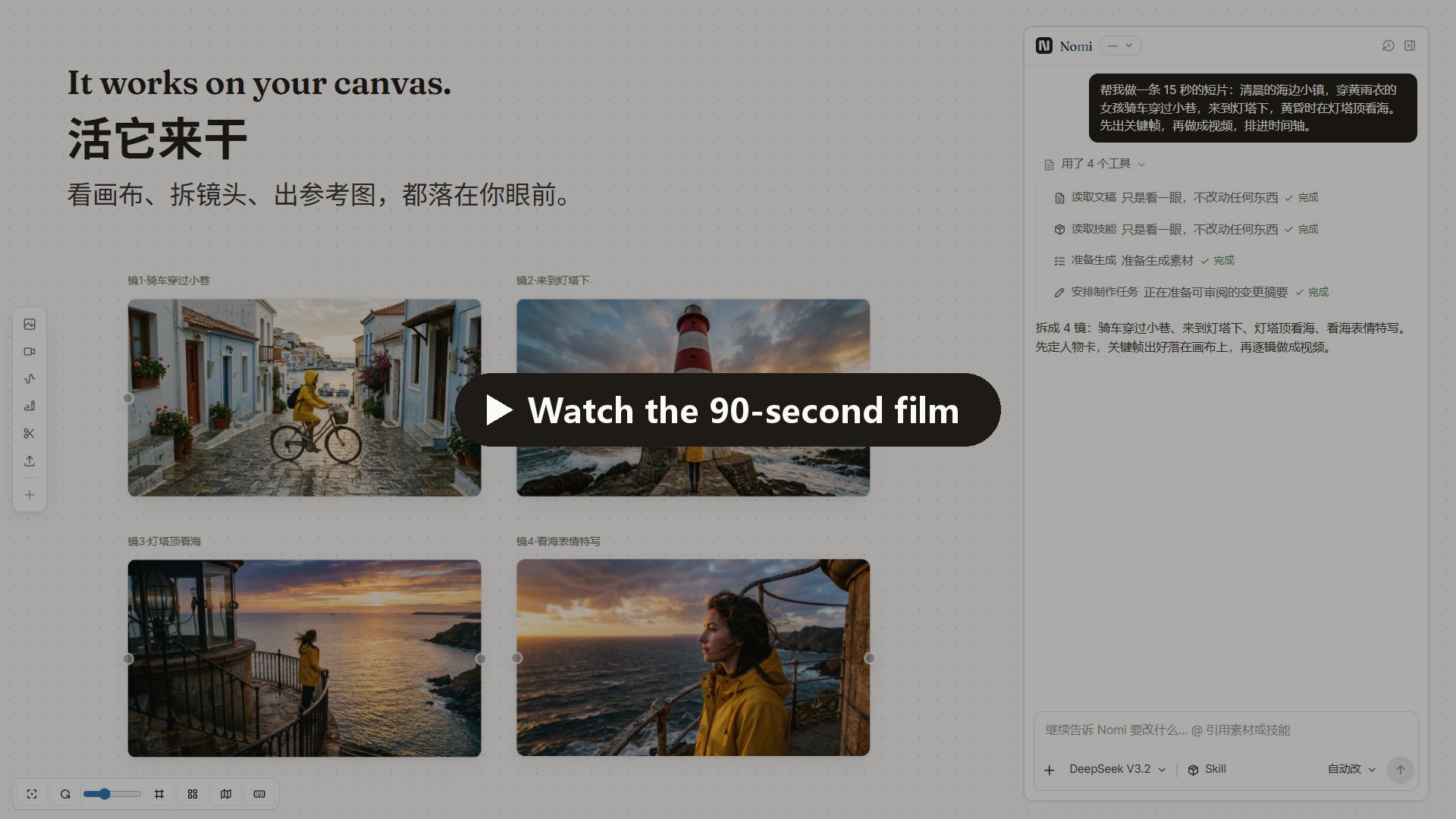
Every screen in the film is Nomi's real UI, and every image and clip in it was generated with Nomi.
What you can do
Just ask — the agent works on your canvas
Describe the film you want. The agent reads your canvas, splits the story into shots, generates keyframes, turns them into video, and arranges the timeline. Everything it makes lands on the canvas, where you can see it and change it.
You decide how much it asks: Ask each step, Auto-edit (paid generation still asks), or Full auto.
Direct every shot
The storyboard puts each shot on one row — prompt, first frame, model, duration. Lock a reference card for a character or a place, and every shot that uses it keeps the same face.
A 3D director you can hold in your hand
Pose characters, place cameras, and use your phone as the viewfinder. The frames you capture go straight back onto the canvas.
Any model, per shot
Seedance, Kling, Wan, Hailuo, Nano Banana, GPT Image and more — through APIMart, Kie.ai, Volcengine, ModelScope, a Dreamina membership, any OpenAI-compatible relay, or your local ComfyUI. Swap the model on a single shot and generate another take.
New model today, in Nomi today
When a new model ships, click Let AI connect it for me and let Claude Code or Codex wire it in. It looks up the endpoint, parameters and model IDs, has you paste your key on Nomi's own page (the assistant never sees it), runs one real test, and lists the model once it works.
Yours
A project is a plain folder on your disk: canvas, storyboard, timeline, every generated file, and the exported film. No account, no telemetry. The code is AGPL-3.0.
Next up: AI editing. Nomi is heading toward one studio for everything you make with AI — come build it with us.
Download
| System | Build | Download |
|---|---|---|
| macOS | Apple Silicon | Nomi-mac-arm64.dmg |
| macOS | Intel | Nomi-mac-intel.dmg |
| Windows | Windows 10 / 11 x64 | Nomi-windows-setup.exe |
Supported release targets are macOS arm64/x64 and Windows x64. Linux, Windows arm64, and macOS universal installers are not currently published.
The current macOS build is not Apple Developer ID signed or notarized, so macOS may block it on first launch. Only use the direct downloads above or links from the official Nomi website and GitHub repository.
- Download the matching DMG and drag
Nomi.appto Applications. - In Finder, right-click
Nomi.appin Applications, choose Open, then confirm Open. - If it is still blocked, open System Settings → Privacy & Security, find the Nomi message, and click Open Anyway.
Only if macOS says Nomi is “damaged”, first confirm the installer came from an official Nomi link, then run:
xattr -dr com.apple.quarantine "/Applications/Nomi.app"
Do not disable Gatekeeper globally. Updates require downloading the matching DMG and replacing the app manually.
The installer has no Authenticode signature. In the SmartScreen prompt, choose More info → Run anyway.
Quick start
- Connect a model. Pick APIMart or Kie.ai and paste one key — or add your own relay, OpenAI-compatible endpoint, or local ComfyUI. Rather not do it yourself? Hand Let your AI connect Nomi to Claude Code or Codex.
- Say what you want to make. Type it into the agent panel, or start from a story in the storyboard.
- Direct and export. Keep the takes you like, arrange the timeline, export MP4.
Disclosure: the APIMart link carries a referral code. You always pay providers directly with your own key at their price. Nomi never proxies or resells inference, and every provider can be swapped for your own endpoint.
More: quick start · model connection · user guide · providers · CLI + MCP
Use Nomi from your own agent
Nomi ships an MCP server with 24 MCP tools, so Claude Code, Codex, or Cursor can drive it — generate, arrange, and edit — while reusing the credits that come with your agent subscription. See Let your AI connect Nomi.
Community
- Questions, workflows, what's next: GitHub Discussions
- Bugs and feature requests: GitHub Issues
- Release notes and short demos: X / Twitter · Bilibili
WeChat users can scan to join the user group (left). If the group code has expired, add the maintainer (right) at TZ857886159.
Hit a bug? The code is open — send the error and the issue-fix prompt to Claude Code or Codex, and it can often patch it for you. Anything everyone runs into, tell us and it goes into the mainline.
For Teams
Custom builds, Integrations, AGPL-compliant deployment, and Ongoing iteration for teams that want Nomi inside a real production workflow. Discuss a project — the form is public, so share only a non-confidential summary and never post credentials, private contact details, budget details, or NDA-protected information.
Developers
Requires Node.js 20+ and pnpm.
git clone https://github.com/aqm857886159/Nomi.git
cd Nomi
corepack enable
pnpm install
pnpm dev
electron/    Electron main process, local runtime, storage, and model calls
src/         React + Vite + Tailwind workbench
skills/      Skill Pack v2; see docs/skill-pack-format.md
Useful checks: pnpm run test · pnpm run typecheck · pnpm run gates
Research tooling (searching what creators say on Douyin / Xiaohongshu / Bilibili / X) reads its key only from the TIKHUB_API_KEY environment variable — see docs/research/tikhub-api-notes.md.
Contributing
Bug reports, feature proposals, documentation, and code contributions are welcome. Contributors do not need to sign a CLA; contributions are accepted under AGPL-3.0-only.
License
Current releases are licensed under AGPL-3.0-only; historical releases published under Apache-2.0 keep their original license.
See LICENSE. Paid services can include AGPL-compliant custom development, integration, deployment, training, and ongoing iteration. Nomi does not offer a closed-source distribution that withholds the corresponding source code.
File tree
Showing a partial view of a very large repo.
FAQ
nomi is a Claude Code plugin with 93 hand-picked skills for video & audio work, indexed on Flowy. Install it with the command on its page. It includes brand-promo, creation-edit, curated-candle-mood. Its skills do not fire on their own yet. Request auto-invocation to have Flowy route them as you prompt. Free and open source.
- What is nomi?
- Open-source AI video workbench. Bring any model or your local ComfyUI, and let Claude Code / Codex / Cursor direct it over MCP — storyboard, references, generation, editable first cut on a real timeline. Local-first: projects, prompts, and keys stay on your machine. No account, no telemetry.
- How do I install nomi?
- Run these in Claude Code: npx -y skills add aqm857886159/nomi --agent claude-code. Then prompt normally.
- Does nomi auto-invoke its skills?
- Not yet. It is indexed on Flowy as a plain plugin. Request auto-invocation on its page and Flowy will route its skills for you as you prompt.
- Is nomi free?
- Yes. Flowy is free and open source, with nothing gated. You can read every skill in full before you install.
Is this plugin yours?
Claim it with GitHubSubmit a pluginPromote it