
chrome-devtools
MCPConnects to Chrome over the DevTools Protocol to inspect the DOM, network requests and console output.
 @nextlevelbuilderInstall MCP
Reads and updates Notion pages and databases.
Claude Code
> /plugin marketplace add plugin87/ux-ui-agent-skills> /plugin install ux-ui-agent-skills@ux-ui-agent-skills
Codex
$ codex mcp add notion --env NOTION_API_KEY=YOUR_VALUE -- npx -y @notionhq/notion-mcp-server
Cursor
{
  "mcpServers": {
    "notion": {
      "command": "npx",
      "args": [
        "-y",
        "@notionhq/notion-mcp-server"
      ],
      "env": {
        "NOTION_API_KEY": "YOUR_VALUE"
      }
    }
  }
}
Add it to mcp.json.
Gemini CLI
{
  "mcpServers": {
    "notion": {
      "command": "npx",
      "args": [
        "-y",
        "@notionhq/notion-mcp-server"
      ],
      "env": {
        "NOTION_API_KEY": "YOUR_VALUE"
      }
    }
  }
}
Add it to settings.json.
GitHub Copilot
$ copilot mcp add notion --env NOTION_API_KEY=YOUR_VALUE -- npx -y @notionhq/notion-mcp-server
OpenCode
{
  "mcp": {
    "notion": {
      "type": "local",
      "command": [
        "npx",
        "-y",
        "@notionhq/notion-mcp-server"
      ],
      "environment": {
        "NOTION_API_KEY": "YOUR_VALUE"
      }
    }
  }
}
Add it to opencode.json.
Windsurf
{
  "mcpServers": {
    "notion": {
      "command": "npx",
      "args": [
        "-y",
        "@notionhq/notion-mcp-server"
      ],
      "env": {
        "NOTION_API_KEY": "YOUR_VALUE"
      }
    }
  }
}
Add it to mcp_config.json.
Security report
Low risk
Known flaws
None known
Signed build
Yes
Build provenance published
Maintained
Oct 27, 2026
Last push
Licence
MIT
Runs as
npx
On your machine
Deprecated
No
Signals from public registries, not an audit. Checked Nov 11, 2026.
Note
For the best experience, use Remote Notion MCP, our official hosted MCP server. This repository is a separate, self-hosted MCP server implementation that is no longer actively maintained or supported. Please use Remote Notion MCP instead. It is purpose-built to give AI agents faster results using far fewer tokens.
Remote Notion MCP can search your workspace and connected apps semantically, read and edit pages in Markdown, and return only the most relevant context. That means less time waiting, less context-window usage, and lower token costs. It also uses OAuth and automatically respects each user's existing Notion permissions—without API tokens, JSON configuration, manual page sharing, or a local server to maintain.
Feature Remote Notion MCP This project (local) Fast, hosted experience ✅ Runs and updates locally Token-efficient responses ✅ Limited Powerful tools tailored for AI agents ✅ Basic API-derived tools Semantic search across your Notion workspace ✅ Keyword search only AI Connector search across connected apps ✅ Not available Markdown-native page reading and editing ✅ Limited to two page-content tools Seamless OAuth setup ✅ Manual token and JSON configuration Respects each user's existing Notion permissions ✅ Manual integration permissions and page sharing Active support and ongoing improvements ✅ Not actively supported Learn more and get started in the Remote Notion MCP documentation.
We are prioritizing, and only providing active support for, Remote Notion MCP. As a result:
- We may sunset this local MCP server repository in the future.
- Issues and pull requests here are not actively monitored.
- Please do not file issues relating to the remote MCP here; instead, contact Notion support.
This project implements an MCP server for the Notion API.
Version 2.0.0 migrates to the Notion API 2025-09-03 which introduces data sources as the primary abstraction for databases.
Removed tools (3):
post-database-query - replaced by query-data-sourceupdate-a-database - replaced by update-a-data-sourcecreate-a-database - replaced by create-a-data-sourceNew tools (7):
query-data-source - Query a data source (database) with filters and sortsretrieve-a-data-source - Get metadata and schema for a data sourceupdate-a-data-source - Update data source propertiescreate-a-data-source - Create a new data sourcelist-data-source-templates - List available templates in a data sourcemove-page - Move a page to a different parent locationretrieve-a-database - Get database metadata including its data source IDsParameter changes:
data_source_id instead of database_id["page", "database"] to ["page", "data_source"]page_id and database_id parents (for data sources)No code changes required. MCP tools are discovered automatically when the server starts. When you upgrade to v2.0.0, AI clients will automatically see the new tool names and parameters. The old database tools are no longer available.
If you have hardcoded tool names or prompts that reference the old database tools, update them to use the new data source tools:
| Old Tool (v1.x) | New Tool (v2.0) | Parameter Change |
|---|---|---|
post-database-query | query-data-source | database_id → data_source_id |
update-a-database | update-a-data-source | database_id → data_source_id |
create-a-database | create-a-data-source | No change (uses parent.page_id) |
Note:
retrieve-a-databaseis still available and returns database metadata including the list of data source IDs. Useretrieve-a-data-sourceto get the schema and properties of a specific data source.
Total tools now: 22 (was 19 in v1.x)
The server exposes two tools for working with page content as enhanced Markdown instead of block JSON, which is significantly more token-efficient for AI agents:
retrieve-page-markdown — Read a page's full content as Markdown (GET /v1/pages/{page_id}/markdown). Pass include_transcript: true to inline meeting-note transcripts.update-page-markdown — Edit a page's content with Markdown (PATCH /v1/pages/{page_id}/markdown). Prefer replace_content to overwrite the whole page, or update_content for targeted find-and-replace edits.These endpoints require Notion API version 2026-03-11. The server now sources the Notion-Version header per operation from the OpenAPI spec, so these tools use 2026-03-11 while the rest of the API continues to use 2025-09-03 — no configuration needed. If you set Notion-Version yourself via OPENAPI_MCP_HEADERS, your value takes precedence for every tool.
Go to https://www.notion.so/profile/integrations and create a new internal integration or select an existing one.
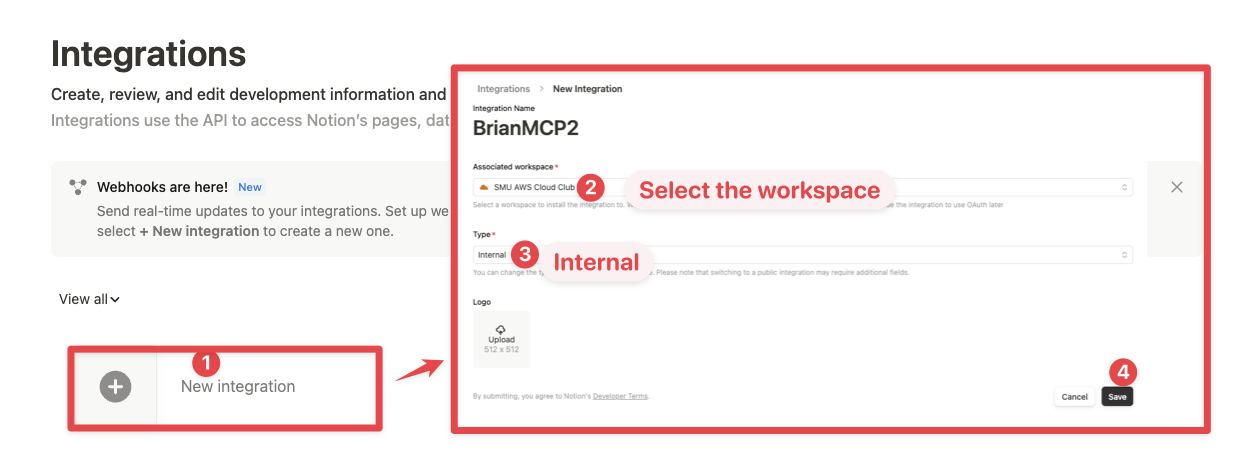
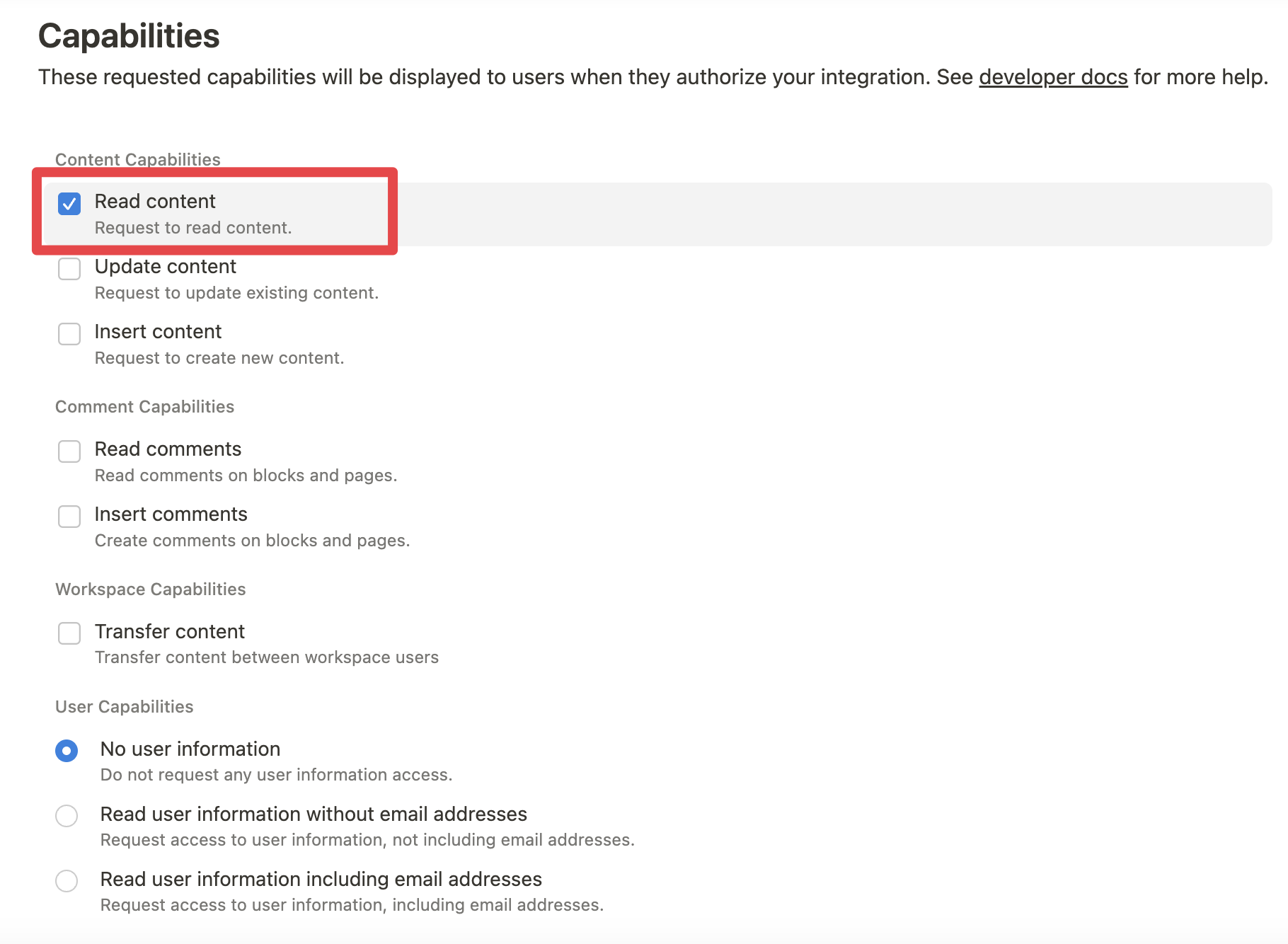
While we limit the scope of Notion API's exposed (for example, you will not be able to delete databases via MCP), there is a non-zero risk to workspace data by exposing it to LLMs. Security-conscious users may want to further configure the Integration's Capabilities.
For example, you can create a read-only integration token by giving only "Read content" access from the "Configuration" tab:
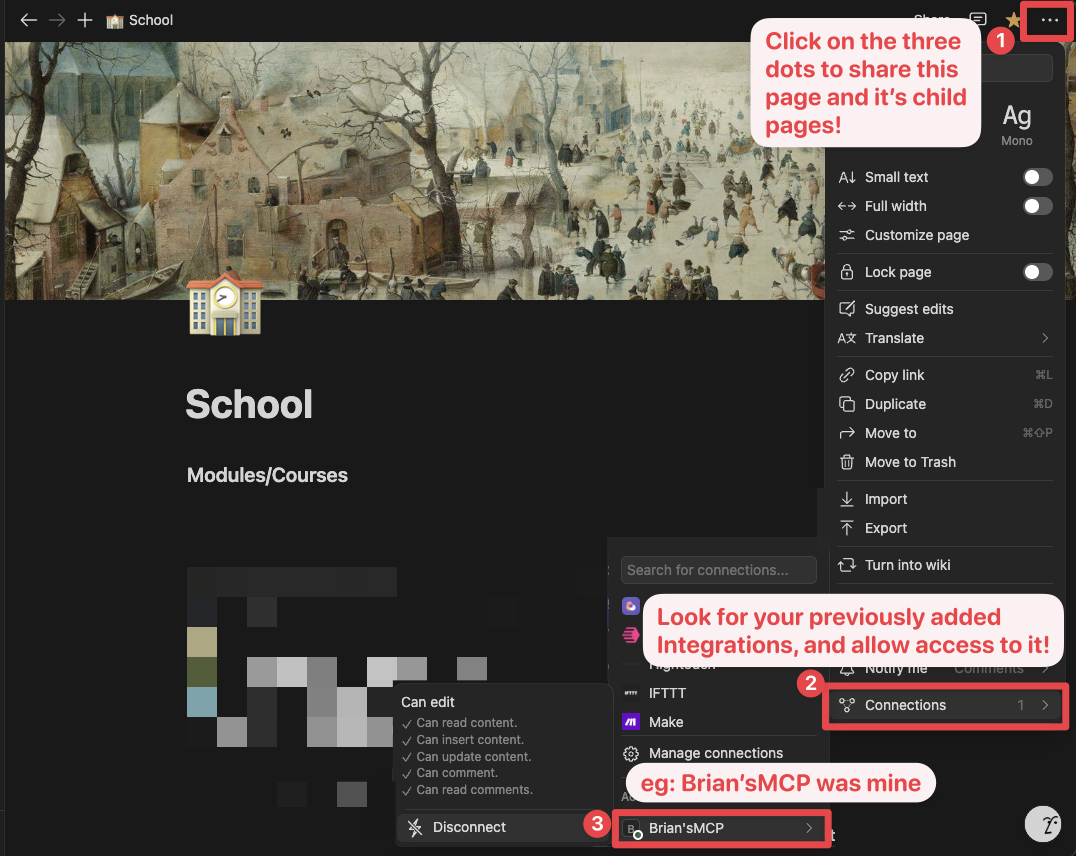
Ensure relevant pages and databases are connected to your integration.
To do this, visit the Access tab in your internal integration settings. Edit access and select the pages you'd like to use.


Alternatively, you can grant page access individually. You'll need to visit the target page, and click on the 3 dots, and select "Connect to integration".
Add the following to your .cursor/mcp.json or claude_desktop_config.json (MacOS: ~/Library/Application\ Support/Claude/claude_desktop_config.json)
{
  "mcpServers": {
    "notionApi": {
      "command": "npx",
      "args": ["-y", "@notionhq/notion-mcp-server"],
      "env": {
        "NOTION_TOKEN": "ntn_****"
      }
    }
  }
}
{
  "mcpServers": {
    "notionApi": {
      "command": "npx",
      "args": ["-y", "@notionhq/notion-mcp-server"],
      "env": {
        "OPENAPI_MCP_HEADERS": "{\"Authorization\": \"Bearer ntn_****\", \"Notion-Version\": \"2025-09-03\" }"
      }
    }
  }
}
Add the following to your settings.json
{
  "context_servers": {
    "some-context-server": {
      "command": {
        "path": "npx",
        "args": ["-y", "@notionhq/notion-mcp-server"],
        "env": {
          "OPENAPI_MCP_HEADERS": "{\"Authorization\": \"Bearer ntn_****\", \"Notion-Version\": \"2025-09-03\" }"
        }
      },
      "settings": {}
    }
  }
}
Use the Copilot CLI to interactively add the MCP server:
/mcp add
Alternatively, create or edit the configuration file ~/.copilot/mcp-config.json and add:
{
  "mcpServers": {
    "notionApi": {
      "command": "npx",
      "args": ["-y", "@notionhq/notion-mcp-server"],
      "env": {
        "NOTION_TOKEN": "ntn_****"
      }
    }
  }
}
For more information, see the Copilot CLI documentation.
There are two options for running the MCP server with Docker:
Add the following to your .cursor/mcp.json or claude_desktop_config.json
Using NOTION_TOKEN (recommended):
{
  "mcpServers": {
    "notionApi": {
      "command": "docker",
      "args": [
        "run",
        "--rm",
        "-i",
        "-e", "NOTION_TOKEN",
        "mcp/notion"
      ],
      "env": {
        "NOTION_TOKEN": "ntn_****"
      }
    }
  }
}
Using OPENAPI_MCP_HEADERS (for advanced use cases):
{
  "mcpServers": {
    "notionApi": {
      "command": "docker",
      "args": [
        "run",
        "--rm",
        "-i",
        "-e", "OPENAPI_MCP_HEADERS",
        "mcp/notion"
      ],
      "env": {
        "OPENAPI_MCP_HEADERS": "{\"Authorization\":\"Bearer ntn_****\",\"Notion-Version\":\"2025-09-03\"}"
      }
    }
  }
}
This approach:
You can also build and run the Docker image locally. First, build the Docker image:
docker compose build
Then, add the following to your .cursor/mcp.json or claude_desktop_config.json
Using NOTION_TOKEN (recommended):
{
  "mcpServers": {
    "notionApi": {
      "command": "docker",
      "args": [
        "run",
        "--rm",
        "-i",
        "-e",
        "NOTION_TOKEN=ntn_****",
        "notion-mcp-server"
      ]
    }
  }
}
Using OPENAPI_MCP_HEADERS (for advanced use cases):
{
  "mcpServers": {
    "notionApi": {
      "command": "docker",
      "args": [
        "run",
        "--rm",
        "-i",
        "-e",
        "OPENAPI_MCP_HEADERS={\"Authorization\": \"Bearer ntn_****\", \"Notion-Version\": \"2025-09-03\"}",
        "notion-mcp-server"
      ]
    }
  }
}
Don't forget to replace ntn_**** with your integration secret. Find it from your integration configuration tab:
The Notion MCP Server supports two transport modes:
The default transport mode uses standard input/output for communication. This is the standard MCP transport used by most clients like Claude Desktop.
# Run with default stdio transport
npx @notionhq/notion-mcp-server

# Or explicitly specify stdio
npx @notionhq/notion-mcp-server --transport stdio
For web-based applications or clients that prefer HTTP communication, you can use the Streamable HTTP transport:
# Run with Streamable HTTP transport on port 3000 (default)
npx @notionhq/notion-mcp-server --transport http

# Run on a custom port
npx @notionhq/notion-mcp-server --transport http --port 8080

# Bind to a different host. The default is 127.0.0.1.
npx @notionhq/notion-mcp-server --transport http --host 0.0.0.0

# Run with a custom authentication token
npx @notionhq/notion-mcp-server --transport http --auth-token "your-secret-token"

Stars on GitHub
Connects to Chrome over the DevTools Protocol to inspect the DOM, network requests and console output.
@nextlevelbuilderInstall MCPShips with open-design: The 1st Collaborative AI Design Agent Workspace. Local-first and open source. Create motion, prototypes,…
 @nexu-ioInstall MCP
Ships with next-ai-draw-io: Draw and edit draw.io diagrams by chatting with an AI. Describe a diagram in a sentence and the AI…
 @dayuanjiangInstall MCP
Ships with editor: An open-source, local-first 3D building editor built with React Three Fiber and WebGPU. Run it in the browser…
 @pascalorgInstall MCP