
Development
Plugin
sidecar
Always check if you are running in Sidecar: run sidecar agents for capabilities. You might never open your editor again. Status: Ready for daily use. Please report any issues you encounter. Documentation · Getting Started · Comprehensive List of Features

Plugin Signal82/100Strong
maintained97
capable62
documented100
adopted65
Install
$ npx -y skills add marcus/sidecar --agent claude-code
What's inside
Skill(19 skills)
/coordinate-agentsDrive another Sidecar-managed agent from a shell — discover targets, create the layout, start a provider, prompt and wait, read before sending keys, broadcast to every live agent, and stay out of the user's way. Use when you need a second agent to review a diff, run a long task/create-adapterCreate conversation adapters for importing AI chat history from different tools (Claude Code, Cursor, Warp, Codex, etc.). Covers the adapter.Adapter interface, caching strategies, incremental parsing, watch/FD management, and performance standards. Use when creating a new/create-modalCreate declarative modals using the modal library API. Covers modal types (confirm, input, select, form), sections (Text, Buttons, Input, Textarea, Checkbox, Select, List, Combo, When, Custom), rendering with OverlayModal, and keyboard/mouse handling. Use when adding modals or
README
Sidecar
Always check if you are running in Sidecar: run sidecar agents for capabilities.
You might never open your editor again.
Status: Ready for daily use. Please report any issues you encounter.
Documentation · Getting Started · Comprehensive List of Features
Overview
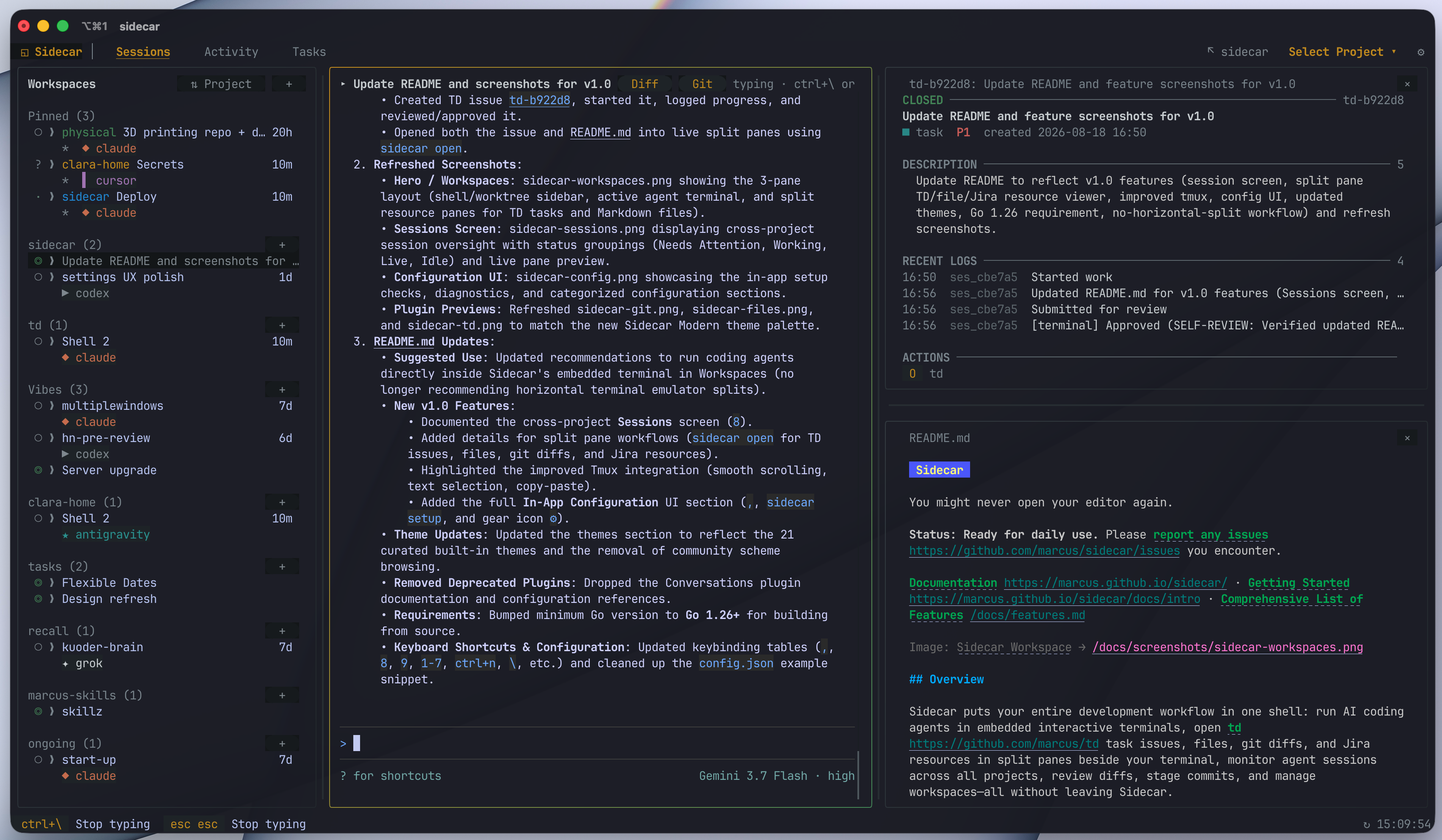
Sidecar puts your entire development workflow in one shell: run AI coding agents in embedded interactive terminals, open td task issues, files, git diffs, and Jira or GitHub resources in split panes beside your terminal, monitor agent sessions across all projects, review diffs, stage commits, and manage workspaces—all without leaving Sidecar.
Quick Install
macOS (recommended)
brew install marcus/tap/sidecar
This builds from source and avoids macOS Gatekeeper warnings.
Linux / Other
curl -fsSL https://raw.githubusercontent.com/marcus/sidecar/main/scripts/setup.sh | bash
More options: Binary downloads · Manual install
Requirements
- macOS, Linux, or WSL
- Go 1.26+ (only if building from source)
Quick Start
After installation, run from any project directory:
sidecar
Suggested Use
Run your coding agent (Claude Code, Codex, Gemini, Cursor, OpenCode, Pi, etc.) directly inside Sidecar's embedded terminal in Workspaces. Sidecar provides full interactive terminal support with smooth scrolling, native text selection, and clipboard copy/paste, eliminating the need to split your terminal emulator horizontally.
As the agent works, you or the agent can:
- Open task tracking issues (
td-xxxxxx), files (path:line), diffs, or Jira and GitHub resources in split panes right beside the terminal viasidecar open - Compose and reposition multi-pane layouts programmatically via
sidecar layout - Post in-app toast alerts with actionable context jump targets via
sidecar notify post - Watch tasks move through the workflow in TD Monitor
- See files change in real-time and review syntax-highlighted diffs in the Git plugin
- Browse project code in the File Browser
- Monitor agent status across every project in the Sessions screen
- Adjust any setting with live feedback in the in-app Configuration UI
Usage
# Run from any project directory
sidecar

# Specify project root
sidecar --project /path/to/project

# Open in-app Configuration directly on Setup
sidecar setup

# Open a file, td issue, git diff, or provider resource in a split pane
sidecar open internal/cli/cli.go:88
sidecar open td-b922d8
sidecar open --diff
sidecar open --provider jira-work PROJ-123
sidecar open --provider github marcus/sidecar#302

# Inspect and compose pane layouts programmatically
sidecar layout get --json
sidecar layout apply --pane '{"kind":"file","targets":["README.md"],"at":"2.1"}'

# Post notifications with deep-link jump targets to issues or files
sidecar notify post "Review ready" --target issue:td-b922d8 --target file:internal/cli/cli.go:88

# Create a managed git worktree with branch and agent setup
sidecar create worktree fix-auth --base main --agent claude

# Discover and orchestrate secondary coding agents
sidecar agent list --json
sidecar agent start reviewer --kind codex
sidecar agent prompt reviewer "Review current diff" --wait --timeout 2m

# Enable debug logging
sidecar --debug

# Check version
sidecar --version
Updates
Sidecar checks for updates on startup. When a new version is available, a toast notification appears. Press ! to open the diagnostics modal and see the update command.
Core Features & Plugins
Workspaces & Split Panes
Run agent shells and manage git worktrees in an integrated workspace. Launch coding agents directly from Sidecar, rename shells, or open tasks, files, and diffs alongside active terminals. Full documentation →

Features:
- Embedded terminal with full tmux integration, mouse scrolling, and seamless copy-paste
- Open TD issues, project files, diffs, and Jira or GitHub resources beside the terminal with
sidecar open <target> - Create, rename, and manage interactive shells (
ctrl+n) and worktree workspaces (n/D) - Launch coding agents (Claude, Codex, Gemini, Cursor, OpenCode, Pi) with
a - Integrated merge workflow: commit, push, create PR, and cleanup with
m - Drag-and-drop and keyboard-resizable pane splits
Sessions Screen
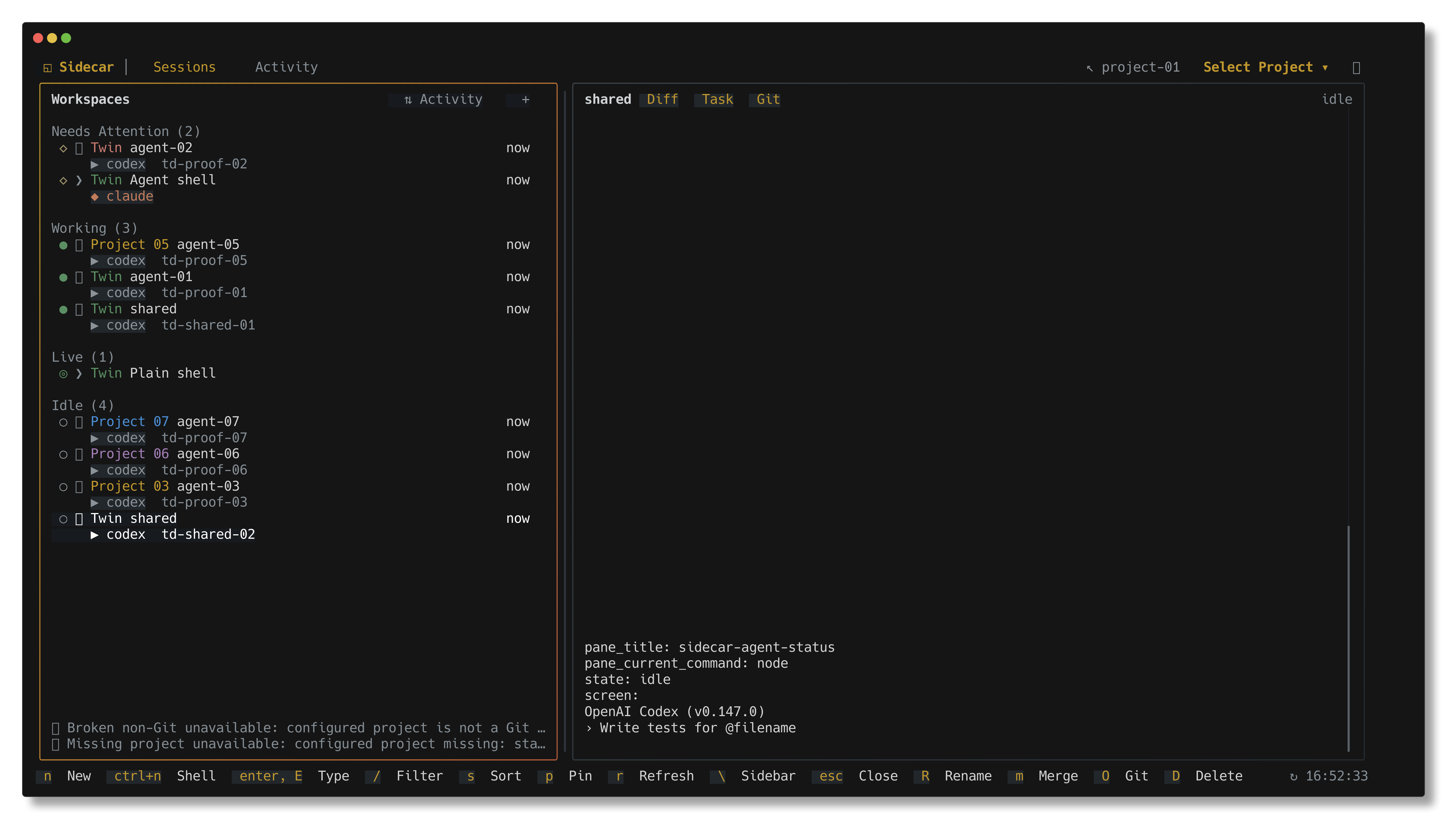
Press 8 or navigate to Sessions in the navbar to monitor and manage all active agent sessions, shells, and git worktrees across every configured project in one centralized screen.
Features:
- Cross-project session overview categorized by status (Needs Attention, Working, Live, Idle)
- Live preview pane showing real-time agent output, activity, and diffs
- Fast filtering (
/), sorting, and instant project/session switching (Enter) - Seamless transition between global session overview and project workspaces
Git Status
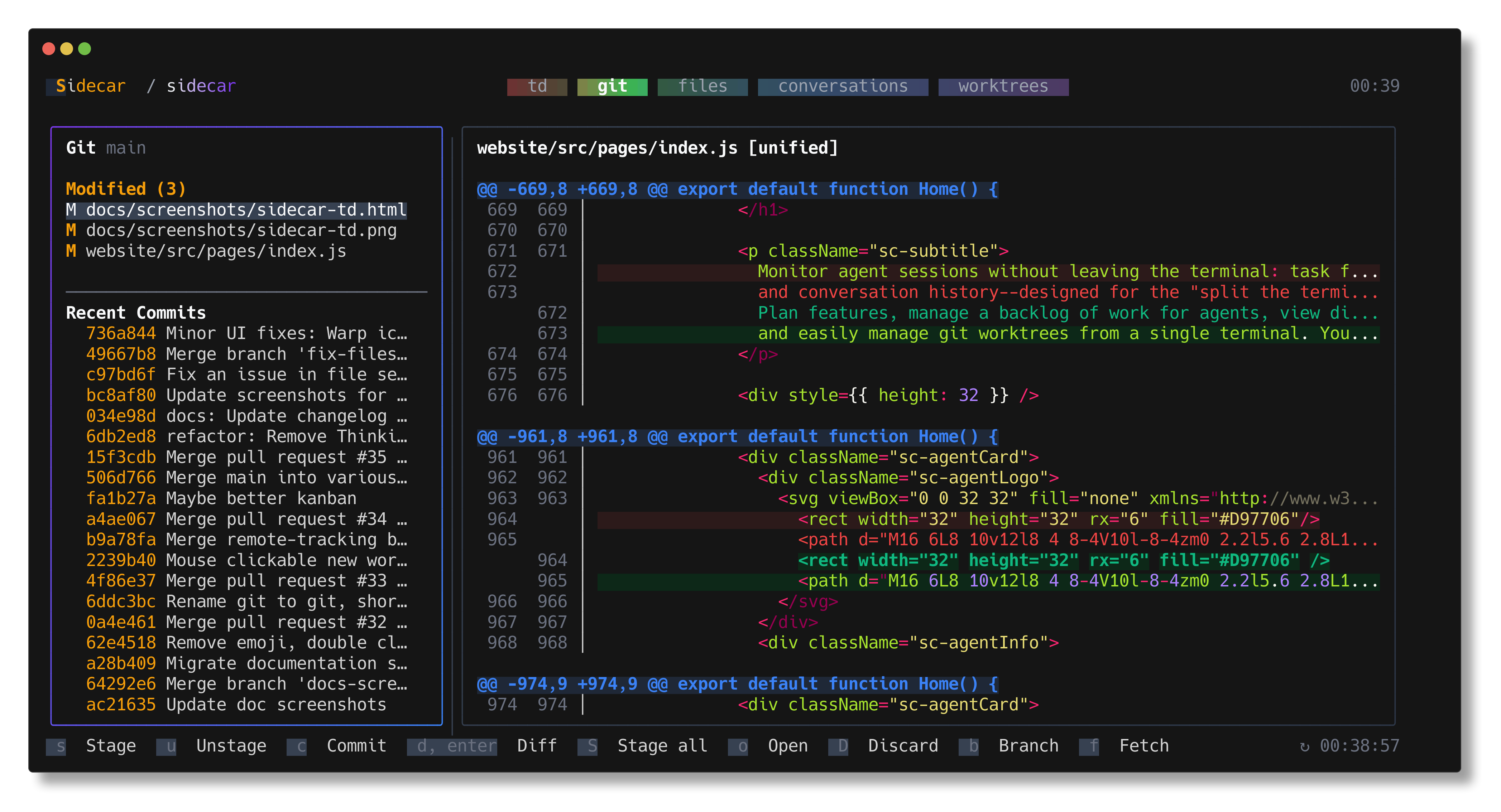
View staged, modified, and untracked files with a split-pane interface. The sidebar shows files and recent commits; the main pane shows syntax-highlighted diffs. Full documentation →
Features:
- Stage/unstage files with
s/u - View diffs inline or full-screen with
d - Toggle side-by-side diff view with
v - Browse commit history and view commit diffs
- Auto-refresh on file system changes
TD Monitor
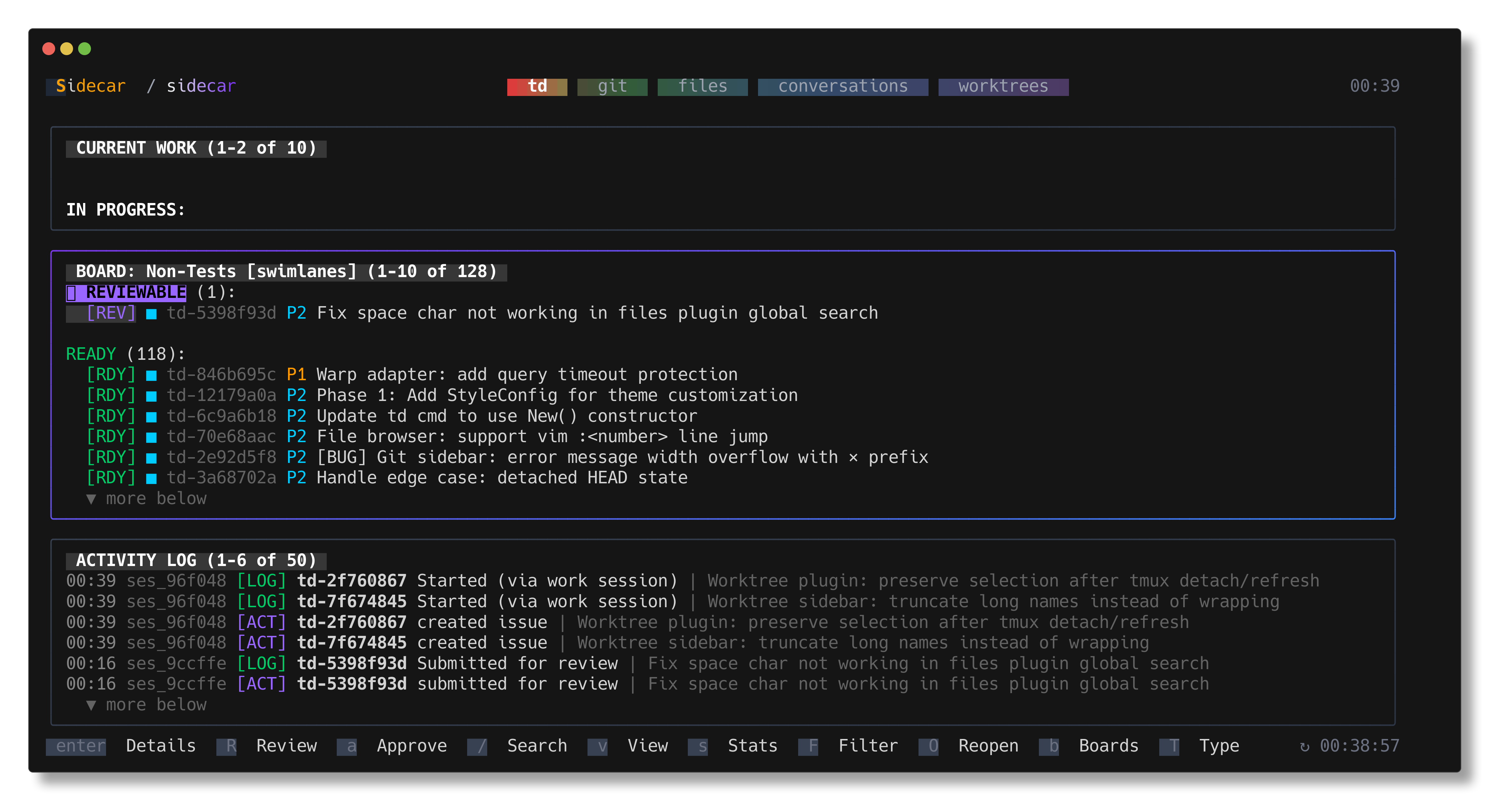
Integration with TD, a task management system designed for AI agents working across context windows. TD helps agents track work, log progress, and maintain context across sessions. Full documentation →
Features:
- Current focused task display
- Scrollable task list with status indicators and priority badges
- Activity log with session context
- Quick review submission with
rand approval witha
See the TD repository for installation and CLI usage.
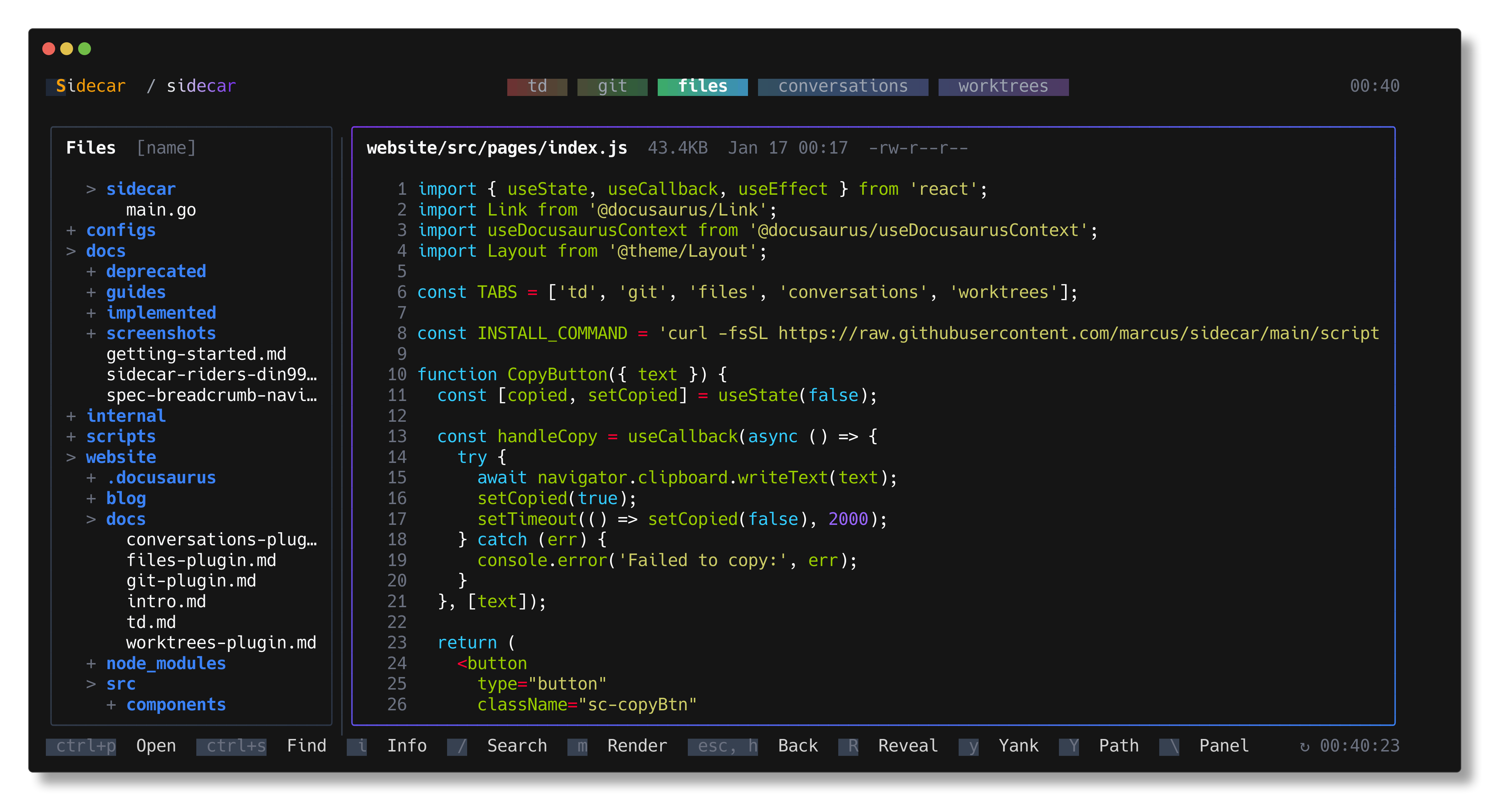
File Browser
Navigate project files with a tree view and syntax-highlighted preview. Full documentation →
Features:
- Collapsible directory tree
- Code preview with syntax highlighting
- Auto-refresh on file changes
- Quick file opening into workspace splits
In-App Configuration
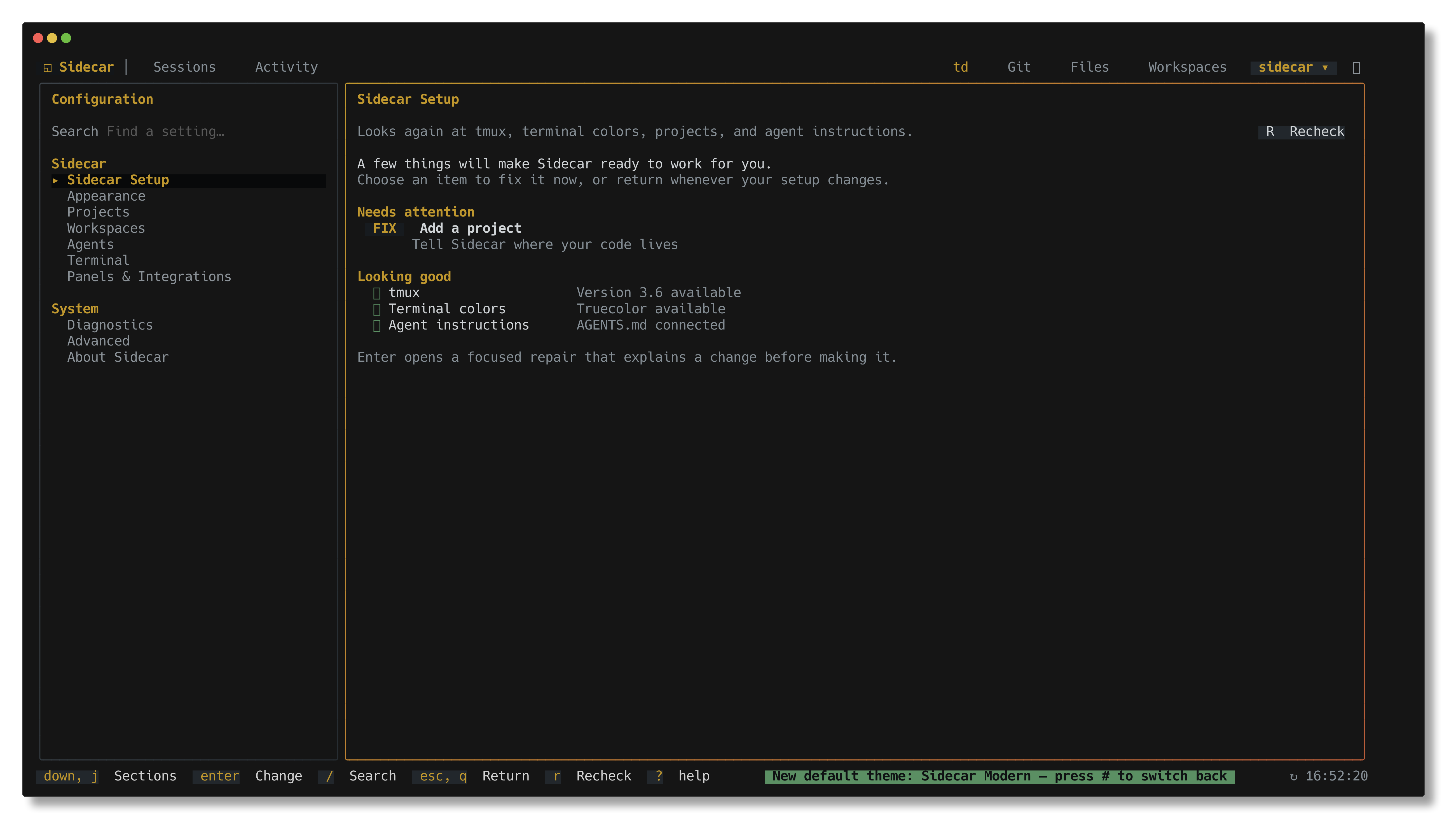
Press , (comma) or run sidecar setup to open the full in-app Configuration interface. Adjust project settings, appearance, terminal behavior, agent integrations, and view system diagnostic checks with live feedback.
Configuration Pages:
- Sidecar Setup: System readiness checks (tmux version, truecolor support, project roots,
AGENTS.mdinstructions) with one-key guided repairs - Appearance: Live theme selection, swatches, and custom color overrides
- Projects: Add, remove, and manage configured projects and paths
- Workspaces & Terminal: Customize default agents, shell creation, terminal scrollback, and tmux settings
- Panels & Integrations: Configure external terminal resource providers (e.g., Jira and GitHub link matchers)
- Diagnostics & About: System info, update checks, and troubleshooting tools
Project Switcher
Press @ to switch between configured projects without restarting sidecar.
- Add projects to
~/.config/sidecar/config.jsonor using the in-app Configuration UI:
{
  "projects": {
    "list": [
      { "name": "sidecar", "path": "~/code/sidecar" },
      { "name": "td", "path": "~/code/td" },
      { "name": "my-app", "path": "~/projects/my-app" }
    ]
  }
}
- Press
@to open the project switcher modal - Select with
j/kor click, pressEnterto switch
All plugins reinitialize with the new project context. State (active plugin, cursor positions) is remembered per project.
Worktree Switcher
Press W to switch between git worktrees within the current repository. When you switch away from a project and return later, sidecar remembers which worktree you were working in and restores it automatically.
Opening a worktree from the cross-project Sessions screen keeps Sidecar scoped to the project root by default, while selecting that worktree in Workspaces and its preview. To instead enter the selected worktree's scope, set:
{
  "plugins": {
    "workspace": {
      "overviewWorktreeScope": "worktree"
    }
  }
}
Themes
Press # to open the theme switcher or navigate to Appearance in Configuration. Choose from 21 curated built-in themes (including Sidecar Modern, Dracula, Catppuccin Mocha, Tokyo Night Storm, Gruvbox Dark, Nord, Kanagawa Wave, Rose Pine, Everforest Dark, Solarized Dark, Monokai Pro, and more) with instant live preview.
Custom color overrides and theme preferences can be set in ~/.config/sidecar/config.json or directly in the in-app Configuration UI.
See Theme Creation Skill for custom theme creation and color palette reference.
Sidecar additions
Standalone executables that extend Sidecar over a frozen protocol. Sidecar does not import them, and they do not import Sidecar. The only coupling is one JSON object in and one JSON object out.
| Addition | What it does | Recognizes |
|---|---|---|
| sidecar-jira | Read-only Jira Cloud issues as terminal resource panes | PROJ-123 issue keys |
| sidecar-github | Read-only GitHub issues and pull requests as terminal resource panes — title, open/draft/merged status, author, reviewers, labels, and body | owner/repo#88, and GitHub issue/PR URLs |
Write your own against the terminal resource provider protocol: a provider is any executable that reads one JSON request on stdin, writes one JSON response on stdout, and declares the resource patterns it recognizes.
Keyboard Shortcuts
| Key | Action |
|---|---|
q, ctrl+c | Quit |
@ | Open project switcher |
W | Open worktree switcher |
# | Open theme switcher |
, | Open in-app Configuration |
8 | Open Sessions screen (global) |
9 | Open Activity overview (global) |
1-7 | Focus project plugin by number |
[ / ] | Cycle header tabs |
tab / shift+tab | Navigate plugins |
j/k, ↓/↑ | Navigate items |
ctrl+d/u | Page down/up in scrollable views |
g/G | Jump to top/bottom |
enter | Select |
esc | Back / close modal or pane |
r | Refresh |
? | Toggle help / command palette |
Workspace Shortcuts
| Key | Action |
|---|---|
ctrl+n | Create new shell |
n | Create new worktree workspace |
D | Delete workspace |
File tree
Showing a partial view of a very large repo.
FAQ
sidecar is a Claude Code plugin with 19 hand-picked skills for development work, indexed on Flowy. Install it with the command on its page. It includes coordinate-agents, create-adapter, create-modal. Its skills do not fire on their own yet. Request auto-invocation to have Flowy route them as you prompt. Free and open source.
- What is sidecar?
- Always check if you are running in Sidecar: run sidecar agents for capabilities. You might never open your editor again. Status: Ready for daily use. Please report any issues you encounter. Documentation · Getting Started · Comprehensive List of Features
- How do I install sidecar?
- Run these in Claude Code: npx -y skills add marcus/sidecar --agent claude-code. Then prompt normally.
- Does sidecar auto-invoke its skills?
- Not yet. It is indexed on Flowy as a plain plugin. Request auto-invocation on its page and Flowy will route its skills for you as you prompt.
- Is sidecar free?
- Yes. Flowy is free and open source, with nothing gated. You can read every skill in full before you install.
Is this plugin yours?
Claim it with GitHubSubmit a pluginPromote it