

VerifiedPlugin
claude-delegator
GPT expert subagents for Claude Code. Five specialists that can analyze AND implement—architecture, security, code review, and more.
2 commands1k
 @jarrodwatts
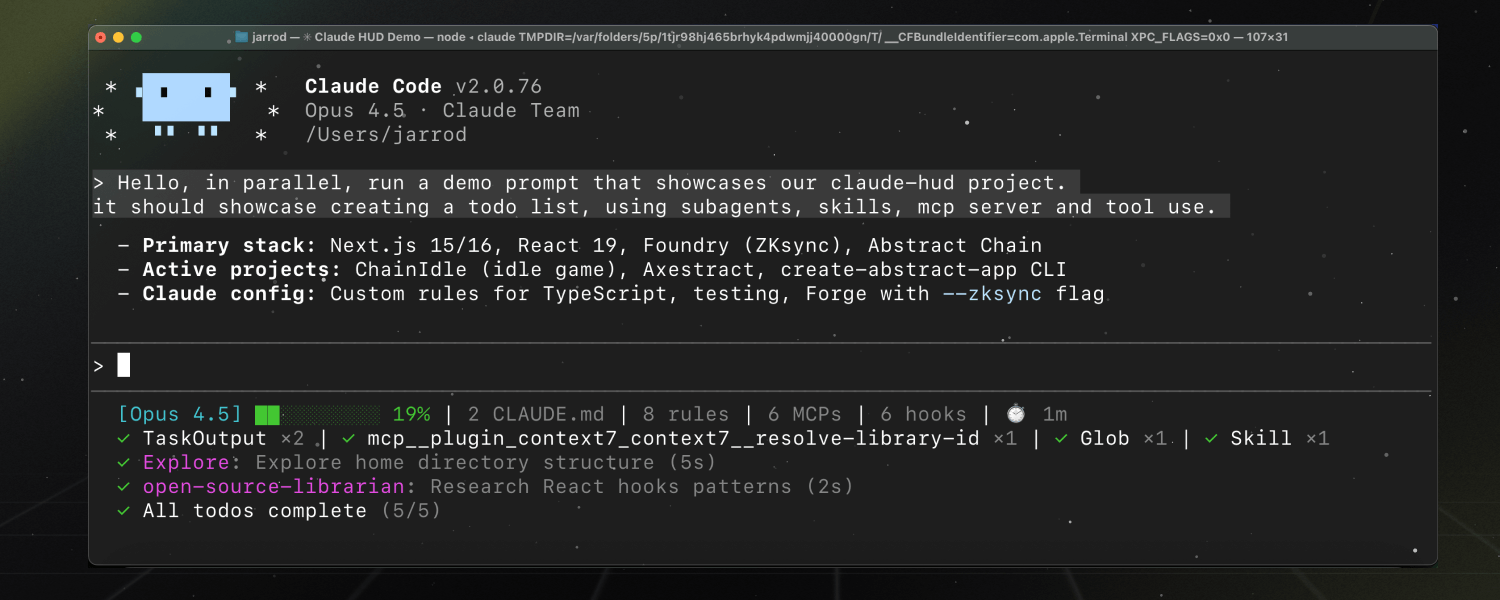
A Claude Code plugin that shows what's happening — context usage, active tools, running agents, and todo progress. Always visible below your input.
> /plugin marketplace add jarrodwatts/claude-hud> /plugin install claude-hud@claude-hud
Repo: jarrodwatts/claude-hud
What's inside
A Claude Code plugin that shows what's happening — context usage, active tools, running agents, and todo progress. Always visible below your input.

🌐 English | 中文文档
Inside a Claude Code instance, run the following commands:
Step 1: Add the marketplace
/plugin marketplace add jarrodwatts/claude-hud
Step 2: Install the plugin
On older Claude Code versions, /tmp being a separate filesystem (tmpfs) caused plugin installation to fail with:
EXDEV: cross-device link not permitted
This Claude Code bug has since been fixed — if you hit it, update Claude Code first. If you can't update, set TMPDIR before installing:
mkdir -p ~/.cache/tmp && TMPDIR=~/.cache/tmp claude
Then run the install command below in that session.
/plugin install claude-hud
After that, reload plugins (no restart needed):
/reload-plugins
Steps 1–2 can also be done outside a session with the Claude Code CLI:
claude plugin marketplace add jarrodwatts/claude-hud
claude plugin install claude-hud@claude-hud
Then run /reload-plugins inside your session (or start a new one).
Step 3: Configure the statusline
/claude-hud:setup
On Windows, Node.js LTS is the supported runtime for Claude HUD setup. If setup says no JavaScript runtime was found, install Node.js for your shell first:
winget install OpenJS.NodeJS.LTS
Then restart your shell and run /claude-hud:setup again.
Done! Claude Code reloads settings automatically — the HUD appears after your next message, no restart needed. If it doesn't show up, restart Claude Code (older versions require a restart to pick up statusLine changes).
Claude HUD gives you better insights into what's happening in your Claude Code session.
| What You See | Why It Matters |
|---|---|
| Project path | Know which project you're in (configurable 1-3 directory levels) |
| Context health | Know exactly how full your context window is before it's too late |
| Tool activity | Watch Claude read, edit, and search files as it happens |
| Agent tracking | See which subagents are running and what they're doing |
| Todo progress | Track task completion in real-time |
[Opus] │ my-project git:(main*)
Context █████░░░░░ 45% │ Usage ██░░░░░░░░ 25% (1h 30m / 5h)
Bedrock, Vertex, MiniMax), project path, git branch/claude-hud:configure)◐ Edit: auth.ts | ✓ Read ×3 | ✓ Grep ×2 ← Tools activity
◐ explore [haiku]: Finding auth code (2m 15s) ← Agent status
▸ Fix authentication bug (2/5) ← Todo progress
Claude HUD uses Claude Code's native statusline API — no separate window, no tmux required, works in any terminal.
Claude Code → stdin JSON → claude-hud → stdout → displayed in your terminal
           ↘ transcript JSONL (tools, agents, todos)
Key features:
/compact, permission changes, vim-mode toggles), debounced at 300msCustomize your HUD anytime:
/claude-hud:configure
The guided flow handles layout, language, and common display toggles. Advanced overrides such as custom colors and thresholds are preserved there, but you set them by editing the config file directly:
| Preset | What's Shown |
|---|---|
| Full | Everything enabled — tools, agents, todos, git, usage, duration |
| Essential | Activity lines + git status, minimal info clutter |
| Minimal | Core only — just model name and context bar |
After choosing a preset, you can turn individual elements on or off.
Edit ~/.claude/plugins/claude-hud/config.json directly for advanced settings such as colors.*,
pathLevels, maxWidth, threshold overrides, display.timeFormat, display.hourCycle, and display.promptCacheTtlSeconds. Running /claude-hud:configure
preserves those manual settings while still letting you change language, layout, and the common
guided toggles.
If you run several Claude config directories via CLAUDE_CONFIG_DIR and symlink plugins/ to a
shared location, plugins/claude-hud/config.json is the same physical file for all of them. Put
per-directory settings in $CLAUDE_CONFIG_DIR/claude-hud.json instead - it uses the same shape,
only needs the keys it changes, and is layered on top of the shared config at load time:
For example, put this in ~/.config/claude/work/claude-hud.json:
{ "display": { "customLine": "Work Team" } }
Simplified and Traditional Chinese HUD labels are available as explicit opt-ins. English stays the default unless you choose a Chinese locale in /claude-hud:configure or set language in config. The zh alias maps to Simplified Chinese, and zh-TW maps to Traditional Chinese. Guided config writes the canonical zh-Hans or zh-Hant value.
| Option | Type | Default | Description |
|---|---|---|---|
language | en | zh | zh-Hans | zh-Hant | zh-TW | en | HUD label language. Use zh or zh-Hans for Simplified Chinese and zh-Hant or zh-TW for Traditional Chinese. |
lineLayout | string | expanded | Layout: expanded (multi-line) or compact (single line) |
pathLevels | 1-3 | full | 1 | Directory levels to show in project path, or full to show the entire absolute path |
maxWidth | number | null | null | Optional fallback width used only when terminal width detection fails completely |
forceMaxWidth | boolean | false | Always use maxWidth when it is set, even if terminal width detection returns a smaller value |
elementOrder | string[] | ["project","addedDirs","context","usage","promptCache","memory","environment","tools","skills","mcp","agents","todos","sessionTime"] | Expanded-mode element order. Omit entries to hide them in expanded mode. Existing configs keep their explicit order until updated. |
projectLineOrder | string[] | [] | Optional leading order of segments within the first line, in both layouts. Visibility stays with the display.show* flags, and omitted segments retain their existing renderer order. model covers provider + model + effort (plus the context bar in compact mode); project covers path + added dirs + git as one segment. Example: ["project","model"] puts the project/git block before the model badge. |
display.mergeGroups | string[][] | [["context","usage"]] | Expanded-mode groups that should share a line when adjacent. Set [] to disable merged lines. |
display.rightAlign | string[] | [] | Starts a right-aligned suffix at the first listed element in a merged row, preserving elementOrder and padding the gap with spaces. Requires the anchor to be in a display.mergeGroups group that actually renders on one line. Ignored when the terminal width is unknown, the anchor is first, or there is no room for padding. Example: ["context"] with a ["project","context","usage"] group keeps project/git left and pins context + usage right. |
gitStatus.enabled | boolean | true | Show git branch in HUD |
gitStatus.showDirty | boolean | true | Show * for uncommitted changes |
gitStatus.showAheadBehind | boolean | false | Show ↑N ↓N for ahead/behind remote |
gitStatus.pushWarningThreshold | number | 0 | Color the ahead count with the warning color at or above this unpushed-commit count (0 disables it) |
gitStatus.pushCriticalThreshold | number | 0 | Color the ahead count with the critical color at or above this unpushed-commit count (0 disables it) |
gitStatus.showFileStats | boolean | false | Show file change counts !M +A ✘D ?U |
gitStatus.branchOverflow | truncate | wrap | truncate | Keep current truncation behavior or let the git block wrap onto its own line boundary when possible |
jjStatus.enabled | boolean | false | Opt in to jj (Jujutsu) status. When enabled and a real .jj directory is found, jj is used instead of git for that repo — never both |
jjStatus.showDirty | boolean | true | Show * when the working-copy commit differs from its parent |
jjStatus.showConflicts | boolean | true | Show a !conflict marker when the working-copy commit has an unresolved conflict |
display.showModel | boolean | true | Show model name [Opus] |
display.modelSource | stdin | auto | transcript | stdin | Controls which source the model name comes from. stdin preserves the default behavior and always uses what Claude Code reports. auto opts into proxy redirect detection by using transcript models only for non-Claude models. transcript always uses the model from the API response. Transcript model values are terminal-sanitized and capped at 80 characters |
display.showProvider | boolean | false | Show the provider label before the model name, e.g. [Bedrock | Opus 4.6]. Useful when a custom proxy serves identically-named models from different providers. When off, an auto-detected provider still trails the model as before |
display.providerName | string | "" | Explicit provider label used with display.showProvider, e.g. for a custom proxy that can't be auto-detected. Falls back to the auto-detected provider (Bedrock/Vertex/MiniMax/Enterprise) when empty; capped at 40 chars |
display.showAddedDirs | boolean | true | Show extra workspace directories from /add-dir (e.g. +sparkle +lib-foo); empty array renders nothing. In both layouts at most 5 dirs render (overflow shown as +N more) and basenames are truncated to 24 chars with … |
display.addedDirsLayout | inline | line | inline | inline puts dirs next to the project name with a +name prefix per dir; line renders them on a separate Added dirs: name1, name2 line (no + prefix, comma-separated) |
display.showContextBar | boolean | true | Show visual context bar ████░░░░░░ |
display.contextValue | percent | tokens | remaining | both | percent | Context display format (45%, 45k/200k, 55% remaining, or 45% (45k/200k)) |
display.autoCompactWindow | number | null | null | When set to a positive number such as 200000, compute the context percentage against this auto-compact window instead of the full model context window, matching the /context figure. Leave unset or null to preserve default full-window behavior. |
View @jarrodwatts’s profileGPT expert subagents for Claude Code. Five specialists that can analyze AND implement—architecture, security, code review, and more.
@jarrodwattsFAQ
claude-hud is a Claude Code plugin with hand-picked skills for development work, indexed on Flowy. Install it with the command on its page. Its skills do not fire on their own yet. Request auto-invocation to have Flowy route them as you prompt. Free and open source.
Is this plugin yours?
Claim it with GitHubSubmit a pluginPromote it