






intrusion
MCPShips with nitrostack: The full-stack TypeScript framework to build, test, and deploy production-ready MCP servers and AI-native…
 @nitrocloudofficialInstall MCP
Combines a real-time database with server logic for building multiplayer games and live apps.
Claude Code
> /plugin marketplace add clockworklabs/spacetimedb> /plugin install spacetimedb@spacetimedb-plugins
Codex
$ docker run --rm --pull always -p 3000:3000 clockworklabs/spacetime start
Cursor
$ docker run --rm --pull always -p 3000:3000 clockworklabs/spacetime start
Gemini CLI
$ docker run --rm --pull always -p 3000:3000 clockworklabs/spacetime start
GitHub Copilot
$ docker run --rm --pull always -p 3000:3000 clockworklabs/spacetime start
OpenCode
$ docker run --rm --pull always -p 3000:3000 clockworklabs/spacetime start
Windsurf
$ docker run --rm --pull always -p 3000:3000 clockworklabs/spacetime start
Security report
Not enough data
Known flaws
Not published
Signed build
Not published
Maintained
Nov 2, 2026
Last push
Licence
Not published
Runs as
Local process
On your machine
Deprecated
Not published
Signals from public registries, not an audit. Checked Nov 15, 2026.






SpacetimeDB is a relational database that is also a server. You upload your application logic directly into the database, and clients connect to it without any server in between. It is built for reactive applications, where every client sees changes as they happen: web apps like collaborative tools, dashboards, and chat, as well as multiplayer games.
Write your schema and business logic as a module in Rust, C#, TypeScript, or C++. SpacetimeDB compiles it, runs it inside the database, and automatically synchronizes state to connected clients in real-time.
Instead of deploying a web or game server that sits in between your clients and your database, your clients connect directly to the database and execute your application logic in your module. You can write all of your permission and authorization logic right inside your module just as you would in a normal server.
This means that you can write your entire application in a single language and deploy it as a single binary. No more separate webserver, no more containers, no more Kubernetes, no more VMs, no more DevOps, no more caching later. Zero infrastructure to manage.
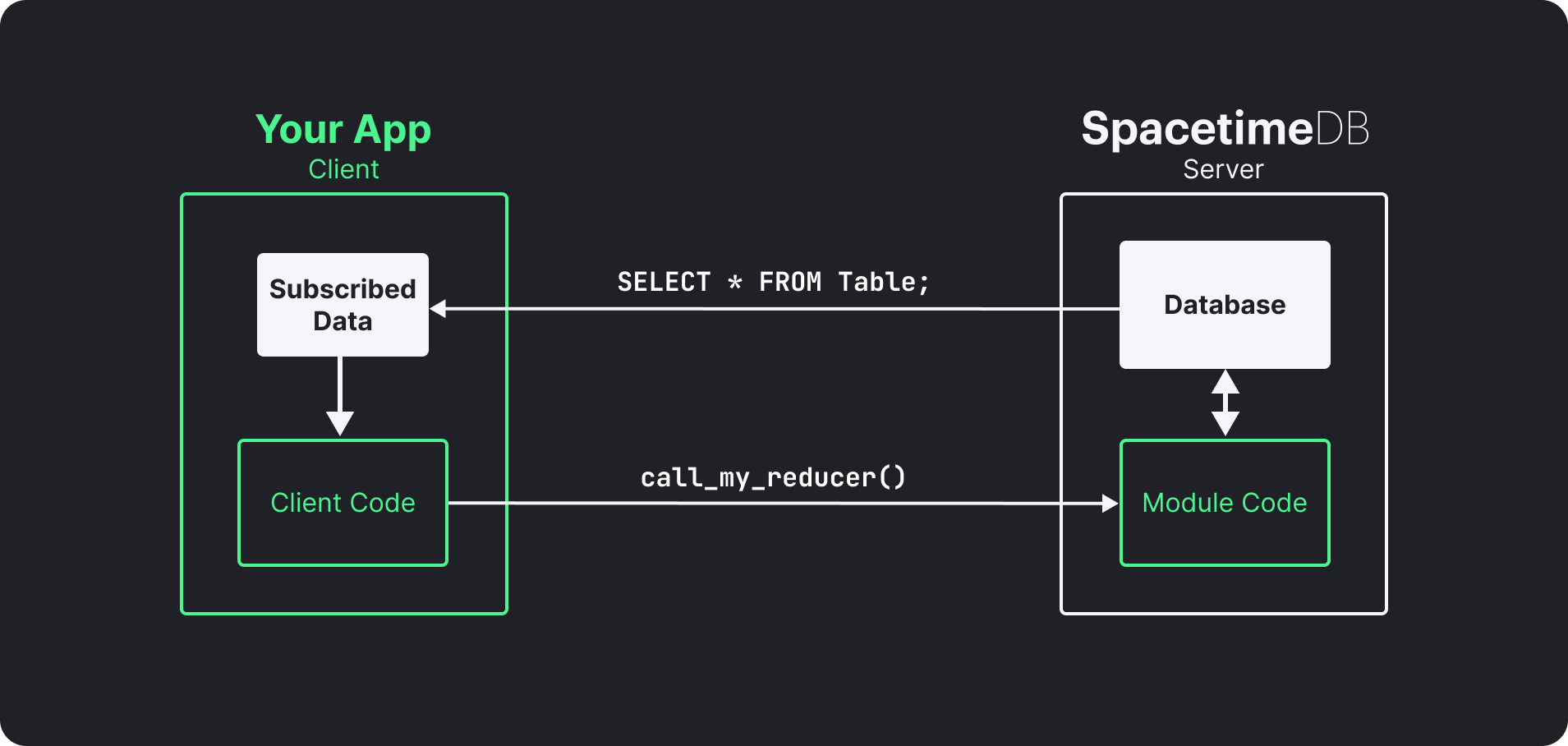
SpacetimeDB is optimized for maximum speed and minimum latency. SpacetimeDB provides all the ACID guarantees of a traditional RDBMS, with all the speed of an optimized web server. All application state is held in memory for fast access, while a commit log on disk provides durability and crash recovery. The entire backend of our MMORPG BitCraft Online runs as a single SpacetimeDB module: chat, items, terrain, player positions, everything, synchronized to thousands of players in real-time.
# macOS / Linux
curl -sSf https://install.spacetimedb.com | sh

# Windows (PowerShell)
iwr https://windows.spacetimedb.com -useb | iex
spacetime login
This opens a browser to authenticate with GitHub. Your identity is linked to your account so you can publish databases.
spacetime dev --template chat-react-ts
That is it. This creates a project from a template, publishes it to Maincloud, and watches for file changes, automatically rebuilding and republishing on save. See pricing for details.
SpacetimeDB modules define tables (your data) and reducers (your logic). Clients connect, call reducers, and subscribe to tables. When data changes, SpacetimeDB pushes updates to subscribed clients automatically.
// Define a table
#[spacetimedb::table(accessor = messages, public)]
pub struct Message {
    #[primary_key]
    #[auto_inc]
    id: u64,
    sender: Identity,
    text: String,
}

// Define a reducer (your API endpoint)
#[spacetimedb::reducer]
pub fn send_message(ctx: &ReducerContext, text: String) {
    ctx.db.messages().insert(Message {
        id: 0,
        sender: ctx.sender,
        text,
    });
}
On the client side, subscribe and get live updates:
const [messages] = useTable(tables.message);
// messages updates automatically when the server state changes.
// No polling. No refetching.
SpacetimeDB is well suited to web application backends, from everyday CRUD apps to reactive ones like collaborative tools, live dashboards, and chat. Write your module in TypeScript and connect from the browser with the TypeScript SDK, which includes React hooks like useTable and integrations for Vue, Svelte, Angular, and other frameworks. Each reducer runs as an ACID transaction, and subscribed clients receive committed changes automatically, so you don't need polling, a separate API server, or a pub/sub layer to keep them in sync. The chat-react-ts template from the Quick Start is a working example.
SpacetimeDB is optimized for low-latency transactional workloads like these, rather than batch processing or analytical queries.
Every transaction that changes data is written to an on-disk commitlog, which is replayed to recover the database after a crash. Transactions are fsynced in batches, so many transactions share a single fsync (group commit) (local.rs).
Since SpacetimeDB 2.0, clients get confirmed reads by default: the server holds back a transaction's subscription updates, and the caller's reducer result, until that transaction is durable (client_connection.rs), so the data a client receives from its subscriptions and reducer calls will survive a crash. SQL queries over HTTP wait for durability by default too. On Maincloud and other replicated deployments, durable instead means persisted by the replicas the database's replication settings require. Apps that can tolerate a client occasionally seeing a write that is then lost in a crash, like many games, can opt out with withConfirmedReads(false) for lower latency.
Write your database logic in any of these languages:
| Language | Quickstart |
|---|---|
| Rust | Get started |
| C# | Get started |
| TypeScript | Get started |
| C++ | Get started |
Connect from any of these platforms:
| SDK | Quickstart |
|---|---|
| TypeScript (React, Next.js, Vue, Svelte, Angular, Node.js, Bun, Deno) | Get started |
| Rust | Get started |
| C# (standalone and Unity) | Get started |
| C++ (Unreal Engine) | Get started |
docker run --rm --pull always -p 3000:3000 clockworklabs/spacetime start
If you need features from master that have not been released yet:
# Prerequisites: Rust toolchain with wasm32-unknown-unknown target
curl https://sh.rustup.rs -sSf | sh

git clone https://github.com/clockworklabs/SpacetimeDB
cd SpacetimeDB
cargo build --locked --release -p spacetimedb-standalone -p spacetimedb-update -p spacetimedb-cli
Then install the binaries:
macOS / Linux

Stars on GitHub
Ships with nitrostack: The full-stack TypeScript framework to build, test, and deploy production-ready MCP servers and AI-native…
@nitrocloudofficialInstall MCP

