
Productivity
Plugin
memsearch
A persistent, unified memory layer for all your AI agents (e.g. Claude Code, Codex, DSH), backed by Markdown and Milvus.

Plugin Signal75/100Solid
maintained100
capable29
documented100
adopted73
Install on Claude Code
> /plugin marketplace add zilliztech/memsearch> /plugin install memsearch@memsearch-plugins
What's inside
Skill(3 skills)
/memory-configDiagnose and configure MemSearch memory behavior. Use when the user asks about MemSearch configuration, plugin summarization, PROJECT.md/USER.md maintenance, memory directories, index health, provider routing, prompt files, or migration/compatibility questions./memory-recallSearch and recall relevant memories from past sessions via memsearch. Use when the user's question could benefit from historical context, past decisions, debugging notes, previous conversations, or project knowledge -- especially questions like 'what did I decide about X', 'why/memory-to-skillTurn workflows from your MemSearch memory into reusable skills. Use when the user asks to make/create/extract/distill a skill from what they just did or from past work, review skill candidates, install a distilled skill, or 'turn this into a skill'. Manages MemSearch
README
📰 What's New
- DeepSeek Harness support — MemSearch now brings automatic capture, pre-step memory injection, native skill-based recall, background maintenance, and a read-only memory browser to DeepSeek Harness (DSH).
- Skills from memory — MemSearch now distills the workflows you repeat into reusable, installable agent skills (a third "procedural memory" layer) and keeps them up to date in the background. See Skills from Memory.
- Advanced memory maintenance — optional background tasks keep durable
PROJECT.mdandUSER.mdnotes current across sessions. See Advanced Memory Maintenance.
Why memsearch?
- 🌐 All Platforms, One Memory — memories flow across Claude Code, Codex, DeepSeek Harness, OpenClaw, and OpenCode. A conversation in one agent becomes searchable context in all others — no extra setup
- 👥 For Agent Users, install a plugin and get persistent memory with zero effort; for Agent Developers, use the full CLI and Python API to build memory and harness engineering into your own agents
- 📄 Markdown is the source of truth — inspired by OpenClaw. Your memories are just
.mdfiles — human-readable, editable, version-controllable. Milvus is a "shadow index": a derived, rebuildable cache - 🔍 Progressive retrieval, hybrid search, smart dedup, live sync — 3-layer recall (search → expand → transcript); dense vector + BM25 sparse + RRF reranking; SHA-256 content hashing skips unchanged content; file watcher auto-indexes in real time
🧑💻 For Agent Users
Pick your platform, install the plugin, and you're done. Each plugin captures conversations automatically and provides semantic recall with zero configuration.
# Install
/plugin marketplace add zilliztech/memsearch
/plugin install memsearch
# Restart Claude Code to activate the plugin
After restarting, just chat with Claude Code as usual. The plugin captures every conversation turn automatically.
Verify it's working — after a few conversations, check your memory files:
ls .memsearch/memory/          # you should see daily .md files
cat .memsearch/memory/$(date +%Y-%m-%d).md
Recall memories — two ways to trigger:
/memory-recall what did we discuss about Redis?
Or just ask naturally — Claude auto-invokes the skill when it senses the question needs history:
We discussed Redis caching before, what was the TTL we chose?
# Install
git clone --depth 1 https://github.com/zilliztech/memsearch.git
bash memsearch/plugins/codex/scripts/install.sh
codex --yolo  # needed for ONNX model network access
After installing, chat as usual. Hooks capture and summarize each turn.
Verify it's working:
ls .memsearch/memory/
Recall memories — use the skill:
$memory-recall what did we discuss about deployment?
# Install the published plugin into your DSH profile
uv tool install "memsearch[onnx]"
dsh plugin --profile web add @zilliz/memsearch-dsh
# Restart that DSH profile, or start a new session
After installing, use DSH normally. Completed turns are captured automatically, and relevant memories are injected before the first model step only when they are useful.
Verify it's working:
ls .memsearch/memory/
Recall memories — ask naturally or tell DSH to use the registered memory-recall skill:
Use memory-recall to find what we decided about the deployment architecture.
The web profile also adds a compact MemSearch dock where you can review skill candidates and browse supported files under .memsearch/ without editing them.
# Install from ClawHub
openclaw plugins install --force clawhub:memsearch
openclaw config set plugins.entries.memsearch.hooks.allowConversationAccess true
openclaw config set plugins.entries.memsearch.hooks.allowPromptInjection true
openclaw gateway restart
After installing, chat in TUI as usual. The plugin captures each turn automatically.
Verify it's working — memory files are stored in your agent's workspace:
# For the main agent:
ls ~/.openclaw/workspace/.memsearch/memory/
# For other agents (e.g. work):
ls ~/.openclaw/workspace-work/.memsearch/memory/
Recall memories — two ways to trigger:
/memory-recall what was the batch size limit we set?
Or just ask naturally — the LLM auto-invokes memory tools when it senses the question needs history:
We discussed batch size limits before, what did we decide?
// In ~/.config/opencode/opencode.json
{ "plugin": ["@zilliz/memsearch-opencode"] }
After installing, chat in TUI as usual. A background daemon captures conversations.
Verify it's working:
ls .memsearch/memory/ # daily .md files appear after a few conversations
Recall memories — two ways to trigger:
/memory-recall what did we discuss about authentication?
Or just ask naturally — the LLM auto-invokes memory tools when it senses the question needs history:
We discussed the authentication flow before, what was the approach?
⚙️ Configuration (all platforms)
All plugins share the same memsearch backend. Configure once, works everywhere.
Embedding
Defaults to ONNX bge-m3 — runs locally on CPU, no API key, no cost. On first launch the model (~558 MB) is downloaded from HuggingFace Hub.
memsearch config set embedding.provider onnx     # default — local, free
memsearch config set embedding.provider openai   # needs OPENAI_API_KEY
memsearch config set embedding.provider ollama   # local, any model
All providers and models: Configuration — Embedding Provider
Milvus Backend
Just change milvus_uri (and optionally milvus_token) to switch between deployment modes:
Milvus Lite (default) — zero config, single file. Great for getting started:
# Works out of the box, no setup needed
memsearch config get milvus.uri   # → ~/.memsearch/milvus.db
⭐ Zilliz Cloud (recommended) — fully managed, free tier available — sign up 👇:
memsearch config set milvus.uri "https://in03-xxx.api.gcp-us-west1.zillizcloud.com"
memsearch config set milvus.token "your-api-key"
You can sign up on Zilliz Cloud to get a free cluster and API key.
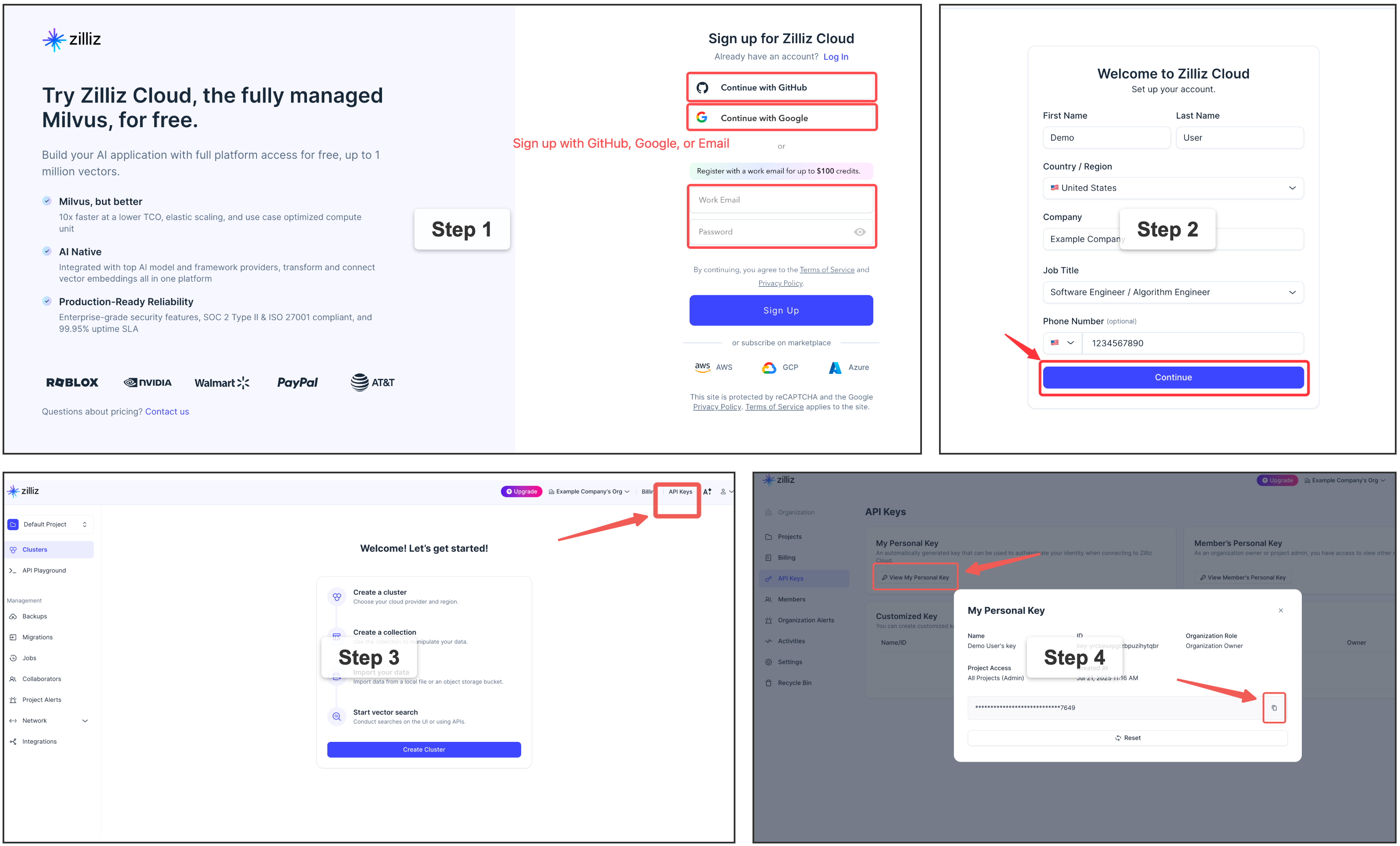
For multi-user or team environments with a dedicated Milvus instance. Requires Docker. See the official installation guide.
memsearch config set milvus.uri http://localhost:19530
📖 Full configuration guide: Configuration · Platform comparison
Capture Summarization Routing
Each plugin keeps its native capture summarizer unless you override it explicitly:
memsearch config set plugins.codex.summarize.model gpt-5.1-codex-mini
memsearch config set plugins.opencode.summarize.model anthropic/claude-haiku
Advanced users can route plugin summarization through a memsearch-managed API provider:
File tree
FAQ
memsearch is a Claude Code plugin with 3 hand-picked skills for productivity work, indexed on Flowy. Install it with the command on its page. It includes memory-config, memory-recall, memory-to-skill. Its skills do not fire on their own yet. Request auto-invocation to have Flowy route them as you prompt. Free and open source.
- What is memsearch?
- A persistent, unified memory layer for all your AI agents (e.g. Claude Code, Codex, DSH), backed by Markdown and Milvus.
- How do I install memsearch?
- Run these in Claude Code: /plugin marketplace add zilliztech/memsearch then /plugin install memsearch@memsearch-plugins. Then prompt normally.
- Does memsearch auto-invoke its skills?
- Not yet. It is indexed on Flowy as a plain plugin. Request auto-invocation on its page and Flowy will route its skills for you as you prompt.
- Is memsearch free?
- Yes. Flowy is free and open source, with nothing gated. You can read every skill in full before you install.
Is this plugin yours?
Claim it with GitHubSubmit a pluginPromote it