
Automation
Plugin
sutando
My AI Stand — Realtime by Day, Rewriting Itself by Night. Summon my AI superpower. Voice, vision, screen, meetings, calls when I'm engaged. Learns my patterns, ships its own code when I'm not. Runs across my Macs, interacts with people & their Stands.

Plugin Signal91/100Strong
maintained100
capable93
documented100
adopted55
Install
$ npx -y skills add sonichi/sutando --agent claude-code
Stats
395
Stars
93
Forks
Active
Maintenance
Python
Language
MIT
License
4d ago
Last commit
5mo ago
Created
Repo: sonichi/sutando
In this plugin
- agent-activity
- agent-registry
- agent-room-ops
- answer-format
- audio-transcribe
- bee-actions
- bot2bot-post
- call-diagnostics
- claude-codex
- claude-gemini
- claude-pi
- claude-router
- collaboration-intelligence
- connect-apps
- context-drop
- context-reconstruct
- db-browser
- deal-finder
- doc-ingest
- electron-overlay-dimming
- email-find
- engine-conflict-resolve
- gemini-tts
- image-generation
- import-claude-context
- local-workspace-server
- macos-tools
- macos-use
- make-viral-video
- marketplace
- media-transcript
- meeting-prep
- meeting-scheduler
- mention-gate
- model-switch
- morning-briefing
- ms365-connect
- observe
- obsidian-vault
- open-sutando-ref
- openai-tts
- overlay-apps
- phone-conversation
- pr-shepherd-contract
- proactive-loop
- quota-tracker
- regression-search
- relay
- release
- report-feedback
- review-preflight
- room-doc
- schedule-crons
- screen-companion
- screen-record
- self-diagnose
- self-upgrade
- session-recap
- skill-usage-report
- startup
- submit-use-case
- subscription-scanner
- sutando-migrate
- task-orphan-check
- task-progress
- task-workstream-grouping
- trusted-capabilities
- voice-agent-test-harness
- worker-pool
- x-twitter
- zoom
What's inside
Skill(72 skills)
/agent-activityStreams what the agent is doing into the room, as rows the desktop client renders in an **events drawer** above the composer (collapsed: avatar, pulsing dots, the newest line rolling in; expanded: the live rows of the task in progress) and in the console dock's **Events** panel/agent-registryLocal Agent Registry — a standalone, dependency-free service that tracks running Claude Code (and other) agent instances. Agents self-register on startup and heartbeat while alive; the Electron overlay and Sutando dashboard read the live list. Use when you need to know which/agent-room-ops**Prefer the `ag2-space` MCP tools when they are connected and the room exposes them** — availability is per-room and per-actor, so check `room.actions.search`. `room.list` supersedes `room_ops.py rooms`; `room.context.read` supersedes `read`; `room.vault.read`/`tree`/`write`/
- /answer-format
- /audio-transcribe
- /bee-actions
- /bot2bot-post
- /call-diagnostics
- /claude-codex
- /claude-gemini
- /claude-pi
- /claude-router
- /collaboration-intelligence
- /connect-apps
- /context-drop
- /context-reconstruct
- /db-browser
- /deal-finder
- /doc-ingest
- /electron-overlay-dimming
- /email-find
- /engine-conflict-resolve
- /gemini-tts
- /image-generation
- /import-claude-context
- /local-workspace-server
- /macos-tools
- /macos-use
- /make-viral-video
- /marketplace
- /media-transcript
- /meeting-prep
- /meeting-scheduler
- /mention-gate
- /model-switch
- /morning-briefing
- /ms365-connect
- /observe
- /obsidian-vault
- /open-sutando-ref
- /openai-tts
- /overlay-apps
- /phone-conversation
- /pr-shepherd-contract
- /proactive-loop
- /quota-tracker
- /regression-search
- /relay
- /release
- /report-feedback
- /review-preflight
- /room-doc
- /schedule-crons
- /screen-companion
- /screen-record
- /self-diagnose
- /self-upgrade
- /session-recap
- /skill-usage-report
- /startup
- /submit-use-case
- /subscription-scanner
- /sutando-migrate
- /task-orphan-check
- /task-progress
- /task-workstream-grouping
- /trusted-capabilities
- /voice-agent-test-harness
- /worker-pool
- /x-twitter
- /zoom
Hook(15 hooks)
Badges




README
Sutando
-FFD700?logo=github&logoColor=white)
My AI Stand — Realtime by Day, Rewriting Itself by Night. Summon my AI superpower.
Voice, vision, screen, meetings, calls when I'm engaged. Learns my patterns, ships its own code when I'm not. Runs across my Macs, interacts with people & their Stands.
It belongs entirely to you.
🛠 Open source: this repo — clone, build, run locally on your own Mac. 🍎 Native app preview: sutando.ai — packaged Mac app, request access.
No pay-per-token core API key required. Sutando runs through the Claude Code or Codex CLI session you select, with optional service credentials only for the capabilities you enable.
Named after Stands from JoJo's Bizarre Adventure — a personal spirit that fights on your behalf. Like a Stand, Sutando starts unnamed. As it learns your style and earns real capabilities, it names itself and generates its own avatar — your Stand, unique to you.
https://github.com/user-attachments/assets/a86ec34e-3b26-4011-824c-d2d124753c25
24 tool calls. 6 tasks. 7 minutes. All by voice from a phone. Demo by @liususan091219. Watch on YouTube (full quality) →
⭐ If Sutando is useful to you, star this repo — it's how other people find it.
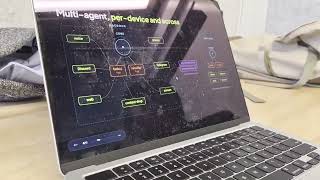 |  | 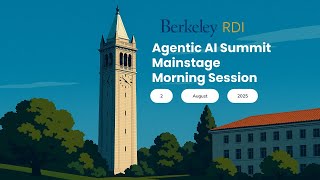 |
|---|---|---|
| 🤖 The AI agent that presented live | 📺 ep.007 — 50 days. 600+ PRs. #1 trending | 📺 Vision talk at UC Berkeley |
Sutando in action
- The Pentagon Declassified a UAP Case Its Own Analysts Rate 40% "Unrecognized", Oct 2023 Orb Incident
- We Measured Our Agent's First 48 Hours on Claude Fable 5 — Then It Got Pulled
- An AI agent caught a bug humans missed — phantom voice sessions, found via anomaly detection
- Anthropic's $150M Bet: 1,000 Paid Fellows to Build AI Inside Nonprofits
- OpenAI's AI Just Disproved Paul Erdős's 80-Year-Old Math Conjecture
@sutando-ai channel · Sutando WIRE playlist
What can you do with it?
Talk while you work. You're looking at a doc. You say "make this paragraph shorter." Sutando sees your screen, rewrites the paragraph, and replaces the original text directly.
Join meetings for you. "Join my 2pm call." It reads your calendar and joins — Zoom via the desktop app, Google Meet via the browser — with computer audio. It can also dial in by phone when you ask. It takes screenshots to identify participants, does live research when someone asks a question, and writes you a summary when the call ends. Meeting access is gated — it messages you on Telegram asking for approval before enabling task delegation.
Make calls for you. "Call her and leave a message." Sutando looks up the contact, dials the number, has the conversation, and reports back — while you keep working. It can even make concurrent calls while in a meeting.
Work from your phone. Call Sutando and say "summon." It opens Zoom with screen sharing — join from your phone to see its screen in real time. "What's on my screen?" — it takes a screenshot and tells you. "Fix the typo in that file" — done. You scroll, switch apps, navigate — all by voice while walking around.
Get better on its own. When you're not giving it tasks, Sutando runs an autonomous build loop — it monitors its own health, detects patterns in how you work, discovers new skills, and builds missing capabilities. Most of Sutando's code was written this way. It learns from your corrections and adapts over time.
Remember everything — and act on it. You have an idea while walking. Say it out loud. Sutando captures it, tags it, and saves it as a searchable note. If there's something actionable, it starts working on it right away or queues it for the next free cycle.
Reach you anywhere. Voice, Zoom, Google Meet, Telegram, Discord (text + voice channel), web, phone, or email — same agent, same memory, any channel.
Scale across machines. Plug in a second Mac and Sutando sets it up — the original agent opens a Discord channel, sends setup commands, and migrates services. The new machine handles phone calls 24/7 while your laptop stays portable. No migration scripts needed — the two agents coordinate the handoff themselves.
Status: Alpha
This is an early-stage project. Honest status:
| Count | Details | |
|---|---|---|
| Verified working | 30 | Voice, screen capture, notes, calendar, reminders, contacts, browser, phone calls, meeting dial-in, task delegation, pattern detection, health check, dashboard, Telegram, Discord, multi-machine migration, onboarding tutorial, and more |
| Needs external setup | 3 | Twilio (phone), Telegram bot, Discord bot |
We're looking for contributors to help test and harden these capabilities. If you try something and it breaks, open an issue.
How it works
See Sutando architecture boundaries for the normative definitions of core, adapters, apps, skills, tooling, and workspace state.
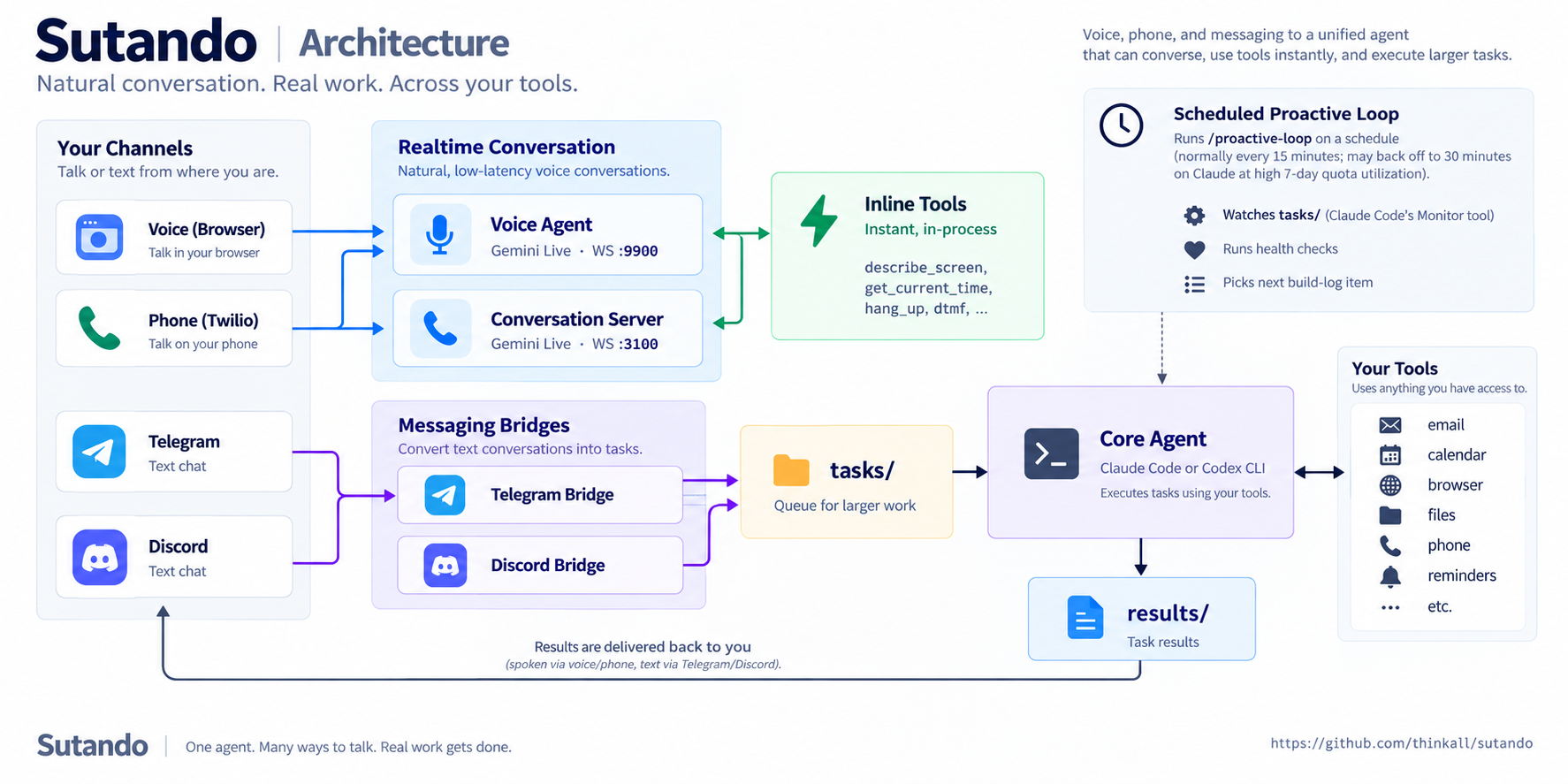
The core agent's loop is a cron job that fires /proactive-loop every 15 minutes (*/15 * * * * in the per-host crons.json). On Claude, Sutando backs that off to every 30 minutes when 7-day quota utilization reaches 80%, restoring the configured cadence once an authoritative routed reading drops below it; missing, stale, rejected, or unrouted telemetry holds the slower cadence and reports why. Each pass keeps a persistent watcher on tasks/ via Claude Code's Monitor tool, so tasks are processed on arrival rather than on the tick, and also runs health checks and picks the next build-log item.
Four processes work together:
- Voice agent (Gemini Live, WebSocket on :9900) — listens and talks in real time for browser voice.
- Web client (
com.sutando.web-client.plist, HTTP on :8080) — separate launchd service that serves the browser UI. The browser then connects directly to the voice agent's WebSocket on :9900 — the web client is not in the WebSocket data path. - Conversation server (Gemini Live, Twilio WebSocket on :3100) — same role as the voice agent for inbound and outbound phone calls.
- Core agent (Claude Code or Codex CLI) — executes tasks with full system access. The persistent CLI session provides an interactive terminal and runs Sutando's task watcher and scheduled work.
Voice agent and conversation server handle conversation-scope actions with inline tools — in-process calls that round-trip instantly (describe the screen, hang up, send DTMF, read the clipboard/current time, capture a screenshot). For anything outside that scope they write to tasks/; core reads them, executes, and writes to results/, which each channel speaks or messages back. Telegram and Discord bridges only use the tasks/ path.
Quick start
Prerequisites — bash src/startup.sh checks that these are installed and refuses to boot otherwise:
- Claude Code or Codex CLI — whichever you select
- Node.js (
brew install node) - Python 3 (
brew install python3) - fswatch (
brew install fswatch) — auto-installs via Homebrew on first start
Also required — sign in to the selected agent CLI. Startup checks the
configured Claude or Codex home before launching background services and fails
with the matching login remedy. SUTANDO_SKIP_AUTH_PREFLIGHT=1 bypasses this
once for recovery; the runtime launcher still checks again before replacing the
core session.
Recommended, but not checked at boot — macOS 15+ and Node.js 22+.
bash src/verify-setup.sh covers this second list — it checks the Node version and whether your CLI is actually authenticated. Run it if startup succeeds but the core doesn't.
Optional — each unlocks one feature and degrades alone:
- Gemini API key — voice (text/core paths work without it)
pip3 install discord.py/slack_bolt— Discord / Slack bridges (Telegram needs no package)- ffmpeg (
brew install ffmpeg) — subtitle-burn, video-concat, recording handoff - tmux (
brew install tmux) — Sutando.app watcher auto-restart; the core starts without it - git — vault sync, self-upgrade, commit provenance
- Twilio account + ngrok — phone calls and SMS
Full list with the line enforcing each, plus what to vendor when embedding Sutando in another application: External runtime dependencies.
# Clone
git clone https://github.com/sonichi/sutando.git
cd sutando

# Configure optional integrations (skip for text/core-only use)
cp .env.example .env
# Add GEMINI_API_KEY only if you want voice

# Start everything on macOS / Linux — core, app, and dashboard
./start.sh

# Start everything on Windows
pwsh -File src/startup.ps1
That is the whole first run. start.sh is a thin front door: it delegates to src/startup.sh --with-app and opens the dashboard once it answers. Extra arguments pass straight through (./start.sh --runtime codex). Set SUTANDO_OPEN_DASHBOARD=0 to skip the browser, or SUTANDO_DASHBOARD_URL to point it elsewhere. If the dashboard never comes up the core still starts — the browser open is backgrounded and can never gate it.
src/startup.sh remains the supported lower-level entry, and is what you want when there is no desktop to open things on:
# Headless core only — no app, no browser
bash src/startup.sh

# Core plus the macOS menu-bar app, still no browser
bash src/startup.sh --with-app
Either path starts the core services (voice agent, phone conversation server, web client, dashboard, and API) and the autonomous loop. The browser UI is at http://localhost:8080 and the dashboard at http://localhost:7844; src/startup.sh never opens a browser for you.
The macOS menu-bar app is opt-in and separate. Plain bash src/startup.sh never touches it, so the core stays headless. --with-app builds, signs, and launches the bundle; a failure there is reported and never stops the core.
File tree
Showing a partial view of a very large repo.
FAQ
sutando is a Claude Code plugin with 72 hand-picked skills for automation work, indexed on Flowy. Install it with the command on its page. It includes agent-activity, agent-registry, agent-room-ops. Its skills do not fire on their own yet. Request auto-invocation to have Flowy route them as you prompt. Free and open source.
- What is sutando?
- My AI Stand — Realtime by Day, Rewriting Itself by Night. Summon my AI superpower. Voice, vision, screen, meetings, calls when I'm engaged. Learns my patterns, ships its own code when I'm not. Runs across my Macs, interacts with people & their Stands.
- How do I install sutando?
- Run these in Claude Code: npx -y skills add sonichi/sutando --agent claude-code. Then prompt normally.
- Does sutando auto-invoke its skills?
- Not yet. It is indexed on Flowy as a plain plugin. Request auto-invocation on its page and Flowy will route its skills for you as you prompt.
- Is sutando free?
- Yes. Flowy is free and open source, with nothing gated. You can read every skill in full before you install.
Is this plugin yours?
Claim it with GitHubSubmit a pluginPromote it