
Auto-invoked
Development
MCP
context-mode
Ships with ai-kit: Claude Code, set up to ship on Solana. Not programs alone — the whole lifecycle: validating the idea, building the program and the app around it, shipping it, and the launch and…
Claude Code
> /plugin marketplace add solanabr/ai-kit> /plugin install solana-ai-kit@stbr
Codex
$ codex mcp add context-mode -- npx -y context-mode@1.0.169
Cursor
{
  "mcpServers": {
    "context-mode": {
      "command": "npx",
      "args": [
        "-y",
        "context-mode@1.0.169"
      ]
    }
  }
}
Add it to mcp.json.
Gemini CLI
{
  "mcpServers": {
    "context-mode": {
      "command": "npx",
      "args": [
        "-y",
        "context-mode@1.0.169"
      ]
    }
  }
}
Add it to settings.json.
GitHub Copilot
$ copilot mcp add context-mode -- npx -y context-mode@1.0.169
OpenCode
{
  "mcp": {
    "context-mode": {
      "type": "local",
      "command": [
        "npx",
        "-y",
        "context-mode@1.0.169"
      ]
    }
  }
}
Add it to opencode.json.
Windsurf
{
  "mcpServers": {
    "context-mode": {
      "command": "npx",
      "args": [
        "-y",
        "context-mode@1.0.169"
      ]
    }
  }
}
Add it to mcp_config.json.
Security report
Found
Low risk
Known flaws
None known
Signed build
No
No build provenance published
Maintained
Oct 27, 2026
Last push
Licence
MIT
Runs as
npx
On your machine
Deprecated
No
Signals from public registries, not an audit. Checked Nov 12, 2026.
context-mode README
Context Mode
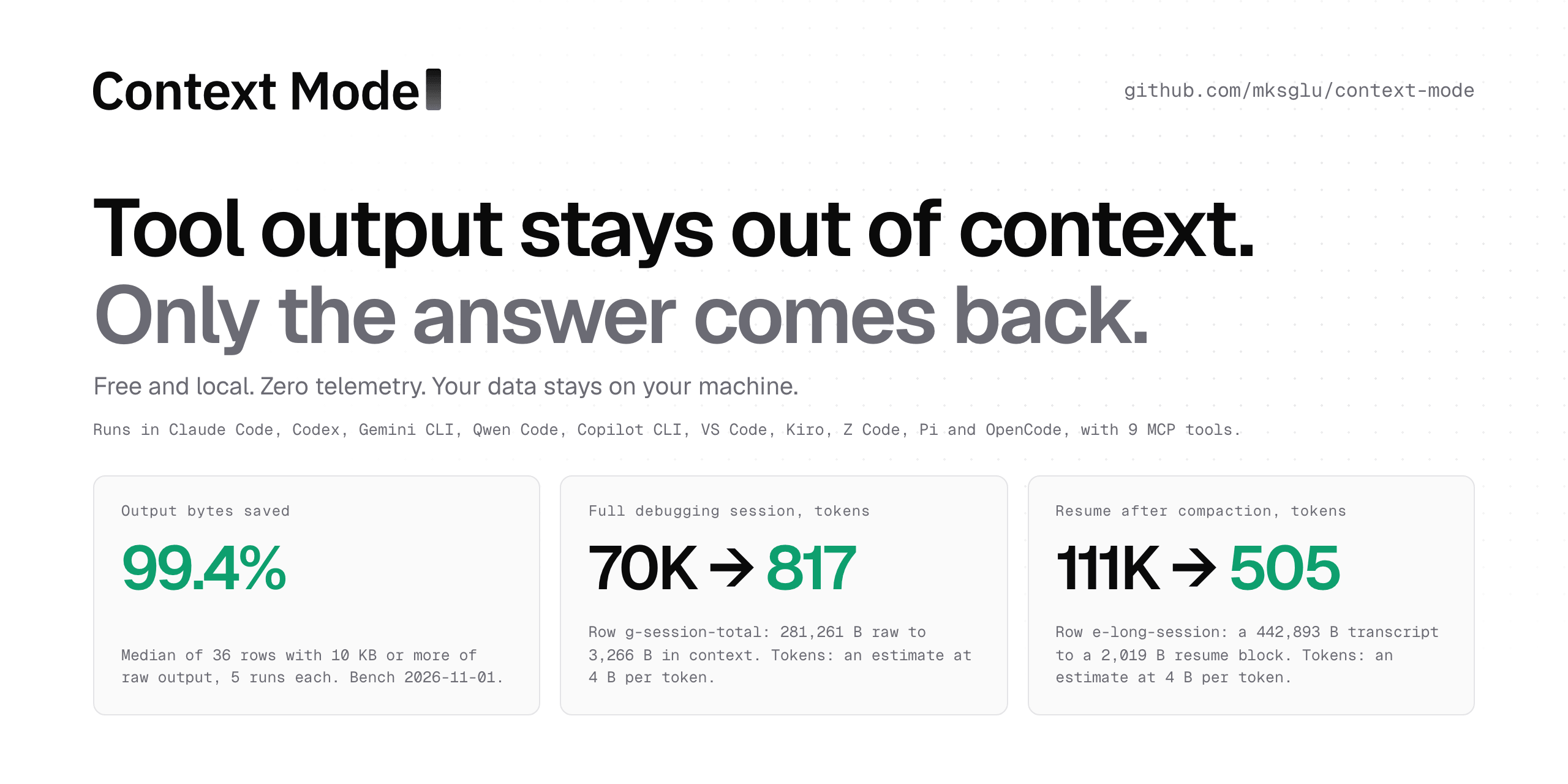
A free, local plugin for 10 coding agents. It keeps tool output out of your agent's context window and keeps all usage data on your machine. The plugin is free forever.



33K GitHub stars · 683K npm downloads (read 2026-11-01, stats.json) · on the Hacker News front page and GitHub Trending: charts and sources
The Context Mode plugin is free and local, with its source open on GitHub. Context Mode Gateway is a separate hosted service with its own account and subscription. It takes the same idea from tool output to the whole conversation: Gateway Recall keeps long sessions searchable, and Gateway Memory shares what your agents learn across sessions and tools. See how the Gateway works
Contents: Why · Adoption · Install · Try it · Use cases · Benchmarks · How it works · Tools · Security and privacy · Context Mode Gateway · License · Community
Why
A coding agent reads files, runs commands and fetches pages, and every result goes into its context window. The Context Mode plugin runs that work in a local sandbox, keeps the full output in a SQLite index on your machine, and gives the agent the part it asks for.
- The plugin is free forever. Use it at home and at work, free of charge, under a source-available license.
- Runs on your machine. The hooks, the sandbox and search run as local processes next to your agent.
- The plugin keeps your data on your machine. Every index lives in
~/.context-mode: onecontext.dbper project. - Zero telemetry. The plugin keeps all usage data on your machine. Security and privacy lists each network call it makes.
- Works offline after install. Sandbox runs, file indexing and search use local SQLite and your own runtimes.
- Thinking in Code. The agent writes a short script instead of reading the data, and only what the script prints reaches the context: see How it works, step 5.
- Small replies. On the 36 bench rows with 10 KB or more of raw output, the plugin's median reply is 99.4% smaller than the raw output.
Adoption: stars and npm downloads
Open the interactive chart and point at a bar to read its value. Tabs there show days, weeks, months and years. Stars come from the GitHub GraphQL API (starredAt); npm downloads come from api.npmjs.org/downloads/range. The total up to 2026-10-29 is 683K npm downloads (stats.json keeps a daily copy). A daily job redraws both charts.
- Hacker News. "MCP server that reduces Claude Code context consumption by 98%" reached the front page with 570+ points and 107 comments on 2026-02-28 (thread).
- GitHub Trending. A bot that watches GitHub Trending logged the repo there on 14 days from 2026-04-24 to 2026-10-17 (uibm/trending-watcher).
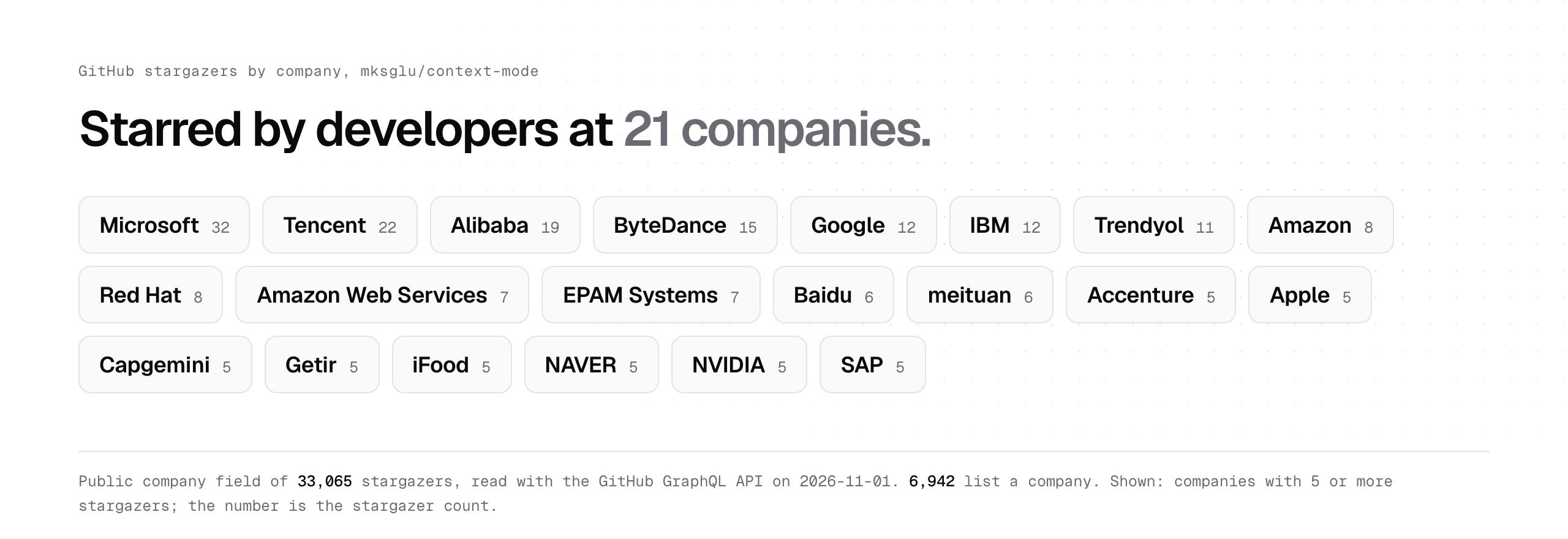
Starred by engineers at these companies: each name is the company field of 2 or more stargazer profiles, read with the GitHub GraphQL API on 2026-11-01 (data).
Install
Pick your agent: Claude Code · Codex · Gemini CLI · Qwen Code · Pi · OpenCode · Copilot CLI · Kiro · VS Code · ZCode
Open its block and copy its own install command. Each block also holds the update, check and remove steps, and the Install guide walks through them.
The plugin needs Node 24.15.0 or later, from the engines field in package.json. On Windows, add Git for Windows: the shell tools run in Git Bash, and doctor checks for it.
contextmode installs as the npm package and command context-mode.
Claude Code, Codex, Gemini CLI and Qwen Code install from GitHub, and each of their commands names the release branch.
Claude Code
claude plugin marketplace add mksglu/context-mode
claude plugin install context-mode@context-mode
# update
claude plugin update context-mode@context-mode
# check
claude plugin list
# remove
claude plugin marketplace remove context-mode
Hooks ✓ (package) · MCP ✓ · Skills ✓
Codex
codex plugin marketplace add mksglu/context-mode
codex plugin add context-mode@context-mode
# one-time step: trust the plugin hooks
npm i -g context-mode
context-mode setup --agents codex
# update
codex plugin marketplace upgrade context-mode
# check
codex mcp list
# remove
codex plugin remove context-mode@context-mode
Hooks ✓ (hook file) · MCP ✓ · Skills ✓
Gemini CLI
gemini extensions install https://github.com/mksglu/context-mode
# update
gemini extensions update context-mode
# check
GEMINI_CLI_TRUST_WORKSPACE=true gemini mcp list
# remove
gemini extensions uninstall context-mode
Hooks ✓ (package) · MCP ✓ · Skills ✓
Qwen Code
qwen extensions install https://github.com/mksglu/context-mode:context-mode
# update
qwen extensions update context-mode
# check
qwen extensions list
# remove
qwen extensions uninstall context-mode
Hooks ✓ (package) · MCP ✓ · Skills ✓
Pi
pi install npm:context-mode
# update
pi update --extensions
# check
pi list
# remove
pi remove npm:context-mode
Hooks ✓ (the plugin's own event handlers) · MCP ✓ (ctx tools built into the plugin) · Skills ✓
OpenCode
opencode plugin add context-mode
# update
opencode plugin update
# check
opencode mcp list --pure          # OpenCode 1.19
opencode mcp list --standalone    # OpenCode 2
# remove
opencode plugin remove context-mode
Hooks ✓ (the plugin's own event handlers) · MCP ✓ · Skills ✓
Copilot CLI
npm i -g context-mode
context-mode setup --agents copilot-cli
# update
context-mode upgrade
# check
context-mode doctor --agents copilot-cli
copilot mcp list
# remove
context-mode setup --remove --agents copilot-cli
Hooks ✓ (hook file) · MCP ✓ · Skills ✓
Kiro
npm i -g context-mode
context-mode setup --agents kiro
# update
context-mode upgrade
# check
context-mode doctor --agents kiro
# remove
context-mode setup --remove --agents kiro
Hooks ✓ (hook file) · MCP ✓ · Skills ✓
VS Code (Copilot)
npm i -g context-mode
context-mode setup --agents vscode
# update
context-mode upgrade
# check
context-mode doctor --agents vscode
# remove
context-mode setup --remove --agents vscode
Hooks ✓ (hook file) · MCP ✓ · Skills ✓
ZCode
zcode plugins marketplace add mksglu/context-mode
zcode plugins install context-mode@context-mode
# update
zcode plugins update context-mode@context-mode
# check
zcode plugins list
# remove
zcode plugins uninstall context-mode@context-mode
Hooks ✓ (hook file) · MCP ✓ · Skills ✓
The npm route works for every agent:
npm i -g context-mode
context-mode setup
Setup is also the repair. It shows a plan, saves your earlier config, then applies the plan; when a step ends early, it restores the saved config. To uninstall:
context-mode setup --remove
npm rm -g context-mode
Restart the agent, then run /ctx-doctor in it. Each check prints PASS or a fix command, and the Doctor guide explains each check.
How we tested the install
Every agent gets hooks, the MCP server and the plugin skills; the last line of each block above says how.
Stats
111
Stars
59
Forks
Active
Maintenance
Shell
Language
MIT
License
Last commit
Created

Ships withai-kit
1113 skills15 agents4 MCP
Stars on GitHub
Momentum
- stars in total
- 111
More MCP servers from other plugins.




Questions about context-mode.
- Which coding agents can use context-mode?
- context-mode works in any agent that reads an MCP config file: Claude Code, Codex, Cursor, Gemini CLI, GitHub Copilot, OpenCode and Windsurf. Each agent reads it from its own file; this page names the file for each one.
- How do I add context-mode to Claude Code?
- Run these in order, one at a time. 1. In Claude Code: /plugin marketplace add solanabr/ai-kit 2. In Claude Code: /plugin install solana-ai-kit@stbr
- Is context-mode safe to install?
- Low risk. Signals from public registries, not an audit.