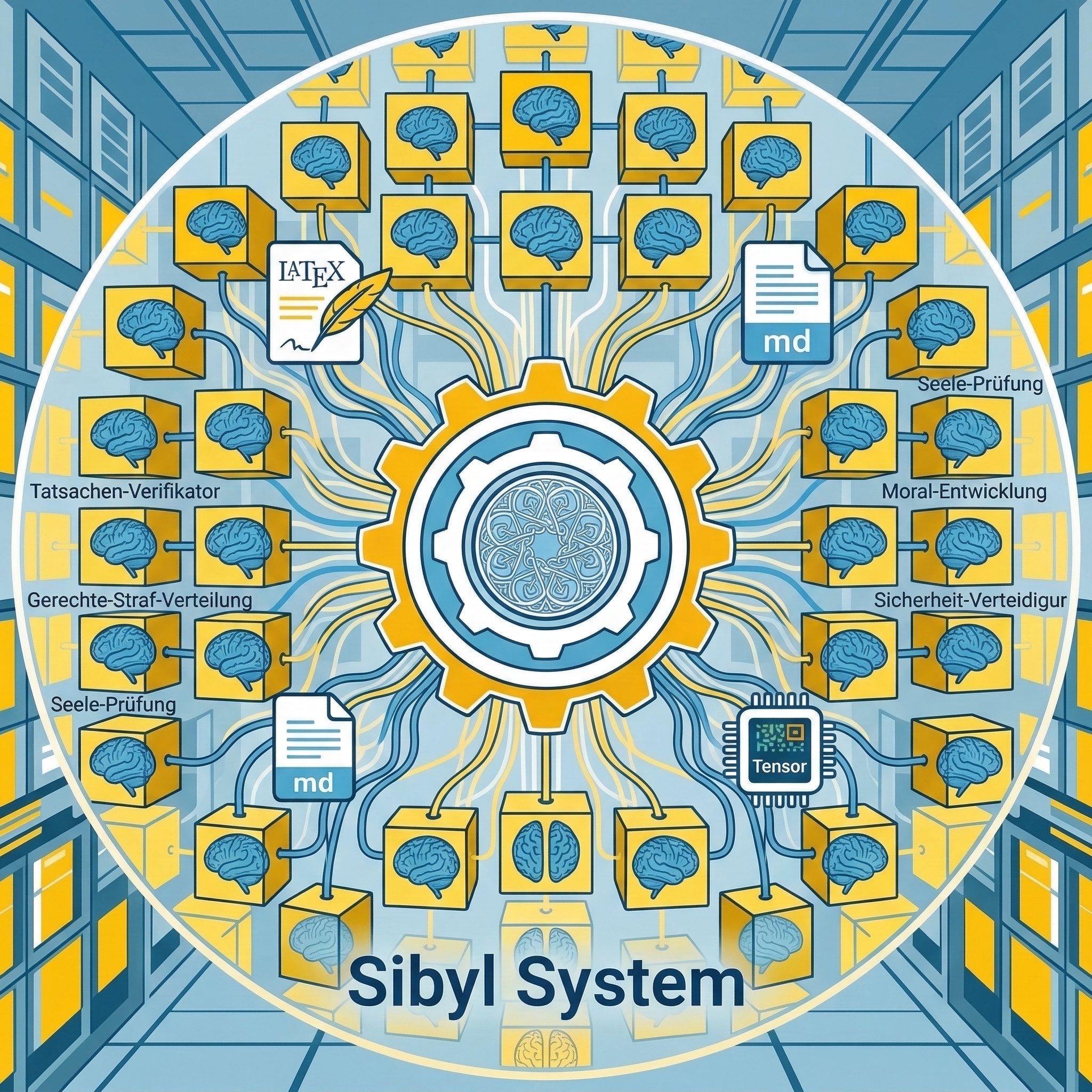





Inspired by the pioneering work of The AI Scientist, FARS, and AutoResearch, Sibyl takes the vision further by building natively on Claude Code to fully leverage its agent ecosystem — skills, plugins, MCP servers, and multi-agent teams.
中文文档
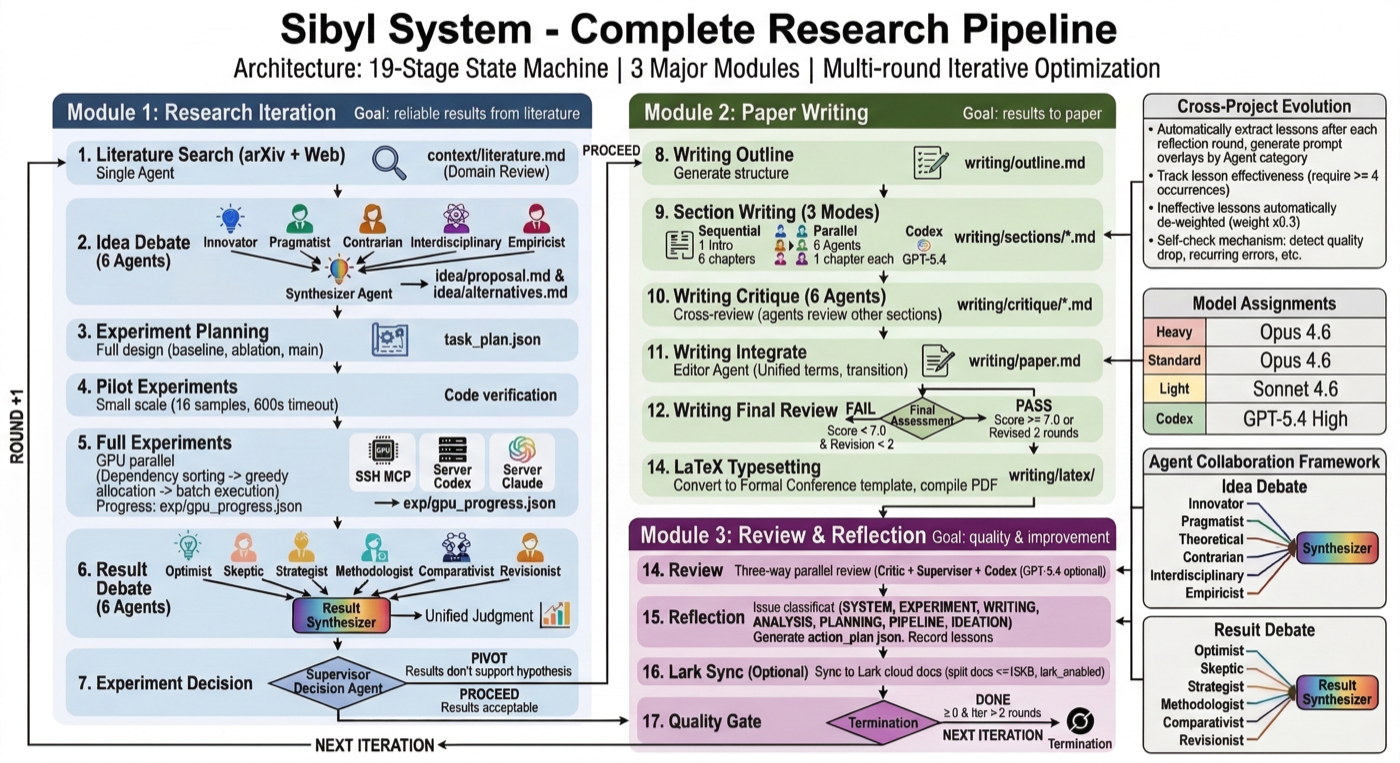
Sibyl is a fully autonomous AI scientist that drives end-to-end ML research — from literature survey and hypothesis generation to GPU experiment execution and conference-ready paper writing. It operates as an autonomous research organization: 20+ specialized AI agents debate ideas, design and run GPU experiments, write papers, and critically review their own work — all without human intervention.
Key capabilities: automated literature review, multi-agent idea debate, experiment planning & GPU-parallel execution, multi-agent paper writing & peer review, autonomous iteration with quality gates, and cross-project self-evolution. Supports NeurIPS/ICML/ICLR-level output with LaTeX compilation.
What truly sets Sibyl apart is its dual-loop architecture:
- Inner Loop — Research Iteration: Each project automatically iterates across every dimension — refining hypotheses based on experiment results, re-planning experiments, rewriting papers, pivoting to alternative ideas when needed — until quality meets publication standards.
- Outer Loop — System Self-Evolution: Sibyl learns from the research process itself. After every iteration, it classifies issues across 8 categories, accumulates reusable lessons, and automatically updates its own agent prompts, scheduling strategies, and architectural patterns. The system that runs your research is itself getting better at running research.
What Makes Sibyl Different?
- Autonomous Multi-Dimensional Iteration — Not just "run experiments and write a paper." Every aspect of the research improves automatically across iterations: ideas sharpen through multi-agent debate, experiments expand with better baselines and ablations, writing tightens under 6-agent cross-review, and resource utilization optimizes through GPU scheduling feedback. The quality gate decides when to stop or pivot — no human in the loop.
- Self-Evolving System — Most AI research tools are static — they run the same way every time. Sibyl evolves. It extracts lessons from every research iteration (issues, success patterns, efficiency metrics), keeps them time-weighted and context-filtered, and injects the relevant ones back into agent prompts. Across projects, the system accumulates institutional knowledge — each project makes every future project better.
- Claude Code Native — Not a wrapper around API calls. Built directly on Claude Code's architecture (fork skills, agent teams, MCP tools), inheriting its full ecosystem: SSH remote execution, multi-model collaboration (Claude + GPT-5.4 cross-review), Feishu/Lark cloud sync, and more.
Use Cases
- Automated ML Research — Give Sibyl a research topic or spec, and it autonomously explores ideas, runs experiments on your GPU cluster, and produces a conference-quality paper
- Research Augmentation — Use individual pipeline stages (literature search, idea debate, experiment planning) as standalone research tools
- Vibe Research — Describe what you want to explore in natural language; Sibyl handles the rest (what is vibe research?)
Get Started
Recommended: Let Claude Configure Everything
The fastest way to set up Sibyl is to let Claude Code do it for you. Clone the repo, open it in Claude Code, and ask:
git clone https://github.com/Sibyl-Research-Team/sibyl-research-system.git
cd sibyl-research-system
tmux new -s sibyl                                           # recommended: persistent session
claude --plugin-dir ./plugin --dangerously-skip-permissions
⚠️ --dangerously-skip-permissions grants Claude Code unrestricted execution (shell commands, file I/O, MCP calls) without confirmation. It is strongly recommended for Sibyl's autonomous multi-agent workflow (hundreds of tool calls per iteration), but should only be used on dedicated research machines. See Manual Setup for full details and mitigation advice.
Then tell Claude:
"Help me set up Sibyl Research System. Read docs/setup-guide.md and configure everything."
Claude will automatically check your environment, install dependencies, configure MCP servers, create config files, and ask you only for what it can't detect (GPU server IP, username, etc.). The setup guide is a step-by-step checklist designed for Claude to follow.
Once setup is complete, run the init command inside Claude Code to verify the installation and prepare your first workspace:
/sibyl-research:init
Manual Setup
Click to expand manual setup instructions
Prerequisites
- Python 3.12+, Node.js 18+
- Claude Code CLI
- GPU server with SSH access
ANTHROPIC_API_KEY environment variableCLAUDE_CODE_EXPERIMENTAL_AGENT_TEAMS=1 environment variable- tmux (strongly recommended) — enables persistent sessions and automatic recovery via Sentinel watchdog. Install:
brew install tmux (macOS) / apt install tmux (Linux)
1. Install
git clone https://github.com/Sibyl-Research-Team/sibyl-research-system.git
cd sibyl-research-system
chmod +x setup.sh && ./setup.sh    # Interactive: creates venv, installs deps, configures MCP
setup.sh also adds or updates export SIBYL_ROOT="..." in your shell rc file so workspace-root Claude sessions can still resolve the repo plugin and tools.
2. Configure MCP Servers
Two MCP servers are required. setup.sh configures them interactively, but for manual setup the preferred path is claude mcp add --scope local ... so the configuration stays repo-scoped:
claude mcp add --scope local ssh-mcp-server -- npx -y @fangjunjie/ssh-mcp-server \
  --host YOUR_GPU_IP --port 22 --username YOUR_USER --privateKey ~/.ssh/id_ed25519

claude mcp add --scope local arxiv-mcp-server -- /ABSOLUTE/PATH/TO/sibyl-research-system/.venv/bin/python3 -m arxiv_mcp_server
If you already manage Claude Code MCP servers through JSON, update the existing MCP config instead of creating a second source of truth:
{
  "mcpServers": {
    "ssh-mcp-server": {
      "command": "npx",
      "args": ["-y", "@fangjunjie/ssh-mcp-server",
               "--host", "YOUR_GPU_IP", "--port", "22",
               "--username", "YOUR_USER",
               "--privateKey", "~/.ssh/id_ed25519"]
    },
    "arxiv-mcp-server": {
      "command": "/ABSOLUTE/PATH/TO/sibyl-research-system/.venv/bin/python3",
      "args": ["-m", "arxiv_mcp_server"]
    }
  }
}
Server names must be exact: "ssh-mcp-server" and "arxiv-mcp-server".
3. Configure GPU Server
Create config.yaml at project root (git-ignored):
ssh_server: "default"
remote_base: "/home/user/sibyl_system"
max_gpus: 4
language: zh
codex_enabled: false
Use ssh_server: "default" when ssh-mcp-server was registered with explicit --host/--username arguments. If your MCP setup resolves a named SSH host alias instead, use that alias.
4. Run
# `setup.sh` normally writes this for you; set it manually only if you skipped setup.sh
export SIBYL_ROOT=/path/to/sibyl-system

# Repo root: setup, init, status, migrate, evolve
cd "$SIBYL_ROOT"
tmux new -s sibyl-admin
claude --plugin-dir "$SIBYL_ROOT/plugin" --dangerously-skip-permissions

# Workspace root: actual project execution (recommended)
cd "$SIBYL_ROOT/workspaces/my-project"
tmux new -s sibyl-my-project
claude --plugin-dir "$SIBYL_ROOT/plugin" --dangerously-skip-permissions

# Inside Claude Code (repo root) — run once after installation:
/sibyl-research:init              # Verify installation and prepare first workspace

# Inside Claude Code launched from workspaces/my-project:
/sibyl-research:start spec.md     # New project from this workspace's spec
/sibyl-research:continue .        # Resume the current workspace
Why tmux? Sibyl experiments can run for hours. Running inside tmux ensures the session persists through terminal disconnections. The Sentinel watchdog (auto-launched by /sibyl-research:start) runs in a sibling tmux pane and automatically restarts Claude Code if it crashes or goes idle — enabling truly unattended autonomous research.
Which directory should Claude start in? Use the repo root only for setup and global maintenance (/sibyl-research:init, :status, :migrate, :evolve). For an actual research run, start Claude from the target workspace root (workspaces/<project>/), not from the repo root and not from workspaces/<project>/current. This makes Claude load the workspace-specific CLAUDE.md, .claude/ links, Ralph prompt, and project memory directly.
Parallel projects: run one Claude session/pane per workspace root. Example: pane A starts in workspaces/ttt-dlm/, pane B starts in workspaces/dlm-improve/. Do not reuse the same Claude pane/session across multiple projects; Sibyl now treats pane/session ownership as project-scoped.
Why --dangerously-skip-permissions? Sibyl orchestrates 20+ agents across 19 pipeline stages, each involving dozens of tool calls (file I/O, SSH commands, MCP server calls, sub-agent spawning). Without this flag, Claude Code will prompt for permission on nearly every operation, making autonomous research impossible — you'd need to approve hundreds of prompts per iteration. The flag skips all permission confirmations, enabling true end-to-end automation.
⚠️ Risks: This flag allows Claude Code to execute any shell command, read/write any file, and make any MCP call without confirmation. Only use it in environments where you trust the system and have reviewed the codebase. Do not use it on machines with sensitive data outside the project directory. Consider running in a container or VM for additional isolation.
Docs: Full Setup Guide · Configuration (35+ options) · MCP Servers · SSH & GPU · All 12 Commands
WebUI
Sibyl now includes a browser-based WebUI for live project operations:
- Chat with the active session
- Monitor project state, agents, GPUs, and token cost
- Browse workspace files with a tree view
- Preview text files and embedded PDFs directly in the browser
- Edit project config and open the live terminal
- Switch UI language between
EN / 中文
Quick Start
From the repo root:
./scripts/dev-webui.sh
Default local addresses:
- Backend API:
http://127.0.0.1:7654
- Frontend UI:
http://127.0.0.1:3000
For auth-enabled local testing:


 @n8n-io