Learn Claude Code by exploring it.





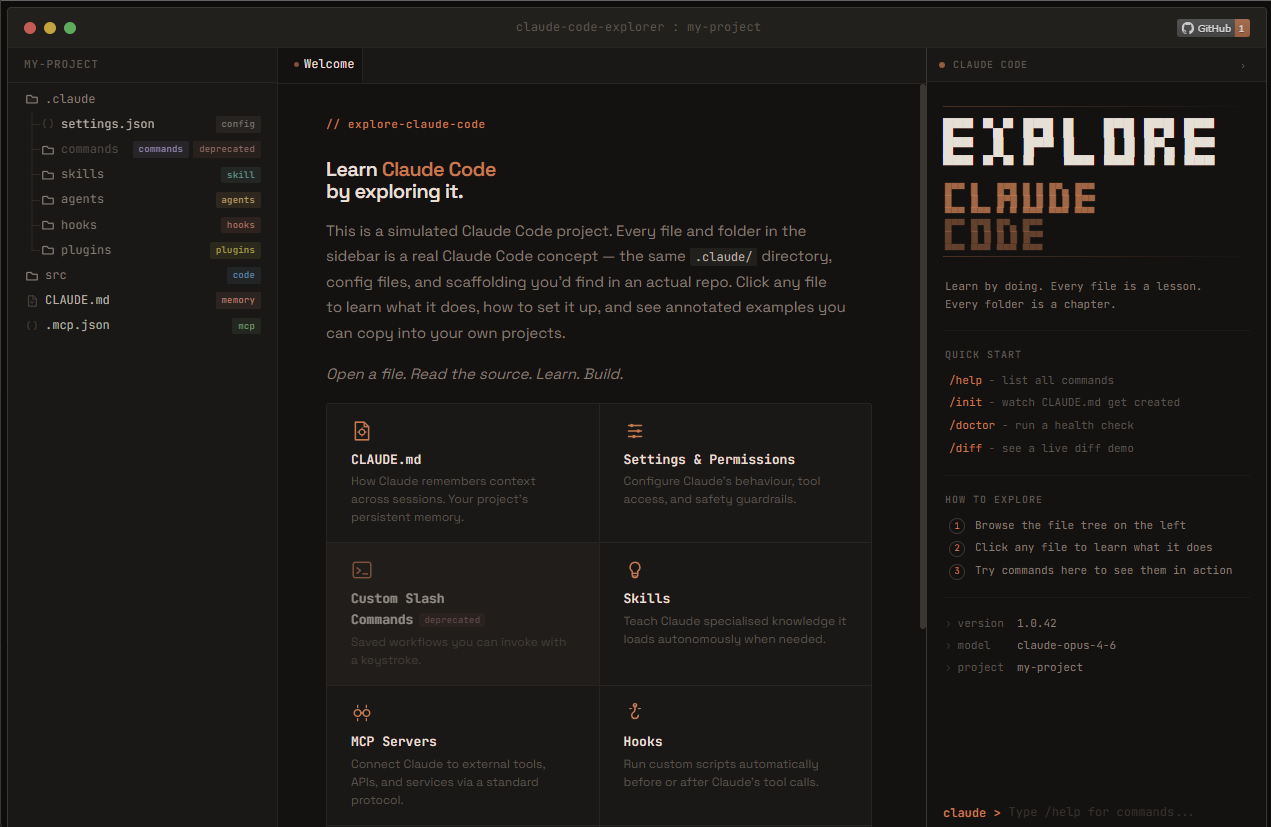
A simulated Claude Code project you can click through. Every file and folder in the sidebar is a real Claude Code concept — the same .claude/ directory, config files, and scaffolding you'd find in an actual repo. Click any file to learn what it does, how to set it up, and see annotated examples you can copy into your own projects.
📚 What You'll Learn
| Folder / File | Feature |
|---|
CLAUDE.md | Project memory that persists across sessions |
.claude/settings.json | Permissions, tool access, and guardrails |
.claude/rules/ | Contextual conventions scoped to specific file types |
.claude/commands/ | Custom slash commands for saved workflows |
.claude/skills/ | Knowledge folders Claude loads autonomously |
.claude/agents/ | Subagents for specialised, delegated tasks |
.claude/hooks/ | Shell scripts that run on Claude lifecycle events |
.claude/plugins/ | Extend Claude with custom tools and resources |
.claude/mods/ | JavaScript hooks that run inside your session and draw custom UI |
.mcp.json | MCP server config for external tool integrations |
src/ | Example source code sitting alongside real config |
| built-in/ | Features that ship with Claude Code (no setup required) |
built-in/bundled-skills/ | /simplify, /batch, /code-review, /run, /plugin-authoring, and more |
The explorer is split into two sections. Everything under .claude/ is project config you create and commit. Everything under built-in/ covers features that ship with Claude Code out of the box, no setup required. A visual separator divides the two.
Every piece of content is written as if it were a real config file in a real repo. You're not reading about the config, you're reading the config itself, annotated so you understand every line. When you're done exploring, you can copy the scaffolding straight into your own projects.
⌨️ Getting Around
- Search with
Ctrl/Cmd + K: a palette that jumps to any file or feature by title, path, or badge
- Light and dark themes via a title-bar toggle that remembers your choice and follows your system preference
- Copy link on any page to share a deep link straight to that entry
- Arrow keys step through files in order, and the terminal panel runs a slash-command emulator (
/help, /init, /doctor, and more)
🚀 Try It
The fastest way to get started is the live site:
👉 exploreclaudecode.com
No install, no signup, no build step. Just open it and start clicking.
If you want to run it locally, clone the repo and point any static server at the site/ directory:
git clone https://github.com/LukeRenton/explore-claude-code.git
cd explore-claude-code

npx serve site
# or
python -m http.server -d site 8080
# or just open site/index.html directly in your browser
🏗️ Project Structure
The entire site is static HTML, CSS, and vanilla JavaScript. Zero build steps, zero frameworks, zero bundlers.
explore-claude-code/
├── site/
│   ├── index.html            # Single-page app entry point
│   ├── data/
│   │   └── manifest.json     # Drives the entire UI (tree, content, badges, features)
│   ├── content/              # Source markdown and config files
│   ├── js/
│   │   ├── app.js            # Main controller, routing, keyboard nav, theme
│   │   ├── file-explorer.js  # Sidebar tree with animated canvas connectors
│   │   ├── content-loader.js # Custom markdown parser and renderer
│   │   ├── terminal.js       # Interactive terminal panel
│   │   ├── search.js         # Cmd/Ctrl+K search palette
│   │   ├── progress.js       # Feature completion tracking (localStorage)
│   │   └── icons.js          # Hand-crafted SVG icon library
│   └── css/                  # Variables, layout, components, syntax, terminal, search, void
├── logo.png
└── README.md
All educational content is stored in site/data/manifest.json and the source files in site/content/. The manifest is the single source of truth for the tree structure, badges, feature groupings, and content references. To add or change content, that's where you go.
🤝 Contributing
Contributions are welcome! Here are some areas where help would be great:
- Content for new Claude Code features as they ship
- Accessibility improvements (keyboard nav, screen readers, ARIA)
- Mobile experience refinements
- Translations into other languages
If you'd like to add or update educational content, the two places to look are:
site/data/manifest.json for tree structure and metadatasite/content/ for the actual markdown and config files
Feel free to open an issue if you have ideas or spot something that could be better.
⭐ Support
If you found this useful, consider giving it a star! It helps others discover the project.
Built by Luke Renton. More of my projects live there.
📄 License
MIT


 @upstash


