
Development
Plugin
gsd-pro
GSD Pro — The most powerful AI coding workflow for Claude Code. Free alternative to Cursor Composer, Copilot Workspace, Devin & Bolt. Multi-model routing, rollback/recovery, adaptive context. Fork of 30K★ original. npx get-shit-done-cc

Plugin Signal60/100Solid
maintained26
capable84
documented100
adopted41
From the author’s README · Getting Started · not verified by Flowy
Install
$ npx get-shit-done-cc@latest
Stats
84
Stars
18
Forks
Quiet
Maintenance
JavaScript
Language
MIT
License
6mo ago
Last commit
8mo ago
Created
Repo: itsjwill/gsd-pro
In this plugin
- commands
- add-phase
- add-tests
- add-todo
- audit-milestone
- autonomous
- check-todos
- cleanup
- complete-milestone
- debug
- discuss-phase
- execute-phase
- health
- help
- insert-phase
- join-discord
- list-phase-assumptions
- map-codebase
- new-milestone
- new-project
- pause-work
- plan-milestone-gaps
- plan-phase
- progress
- quick
- reapply-patches
- recover
- remove-phase
- research-phase
- resume-work
- rollback
- set-profile
- settings
- stats
- ui-phase
- ui-review
- update
- validate-phase
- verify-work
- agents
What's inside
Agent(15 agents)
gsd-codebase-mapperExplores codebase and writes structured analysis documents. Spawned by map-codebase with a focus area (tech, arch, quality, concerns). Writes documents directly to reduce orchestrator context load.gsd-debuggerInvestigates bugs using scientific method, manages debug sessions, handles checkpoints. Spawned by /gsd:debug orchestrator.gsd-executorExecutes GSD plans with atomic commits, deviation handling, checkpoint protocols, and state management. Spawned by execute-phase orchestrator or execute-plan command.
Command(38 commands)
/add-phaseAdd phase to end of current milestone in roadmap/add-testsGenerate tests for a completed phase based on UAT criteria and implementation/add-todoCapture idea or task as todo from current conversation context
- /audit-milestone
- /autonomous
- /check-todos
- /cleanup
- /complete-milestone
- /debug
- /discuss-phase
- /execute-phase
- /health
- /help
- /insert-phase
- /join-discord
- /list-phase-assumptions
- /map-codebase
- /new-milestone
- /new-project
- /pause-work
- /plan-milestone-gaps
- /plan-phase
- /progress
- /quick
- /reapply-patches
- /recover
- /remove-phase
- /research-phase
- /resume-work
- /rollback
- /set-profile
- /settings
- /stats
- /ui-phase
- /ui-review
- /update
- /validate-phase
- /verify-work
README
GSD Pro — The Most Powerful AI Coding Workflow for Claude Code
Free alternative to Cursor Composer, GitHub Copilot Workspace, Windsurf Cascade, Devin, and Bolt.new
English · 简体中文
A light-weight and powerful meta-prompting, context engineering and spec-driven development system for Claude Code, OpenCode, Gemini CLI, and Codex.
Solves context rot — the quality degradation that happens as Claude fills its context window.
This fork adds rollback/recovery, adaptive context loading, and model routing intelligence on top of the original GSD by TÂCHES. Synced with upstream v1.24.0.









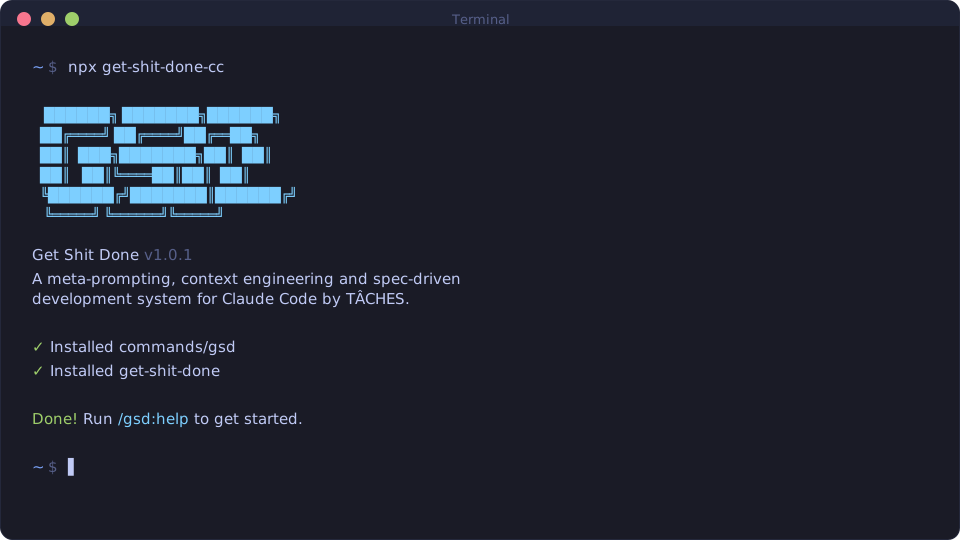
npx get-shit-done-cc@latest
Works on Mac, Windows, and Linux.
"If you know clearly what you want, this WILL build it for you. No bs."
"I've done SpecKit, OpenSpec and Taskmaster — this has produced the best results for me."
"By far the most powerful addition to my Claude Code. Nothing over-engineered. Literally just gets shit done."
Trusted by engineers at Amazon, Google, Shopify, and Webflow.
Why I Built This · How It Works · Commands · Why It Works · User Guide
Why I Built This
I'm a solo developer. I don't write code — Claude Code does.
Other spec-driven development tools exist; BMAD, Speckit... But they all seem to make things way more complicated than they need to be (sprint ceremonies, story points, stakeholder syncs, retrospectives, Jira workflows) or lack real big picture understanding of what you're building. I'm not a 50-person software company. I don't want to play enterprise theater. I'm just a creative person trying to build great things that work.
So I built GSD. The complexity is in the system, not in your workflow. Behind the scenes: context engineering, XML prompt formatting, subagent orchestration, state management. What you see: a few commands that just work.
The system gives Claude everything it needs to do the work and verify it. I trust the workflow. It just does a good job.
That's what this is. No enterprise roleplay bullshit. Just an incredibly effective system for building cool stuff consistently using Claude Code.
— TÂCHES
Vibecoding has a bad reputation. You describe what you want, AI generates code, and you get inconsistent garbage that falls apart at scale.
GSD fixes that. It's the context engineering layer that makes Claude Code reliable. Describe your idea, let the system extract everything it needs to know, and let Claude Code get to work.
Who This Is For
People who want to describe what they want and have it built correctly — without pretending they're running a 50-person engineering org.
Getting Started
npx get-shit-done-cc@latest
The installer prompts you to choose:
- Runtime — Claude Code, OpenCode, Gemini, Codex, Copilot, or all
- Location — Global (all projects) or local (current project only)
Verify with:
- Claude Code / Gemini:
/gsd:help - OpenCode:
/gsd-help - Codex:
$gsd-help - Copilot:
/gsd:help
[!NOTE] Codex installation uses skills (
skills/gsd-*/SKILL.md) rather than custom prompts.
Staying Updated
GSD evolves fast. Update periodically:
npx get-shit-done-cc@latest
# Claude Code
npx get-shit-done-cc --claude --global   # Install to ~/.claude/
npx get-shit-done-cc --claude --local    # Install to ./.claude/

# OpenCode (open source, free models)
npx get-shit-done-cc --opencode --global # Install to ~/.config/opencode/

# Gemini CLI
npx get-shit-done-cc --gemini --global   # Install to ~/.gemini/

# Codex (skills-first)
npx get-shit-done-cc --codex --global    # Install to ~/.codex/
npx get-shit-done-cc --codex --local     # Install to ./.codex/

# Copilot (GitHub Copilot CLI)
npx get-shit-done-cc --copilot --global  # Install to ~/.github/
npx get-shit-done-cc --copilot --local   # Install to ./.github/

# All runtimes
npx get-shit-done-cc --all --global      # Install to all directories
Use --global (-g) or --local (-l) to skip the location prompt.
Use --claude, --opencode, --gemini, --codex, --copilot, or --all to skip the runtime prompt.
Clone the repository and run the installer locally:
git clone https://github.com/glittercowboy/get-shit-done.git
cd get-shit-done
node bin/install.js --claude --local
Installs to ./.claude/ for testing modifications before contributing.
Recommended: Skip Permissions Mode
GSD is designed for frictionless automation. Run Claude Code with:
claude --dangerously-skip-permissions
[!TIP] This is how GSD is intended to be used — stopping to approve
dateandgit commit50 times defeats the purpose.
If you prefer not to use that flag, add this to your project's .claude/settings.json:
{
  "permissions": {
    "allow": [
      "Bash(date:*)",
      "Bash(echo:*)",
      "Bash(cat:*)",
      "Bash(ls:*)",
      "Bash(mkdir:*)",
      "Bash(wc:*)",
      "Bash(head:*)",
      "Bash(tail:*)",
      "Bash(sort:*)",
      "Bash(grep:*)",
      "Bash(tr:*)",
      "Bash(git add:*)",
      "Bash(git commit:*)",
      "Bash(git status:*)",
      "Bash(git log:*)",
      "Bash(git diff:*)",
      "Bash(git tag:*)"
    ]
  }
}
How It Works
Already have code? Run
/gsd:map-codebasefirst. It spawns parallel agents to analyze your stack, architecture, conventions, and concerns. Then/gsd:new-projectknows your codebase — questions focus on what you're adding, and planning automatically loads your patterns.
1. Initialize Project
/gsd:new-project
One command, one flow. The system:
- Questions — Asks until it understands your idea completely (goals, constraints, tech preferences, edge cases)
- Research — Spawns parallel agents to investigate the domain (optional but recommended)
- Requirements — Extracts what's v1, v2, and out of scope
- Roadmap — Creates phases mapped to requirements
You approve the roadmap. Now you're ready to build.
Creates: PROJECT.md, REQUIREMENTS.md, ROADMAP.md, STATE.md, .planning/research/
2. Discuss Phase
/gsd:discuss-phase 1
This is where you shape the implementation.
Your roadmap has a sentence or two per phase. That's not enough context to build something the way you imagine it. This step captures your preferences before anything gets researched or planned.
The system analyzes the phase and identifies gray areas based on what's being built:
- Visual features → Layout, density, interactions, empty states
- APIs/CLIs → Response format, flags, error handling, verbosity
- Content systems → Structure, tone, depth, flow
- Organization tasks → Grouping criteria, naming, duplicates, exceptions
For each area you select, it asks until you're satisfied. The output — CONTEXT.md — feeds directly into the next two steps:
- Researcher reads it — Knows what patterns to investigate ("user wants card layout" → research card component libraries)
- Planner reads it — Knows what decisions are locked ("infinite scroll decided" → plan includes scroll handling)
The deeper you go here, the more the system builds what you actually want. Skip it and you get reasonable defaults. Use it and you get your vision.
Creates: {phase_num}-CONTEXT.md
3. Plan Phase
/gsd:plan-phase 1
The system:
- Researches — Investigates how to implement this phase, guided by your CONTEXT.md decisions
- Plans — Creates 2-3 atomic task plans with XML structure
- Verifies — Checks plans against requirements, loops until they pass
Each plan is small enough to execute in a fresh context window. No degradation, no "I'll be more concise now."
Creates: {phase_num}-RESEARCH.md, {phase_num}-{N}-PLAN.md
4. Execute Phase
/gsd:execute-phase 1
The system:
- Runs plans in waves — Parallel where possible, sequential when dependent
- Fresh context per plan — 200k tokens purely for implementation, zero accumulated garbage
- Commits per task — Every task gets its own atomic commit
- Verifies against goals — Checks the codebase delivers what the phase promised
Walk away, come back to completed work with clean git history.
How Wave Execution Works:
Plans are grouped into "waves" based on dependencies. Within each wave, plans run in parallel. Waves run sequentially.
┌────────────────────────────────────────────────────────────────────┐
│  PHASE EXECUTION                                                   │
├────────────────────────────────────────────────────────────────────┤
│                                                                    │
│  WAVE 1 (parallel)          WAVE 2 (parallel)          WAVE 3      │
│  ┌─────────┐ ┌─────────┐    ┌─────────┐ ┌─────────┐    ┌─────────┐ │
│  │ Plan 01 │ │ Plan 02 │ →  │ Plan 03 │ │ Plan 04 │ →  │ Plan 05 │ │
│  │         │ │         │    │         │ │         │    │         │ │
│  │ User    │ │ Product │    │ Orders  │ │ Cart    │    │ Checkout│ │
│  │ Model   │ │ Model   │    │ API     │ │ API     │    │ UI      │ │
│  └─────────┘ └─────────┘    └─────────┘ └─────────┘    └─────────┘ │
│       │           │              ↑           ↑              ↑      │
│       └───────────┴──────────────┴───────────┘              │      │
│              Dependencies: Plan 03 needs Plan 01            │      │
│                          Plan 04 needs Plan 02              │      │
│                          Plan 05 needs Plans 03 + 04        │      │
│                                                                    │
└────────────────────────────────────────────────────────────────────┘
Why waves matter:
- Independent plans → Same wave → Run in parallel
- Dependent plans → Later wave → Wait for dependencies
- File conflicts → Sequential plans or same plan
File tree
FAQ
gsd-pro is a Claude Code plugin with hand-picked skills for development work, indexed on Flowy. Install it with the command on its page. Its skills do not fire on their own yet. Request auto-invocation to have Flowy route them as you prompt. Free and open source.
- What is gsd-pro?
- GSD Pro — The most powerful AI coding workflow for Claude Code. Free alternative to Cursor Composer, Copilot Workspace, Devin & Bolt. Multi-model routing, rollback/recovery, adaptive context. Fork of 30K★ original. npx get-shit-done-cc
- How do I install gsd-pro?
- Run these in Claude Code: . Then prompt normally.
- Does gsd-pro auto-invoke its skills?
- Not yet. It is indexed on Flowy as a plain plugin. Request auto-invocation on its page and Flowy will route its skills for you as you prompt.
- Is gsd-pro free?
- Yes. Flowy is free and open source, with nothing gated. You can read every skill in full before you install.
Is this plugin yours?
Claim it with GitHubSubmit a pluginPromote it