
coderunner
Sandboxes Claude Code and other AI agents so their actions run isolated, protecting data from loss or exfiltration. Includes skills for cropping and rotating images and for replacing text in fillable PDF forms.
2 skills898
 @instavm
Runs image cropping and rotation and fillable PDF form text replacement inside a sandboxed container on your own machine, so sensitive files never leave it. Works with any MCP-compatible tool.
Claude Code
$ npx -y skills add instavm/open-skills --agent claude-code
Codex
$ npx skills add instavm/open-skills -a codex
Cursor
$ npx skills add instavm/open-skills -a cursor
Gemini CLI
$ npx skills add instavm/open-skills -a gemini-cli
GitHub Copilot
$ npx skills add instavm/open-skills -a github-copilot
OpenCode
$ npx skills add instavm/open-skills -a opencode
Windsurf
$ npx skills add instavm/open-skills -a windsurf
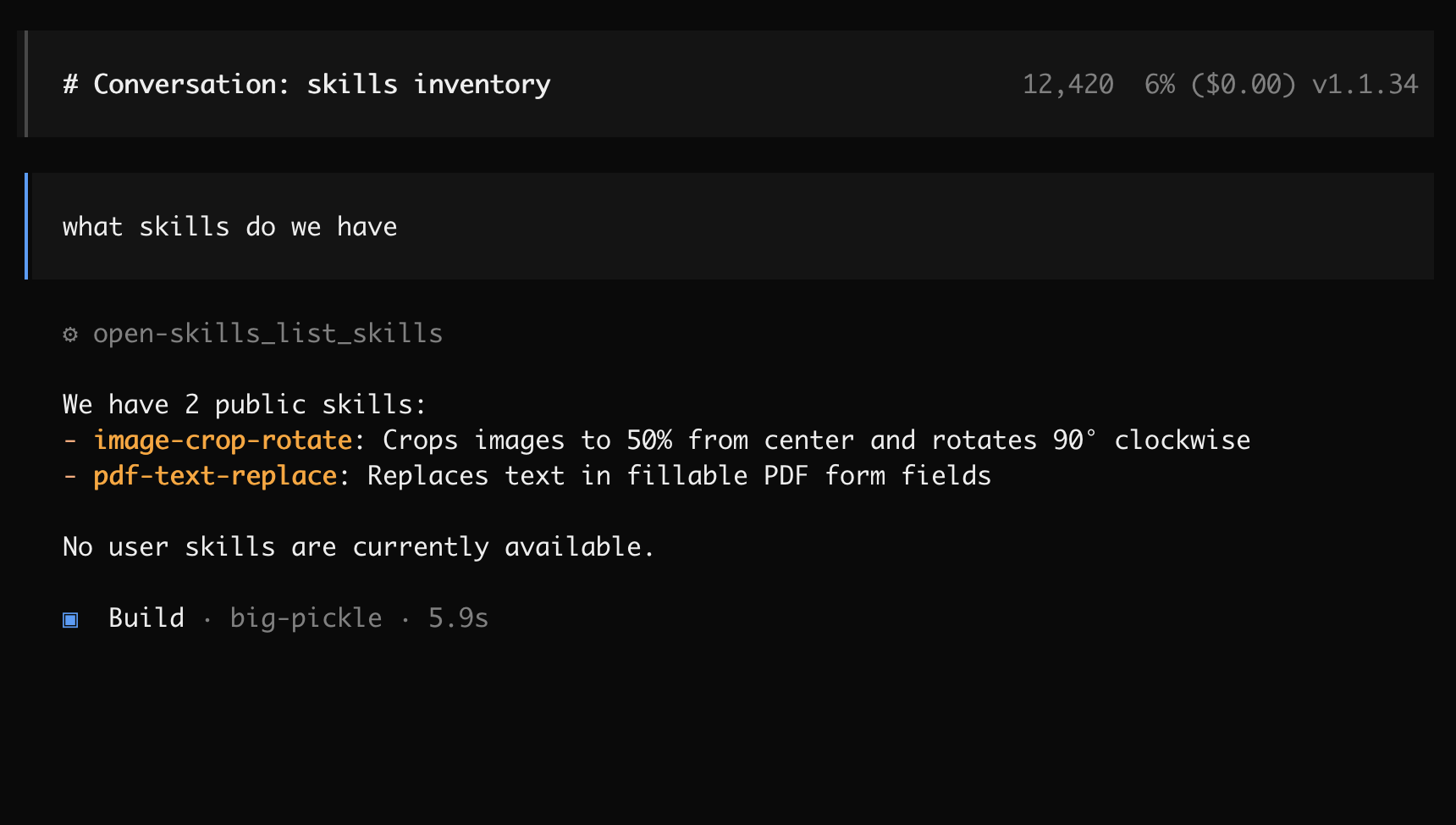

    ___  ____  _____ _   _     ____  _  _____ _     _     ____
   / _ \|  _ \| ____| \ | |   / ___|| |/ /_ _| |   | |   / ___|
  | | | | |_) |  _| |  \| |   \___ \| ' / | || |   | |   \___ \
  | |_| |  __/| |___| |\  |    ___) | . \ | || |___| |___ ___) |
   \___/|_|   |_____|_| \_|   |____/|_|\_\___|_____|_____|____/
Anthropic recently announced Skills for Claude - reusable folders with instructions, scripts, and resources that make Claude better at specialized tasks. This tool lets you run these skills entirely on your local machine in a sandboxed environment.
What this means: You can now process your files (documents, spreadsheets, presentations, images) using these specialized skills while keeping all data on your Mac. No uploads, complete privacy.
This tool executes AI-generated code in a truly isolated sandboxed environment on your Mac using Apple's native containers.
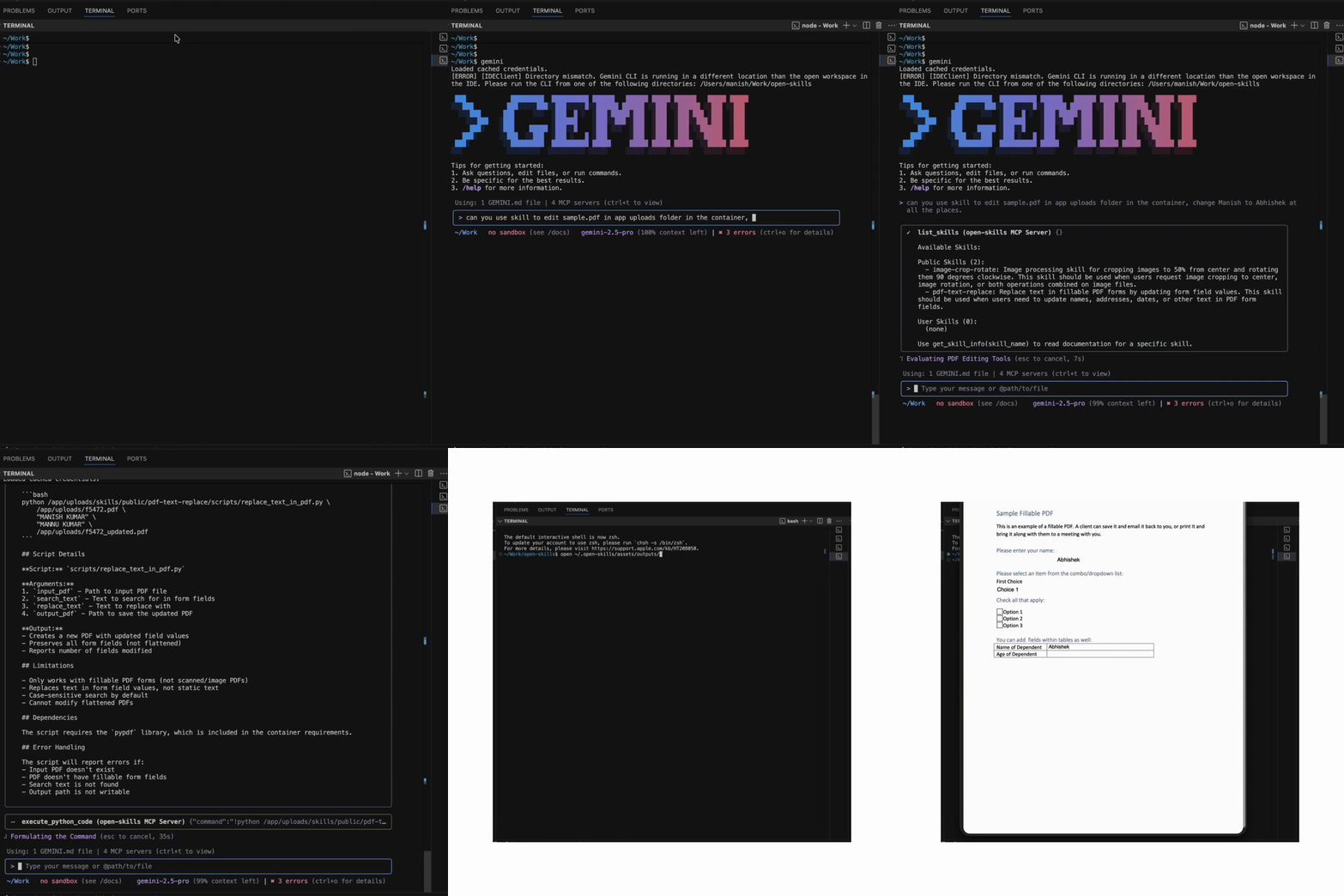
Watch Open-Skills in action with Gemini CLI:
Prerequisites: Mac with macOS and Apple Silicon (M1/M2/M3/M4/M5), Python 3.10+
git clone https://github.com/BandarLabs/open-skills.git
cd open-skills
chmod +x install.sh
./install.sh
Installation takes ~2 minutes. The MCP server will be available at http://open-skills.local:8222/mcp
Install required packages (use virtualenv and note the python path):
pip install -r examples/requirements.txt
This MCP server works with any MCP-compatible tool. All execution happens locally on your Mac.
Configure Claude Desktop to use this MCP server:
Copy the example configuration:
cd examples
cp claude_desktop/claude_desktop_config.example.json claude_desktop/claude_desktop_config.json
Edit the configuration file and replace the placeholder paths:
/path/to/your/python with your actual Python path (e.g., /usr/bin/python3 or /opt/homebrew/bin/python3)/path/to/open-skills with the actual path to your cloned repositoryExample after editing:
{
  "mcpServers": {
    "open-skills": {
      "command": "/opt/homebrew/bin/python3",
      "args": ["/Users/yourname/open-skills/examples/claude_desktop/mcpproxy.py"]
    }
  }
}
Update Claude Desktop configuration:
For OpenCode users, create ~/.config/opencode/opencode.json:
{
  "$schema": "https://opencode.ai/config.json",
  "mcp": {
    "open-skills": {
      "type": "remote",
      "url": "http://open-skills.local:8222/mcp",
      "enabled": true
    }
  }
}
Edit ~/.gemini/settings.json:
{
  "theme": "Default",
  "selectedAuthType": "oauth-personal",
  "mcpServers": {
    "open-skills": {
      "httpUrl": "http://open-skills.local:8222/mcp"
    }
  }
}
For system instructions, replace ~/.gemini/GEMINI.md with GEMINI.md
Use this server with OpenAI's Python agents library:
Set your OpenAI API key:
export OPENAI_API_KEY="your-openai-api-key-here"
Run the client:
python examples/openai_agents/openai_client.py
http://open-skills.local:8222/mcpOnce configured, you can ask your AI to:
You can extend this server with additional skills in two ways:
Download skills from Anthropic's skills repository and copy to:
~/.open-skills/assets/skills/user/<new-skill-folder>
Available Official Skills:
Here's an example with 4 imported skills:
~/.open-skills/assets/skills/
├── public
│   ├── image-crop-rotate
│   │   ├── scripts
│   │   └── SKILL.md
│   └── pdf-text-replace
│       ├── scripts
│       └── SKILL.md
└── user
    ├── docx
    │   ├── docx-js.md
    │   ├── LICENSE.txt
    │   ├── ooxml
    │   ├── ooxml.md
    │   ├── scripts
    │   └── SKILL.md
    ├── pptx
    │   ├── html2pptx.md
    │   ├── LICENSE.txt
    │   ├── ooxml
    │   ├── ooxml.md
    │   ├── scripts
    │   └── SKILL.md
    ├── slack-gif-creator
    │   ├── core
    │   ├── LICENSE.txt
    │   ├── requirements.txt
    │   ├── SKILL.md
    │   └── templates
    └── xlsx
        ├── LICENSE.txt
        ├── recalc.py
        └── SKILL.md
Create a folder matching the structure shown above. The only mandatory file is SKILL.md. See Anthropic's skills documentation for details.
Quick Method: Ask Claude to generate a skill for you:
"Can you write a skill which creates ASCII art of words?"
Claude will create the skill and offer a ZIP download. Place the ZIP file directly in ~/.open-skills/assets/skills/user (no need to expand).
Manual Method: Create your own skill folder structure:
~/.open-skills/assets/skills/user/my-custom-skill/
├── SKILL.md              # Documentation and usage examples
├── scripts/              # Your Python/bash scripts
│   └── process.py
└── requirements.txt      # (optional) Python dependencies
This MCP server provides a compatibility layer that lets you run Claude's skills locally without modification:
Path Translation:
/mnt/user-data → Local path: /app/uploadsFile Sharing - How to Share Files with Skills: To share your local files with skills for processing:
Place files in the outputs directory:
cp your-file.pdf ~/.open-skills/assets/outputs/
cp your-image.png ~/.open-skills/assets/outputs/
Files become available inside the container:
~/.open-skills/assets/outputs/ are automatically mounted/mnt/user-data/ (the standard Claude path)Processed files appear in the same directory:
~/.open-skills/assets/outputs/Skill Structure:
Here's a real example using Gemini CLI:
> /mcp

Configured MCP servers:

🟢 open-skills - Ready (5 tools)
  Tools:
  - execute_python_code
  - get_skill_file
  - get_skill_info
  - list_skills
  - navigate_and_get_all_visible_text

> can you generate ascii art for my project

✦ I will generate the ASCII art you desire. First, I must survey my available skills.
✓  list_skills (open-skills MCP Server)

✦ I have located a relevant skill: ascii-art. I will now retrieve its instructions.
✓  get_skill_info (open-skills MCP Server) {"skill_name":"ascii-art"}
✦ Your ASCII art is ready:

   ___  ____  _____ _   _     ____  _  _____ _     _     ____
  / _ \|  _ \| ____| \ | |   / ___|| |/ /_ _| |   | |   / ___|
 | | | | |_) |  _| |  \| |   \___ \| ' / | || |   | |   \___ \
 | |_| |  __/| |___| |\  |    ___) | . \ | || |___| |___ ___) |
  \___/|_|   |_____|_| \_|   |____/|_|\_\___|_____|_____|____/


Using: 1 GEMINI.md file | 3 MCP servers (ctrl+t to view)
What happened:
list_skillsascii-art skillget_skill_infoCode runs in an isolated container with VM-level isolation. Your host system and files outside the sandbox remain protected.
From @apple/container:
Each container has the isolation properties of a full VM, using a minimal set of core utilities and dynamic libraries to reduce resource utilization and attack surface.
This MCP server consists of:
When connected, this server exposes these tools to your AI:
execute_python_code - Execute code in the sandboxget_skill_file - Read skill filesget_skill_info - Get skill documentationlist_skills - List all available skillsnavigate_and_get_all_visible_text - Web scraping with PlaywrightWe welcome contributions! If you create useful skills or improve the implementation, please share them with the community.
This project is licensed under the Apache 2.0 License - see the LICENSE file for details.
Stars on GitHub
View @instavm’s profileSandboxes Claude Code and other AI agents so their actions run isolated, protecting data from loss or exfiltration. Includes skills for cropping and rotating images and for replacing text in fillable PDF forms.
@instavmA development methodology for coding agents that makes the agent brainstorm before building, follow plans, run parallel work and finish branches in a disciplined way. You get fewer skipped steps and more consistent results from your coding assistant.
 @obra
Helps you take a change from a rough idea or bug report through to a tested, reviewed result, with each step handled by a focused skill. Its skills cover pinning down domain terms, designing module interfaces, diagnosing hard bugs, and reviewing changes against your repo's coding standards.
 @mattpocock
Gives your coding agent a planning, testing and review routine to follow on every task. It plans before building, checks changes with tests, has a fresh reviewer look for regressions, and saves repeated wins as reusable skills.
 @affaan-m
Developer tools for working on the React codebase itself. Provides skills for extracting error messages, managing and debugging feature flags across release channels, running Flow type checks, and fixing lint and formatting issues before committing.
 @facebook
Runs image cropping and rotation and fillable PDF form text replacement inside a sandboxed container on your own machine, so sensitive files never leave it. Works with any MCP-compatible tool. Install it with the command on its page. It includes image-crop-rotate, pdf-text-replace. Its skills do not fire on their own yet. Free and open source.
Is this plugin yours?
Claim it with GitHubSubmit a pluginPromote it