

Auto-invoked
Development
MCP
context7
Fetches current, version specific documentation and code examples for a library, so the agent stops working from stale training data.
Claude Code
> /plugin marketplace add iliaal/whetstone> /plugin install whetstone@iliaal-marketplace
Codex
$ codex mcp add context7 --url https://mcp.context7.com/mcp
Cursor
{
  "mcpServers": {
    "context7": {
      "url": "https://mcp.context7.com/mcp"
    }
  }
}
Add it to mcp.json.
Gemini CLI
$ gemini mcp add --transport http context7 https://mcp.context7.com/mcp
GitHub Copilot
$ copilot mcp add --transport http context7 https://mcp.context7.com/mcp
OpenCode
{
  "mcp": {
    "context7": {
      "type": "remote",
      "url": "https://mcp.context7.com/mcp"
    }
  }
}
Add it to opencode.json.
Windsurf
{
  "mcpServers": {
    "context7": {
      "serverUrl": "https://mcp.context7.com/mcp"
    }
  }
}
Add it to mcp_config.json.
Security report
Found
Low risk
Known flaws
Not published
Signed build
Not published
Maintained
Nov 14, 2026
Last push
Licence
MIT
Runs as
Remote
mcp.context7.com
Deprecated
Not published
Signals from public registries, not an audit. Checked Nov 15, 2026.
whetstone README
Whetstone




A Claude Code plugin that makes AI coding agents follow engineering discipline. Plan before coding. Verify before claiming done. Find root cause before patching. Review before merge. Skills activate based on file type and task signals, not manual toggling.
Bundles agents, skills, workflow commands, and a skill distillery for PHP, Python, TypeScript, React, and infrastructure workflows.
Who this is for
Teams using Claude Code for real work. You build with PHP, Python, TypeScript, or React and want the agent to plan before building, verify before shipping, and debug from evidence.
Solo developers who want consistency. Bash tasks receive guidance on strict mode and ShellCheck; Laravel tasks receive strict-type and thin-controller patterns. Skills guide the agent; only checks actually run can establish compliance.
Anyone building with AI agents. Includes skills for multi-agent orchestration, agent-native architecture design, and a distillery that generates new skills from top-rated community sources.
The problem
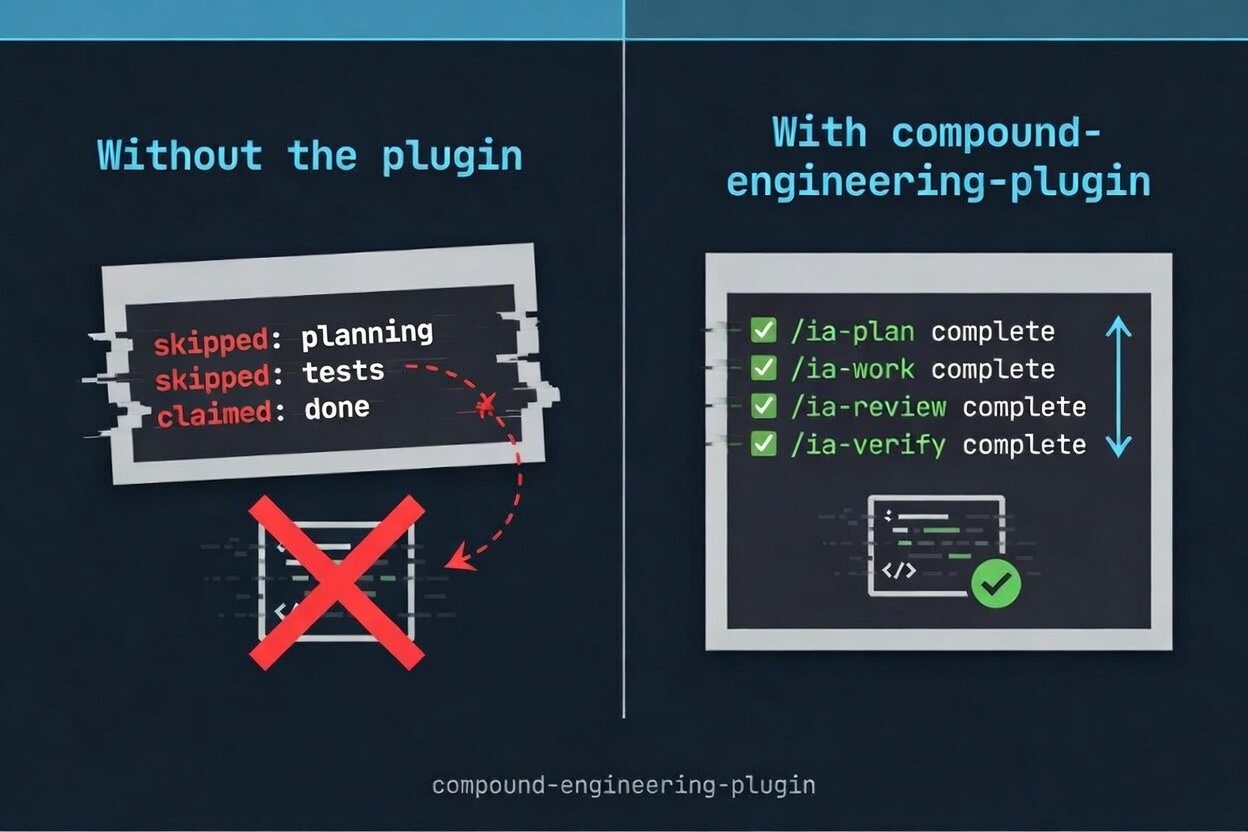
AI coding agents skip planning, claim "done" without verifying, patch symptoms over root causes, and forget what they learned when context resets. The output looks polished even when the process behind it is missing.
The long-form argument is at AI Agents Don't Lack Capability. They Lack Process.. This plugin supplies that process as instructions and supporting tools.
🚀 Install
Claude Code (recommended)
/plugin marketplace add https://github.com/iliaal/whetstone
/plugin install whetstone@iliaal-marketplace
/reload-plugins
Standalone skills (any AI coding agent)
Individual skills work with Claude Code, Cursor, Codex, Gemini CLI, Copilot CLI, OpenCode, and 35+ other agents via the ai-skills repo:
# All skills
npx skills add iliaal/ai-skills

# Single skill
npx skills add iliaal/ai-skills -s code-review

# Target a specific agent
npx skills add iliaal/ai-skills -a cursor
Codex
Install Whetstone's portable skills and Context7 integration through the repository's native Codex marketplace:
git clone https://github.com/iliaal/whetstone
cd whetstone
bash scripts/install-codex-plugin.sh
Start a new Codex thread after installation or update. The native package includes Whetstone's cross-harness skills and Context7 MCP server. Claude-specific agents, slash commands, and hooks remain available only through the Claude Code plugin.
No shipped skill carries Claude's disable-model-invocation flag or its Codex twin, allow_implicit_invocation: false in agents/openai.yaml. Commands reach skills through explicit Skill() tool calls, which the harness treats as model invocation, so either flag makes that call fail. Trigger control lives in each skill's description. scripts/test-codex-plugin.sh asserts the set of flagged skills stays empty.
Normal Whetstone releases refresh the local Codex plugin before publication when codex is on PATH. For source edits between releases, use the wrapper that applies a temporary cachebuster, reinstalls, and restores the tracked release version:
bash scripts/refresh-codex-plugin.sh
The legacy converter remains available for OpenCode and other non-plugin targets.
In this checkout, Codex also discovers the 12 repository commands and skill-distiller through .agents/skills/. Invoke them as $release, $audit-plugin, $write-skill, or $skill-distiller, with arguments after the name. Command wrappers read the maintained .claude/commands/ sources. If an existing session has not refreshed its skill list, start a new Codex session. These repository workflows are separate from the distributed plugin skills.
OpenCode
OpenCode reads skills from its per-project config. The converter translates the plugin's SKILL.md format into OpenCode's expected shape and writes output into the current project (override with --output <dir>).
Command-based PreToolUse and PostToolUse hooks use a bundled adapter. Conversion skips SubagentStart with a warning because the adapter has no equivalent event; it also skips Whetstone's paired recorder so prompts are not queued without a consumer. Automatic per-task skill context is therefore available only in Claude Code; converted skills remain available to OpenCode. Other unsupported hook events and types cause conversion to fail.
Converted command hooks require Bash on PATH and retain any script-specific dependencies. The installed bundle includes its scripts and skill files, so it does not depend on the source checkout. Codex conversion also warns when skipping SubagentStart; it installs skills and prompts without executing Claude hooks.
bun run src/index.ts install ./plugins/whetstone --to opencode
Cleanup for OpenCode (and other targets) uses the same command:
bun run src/index.ts cleanup --target opencode
bun run src/index.ts cleanup --target kilocode
bun run src/index.ts cleanup --target agents
Use cleanup --target opencode --output <dir> for a custom installation. Default OpenCode cleanup checks the current project and legacy global locations. Cleanup backs up individually identified Whetstone artifacts and preserves unrelated or customized files; files whose ownership cannot be established require manual review.
Additional targets (symlink-based)
For tools that read skills directly from ~/.agents/skills or ~/.kilocode/skills, scripts/sync-to-tools.sh symlinks the plugin's skill directory into each path so edits land immediately without re-conversion. It removes legacy Whetstone-owned links from ~/.codex/skills and adds managed Codex exclusions for the same skills discovered through ~/.agents/skills; the native plugin remains Codex's single source.
bash scripts/sync-to-tools.sh              # symlink into shared non-Codex tool dirs
bash scripts/sync-to-tools.sh --dry-run    # preview changes
🔗 Works well with
- codesage adds structural code intelligence (find symbols, references, dependencies, blast-radius analysis) as an MCP server. Whetstone supplies process guidance; CodeSage supplies codebase structure for applying it.
- ai-skills is the read-only mirror of this plugin's skills for agents without native Whetstone plugin support.
🛠️ The workflow
The core workflow is to explore the problem, plan the solution, build it, and review it.
| Command | What it does |
|---|---|
/ia-brainstorm | Interviews you one question at a time to surface hidden requirements. Produces 2-3 named approaches with trade-offs. No code until a design doc is approved. |
/ia-plan | Turns a brainstorm or feature idea into a file-based plan with atomic tasks, specific file paths, and phased delivery in vertical slices. |
/ia-work | Executes a plan with task tracking, worktree isolation, and verification gates. Each task runs through build/test before marking complete. |
/ia-review | Multi-agent code review: scope-drift detection, spec compliance, code quality, security, performance. Auto-escalates to deep mode on complex diffs. |
Each command also works on its own: /ia-review as a pre-merge check, /ia-plan for scoping.
✨ Skills
Skills are instructions selected for the task. They guide procedures and identify anti-patterns; they are not runtime enforcement of the agent's decisions.
Architecture & design
| Skill | Description |
|---|---|
| ia-agent-native-architecture | 15-area architecture checklist for systems where AI agents are primary actors: tool design, execution patterns, context injection, approval gates, audit trails. For designing agent systems or MCP tools. |
| ia-frontend-design | Requires a design philosophy statement before code, detects existing design systems to match, and bans AI design cliches (purple-to-blue gradients, Space Grotesk, three-card hero layouts). Calibrates output via variance, motion, and density parameters. For work where visual identity matters. |
| ia-simplifying-code | Declutters code without changing behavior. Targets AI slop: redundant comments, unnecessary defensive checks, over-abstraction, verbose stdlib reimplementations. Applies changes in priority order and stops before touching public APIs. For cleanup after AI generation or accumulated complexity. |
Language & framework
| Skill | Description |
|---|---|
| ia-react-frontend | Decision tree routing most "should I use an effect?" questions to non-effect solutions. Separates state tools by purpose (Zustand for client, React Query for server, nuqs for URL). Enforces React 19 patterns, App Router server/client boundaries, and flags that Server Actions are public endpoints. For React, Next.js, and Vitest/RTL testing. |
| ia-nodejs-backend | Strict layered architecture (routes > services > repos) with no cross-layer HTTP imports. Contract-first API design using Zod schemas as the single source of truth. Requires production patterns such as circuit breakers and load shedding. For Express, Fastify, Hono, or NestJS backends. |
| ia-python-services | Mandates modern tooling (uv, ruff, ty) over legacy equivalents. Structured concurrency via asyncio.TaskGroup, idempotent background jobs, and structured JSON logging with correlation IDs via contextvars. For Python CLI tools, FastAPI services, async workers, or new project setup. |
| ia-php-laravel | declare(strict_types=1) everywhere, PHPStan level 8+, fat models / thin controllers, Form Requests with toDto(), event-driven side effects. Prevents N+1 by disabling lazy loading in dev. Defaults to feature tests through the full HTTP stack. For Laravel codebases. |
| ia-rust-systems | Edition 2024, workspace layout with inward-only deps, thiserror in libraries / anyhow in binaries, no unwrap/expect outside main and tests, every unsafe block needs a // SAFETY: comment. Tokio patterns (JoinSet, CancellationToken, bounded mpsc) and axum service layout. For Rust CLIs, axum services, or cargo workspaces. |
| ia-c-systems | Repo conventions outrank the skill, so it defers on tabs, goto cleanup, and macros that return rather than fighting established C. Function altitudes (orchestrator / leaf / adapter) gated behind a name test that stops over-decomposition, status enums with one producer per error value, public-validates / internal-asserts boundaries. Separate references for memory safety (sanitizers, overflow-checked allocation, recursion to bounded worklists) and PHP extension C. For C11 and later, native extensions, and systems code. |
Stats
36
Stars
5
Forks
Active
Maintenance
Python
Language
MIT
License
Last commit
Created

Ships withwhetstone
A Claude Code plugin that makes AI coding agents follow engineering discipline. Plan before coding. Verify before claiming done. Find root cause before patching. Review before merge. Skills activate based on file type and task signals, not manual toggling.
3630 skills18 agents1 MCP
Stars on GitHub
Momentum
- stars in total
- 36
More MCP servers from other plugins.




Questions about context7.
- Which coding agents can use context7?
- context7 works in any agent that reads an MCP config file: Claude Code, Codex, Cursor, Gemini CLI, GitHub Copilot, OpenCode and Windsurf. Each agent reads it from its own file; this page names the file for each one.
- How do I add context7 to Claude Code?
- Run these in order, one at a time. 1. In Claude Code: /plugin marketplace add iliaal/whetstone 2. In Claude Code: /plugin install whetstone@iliaal-marketplace
- Is context7 safe to install?
- Low risk. Signals from public registries, not an audit.