
Development
Plugin
glaze-coder
Build Glaze (by Raycast) desktop apps from Claude Code, using your own Claude subscription instead of Glaze's paid credits. Glaze builds Mac apps with a built-in AI agent, and that agent is what spends Glaze credits.

Plugin Signal62/100Solid
maintained85
capable29
documented100
adopted21
Install on Claude Code
> /plugin marketplace add GaimsDevSoftware/glaze-coder> /plugin install glaze-coder@glaze-coder-marketplace
What's inside
Skill(2 skills)
/glaze-app-devBuild, edit, run, and debug Glaze (Raycast) desktop apps directly from Claude Code, for free, using your own Claude subscription instead of Glaze's paid credits. Use whenever the user wants to create, modify, style, fix, or add features to a Glaze app, mentions Glaze, a Glaze/glaze-byok-aiGive Glaze app users a choice of AI engine - built-in Glaze AI (zero setup, uses their Glaze credits), their own free API key (Google Gemini free tier, optionally OpenRouter free models), or their local Claude Code CLI (their Claude subscription). Use whenever an app built with
README
glaze-coder
Build Glaze (by Raycast) desktop apps from Claude Code, using your own Claude subscription instead of Glaze's paid credits.
Glaze builds Mac apps with a built-in AI agent, and that agent is what spends Glaze credits. Every Glaze app is a normal project on disk, and Glaze supports editing the source yourself. glaze-coder points your own Claude Code at that source and builds it locally with the Node runtime Glaze already ships. Editing and building cost you nothing in Glaze credits.




Why glaze-coder
- Development costs 0 Glaze credits. Glaze's built-in agent spends credits for every change. glaze-coder does the same work with the Claude subscription you already pay for: create, code, build and run apps for free.
- Your app users choose whether AI costs them anything. Apps built with glaze-coder ship with an engine picker: built-in Glaze AI (their credits), a free Google Gemini key, OpenRouter free models, or their own Claude subscription via the local CLI. When Glaze credits run out, the app switches to a configured free engine on its own.
- Pick up where Glaze's agent stopped. Ran out of credits mid-task? Continue in
Claude Code with full project context, and pull the paused prompt queue straight
out of the Glaze window with
glaze-dev queue. - Not locked to one agent. Works with codex, opencode, gemini and the desktop apps too.
What you get
- A skill (
glaze-app-dev) that gives Claude Code the Glaze project layout, the safety rules, and the local build and run loop. It also reads the guide and skills that ship with your own Glaze install, so it stays current with your version. That includes the newer SDK APIs: built-in AI (glaze.capabilities.ai), apps as MCP servers, local Claude Code CLI integration, and native icons and thumbnails. - A skill (
glaze-byok-ai) that makes AI apps built with this plugin give the end user an engine choice: built-in Glaze AI (uses their Glaze credits) or their own free API key (Google Gemini free tier, optionally OpenRouter). Users decide whether using the app costs them anything. - A command (
/glaze-coder:glaze) that lists your apps and starts building. - A launcher (
glaze-dev) for the terminal and Raycast, with commands to create, edit, build, run and remove apps.
Requirements and auto-setup
The installer does as much as it safely can for you:
- installs
glaze-devonto your PATH - links Glaze's skills into Claude Code/ZCode when Glaze has downloaded them
- installs the Claude Code plugin when
claudeis available - can install Claude Code with
npmwhen you run the interactive setup - the double-click installer downloads a repo archive, shows the installer checksum, and asks before running it
Some requirements still need you because they involve a signed app, first-run setup, or account login:
- macOS (Tahoe or newer) on Apple Silicon
- Glaze installed, opened once, and with at least one app
- Claude Code installed and logged in if you want free local development through your Claude subscription
Install
Quick install
Clone the repository first so you can inspect the installer you are about to run.
It installs glaze-dev, sets up everything it can automatically, and then tells
you clearly about any manual requirement that remains.
git clone https://github.com/GaimsDevSoftware/glaze-coder.git
cd glaze-coder
./install.sh
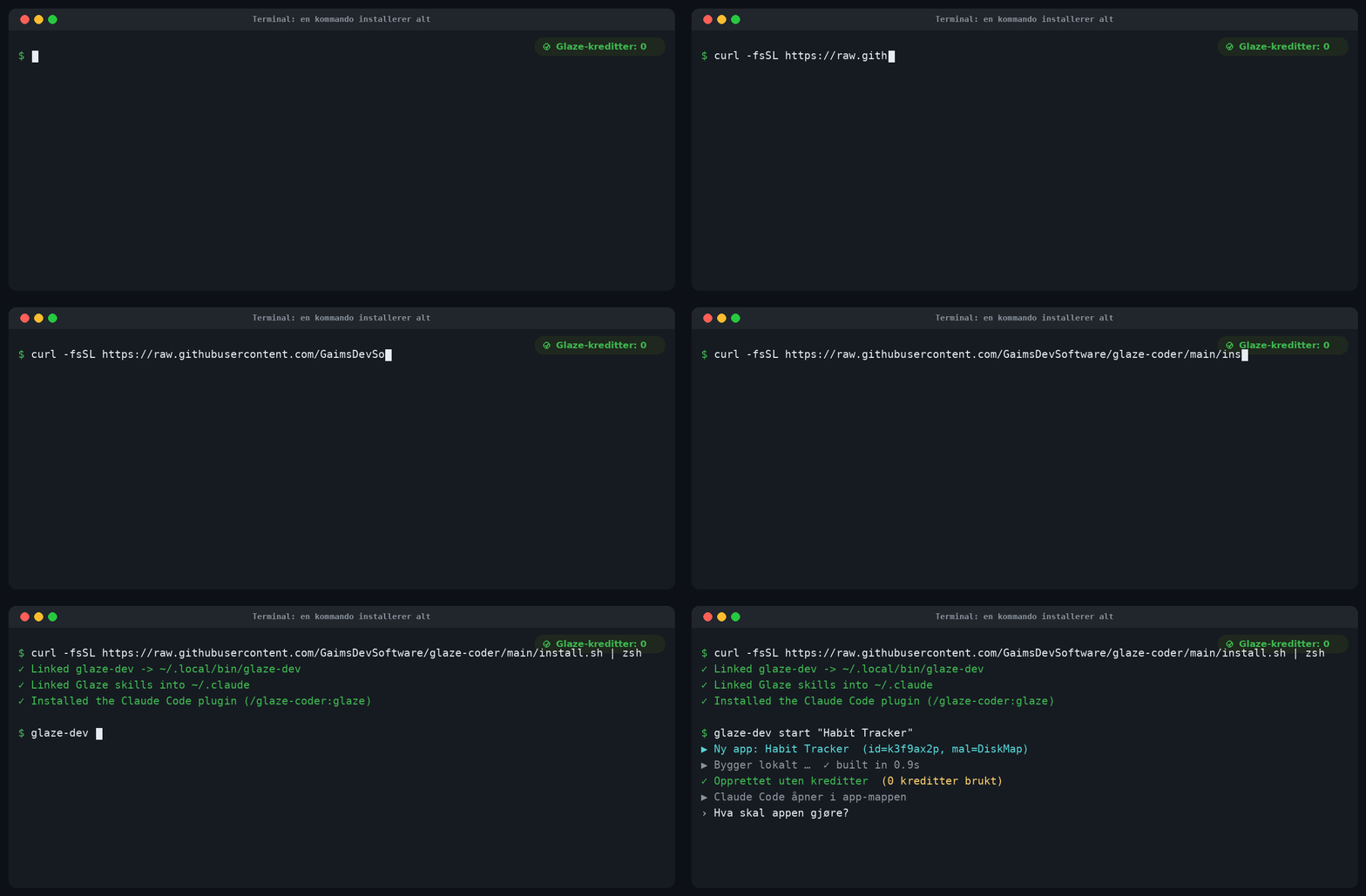
Then create your first app and jump straight into Claude Code:
glaze-dev start "Habit Tracker"
The installer ends with a guided check of the whole setup. You can rerun it any time to auto-fix safe local pieces, see what is installed, and see exactly what still needs you:
glaze-dev setup
That is all most people need. The sections below show the individual methods if you prefer to do it by hand.
Claude Code plugin (manual)
The installer can do this when claude is on your PATH. To do it yourself from
inside Claude Code:
/plugin marketplace add GaimsDevSoftware/glaze-coder
/plugin install glaze-coder
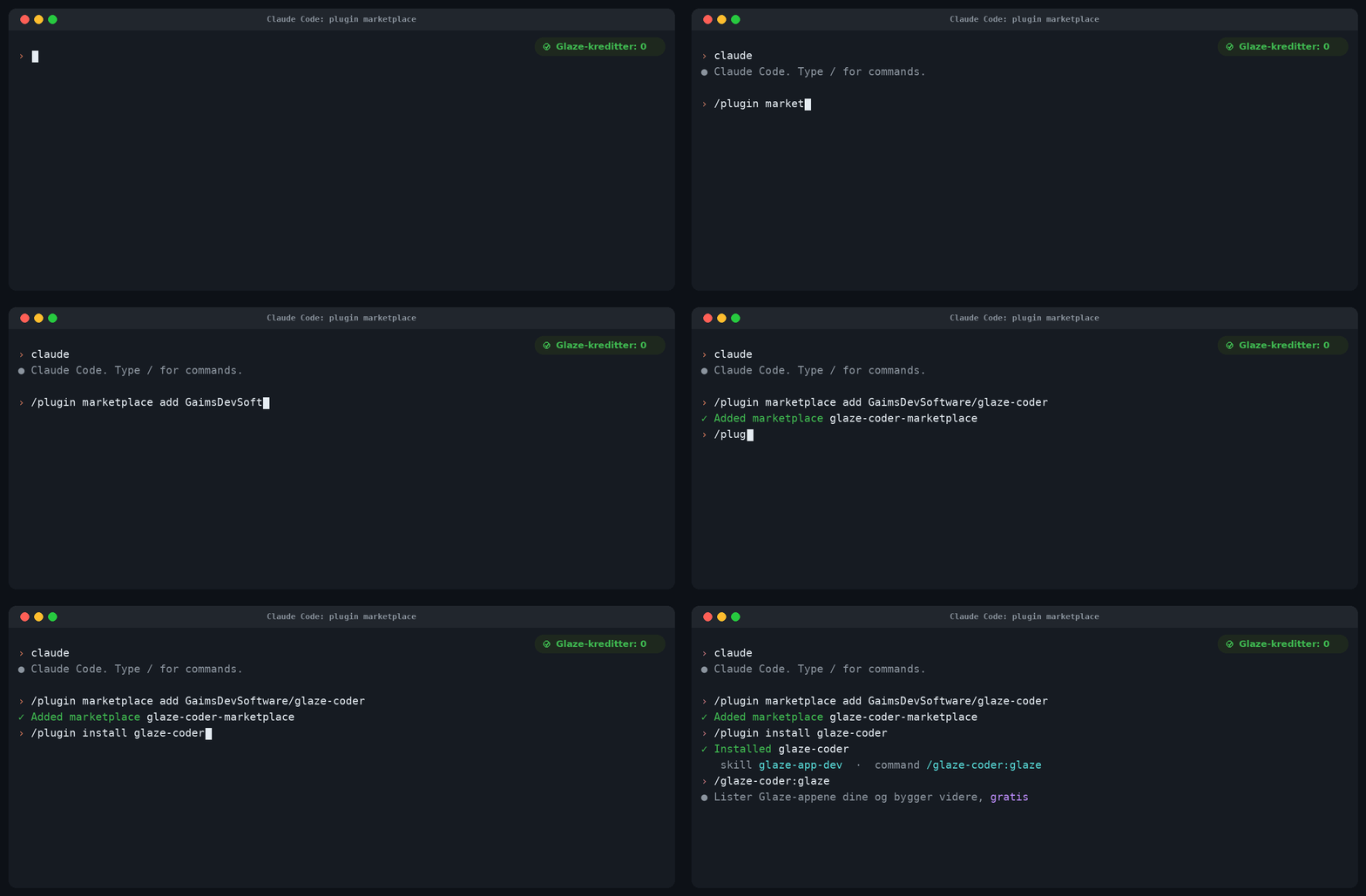
This gives you the glaze-app-dev skill and the /glaze-coder:glaze command. It works
the same whether you run Claude Code in a terminal or in the desktop app.
Only install it if you trust the GaimsDevSoftware/glaze-coder repository and its
future plugin updates.
Raycast (optional)
Raycast can only add a script folder from its own UI (there is no raycast:// deeplink
to add a directory), so this is the one step that needs a click. Run:
glaze-dev raycast
That copies the folder path to your clipboard and opens Raycast. Then:
- Raycast Settings, Extensions, Script Commands, Add Directories.
- In the file picker press Cmd+Shift+G, paste, Enter, then Open.
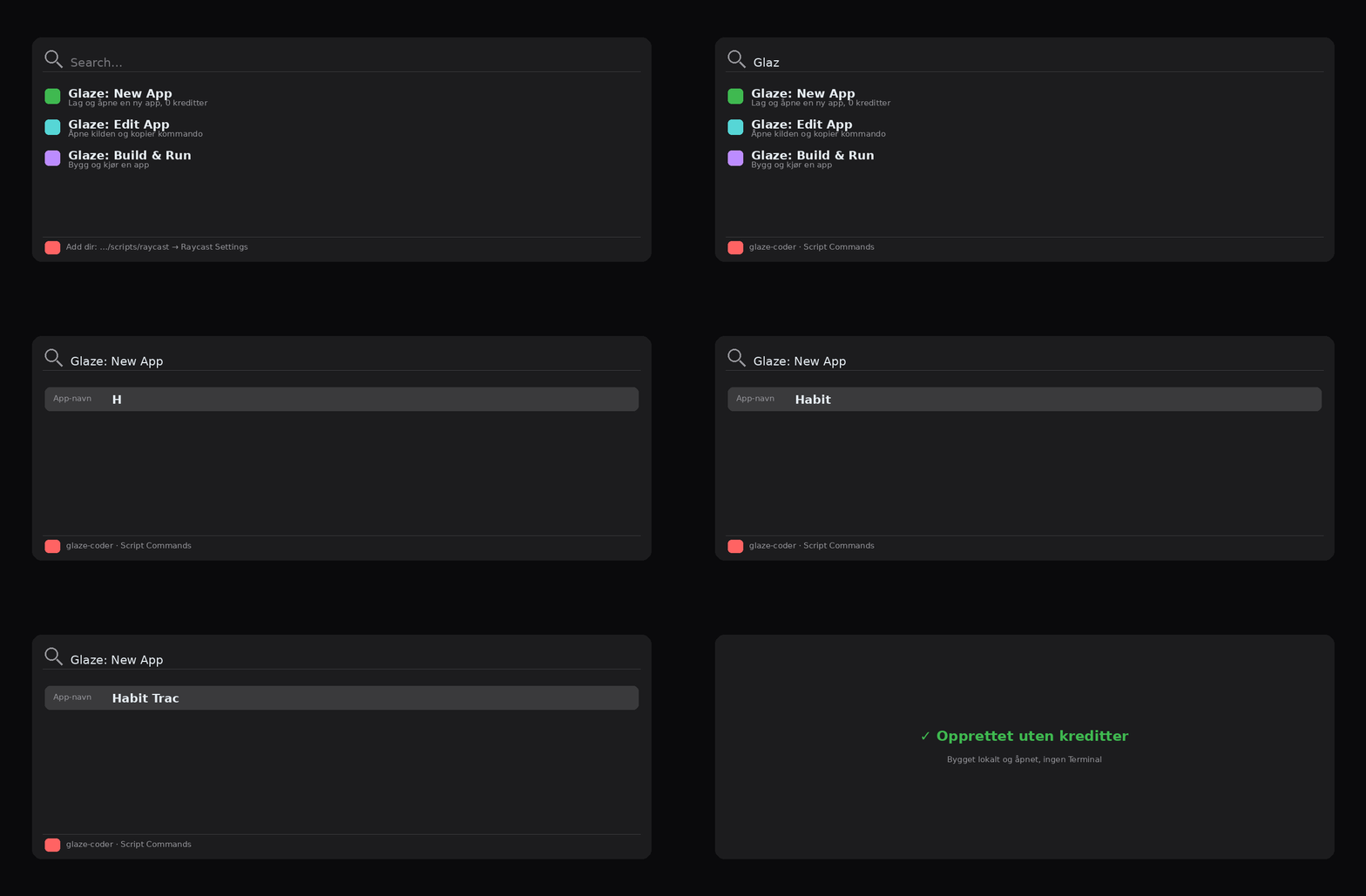
You then get three commands in Raycast, and none of them need a terminal:
- "Glaze: New App" builds a new app and opens it.
- "Glaze: Build & Run" builds an app and opens it.
- "Glaze: Edit App" opens the app's source folder and copies
glaze-dev code '<app>'to your clipboard, so you can edit it in a terminal or with/glaze-coder:glazein Claude Code.
Usage
glaze-dev start "My App"     Create a new app and open Claude Code in it
glaze-dev new   "My App"     Create a new app (no editor)
glaze-dev list               List your Glaze apps
glaze-dev code  <app>        Open Claude Code in an app's source
glaze-dev dev   <app>        Start the dev server (live reload)
glaze-dev build <app>        Build the app locally
glaze-dev run   <app>        Open the built app
glaze-dev br    <app>        Build then run
glaze-dev rm    <app>        Remove an app (bundle, source, profile)
glaze-dev agents             List the coding agents you have installed
glaze-dev setup              Guided check of the whole setup
glaze-dev queue <app>        Read the paused prompt queue out of the Glaze window
<app> matches on the folder name or product name, so partial names work.
Use another coding agent
Claude Code is the default, but you can open a Glaze app in any agent you have
installed. Run glaze-dev agents to see what was detected, then pass --agent:
glaze-dev code diskmap --agent codex
glaze-dev code diskmap --agent opencode
glaze-dev start "My App" --agent codex
Supported: claude (default), codex, opencode, gemini, and the desktop apps
codex-app, opencode-app, antigravity, zcode (these open the source folder).
Set a default with export GLAZE_AGENT=codex. For Codex, OpenCode and Gemini, glaze-dev
drops an AGENTS.md next to the app's CLAUDE.md so they get the same Glaze context.
How it works
A Glaze app lives in ~/Library/Application Support/app.glaze.macos.main/apps/<app>/.
Inside, .glaze-sources/ holds the editable source: a React and Vite renderer, a Node
backend, and a package.json. npm run build compiles it with the @glaze/core SDK and
the Node runtime that Glaze bundles, so no network call to Glaze happens and no credits
are used. The installed launcher in /Applications/Glaze/<App>.app finds the built code
through a symlink, which is how glaze-dev new can create a working app on its own.
Notes
- Apps created by
newandstartare ad-hoc signed for your own use. - Publishing to the public Glaze Store still needs a Glaze account, but publishing does not cost credits.
- Manual edits are not saved as entries in Glaze's version history. Make one small prompt to Glaze's agent if you want a checkpoint.
- You own your app and its code, so this is supported use of your own project.
License
MIT
File tree
FAQ
glaze-coder is a Claude Code plugin with 2 hand-picked skills for development work, indexed on Flowy. Install it with the command on its page. It includes glaze-app-dev, glaze-byok-ai. Its skills do not fire on their own yet. Request auto-invocation to have Flowy route them as you prompt. Free and open source.
- What is glaze-coder?
- Build Glaze (by Raycast) desktop apps from Claude Code, using your own Claude subscription instead of Glaze's paid credits. Glaze builds Mac apps with a built-in AI agent, and that agent is what spends Glaze credits.
- How do I install glaze-coder?
- Run these in Claude Code: /plugin marketplace add GaimsDevSoftware/glaze-coder then /plugin install glaze-coder@glaze-coder-marketplace. Then prompt normally.
- Does glaze-coder auto-invoke its skills?
- Not yet. It is indexed on Flowy as a plain plugin. Request auto-invocation on its page and Flowy will route its skills for you as you prompt.
- Is glaze-coder free?
- Yes. Flowy is free and open source, with nothing gated. You can read every skill in full before you install.
Is this plugin yours?
Claim it with GitHubSubmit a pluginPromote it