SEO Skill (Antigravity / Claude / Codex / Cursor)
An LLM-first SEO analysis skill for agent IDEs and AI coding assistants, with 16 specialized sub-skills, 10 specialist agents, and 89 scripts used as evidence collectors and workflow automation.
For detailed installation guidance, example prompts, report generation, troubleshooting, and the full script inventory, see the Agentic SEO Skill Wiki.
IDE Compatibility
The installer ships native formats for each tool — not just a generic copy:
| Tool | Install location | Native format |
|---|
| Claude Code | ~/.claude/skills/seo | Skill directory |
| Codex CLI | ~/.codex/skills/seo | Skill directory |
| Antigravity IDE | <project>/.agent/skills/seo | Skill directory |
| Claude Cowork | <project>/.claude/skills/seo | Project-scoped skill (commit to git) |
| Cursor | <project>/.cursor/rules/seo.mdc + .cursor/skills/seo/ | MDC rule |
| Windsurf | <project>/.windsurf/rules/seo.md + .windsurf/skills/seo/ | Windsurf rule |
| Continue.dev | <project>/.continue/prompts/seo.prompt + .continue/skills/seo/ | Slash command |
| GitHub Copilot | <project>/.github/copilot-instructions.md + .github/skills/seo/ | Repo instructions |
| Cline | <project>/.clinerules + .cline/skills/seo/ | Project rules |
📦 Current Inventory
- Specialized sub-skills:
16
- Specialist agents:
10
- Scripts in
scripts/: 89 (88 Python + 1 shell validation helper)
Inventory drift is checked by CI with:
python3 scripts/validate_skill_inventory.py
python3 scripts/reference_freshness.py resources/references --max-age-days 90
Key Script Inventory
The README only highlights the scripts most users reach for first. See the full 89-script list with purpose notes in the Script Inventory wiki.
| Script | Best for |
|---|
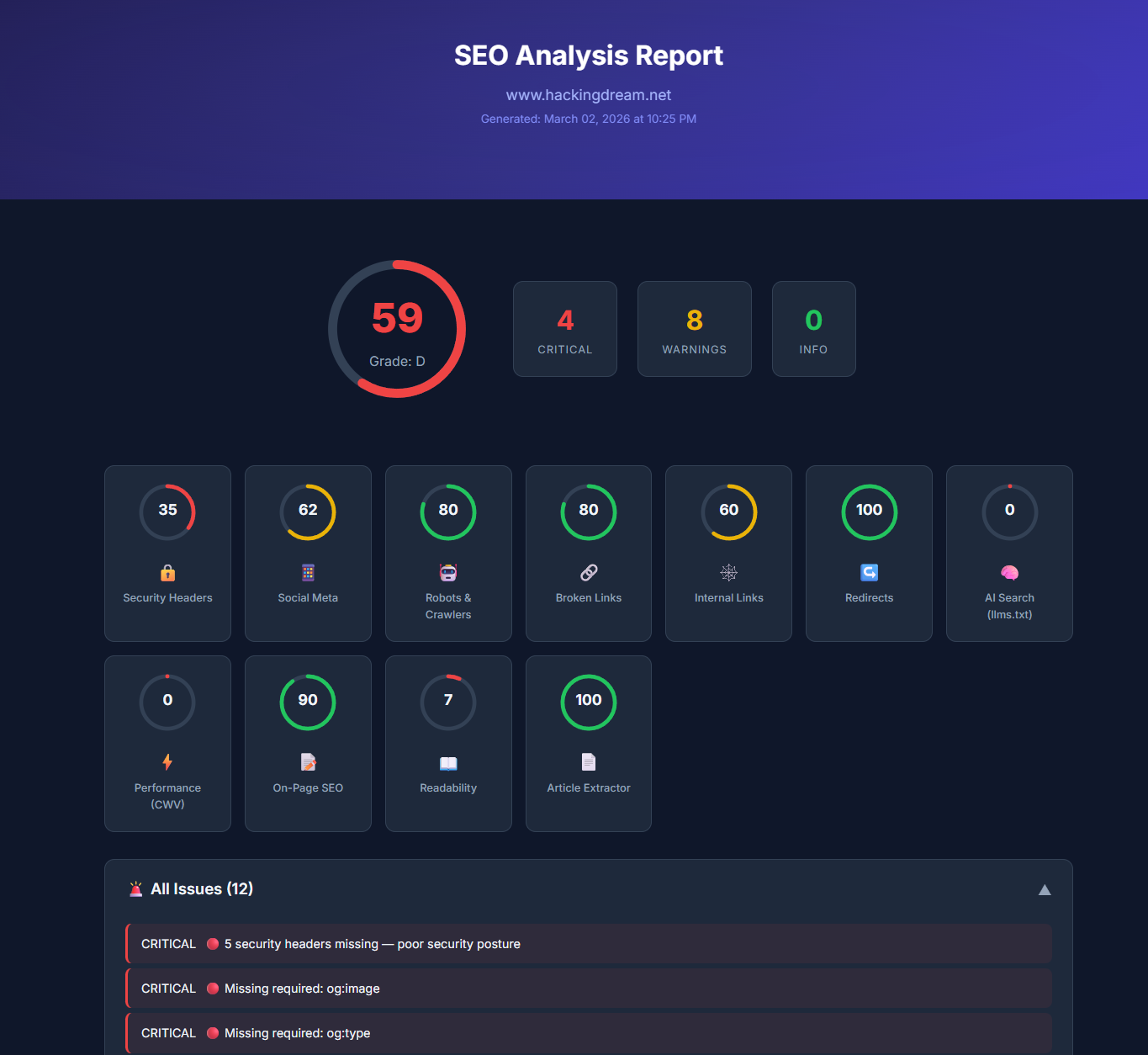
audit_runner.py | One-command full audit that writes JSON, HTML, FULL-AUDIT-REPORT.md, and ACTION-PLAN.md. |
generate_report.py | Self-contained browser dashboard for sharing SEO findings. |
fetch_page.py | Reliable page fetch with SEO crawler headers and local HTML output. |
parse_html.py | Extract titles, metadata, headings, links, images, schema, and canonical signals. |
pagespeed.py | Core Web Vitals and PageSpeed Insights evidence. |
crawl_audit.py | Multi-page crawl evidence for status, metadata, depth, and duplicate signals. |
indexability_matrix.py | Per-URL indexability verdicts from robots, meta robots, canonicals, status, and sitemaps. |
robots_checker.py | Search and AI crawler policy checks from robots.txt. |
sitemap_checker.py | XML sitemap discovery, parsing, limits, status checks, and lastmod quality. |
image_inventory.py | Image alt text, dimensions, loading behavior, responsive image, and LCP-candidate evidence. |
validate_schema.py | JSON-LD syntax, required fields, placeholders, and deprecated schema checks. |
github_seo_report.py | GitHub repository SEO report and action plan generation. |
finding_verifier.py | Deduplicate, prioritize, and validate findings before final reporting. |
🐙 GitHub SEO Metadata
Recommended GitHub repository description (About field):
LLM-first SEO skill for Claude Code, Codex, Antigravity, Cursor, Windsurf, Continue, Copilot, and Cline — 16 sub-skills, 10 specialist agents, and GitHub SEO workflows that output GITHUB-SEO-REPORT.md and GITHUB-ACTION-PLAN.md.
Suggested GitHub topics:
seo, llm, github-seo, ai-search, geo, aeo, technical-seo, schema, core-web-vitals, codex, claude-code, antigravity, cursor, windsurf, copilot
✨ Features
| Sub-Skill | Description |
|---|
| seo audit | Full website audit with evidence-backed scoring |
| seo article | Article data extraction & LLM-driven content optimization |
| seo page | Deep single-page analysis |
| seo technical | Crawlability, indexability, security, Core Web Vitals, AI crawlers |
| seo content | Content quality & E-E-A-T assessment (Sept 2025 QRG) |
| seo schema | Schema.org detection, validation & JSON-LD generation |
| seo sitemap | XML sitemap analysis & generation |
| seo images | Image optimization audit (alt text, formats, lazy loading, CLS) |
| seo geo | Generative Engine Optimization — AI Overviews, ChatGPT, Perplexity |
| seo aeo | Answer Engine Optimization — Featured Snippets, PAA, Knowledge Panel |
| seo links | Link profile analysis — internal links, backlinks, anchor text, orphan pages |
| seo programmatic | Programmatic SEO safeguards & quality gates |
| seo competitors | Comparison & alternatives page generation |
| seo hreflang | International SEO / hreflang validation |
| seo plan | Strategic SEO planning with topical clusters & industry templates |
| seo github | GitHub repository SEO: metadata/topics, README quality, community profile, query benchmarking, traffic archiving |
🧠 LLM-First Workflow
This skill is designed for reasoning-first SEO analysis:
- Collect page evidence (
read_url_content first, scripts optional).
- Analyze with LLM using explicit proof for each finding.
- Apply confidence labels (
Confirmed, Likely, Hypothesis).
- Prioritize by impact and effort.
- Produce a structured action plan.
Required Rubric
All audits should apply:
resources/references/llm-audit-rubric.md
The rubric standardizes:
- evidence format (
Finding, Evidence, Impact, Fix)
- severity (
Critical, Warning, Pass, Info)
- confidence labeling
- output contract for audit reports
🤖 Specialist Agents
- Technical SEO — crawlability, indexability, security, mobile, JS rendering
- Content Quality — E-E-A-T scoring, AI content detection
- Performance — Core Web Vitals (LCP, INP, CLS) analysis
- Schema Markup — JSON-LD detection, validation, generation
- Sitemap — XML sitemap validation, quality gates
- Visual Analysis — screenshots, above-the-fold, responsiveness (Playwright)
- GitHub Analyst — metadata, topics, README, trust, title strategy
- GitHub Benchmark — query ranking and competitor intelligence
- GitHub Data — API/auth fallback and traffic archival continuity
- Verifier (Global) — dedupe/contradiction suppression before final reporting
📚 Reference Data
- Core Web Vitals thresholds (INP replaced FID)
- E-E-A-T framework (Sept 2025 QRG + Dec 2025 core update)
- Schema.org types — active, restricted, deprecated
- Content quality gates & word count minimums
- Google SEO quick reference
- LLM audit rubric for consistent outputs
Each reference file carries its own <!-- Updated: YYYY-MM-DD --> marker. CI checks those markers with scripts/reference_freshness.py and flags stale references for review.
🏭 Industry Templates
Pre-built strategy templates for: SaaS, E-commerce, Local Business, Publisher/Media, Agency, and Generic businesses.
🔧 Installation
All --online commands below download the latest release package from GitHub automatically. With no --target, --online installs to every supported IDE.
Quick install (no cloning required)
Linux / macOS:
# Default: installs to every target at once
curl -fsSL https://raw.githubusercontent.com/Bhanunamikaze/Agentic-SEO-Skill/main/install.sh | bash -s -- --online

# Claude Code only
curl -fsSL https://raw.githubusercontent.com/Bhanunamikaze/Agentic-SEO-Skill/main/install.sh | bash -s -- --online --target claude

# User-wide (Claude + Codex)
curl -fsSL https://raw.githubusercontent.com/Bhanunamikaze/Agentic-SEO-Skill/main/install.sh | bash -s -- --online --target global

# Every target, scoped to a project
curl -fsSL https://raw.githubusercontent.com/Bhanunamikaze/Agentic-SEO-Skill/main/install.sh | bash -s -- --online --target all --project-dir /path/to/your/project
Windows (PowerShell 7+):
# Download installer, then run with --online
irm https://raw.githubusercontent.com/Bhanunamikaze/Agentic-SEO-Skill/main/install.ps1 -OutFile install.ps1

# Default: installs to every target at once
powershell -ExecutionPolicy Bypass -File .\install.ps1 --online

# Claude Code only
powershell -ExecutionPolicy Bypass -File .\install.ps1 --online --target claude

# Every target, scoped to a project
powershell -ExecutionPolicy Bypass -File .\install.ps1 --online --target all --project-dir C:\path\to\your\project
From source
git clone https://github.com/Bhanunamikaze/Agentic-SEO-Skill.git
cd Agentic-SEO-Skill

# Claude Code (most common)
bash install.sh --target claude

# Codex
bash install.sh --target codex

# Claude Cowork / project-scoped (installs to .claude/skills/, commit to git to share with team)
bash install.sh --target cowork --project-dir /path/to/your/project

# GitHub Copilot Chat (writes .github/copilot-instructions.md)
bash install.sh --target copilot --project-dir /path/to/your/project

# Cursor AI (writes .cursor/rules/seo.mdc)
bash install.sh --target cursor --project-dir /path/to/your/project

# Windsurf (writes .windsurf/rules/seo.md)
bash install.sh --target windsurf --project-dir /path/to/your/project

# Cline (writes .clinerules)
bash install.sh --target cline --project-dir /path/to/your/project

# Continue.dev (writes .continue/prompts/seo.prompt)
bash install.sh --target continue --project-dir /path/to/your/project

# Antigravity (writes .agent/skills/seo)
bash install.sh --target antigravity --project-dir /path/to/your/project

# User-wide (Claude + Codex)
bash install.sh --target global

# All project-local IDEs at once
bash install.sh --target project --project-dir /path/to/your/project

# Every target at once
bash install.sh --target all --project-dir /path/to/your/project

# With Python deps + Playwright (for visual analysis scripts)
bash install.sh --target claude --install-deps --install-playwright
Windows (PowerShell) — from source:
powershell -ExecutionPolicy Bypass -File .\install.ps1 --target claude
powershell -ExecutionPolicy Bypass -File .\install.ps1 --target cursor --project-dir C:\path\to\project
powershell -ExecutionPolicy Bypass -File .\install.ps1 --target all --project-dir C:\path\to\project
Safer remote install (download, inspect, run):
curl -fsSLO https://raw.githubusercontent.com/Bhanunamikaze/Agentic-SEO-Skill/main/install.sh
less install.sh                  # review before running
bash install.sh --online
All flags
| Flag | Default | Purpose |
|---|
--target <name> | claude | Pick a target (see IDE Compatibility table). With --online and no flag, defaults to all. |
--project-dir <path> | cwd | Where to install project-local targets. |
--skill-name <name> | seo | Override the installed folder name for skills-dir targets. |
--online | off | Fetch the latest release/branch archive from GitHub instead of using the local tree. |
--ref <branch-or-tag> | main | Branch or tag to use in --online mode. |
--repo-url <url> | upstream | Override the source repo for remote clone. |
--source <auto|local|remote> | auto | Force the source resolution mode. |
--repo-path <path> | — | Use a specific local checkout as the install source. |
--install-deps | off | Also pip install --user requests beautifulsoup4. |



 @coreyhaines31


