
Testing
MCP
harness
Ships with harness: macOS 14+ · Apple Silicon & Intel · ~12 MB awizemann.github.io/harness · Wiki · All releases A native macOS developer tool that drives an iOS Simulator, a macOS app, or a web…
Claude Code
$ git clone https://github.com/awizemann/harness
Clone the repository
Codex
Cursor
Gemini CLI
GitHub Copilot
$ git clone https://github.com/awizemann/harness
Clone the repository
OpenCode
Windsurf
Security report
Info
Not enough data
Known flaws
Not published
Signed build
Not published
Maintained
Sep 2, 2026
Last push
Licence
MIT
Runs as
Local process
On your machine
Deprecated
Not published
Signals from public registries, not an audit. Checked Nov 11, 2026.
harness README
Harness






macOS 14+ · Apple Silicon & Intel · ~12 MB
awizemann.github.io/harness · Wiki · All releases
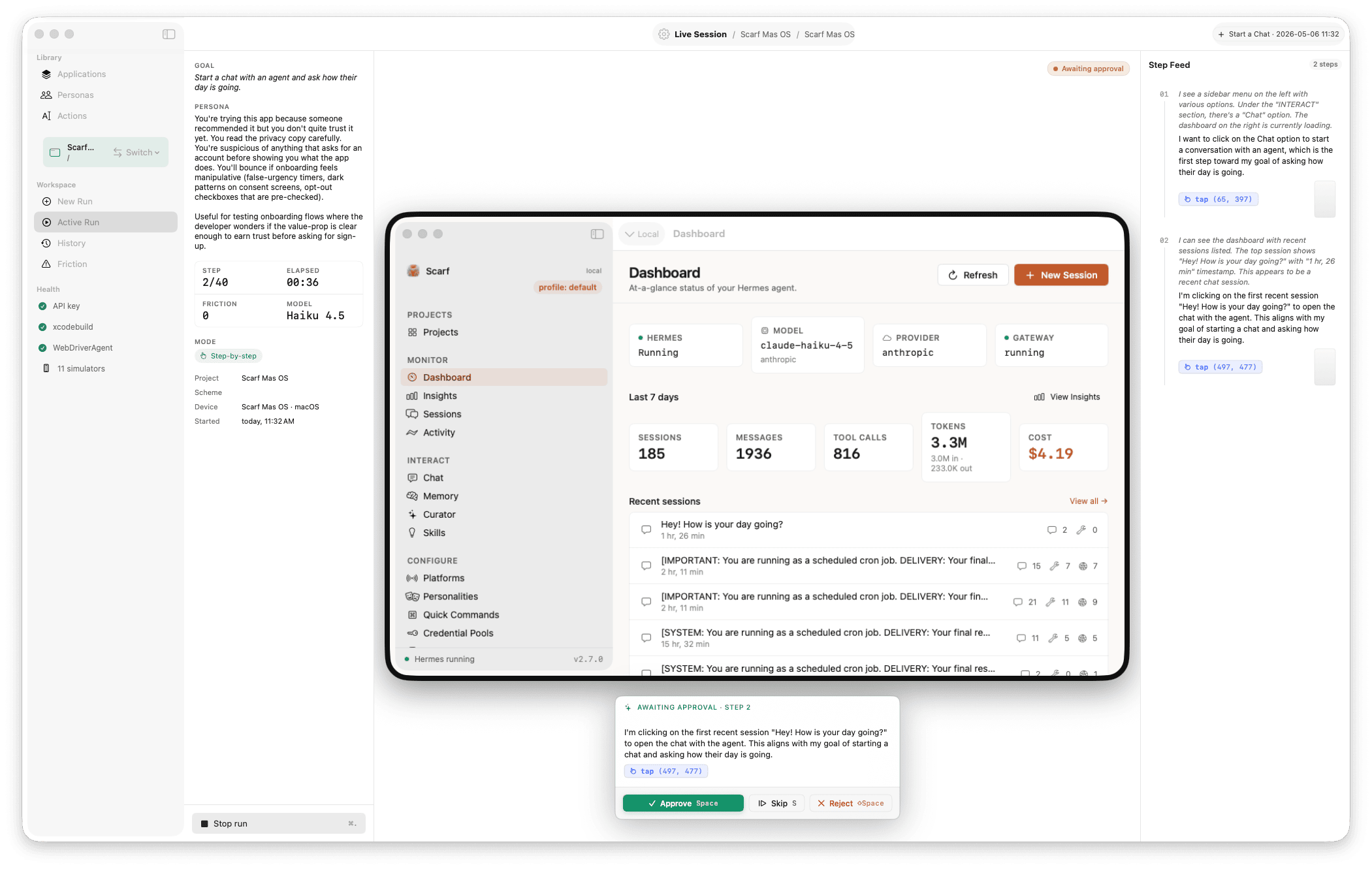
A native macOS developer tool that drives an iOS Simulator, a macOS app, or a web app with an AI agent so you can run user tests — not scripted UI tests, but real-user simulation.
You write a goal in plain language ("I want to sign up and create my first list", "delete my account", "find a vegetarian restaurant near me and save it") and a persona ("first-time user, never seen this app"). Harness builds (or just launches) your target, and an LLM agent reads screenshots, clicks/types/scrolls, and pursues the goal — narrating what it sees, flagging UX friction (dead ends, ambiguous labels, unresponsive controls), and stopping when it succeeds, fails, or would give up.
Three artifacts come out of every run:
- Did the goal complete? — success / failure / blocked + summary
- What was the path? — replayable sequence of screens + actions
- Where was the friction? — timestamped events the agent flagged as confusing
Targets
| Kind | How Harness drives it |
|---|---|
| iOS Simulator | xcodebuild your project + scheme; simctl boot/install/launch; WebDriverAgent for input. |
| macOS app | NSWorkspace launch (pre-built .app or xcodebuild macOS scheme). Contained input by default — AX actions (AXPress / AXSetValue) first, then CGEvent.postToPid to the app's own queue for scroll / shortcuts / raw clicks; the real pointer never moves, focus is never stolen, no app but the target is touched, and there's no global-HID fallback (unreachable controls fail honestly). Set HARNESS_MACOS_INPUT=hid to restore the legacy global-HID + foregrounding backend. CGWindowListCreateImage for capture (grabs the window even in the background). |
| Web app | Embedded WKWebView at a chosen viewport (default 1280×1600 tall desktop, or 375×812 mobile); JS-synthesised events for input; WKWebView.takeSnapshot for capture. The mirror shows a flat browser chrome (no device bezel) so the screenshot fills the full pane and one snapshot covers more page — fewer scrolls per goal, lower API cost. |
Per-app setting: each Application declares its kind once at create time. The agent's tool schema (clicks vs swipes vs key shortcuts vs navigate) and the system-prompt context block re-shape per platform. Run history, replay, and friction reporting are platform-neutral.
Status: v0.8.1 (alpha). Drive Harness from an agent via the MCP server — either autonomous runs (surfaced as first-class, badged history) or step-level UI sessions that let an external client see and act on a web, iOS, or macOS target directly, with no LLM loop and no API key. The
harness-mcpbinary is now standalone and relocatable — bundle it inside another product and run it from anywhere. Sparkle auto-update built in. All three platforms wired end-to-end with Set-of-Mark targeting on iOS, macOS, and web (numbered overlays on interactive elements; agent clicks by id, not pixel; agent-only, never on disk); Local Mac inference via Ollama (Qwen3-VL 8B, Gemma 4 Vision 9B, Llama 3.2 Vision 11B, plus a custom-model field) alongside cloud providers (Anthropic Opus 4.7 / Sonnet 4.6 / Haiku 4.5; OpenAI GPT-5 Mini / GPT-4.1 Nano; Google Gemini 2.5 Flash / Flash Lite); per-Application credential storage; per-provider Keychain storage; configurable per-model token budgets; unlimited-step option;harness-clidev-time driver. macOS needs Screen Recording + Accessibility permission. Web is WebKit-only; Chrome via CDP is on the roadmap. Seedocs/ROADMAP.md.
What's new in 0.8.1
- Authenticated web sessions — inject and export session state. Web sessions stay fresh-user by default, but SSO-only products were unreachable.
start_ui_sessiongains web-onlyvisible: true(the session window comes on screen for a human to log in — password, SSO, MFA) andsession_state(cookies +localStorage, injected before the first navigation). The newexport_ui_session_statetool returns the live session's state in exactly the shapesession_stateaccepts, so a human-authenticated visible session round-trips into later headless ones. Cookie values follow thefill_credentialprecedent: never logged, never insteps.jsonl, never on disk, never on the persisted run model. SeeHarnessMCP/README.md. - Mark labels come from the label, not the placeholder. The web probe now resolves an accessible name the way a screen reader would (
aria-label→labelledby→<label>→placeholder→title→value→ text →name) and each structured mark reports which rule won aslabel_source(declared in theoutputSchema; web only). No more selectors keyed on sample placeholder data. act_uisettles on the DOM change, not just on navigation. Observation is armed before dispatch and the gate drains the page's own pending work (setTimeout≤ 2s, in-flightfetch/XHR), so a same-URL React state swap lands in the action's own observation instead of the pre-action frame. Idle pages still return at the 250ms floor; ceiling 3s.- 359 unit tests passing (326 at 0.8.0), plus three new live-smoke phases: label priority, the 500ms same-URL swap captured by
act_uiitself, and the injection → export round trip with asteps.jsonlsecret check.
Notes for earlier versions live on the Releases page.
First clone
Harness vendors appium/WebDriverAgent as a git submodule under vendor/WebDriverAgent (it's how we drive the iOS Simulator's responder chain). The Xcode project is generated from project.yml via xcodegen.
git clone https://github.com/awizemann/harness.git
cd harness
git submodule update --init --recursive
brew install xcodegen
xcodegen generate
open Harness.xcodeproj
The first run builds WDA against your simulator's iOS runtime (~1–2 min). Result is cached under ~/Library/Application Support/Harness/wda-build/<iOS-version>/ and reused on subsequent runs.
Full setup: see Build-and-Run on the Wiki.
How to read this repo
standards/INDEX.md— development, code, and architecture standards. Read these before adding code.- GitHub Wiki — "where things live, why, and how to extend them." Maintained per PR alongside code.
docs/ARCHITECTURE.md— system architecture overview.docs/ROADMAP.md— build order and milestones.docs/PROMPTS/— canonical agent prompts (loaded as a bundle resource at runtime).HarnessDesign/— design system tokens, primitives, and screen layouts.
Contributing
PRs welcome. Read CONTRIBUTING.md first — it covers setup, the architecture rules (MVVM-F, Swift 6 strict concurrency, single subprocess actor), and the public-surfaces sync rule (code changes that affect README / wiki / site update them in the same PR).
License
MIT — see LICENSE.

Ships withharness
3612 MCP
Stars on GitHub
Momentum
- stars in total
- 361
More MCP servers from other plugins.

chrome-devtools
MCPConnects to Chrome over the DevTools Protocol to inspect the DOM, network requests and console output.
 @nexus-modsInstall MCP

agentic-qe
MCPShips with agentic-qe: Quality engineering tools for your coding agent. Generate tests, investigate coverage gaps, analyze flaky…
 @proffesor-for-testingInstall MCP
Questions about harness.
- Which coding agents can use harness?
- harness works in any agent that reads an MCP config file: Claude Code, Codex, Cursor, Gemini CLI, GitHub Copilot, OpenCode and Windsurf. Each agent reads it from its own file; this page names the file for each one.