
Testing
MCP
skill_up_observer
Ships with skill-up: An evaluation and evolution tool for Agent Skills.
Claude Code
$ claude mcp add skill_up_observer -- python3 scripts/observer.py mcp
Codex
$ codex mcp add skill_up_observer -- python3 scripts/observer.py mcp
Cursor
{
  "mcpServers": {
    "skill_up_observer": {
      "command": "python3",
      "args": [
        "scripts/observer.py",
        "mcp"
      ]
    }
  }
}
Add it to mcp.json.
Gemini CLI
$ gemini mcp add skill_up_observer python3 scripts/observer.py mcp
GitHub Copilot
$ copilot mcp add skill_up_observer -- python3 scripts/observer.py mcp
OpenCode
{
  "mcp": {
    "skill_up_observer": {
      "type": "local",
      "command": [
        "python3",
        "scripts/observer.py",
        "mcp"
      ]
    }
  }
}
Add it to opencode.json.
Windsurf
{
  "mcpServers": {
    "skill_up_observer": {
      "command": "python3",
      "args": [
        "scripts/observer.py",
        "mcp"
      ]
    }
  }
}
Add it to mcp_config.json.
From the README
What can you do with skill_up_observer?
Eval-to-Evolution Loop with skill-upper
Create evals through natural conversation, diagnose failures, automatically repair or expand cases, and rerun skill-up until the eval suite evolves.
Declarative Eval Config
Define evaluation environment, engine, model, and cases through YAML (eval.yaml + cases/*.yaml).
Environment Provisioning
Prepare a local, Docker, or OpenSandbox runtime for each case, install configured real or mocked MCP servers into supported Agent Engines, and upload context.repo_fixture and context.files into the…
Skill-Optional Runs and Workspace Cases
Evaluate an agent without a Skill, prepare repository fixtures per case, or run against an existing local workspace with --workspace.
Multi-Engine Support
Works with Qoder CLI, Claude Code, and Codex as built-in Agent Engines, plus user-defined agents via engine.custom (local commands or HTTP services — see docs/design/custom-engine.md).
DeepSeek Harness Plugin
Use the bundled skill-upper Skill, opt-in durable observation capture, approval-gated regression cases, isolated runs, and status comparison to verify evidence-backed Skill improvements.
Multi-Turn Conversations and User Simulation
Run fixed turns, mix scripted and simulated replies, or let an independent user model drive follow-ups and decide when to stop.
Role-Specific Engines and Models
Configure the evaluated agent, Agent Judge, and user simulator separately, including independent judging of custom agents.
Security report
Info
Not enough data
Known flaws
Not published
Signed build
Not published
Maintained
Oct 30, 2026
Last push
Licence
Apache-2.0
Runs as
Local process
On your machine
Deprecated
Not published
Signals from public registries, not an audit. Checked Nov 11, 2026.
skill-up README

Evaluate Agent Skills, agents, and workspaces. Evolve Skills with evidence.







English | 中文
📖 User Manual · 用户手册
Overview
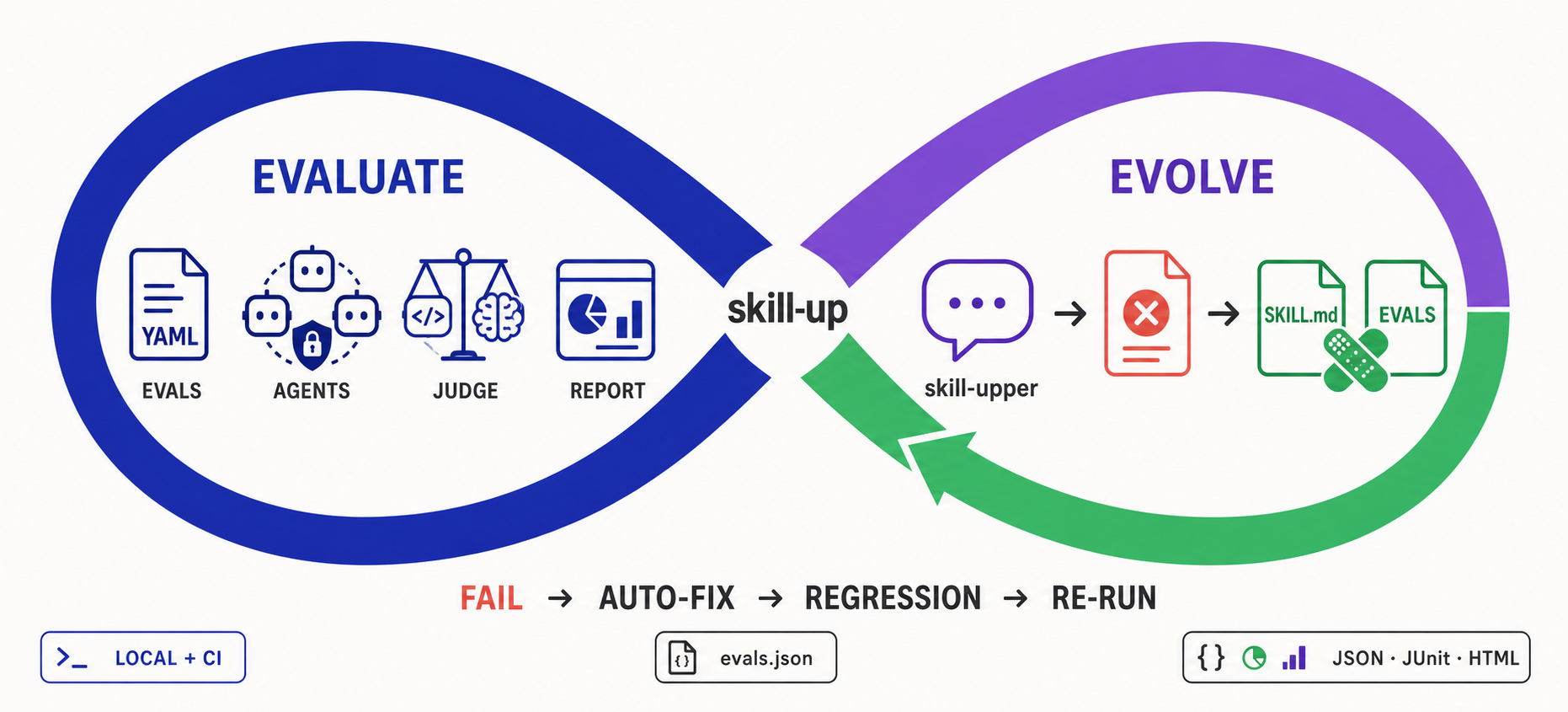
skill-up is a CLI for evaluating Agent Skills, agents, and their workspaces. It runs declarative cases against an Agent Engine, grades the response and workspace changes, and produces reports locally or in CI.
- Skill evaluation measures a Skill's behavior across cases and can compare runs with and without the Skill.
- Agent evaluation runs the same cases without installing a Skill, so you can assess an engine or custom agent on its own.
- Workspace evaluation checks how an agent works with files and repositories, using case fixtures or an existing local workspace.
- Skill evolution uses skill-upper to inspect failures, repair or expand the eval suite, and rerun skill-up through conversation.
Features
- Eval-to-Evolution Loop with skill-upper: Create evals through natural conversation, diagnose failures, automatically repair or expand cases, and rerun skill-up until the eval suite evolves.
- Declarative Eval Config: Define evaluation environment, engine, model, and cases through YAML (
eval.yaml+cases/*.yaml). - Environment Provisioning: Prepare a local, Docker, or OpenSandbox runtime for each case, install configured real or mocked MCP servers into supported Agent Engines, and upload
context.repo_fixtureandcontext.filesinto the workspace. - Skill-Optional Runs and Workspace Cases: Evaluate an agent without a Skill, prepare repository fixtures per case, or run against an existing local workspace with
--workspace. - Multi-Engine Support: Works with Qoder CLI, Claude Code, and Codex as built-in Agent Engines, plus user-defined agents via
engine.custom(local commands or HTTP services — see docs/design/custom-engine.md). - DeepSeek Harness Plugin: Use the bundled
skill-upperSkill, opt-in durable observation capture, approval-gated regression cases, isolated runs, and status comparison to verify evidence-backed Skill improvements. Seeplugins/dsh-skill-up. - Multi-Turn Conversations and User Simulation: Run fixed turns, mix scripted and simulated replies, or let an independent user model drive follow-ups and decide when to stop.
- Role-Specific Engines and Models: Configure the evaluated agent, Agent Judge, and user simulator separately, including independent judging of custom agents.
- Flexible Judging: Supports
rule_based,script, andagent_judgeevaluation strategies. - Structured Reports: Outputs Anthropic-compatible
grading.json,benchmark.json,benchmark.md, plusresult.json, JUnit XML, and HTML reports. - Anthropic Compatible: Import
evals.jsonviaskill-up import, or auto-detect with--auto. - CI-Ready: Designed for local development and continuous integration pipelines.
Why skill-up
Harness engineering treats an agent's environment, tools, constraints, and feedback loops as parts of the system to design and improve. Behavioral evals make expected agent actions observable and help catch regressions. skill-up contributes evaluation and feedback to this work: repeatable prompts and workspace setups, checks on responses, tool calls, and file changes, and structured reports.
For Skills, the official Agent Skills evaluation guide describes a further loop: run with and without the Skill, grade outputs, aggregate results, and iterate. skill-up supports these workflows:
- Replaces ad hoc run folders with a declarative
eval.yaml+cases/*.yamlformat. - Closes the improvement loop: skill-upper can interpret failed reports, repair or add eval cases, and drive the next skill-up run through conversation.
- Automates workspace setup, optional Skill installation, Agent Engine invocation, judging, and report generation.
- Supports multiple engines (
claude_code,codex,qodercli,qwen_code) instead of tying the workflow to one client. - Keeps compatibility with Anthropic-style
evals.jsonwhile adding richer judges, CI-friendly commands, and structured reports.
Quick Start: Evolve a Skill with skill-upper
For Skill evolution, use skill-upper, the Agent Skill shipped in this repository. It lets your AI agent create evals, run skill-up, understand failures, fix the Skill or its evals, add regression coverage, and repeat the loop through conversation.
For repository development, skills/skill-upper/ is the only editable source.
Plugin bundles are generated into ignored build directories rather than tracked
copies or symlinks; run make bundle-plugins when preparing them locally.
make package-plugins VERSION=<version> creates self-contained Codex and DSH
archives. Tagged GitHub releases attach both archives and their checksums; this
repository does not publish either plugin to an external marketplace or npm.
1. Install skill-upper
# Codex, global install
npx skills add https://github.com/alibaba/skill-up/tree/main/skills/skill-upper -g -a codex -y

# Claude Code, global install
npx skills add https://github.com/alibaba/skill-up/tree/main/skills/skill-upper -g -a claude-code -y
You normally do not need to install skill-up first. skill-upper checks for the CLI when it runs and guides the agent through installation if needed.
2. Create and run the first evals
Open a project that contains your Skill's SKILL.md in Codex, Claude Code, or
another compatible Agent, then ask:
Use skill-upper to evaluate this Skill.
Read SKILL.md, identify its most important behaviors, create realistic eval
cases with appropriate judges, validate the configuration, and run skill-up.
Summarize the results and the highest-impact failures.
skill-upper creates the declarative eval suite and drives the CLI for you:
my-skill/
  SKILL.md
  evals/
    eval.yaml
    cases/
      <case-id>.yaml
my-skill-workspace/
  iteration-1/
    result.json
3. Fix, regress, and iterate
Continue in the same conversation:
Use skill-upper to improve this Skill from the latest evaluation results.
Follow its evolution workflow, compare the original and candidate, add
regression coverage, and summarize which changes the evidence supports.
The comparison and acceptance rules live in skill-upper's evolution workflow. This prompt invokes that workflow; keeping the original is a valid outcome when a candidate does not show a supported improvement.
Prefer manual setup?
You can still install the CLI directly and hand-write eval.yaml and case
files:
curl -fsSL https://raw.githubusercontent.com/alibaba/skill-up/main/install.sh | bash
See the official documentation for Getting Started, Writing Evals, CLI Reference, and User Configuration. Windows-specific setup and limitations are covered in the Windows guide.
Evaluate an agent or workspace without a Skill
An agent-only eval does not need SKILL.md. Set skills: [] explicitly: when
skills is omitted and skill-up finds a SKILL.md above the config, it installs
that Skill automatically. Put eval.yaml and case files under evals/, then
pass the config path explicitly. Case and fixture paths resolve from the
discovered Skill root, or from the directory containing evals/ if none is found.
# evals/eval.yaml
schema_version: v1alpha1
environment:
  type: none
skills: []
engine:
  name: codex
cases:
  files:
    - evals/cases/agent-response.yaml
# evals/cases/agent-response.yaml
input:
  prompt: Reply with READY.
expect:
  must_contain: [READY]
skill-up validate ./evals/eval.yaml
skill-up run ./evals/eval.yaml
For repository tasks, a case can use context.repo_fixture to prepare a fresh
workspace and expect or a judge to check the result. To evaluate an agent in
an already prepared local directory, use a case written for that directory and
run skill-up run ./evals/eval.yaml --workspace /path/to/project --parallelism 1.
The existing directory is preserved, but the agent and case setup can change
its contents. This option requires environment.type: none, one case at a time,
and benchmark mode off. See Writing Evals
and the CLI Reference.
Multi-Turn Conversations and Role Configuration
A simulated user can react to what the agent actually says, so follow-up messages need not be scripted in advance. For example, evaluate a Twenty Questions player:
- The evaluated agent asks natural-language yes/no questions and guesses an object.
- The simulated user knows the hidden object and answers from the conversation history.
- An independent Agent Judge reviews the complete dialogue against explicit criteria.
This case YAML excerpt lets the simulator drive all replies after the opening:

Ships withskill-up
1.4k3 skills1 MCP
Stars on GitHub
Momentum
- stars in total
- 1.4k
More MCP servers from other plugins.

chrome-devtools
MCPConnects to Chrome over the DevTools Protocol to inspect the DOM, network requests and console output.
 @nexus-modsInstall MCP
agentic-qe
MCPShips with agentic-qe: Quality engineering tools for your coding agent. Generate tests, investigate coverage gaps, analyze flaky…
 @proffesor-for-testingInstall MCP
scopy
MCPShips with scopy: Scopy is a software oscilloscope and signal analysis toolset.
 @analogdevicesincInstall MCP
Questions about skill_up_observer.
- Which coding agents can use skill_up_observer?
- skill_up_observer works in any agent that reads an MCP config file: Claude Code, Codex, Cursor, Gemini CLI, GitHub Copilot, OpenCode and Windsurf. Each agent reads it from its own file; this page names the file for each one.
- How do I add skill_up_observer to Claude Code?
- Run this in your terminal: claude mcp add skill_up_observer -- python3 scripts/observer.py mcp