Adaptico OS - the go-to-market operating system for SaaS and AI founders
Plug your project into Claude Code and get a real go-to-market team on the command line. Adaptico OS audits your marketing, sharpens your positioning, fixes your conversion, writes your copy, plans your launch, and tracks your competitors - tuned specifically for early-stage SaaS and AI startup founders.
It's more than a set of skills - it's an orchestrator that puts a whole team of specialists on your project and runs them in parallel if needed. Install it, run /gtm init once, and you've got a GTM advisor that already knows your product. Built for technical founders shipping modern software.
What it does
Each Adaptico OS command puts a specialist on one part of your go-to-market - positioning, conversion, copy, a launch plan, a competitor breakdown.
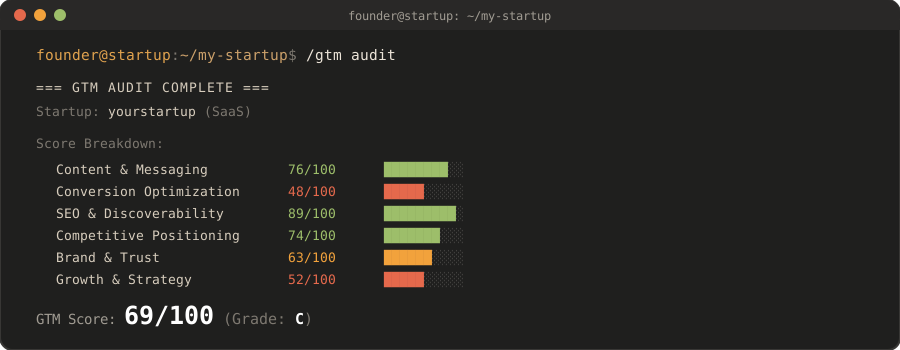
After /gtm init, the next one to run is /gtm audit: it sends a whole team across your site at once, scores the seven dimensions that actually move an early-stage startup - positioning clarity, ICP focus, conversion, activation, channel concentration, AI-search readiness, revenue quality - and rolls them into a single score out of 100 with the biggest fixes ranked first. It never invents a number: what can't be known from your pages is listed as a named gap, not guessed.
Every run saves a dated report you can work through, and every re-audit opens with what changed since the last one - score movement per dimension, what you fixed, what regressed. Re-audit monthly or quarterly to measure strategy movement; re-run weekly only to verify a batch of shipped fixes.
Quick start
Inside Claude Code, install the plugin - two lines, no shell script to run:
/plugin marketplace add adaptico/adaptico-os
/plugin install adaptico-os
Then point it at your project:
/gtm init       # set up your project profile - do this first
/gtm audit      # score your go-to-market
/gtm position   # sharpen your positioning
Other ways to install
One line, into the project you're in (macOS, Linux, or Git Bash on Windows) - run it from your project folder:
curl -fsSL https://raw.githubusercontent.com/adaptico/adaptico-os/main/install.sh | bash
It clones the repo to a temporary folder, copies the skills and the 5 audit agents into .claude/ in your project, and deletes the temporary copy. It also adds an empty projects/ folder for your reports and an .adaptico/telegram.json you can fill in later, and adds .adaptico/ to your .gitignore so git ignores the token file. It pipes a script straight to bash, so read install.sh first if you'd rather not run it unseen - or use the clone path below.
Inspect or customize first - clone anywhere, then install from your project (macOS, Linux, or Git Bash on Windows):
git clone https://github.com/adaptico/adaptico-os.git ~/adaptico-os
cd ~/your-project
bash ~/adaptico-os/install.sh
The installer copies into .claude/ in the folder you run it from (plus the same projects/ folder, .adaptico/telegram.json and .gitignore line), not the folder it lives in, so the clone can sit anywhere and serve several projects. Running it from inside the clone installs into the clone - only useful when you're working on Adaptico OS itself.
Both installers list exactly what they installed; restart Claude Code afterwards so it picks up the new skills. The plugin updates itself with each release; a copied install updates by running the installer again - pull the clone first (the orchestrator tells you when you're behind).
Cursor, Codex, Windsurf, Gemini CLI, or any other agent:
npx skills add adaptico/adaptico-os
This copies the skills only, into your agent's skills directory. The audit's 5 agent files are a Claude Code format and don't come with it, so /gtm audit runs its seven areas one after another in the same session instead of handing them to 5 parallel agents - slower, and with less room for each area on a large site. In Claude Code, use the plugin or one of the installers above to get the agents.
Commands
| Command | What it does |
|---|
| Start here | |
/gtm init | Set up your project profile (PROFILE.md) - do this first |
/gtm <your situation> | Not sure what to run? Describe where you are in plain words - get a short command sequence and one concrete next action |
/gtm audit | Full GTM audit with parallel agents + composite score; re-audits lead with what changed |
/gtm quick | 60-second snapshot - top wins and fixes |
/gtm critic | Red-team any report or draft - ranked findings, the one fix that matters most |
/gtm analytics | Minimum-viable measurement - one activation metric, the 5-7 events that matter, and an attribution sanity check |
| Research & position | |
/gtm interviews | Interview kit + synthesis - turn what customers actually said into evidence your positioning and copy start from |
/gtm position | Positioning chain + messaging house - scored, pressure-tested against live rivals; includes a quick competitor scan |
/gtm competitors | The deep competitor dive (pricing, features, reviews, gaps); position uses it if present |
| Launch & convert | |
/gtm launch | Launch playbook (Product Hunt / Hacker News / X) |
/gtm copy | Before/after copy rewrites for any page |
/gtm copyedit | Tighten your own draft for clarity while keeping your voice |
/gtm humanize | Strip the AI-tells out of any draft before it ships, or list them with --check and change nothing |
/gtm landing | Landing page CRO, tuned for SaaS signup/trial flows |
/gtm pricing | Pricing page + value-based packaging, with a pricing calculator |
/gtm funnel | Funnel & activation analysis - find the leaks (trial / PLG) |
| Reach & retain | |
/gtm outreach | Cold outbound sequences - cold email & LinkedIn DM |
/gtm pitch | Sales kit for a specific call - one-pager, objection doc, discovery-first demo script + a battlecard against a named rival |
/gtm channel | Pick the one channel to bet on (Bullseye), with a not-now list |
/gtm emails | Activation onboarding & dunning (failed-payment recovery) email sequences |
/gtm retention | Activation + churn defense - cancel-flows and save-offers |
/gtm social | Find the live threads your buyers are in, reply well - then a lean X/LinkedIn calendar |
/gtm changelog | Turn shipped work into build-in-public posts - ship notes, an X thread, a LinkedIn post from your git log |
| Scale up (later) | |
/gtm content | Content engine around your buyers' jobs-to-be-done - pillars, cluster map, a cadence you can hold |
/gtm article | One research-first, long-form article built for authority and AI citability - no me-too angles |
/gtm repurpose | Turn one piece into platform-native variants - X thread, LinkedIn post, script outline, newsletter |
/gtm leadmagnet | Email-capture asset that turns organic traffic into a list |
/gtm vs | Comparison / alternatives pages for your own site - high-intent buyers close to a decision |
/gtm seo | SEO groundwork audit + a when-to-invest verdict (it'll say "not yet" when that's right) |
/gtm geo | AI-search visibility - get found and cited by ChatGPT, Perplexity, AI Overviews |
/gtm brand | Brand voice audit + a reusable voice guide (do's & don'ts, copy samples) |
/gtm ads | Should-you-run-ads verdict + CAC/break-even math + a first real ad test - paste-ready copy, you press go |
Point any command at a URL (/gtm audit https://example.com), or pass a saved project's name (/gtm audit my-project) to skip retyping the URL. With a single project set up, running a command bare just uses it.
What's inside
- 31 commands - one focused specialist each, from positioning and conversion to launch, retention, and measurement
- 5 audit agents - the parallel team
/gtm audit sends across your site at once
- 1 orchestrator - routes every command and carries your project context so each one already knows your product
- 2 calculators - deterministic math for pricing and ads, so those numbers are computed, not guessed
Frameworks inside
- Obviously Awesome positioning (April Dunford)
- Positioning maps
- Jobs-to-be-Done (Clayton Christensen)
- The Mom Test (Rob Fitzpatrick)
- The Value Equation, from $100M Offers (Alex Hormozi)
- The Value Proposition Canvas (Alexander Osterwalder)
- Product-Led Growth
- Pirate Metrics / AARRR (Dave McClure)
- The Bullseye framework, from Traction (Gabriel Weinberg & Justin Mares)
- AIDA (E. St. Elmo Lewis)
- Problem-Agitate-Solve (PAS)
- Before-After-Bridge
- The Rule of One (Joanna Wiebe)
- The 4U headline test (Michael Masterson)
- The principles of influence (Robert Cialdini)
- Loss aversion and anchoring (Daniel Kahneman & Amos Tversky)
- Topic clusters (HubSpot)
- E-E-A-T, from Google's Search Quality Rater Guidelines
- Brand archetypes (after Carl Jung)
- SWOT analysis
- Impact/effort prioritization
Uninstall
Plugin install:
/plugin uninstall adaptico-os
Copied install (one-line or clone): run a clone's uninstaller from your project folder (macOS, Linux, or Git Bash on Windows). It removes only the skills and agents Adaptico OS installed there, and leaves projects/ and .adaptico/telegram.json (which holds your bot token, if you set one) in place. A one-line install leaves no clone behind, so clone the repo anywhere first.
cd ~/your-project
bash ~/adaptico-os/uninstall.sh
License
MIT - see LICENSE. Third-party notices: CREDITS.md.
Trademark
"Adaptico" and "Adaptico OS" are trademarks of the Adaptico project. The MIT license covers the code, not the name or logo. If you fork or redistribute, please use your own name and don't present your version as official Adaptico or imply endorsement.
More



 @coreyhaines31


