
Documentation
MCP
wenlan
Ships with wenlan: A living wiki your AI writes from your notes, code, AI chats (memories), and docs, checked against sources. It flags what it can’t back up and updates pages when sources change.…
Claude Code
> /plugin marketplace add wenlan-app/wenlan> /plugin install wenlan@7xuanlu-wenlan
Codex
Cursor
Gemini CLI
GitHub Copilot
$ git clone https://github.com/wenlan-app/wenlan
Clone the repository
OpenCode
Windsurf
Security report
Info
Not enough data
Known flaws
Not published
Signed build
Not published
Maintained
Oct 31, 2026
Last push
Licence
Apache-2.0
Runs as
Local process
On your machine
Deprecated
Not published
Signals from public registries, not an audit. Checked Nov 11, 2026.
wenlan README

Notes, code, AI chats into a wiki, checked against sources. One source of truth for you and your AI tools, kept up to date as your sources change. Your notes stay on your machine and go only to the AI tools you pick.
English | 简体中文 | 繁體中文 | Español
Download · Get started · Sources · Docs · Discord



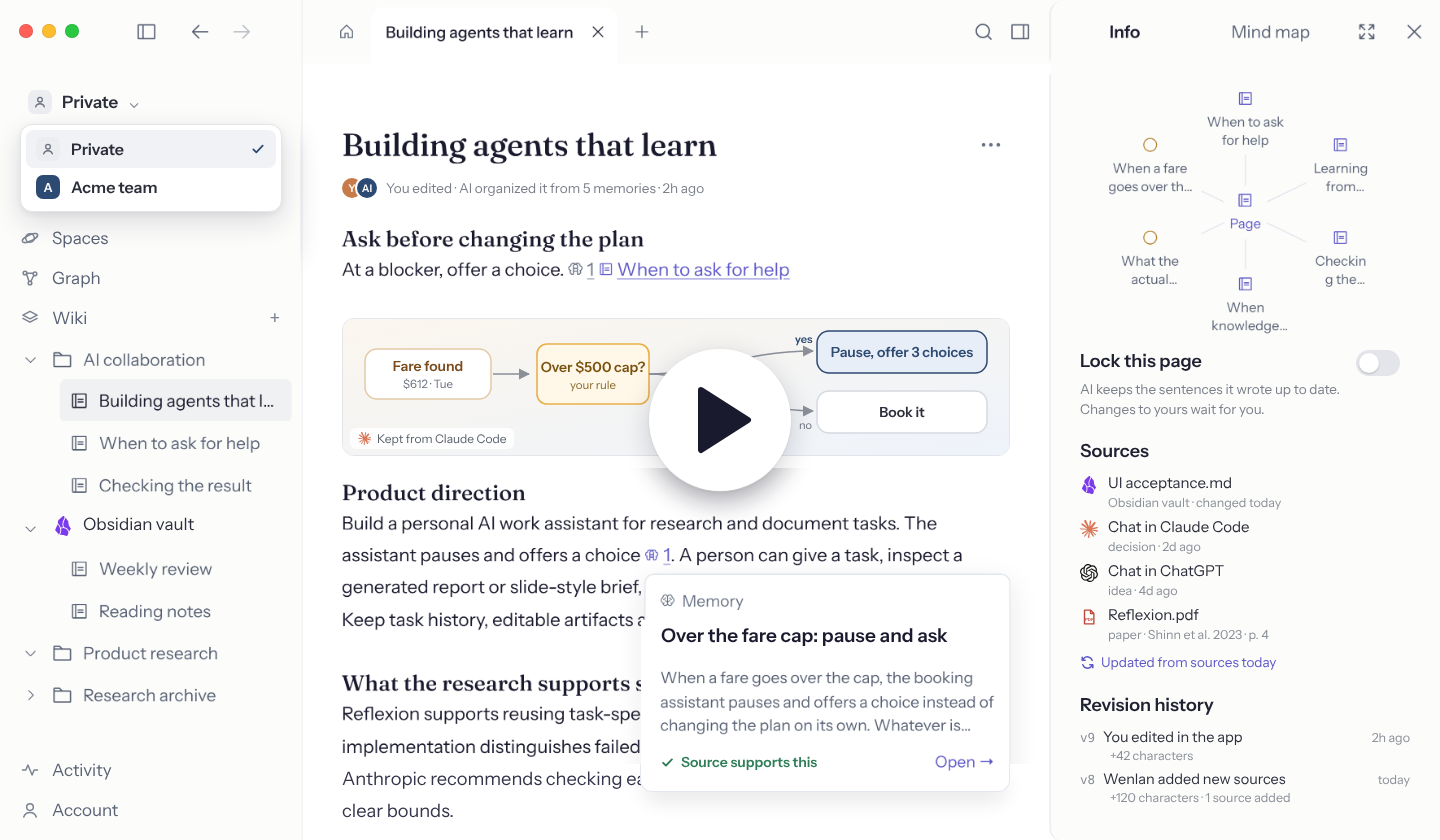
Why Wenlan
I started Wenlan because my notes, documents, and AI chats were scattered and always changing, and keeping a vault from rotting took constant upkeep. I wanted an AI-native knowledge base that stays useful without the hassle.
- Your AI writes it and keeps it current: The AI tool you already use turns your notes, files, and AI chats into pages, with no extra model.
- It tells you what it can't back up: A page is refused when most of its citations don't match the source, and each citation opens the original.
- It flags what changed: When a source, page, or code line changes, only the pages that rely on it are flagged.
- What you write stays yours: Wenlan never edits your existing notes without your OK, and pages you wrote are set to Ask me first.
- Bring what you have, keep it when you switch tools: Notes, documents, links, and chats come in (full list) as local Markdown that works in the AI tools you pick.
Get started
1. Download and open Wenlan
Download the desktop app for macOS 11 or later on Apple Silicon, or Windows x64. The app is in English, 简体中文, and 繁體中文.
Prefer the terminal? On a Mac, run npx -y wenlan setup, or brew install 7xuanlu/tap/wenlan and then wenlan setup. Linux and Windows: CLI install guide.
2. Bring in your material
Create a page, or bring in an Obsidian vault, a Logseq graph, a folder, or earlier AI chats. Import guide.
3. Connect your AI tool
| AI tool | Connection | Setup |
|---|---|---|
| Claude Code / Claude Desktop | Plugin / MCP | Claude guide |
| ChatGPT Desktop (Codex), Codex CLI | Plugin | Codex guide |
| Cursor, GitHub Copilot, VS Code, Gemini CLI, Antigravity, Windsurf, Kiro, OpenCode, Kimi Code | MCP and skills | MCP guide |
| Muse Code and other MCP clients | MCP | MCP guide |
In the App's Settings, Add a tool finds the AI tools on your computer and Connect all sets them up in one press. Then start a new AI session and ask:
/recall my earlier pages and decisions on this, then help me: …
Use $recall in Codex; with an MCP-only tool, just ask it to check Wenlan first.
When an import finishes, the app offers Write pages with your AI tool to turn it into your first cited pages. No command needed.
Sources and imports
| Bring in | How you can use it |
|---|---|
| Markdown, text, text-based PDFs, DOCX, or a folder | Search and cite the imported text. Import a folder once, or keep it in sync as its files change. |
| An Obsidian vault or a Logseq graph | Search and cite existing notes. Keep it in sync to follow changes in the background, or import it once. Wenlan never edits your existing notes without your OK: in an Obsidian vault, notes you set to Ask me first get AI suggestions you accept or decline. |
| Web links | Paste a link into a page and it is saved as a source. YouTube, X, Threads, Instagram, and RedNote links show as a card, a playable video, or the original post. Or paste text with its URL to save that excerpt. |
| Gmail, Notion, Google Drive, Slack, GitHub | Your AI tool reads them with its own connectors and saves what matters to Wenlan with a link to the original. |
| A code repository | /wenlan wiki writes pages tied to the code lines they rely on. Code wiki. |
| An OKF bundle | Connect an Open Knowledge Format folder, such as an OpenWiki or a Wenlan export, as a source. |
| Your AI chats as you work | Claude Code, Codex, and your other AI tools save the decisions, findings, and progress from each conversation as memories, and pages cite them. Full transcripts are not imported. |
| ChatGPT or Claude export ZIPs | Retrieve earlier conversation text, including a last message that got no reply, and cite it as context; imports are snapshots, not live account connections. |
| Existing memories as text | Save preferences, decisions, or lessons as individual memories. |
Scanned PDFs need text extraction first; chat attachments are not imported. Import guide.
Steep: keep knowledge useful as it changes
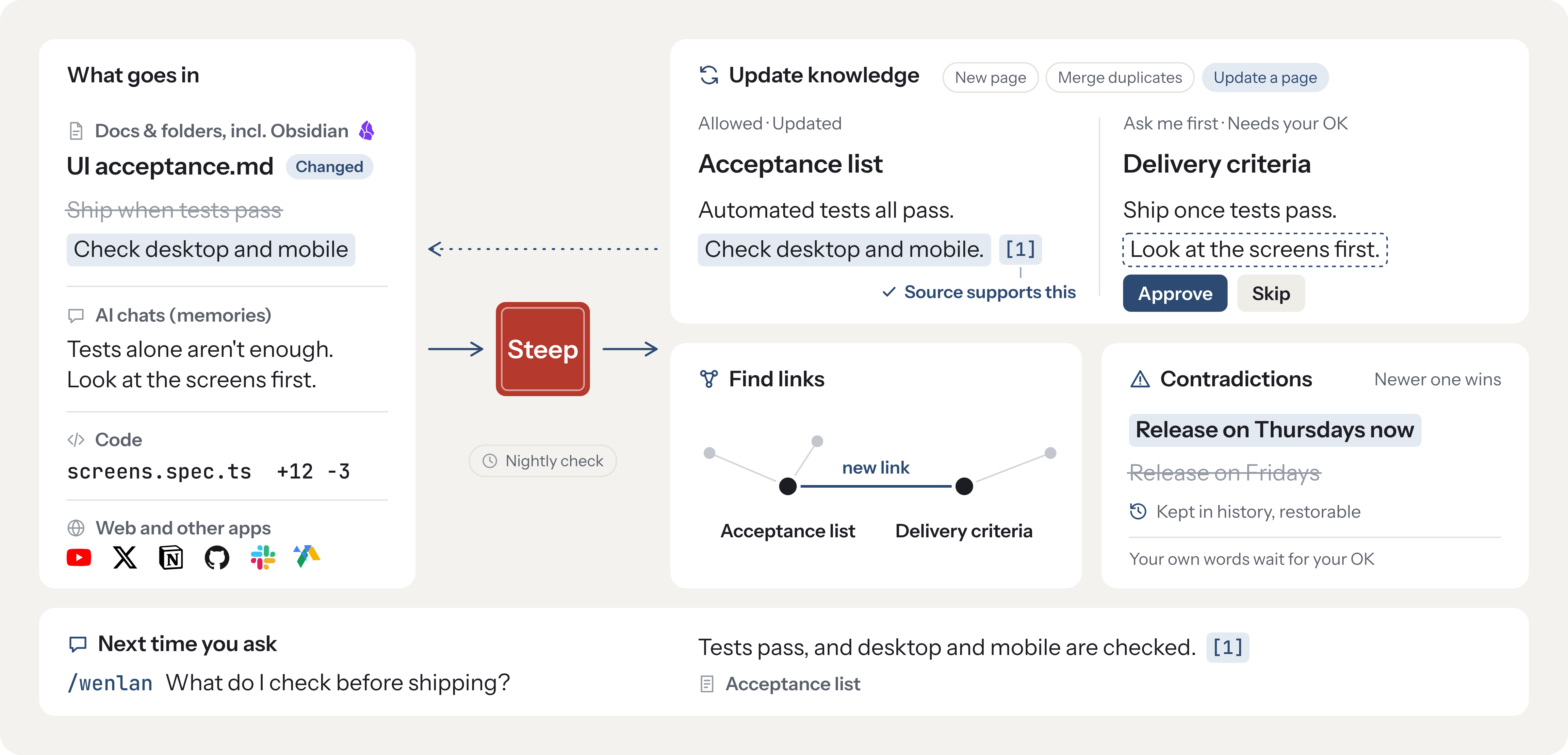
Saving material is only the start. Steep prepares it for reuse and keeps supported pages current, so you and your AI can build on earlier findings instead of repeatedly working through the originals.
Choose one of two modes in Settings:
- On demand (new installs start here): when your AI tool saves or writes into Wenlan, it steeps as it goes, and while it works it hears which pages are out of date and which material is in no page yet. No command needed;
/wenlan steepis there if you want to catch up on everything at once. - Automatic: Wenlan steeps in the background with the model you assign.
What steep does:
- Enrich memories: Add types, structured details, search cues, and graph links so individual findings are easier to retrieve in context.
- Follow the evidence: Changed sources, memories, or cited code flag dependent pages for refresh; new memories can enrich eligible pages. Refresh keeps the saved page if a draft fails citation checks. Passing these checks does not establish factual correctness.
- Keep control and history: Background refresh updates eligible AI-maintained pages; your authored or edited pages receive proposed revisions. Explicit memory replacements hide or archive earlier memories while preserving their links. Page revisions remain inspectable.
- Ask me first: With Ask me first on pages I wrote on, as it is for new installs, AI changes to pages you wrote or edited wait for your OK. Each page's AI changes setting shows Allowed or Ask me first. Pages AI wrote keep updating.
What it does on its own
In both modes, without a model, Wenlan:
- Flags out-of-date pages when their sources, memories, or cited code change. Repository wiki pages show what changed in the code.
- Suggests merging near-duplicate pages as a card for you or your AI to accept or dismiss.
- Tidies links: lists
[[links]]that point to no page yet, and drops citations to memories you deleted.
Rewriting a flagged page takes a model. In Automatic, Wenlan does it in the background. In On demand, your AI tool is told which pages are waiting and can bring them up to date while it works.
Steep guide: triggers, review rules, and model setup. Choose an on-device model, a local server, or a cloud provider; model-backed background work is optional.
A wiki for your code repository
Run /wenlan wiki ($wenlan wiki in Codex) in a repository. Your AI tool plans the wiki from the repository itself: an overview that lists every page, then one page for each part or flow a newcomer needs. A small tool gets a few pages, a large monorepo many more. A rerun writes only the pages that are missing.
- Tied to the code: Each page records the code lines it was read from. When that code changes, the page shows what changed with one Review button, and steep brings the page up to date.
- In the repository as a pull request: The GitHub button on a Space connects it to its repository and puts the pages that rely on that code in the repository's
wiki/folder as a pull request. Run it from the button, or turn on the daily update: it runs your own AI tool on your computer, or runs on GitHub Actions with your AI tool's key saved as a repository secret, so your computer can stay off. The same pull request fixes sentences in the repository's own docs that the code no longer agrees with, for you to review. - Your edits stay: A wiki page someone edited in the repository keeps that edit. Pages that cite your memories or chats stay out of the repository.
Organize scattered material into knowledge
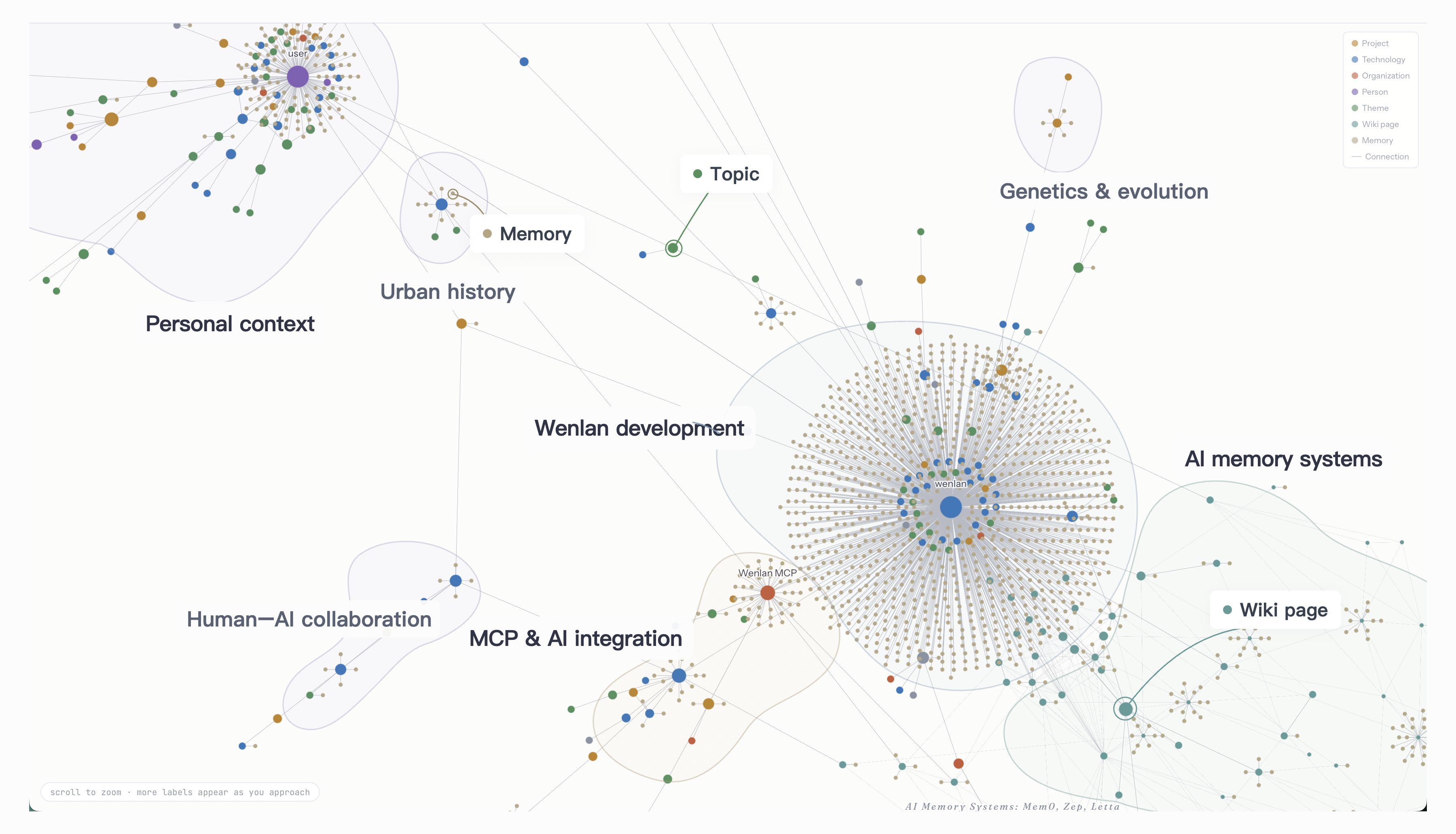
Sources preserve documents and conversations; memories keep the decisions, lessons, and reasons worth reusing. Combine them in editable Markdown pages with citations, connect pages with [[wikilinks]], and follow citations back to the originals. Pages can include Mermaid diagrams, which the App draws; when an AI tool writes a page, Wenlan checks its diagrams for common mistakes and names the line to fix.
Stats
95
Stars
8
Forks
Active
Maintenance
Rust
Language
Apache-2.0
License
Last commit
Created

Ships withwenlan
8921 skills3 agents1 MCP
Stars on GitHub
Momentum
- stars in total
- 89
More MCP servers from other plugins.

bundle
MCPShips with scaccogatto-okf: **Teach your coding agent to author, maintain, validate and visualize portable knowledge bundles:…
 @scaccogattoInstall MCP
aws-knowledge
MCPSearches official AWS documentation, API references and architecture guidance to ground answers in current cloud docs.
 @yoshiiryo1Install MCP
Auto-invoked

Questions about wenlan.
- Which coding agents can use wenlan?
- wenlan works in any agent that reads an MCP config file: Claude Code, Codex, Cursor, Gemini CLI, GitHub Copilot, OpenCode and Windsurf. Each agent reads it from its own file; this page names the file for each one.
- How do I add wenlan to Claude Code?
- Run these in order, one at a time. 1. In Claude Code: /plugin marketplace add wenlan-app/wenlan 2. In Claude Code: /plugin install wenlan@7xuanlu-wenlan