
VerifiedPlugin
dx
Here are my tips for getting the most out of Claude Code, including a custom status line script and Claude Code running itself in a container. Also includes the dx plugin: skills for everyday dev workflows.
9 skills10k
 @ykdojo
The easiest way to run multiple Claude Code sessions, each in its own container, with a dashboard to manage them all. Quick setup with battle-tested sensible defaults and skills. See architecture.md for design details.
$ npx -y skills add ykdojo/safeclaw --agent claude-code
Repo: ykdojo/safeclaw
What's inside
The easiest way to run multiple Claude Code sessions, each in its own container, with a dashboard to manage them all. Quick setup with battle-tested sensible defaults and skills.
https://github.com/user-attachments/assets/e282ed8f-3ec9-4a9e-aa9e-4bc84f9281e9
See architecture.md for design details.
This lets you run Claude Code with --dangerously-skip-permissions safely and fast.
Each Claude Code session runs in its own container. Spin up as many as you need - they're isolated from each other and start in seconds. Run different research tasks, projects, or experiments in parallel without interference. Conversation history is automatically stored on your host machine via a volume mount.
# Build image (once, or after changes)
./scripts/build.sh

# Start container and web terminal
./scripts/run.sh

# To mount a local project (host_path:container_path)
./scripts/run.sh -v ~/myproject:/home/sclaw/myproject

# Run multiple sessions with -s
./scripts/run.sh -s work        # safeclaw-work on next available port
./scripts/run.sh -s research    # safeclaw-research on next available port
On first run, run.sh will prompt you to set up authentication tokens. It then starts a web terminal at http://localhost:7681 and opens it in your browser.
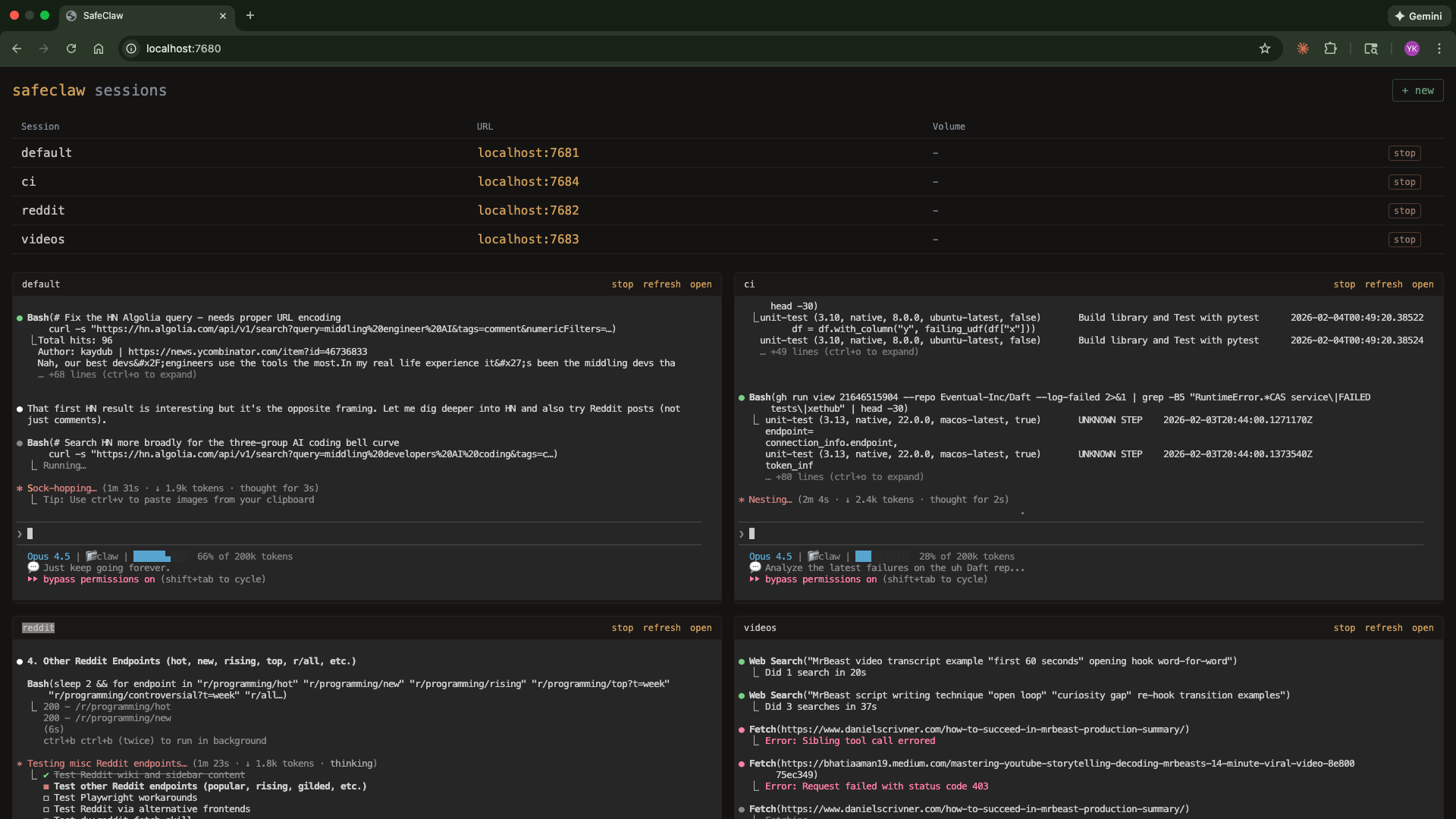
Manage all sessions from a web dashboard:
node dashboard/server.js
Opens at http://localhost:7680 with:
./scripts/setup-slack.sh - Add Slack read accessautoCompactEnabled: false - prevents automatic context compactionpromptSuggestionEnabled: false - disables prompt suggestions--dangerously-skip-permissions enabled (because it's containerized)Each session's data persists locally at:
~/.config/safeclaw/sessions/<session-name>/
This maps to /home/sclaw/.claude/projects/ inside the container and includes:
-home-sclaw/memory/MEMORY.md, loaded into the system prompt each conversationRebuilding containers or restarting sessions won't affect your history or memory.
Tokens are stored in ~/.config/safeclaw/.secrets/ and injected as env vars on each run. The filename becomes the env var name.
| File | How to generate |
|---|---|
CLAUDE_CODE_OAUTH_TOKEN | claude setup-token (valid 1 year) |
GH_TOKEN | gh auth token or create a PAT at github.com/settings/tokens |
SLACK_TOKEN | Optional - ./scripts/setup-slack.sh |
You can add any additional secrets by creating files in the .secrets/ directory.
| Script | Description |
|---|---|
scripts/build.sh | Build the Docker image and remove old container |
scripts/run.sh | Start/reuse container, inject auth, start ttyd. Use -s name for named sessions, -v for volumes, -n to skip opening browser, -q "question" to start with a query. |
scripts/setup-slack.sh | Set up Slack integration (optional) |
scripts/manage-env.js | Manage environment variables (list, add, delete) |
dashboard/server.js | Web dashboard for managing multiple sessions |
Inside each container, these aliases are available:
| Alias | Command |
|---|---|
c | claude |
cs | claude --dangerously-skip-permissions |
| Command | Runs |
|---|---|
npm run build | ./scripts/build.sh |
npm start | ./scripts/run.sh |
npm run dashboard | node dashboard/server.js |
npm run dashboard:dev | nodemon dashboard/server.js |
npm run setup-slack | ./scripts/setup-slack.sh |
npm run manage-env | node scripts/manage-env.js |
Defined in setup/skills/.
| Skill | Description | Requires |
|---|---|---|
| slack | Read Slack messages, channels, DMs, and search (read-only) | SLACK_TOKEN |
| yt-dlp | Download YouTube videos, audio, and subtitles/transcripts | - |
| gdoc | Read publicly shared Google Docs | - |
View @ykdojo’s profileHere are my tips for getting the most out of Claude Code, including a custom status line script and Claude Code running itself in a container. Also includes the dx plugin: skills for everyday dev workflows.
@ykdojoFAQ
safeclaw is a Claude Code plugin with 3 hand-picked skills for development work, indexed on Flowy. Install it with the command on its page. It includes gdoc, slack, yt-dlp. Its skills do not fire on their own yet. Request auto-invocation to have Flowy route them as you prompt. Free and open source.
Is this plugin yours?
Claim it with GitHubSubmit a pluginPromote it