
Development
Plugin
repomix
📦 Repomix is a powerful tool that packs your entire repository into a single, AI-friendly file. Perfect for when you need to feed your codebase to Large Language Models (LLMs) or other AI tools like Claude, ChatGPT, DeepSeek, Perplexity, Gemini, Gemma, Llama, Grok, and more.

Plugin Signal84/100Strong
maintained100
capable48
documented100
adopted95
Install on Claude Code
> /plugin marketplace add yamadashy/repomix
Stats
28,440
Stars
1,538
Forks
Active
Maintenance
TypeScript
Language
MIT
License
9m ago
Last commit
2y ago
Created
Repo: yamadashy/repomix
What's inside
Skill(3 skills)
/browser-extension-developerUse this skill when developing or maintaining browser extension code in the `browser/` directory, including Chrome/Firefox/Edge compatibility, content scripts, background scripts, or i18n updates./repomix-explorerAnalyze or explore a codebase (remote or local repository) by packing it with the Repomix CLI, then reading and searching the generated output. Use when the user wants a high-level understanding of an unfamiliar or large repo, not a targeted edit. Trigger for: -/website-maintainerUse this skill when working on the Repomix documentation website in `website/` directory, including VitePress configuration, multi-language content, or translation workflows.
Command(4 commands)
README
Warp, built for coding with multiple AI agents
Available for MacOS, Linux, & Windows
CodeRabbit | AI Code Reviews
Cut code review time & bugs in half, instantly.







📦 Repomix is a powerful tool that packs your entire repository into a single, AI-friendly file.
It is perfect for when you need to feed your codebase to Large Language Models (LLMs) or other AI tools like Claude,
ChatGPT, DeepSeek, Perplexity, Gemini, Gemma, Llama, Grok, and more.
Please consider sponsoring me.


🏆 Open Source Awards Nomination
We're honored! Repomix has been nominated for the Powered by AI category at the JSNation Open Source Awards 2025.
This wouldn't have been possible without all of you using and supporting Repomix. Thank you!
🎉 New: Repomix Website & Discord Community!
- Try Repomix in your browser at repomix.com
- Join our Discord Server for support and discussion
We look forward to seeing you there!
🌟 Features
- AI-Optimized: Formats your codebase in a way that's easy for AI to understand and process.
- Token Counting: Provides token counts for each file and the entire repository, useful for LLM context limits.
- Simple to Use: You need just one command to pack your entire repository.
- Customizable: Easily configure what to include or exclude.
- Git-Aware: Automatically respects your
.gitignore,.ignore, and.repomixignorefiles. - Security-Focused: Incorporates Secretlint to detect files matching known credential formats and leave them out of the output.
- Code Compression: The
--compressoption uses Tree-sitter to extract key code elements, reducing token count while preserving structure.
🚀 Quick Start
Using the CLI Tool >_
You can try Repomix instantly in your project directory without installation:
npx repomix@latest
Or install globally for repeated use:
# Install using npm
npm install -g repomix

# Alternatively using yarn
yarn global add repomix

# Alternatively using bun
bun add -g repomix

# Alternatively using Homebrew (macOS/Linux)
brew install repomix

# Then run in any project directory
repomix
That's it! Repomix will generate a repomix-output.xml file in your current directory, containing your entire
repository in an AI-friendly format.
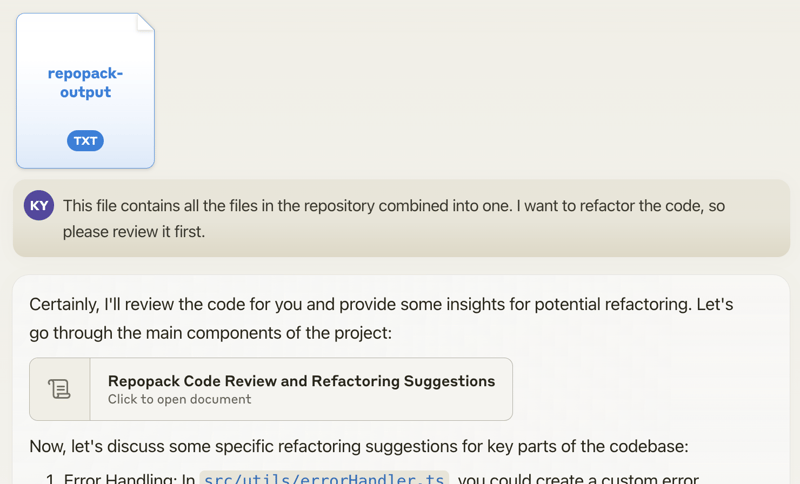
You can then send this file to an AI assistant with a prompt like:
This file contains all the files in the repository combined into one.
I want to refactor the code, so please review it first.
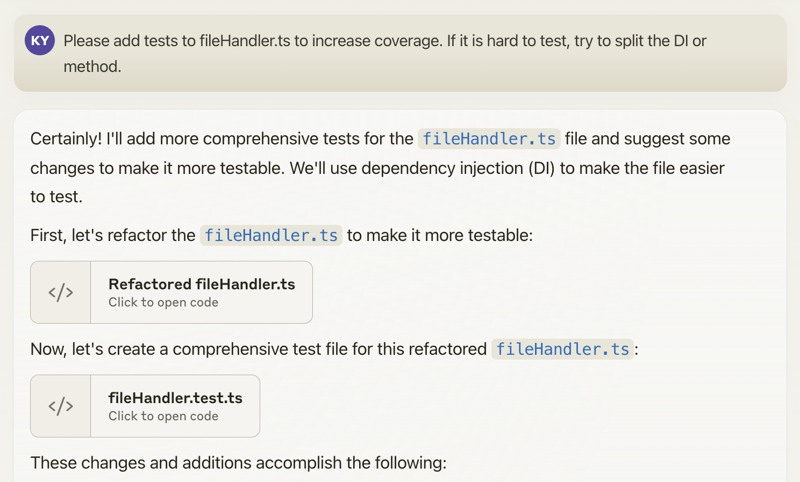
When you propose specific changes, the AI might be able to generate code accordingly. With features like Claude's Artifacts, you could potentially output multiple files, allowing for the generation of multiple interdependent pieces of code.
Happy coding! 🚀
Using The Website 🌐
Want to try it quickly? Visit the official website at repomix.com. Simply enter your repository name, fill in any optional details, and click the Pack button to see your generated output.
Available Options
The website offers several convenient features:
- Customizable output format (XML, Markdown, or Plain Text)
- Instant token count estimation
- Much more!
Using The Browser Extension 🧩
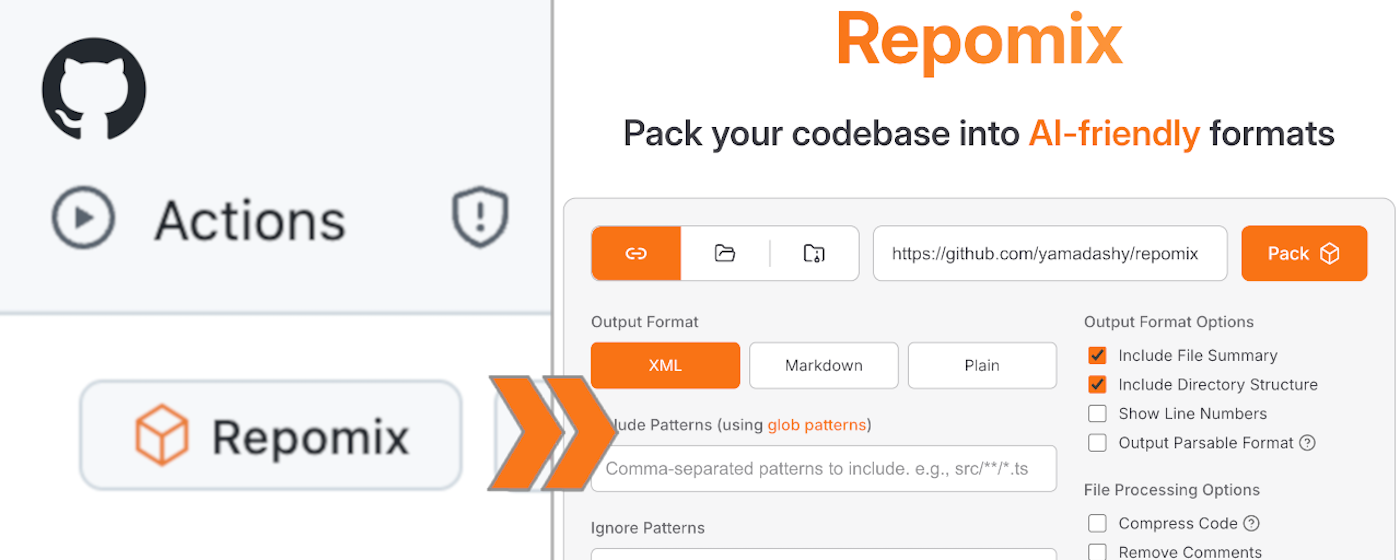
Get instant access to Repomix directly from any GitHub repository! Our Chrome extension adds a convenient "Repomix" button to GitHub repository pages.
Install
- Chrome Extension: Repomix - Chrome Web Store
- Firefox Add-on: Repomix - Firefox Add-ons
Features
- One-click access to Repomix for any GitHub repository
- More exciting features coming soon!
Using The VSCode Extension ⚡️
A community-maintained VSCode extension called Repomix Runner (created by massdo) lets you run Repomix right inside your editor with just a few clicks. Run it on any folder, manage outputs seamlessly, and control everything through VSCode's intuitive interface.
Want your output as a file or just the content? Need automatic cleanup? This extension has you covered. Plus, it works smoothly with your existing repomix.config.json.
Try it now on the VSCode Marketplace! Source code is available on GitHub.
Alternative Tools 🛠️
If you're using Python, you might want to check out Gitingest, which is better suited for Python ecosystem and data
science workflows:
https://github.com/cyclotruc/gitingest
📊 Usage
To pack your entire repository:
repomix
To pack a specific directory:
repomix path/to/directory
To pack specific files or directories using glob patterns:
repomix --include "src/**/*.ts,**/*.md"
To exclude specific files or directories:
repomix --ignore "**/*.log,tmp/"
To pack a remote repository:
repomix --remote https://github.com/yamadashy/repomix

# You can also use GitHub shorthand:
repomix --remote yamadashy/repomix

# You can specify the branch name, tag, or commit hash:
repomix --remote https://github.com/yamadashy/repomix --remote-branch main

# Or use a specific commit hash:
repomix --remote https://github.com/yamadashy/repomix --remote-branch 935b695

# Another convenient way is specifying the branch's URL
repomix --remote https://github.com/yamadashy/repomix/tree/main

# Commit's URL is also supported
repomix --remote https://github.com/yamadashy/repomix/commit/836abcd7335137228ad77feb28655d85712680f1
To pack files from a file list (pipe via stdin):
# Using find command
find src -name "*.ts" -type f | repomix --stdin

# Using git to get tracked files
git ls-files "*.ts" | repomix --stdin

# Using grep to find files containing specific content
grep -l "TODO" **/*.ts | repomix --stdin

# Using ripgrep to find files with specific content
rg -l "TODO|FIXME" --type ts | repomix --stdin

# Using ripgrep (rg) to find files
rg --files --type ts | repomix --stdin

# Using sharkdp/fd to find files
fd -e ts | repomix --stdin

# Using fzf to select from all files
fzf -m | repomix --stdin

# Interactive file selection with fzf
find . -name "*.ts" -type f | fzf -m | repomix --stdin

# Using ls with glob patterns
ls src/**/*.ts | repomix --stdin

# From a file containing file paths
cat file-list.txt | repomix --stdin

# Direct input with echo
echo -e "src/index.ts\nsrc/utils.ts" | repomix --stdin
The --stdin option allows you to pipe a list of file paths to Repomix, giving you ultimate flexibility in selecting which files to pack.
When using --stdin, the specified files are effectively added to the include patterns. This means that the normal include and ignore behavior still applies - files specified via stdin will still be excluded if they match ignore patterns.
[!NOTE] When using
--stdin, file paths can be relative or absolute, and Repomix will automatically handle path resolution and deduplication.
To include git logs in the output:
File tree
FAQ
repomix is a Claude Code plugin with 3 hand-picked skills for development work, indexed on Flowy. Install it with the command on its page. It includes browser-extension-developer, repomix-explorer, website-maintainer. Its skills do not fire on their own yet. Request auto-invocation to have Flowy route them as you prompt. Free and open source.
- What is repomix?
- 📦 Repomix is a powerful tool that packs your entire repository into a single, AI-friendly file. Perfect for when you need to feed your codebase to Large Language Models (LLMs) or other AI tools like Claude, ChatGPT, DeepSeek, Perplexity, Gemini, Gemma, Llama, Grok, and more.
- How do I install repomix?
- Run these in Claude Code: /plugin marketplace add yamadashy/repomix. Then prompt normally.
- Does repomix auto-invoke its skills?
- Not yet. It is indexed on Flowy as a plain plugin. Request auto-invocation on its page and Flowy will route its skills for you as you prompt.
- Is repomix free?
- Yes. Flowy is free and open source, with nothing gated. You can read every skill in full before you install.
Is this plugin yours?
Claim it with GitHubSubmit a pluginPromote it