claude-dashboard


Comprehensive status line plugin for Claude Code — unified usage monitoring across Claude, Codex, Gemini, Antigravity, and z.ai CLIs, with context, rate limits, cost tracking, and a modular widget system.
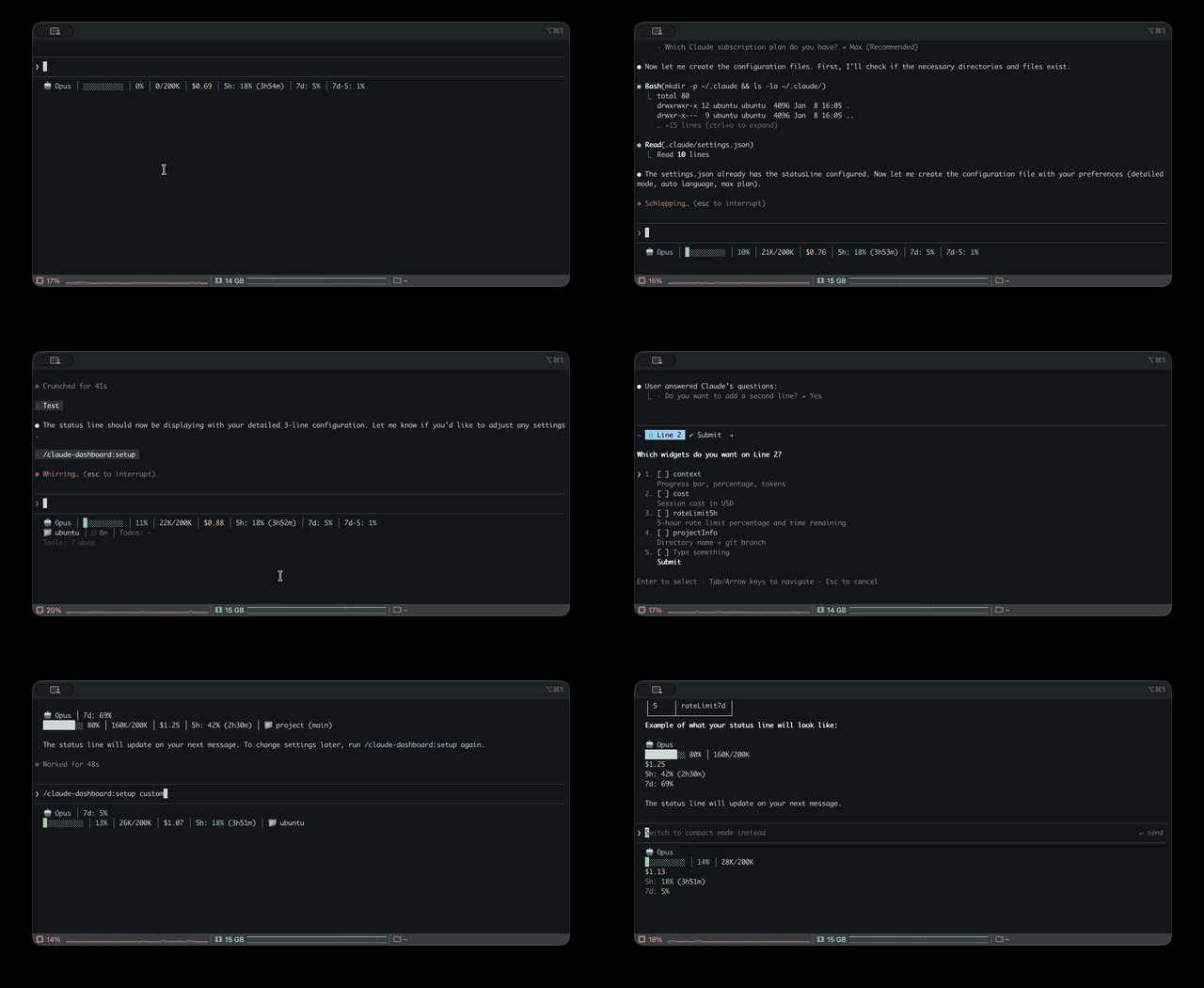
Demo
Installation
Requirements: Claude Code v1.0.80+ / Node.js 18+
From Plugin Marketplace
/plugin marketplace add uppinote20/claude-dashboard
/plugin install claude-dashboard
/claude-dashboard:setup
Manual Installation
git clone https://github.com/uppinote20/claude-dashboard.git "${CLAUDE_CONFIG_DIR:-$HOME/.claude}/plugins/claude-dashboard"
/claude-dashboard:setup
/claude-dashboard:setup looks for the plugin under plugins/cache/claude-dashboard/claude-dashboard/,
which a manual clone into plugins/claude-dashboard/ does not match — the setup command's shim lookup
will find nothing to copy. Point statusLine.command in settings.json directly at your clone's
dist/index.js instead (e.g. node "${CLAUDE_CONFIG_DIR:-$HOME/.claude}/plugins/claude-dashboard/dist/index.js"),
and note that manual installs do not get automatic version pickup — git pull and update the path
yourself after each release.
Display Modes
Compact (1 line) - Default:
Model, context progress bar, cost, rate limits (5h/7d) or z.ai usage (mutually exclusive by provider)
Normal (2 lines):

Adds project info, session ID, session duration, burn rate, todo progress
Detailed (6 lines):

Adds depletion time, config counts, tool/agent status, cache hit, performance badge, token breakdown, forecast, budget, Codex/Gemini/Antigravity usage
Multi-provider support: z.ai/ZHIPU, Codex, Gemini, Antigravity auto-detected when installed.
Widgets
| Category | Widget | Description |
|---|
| Core | model | Model name and version with emoji (e.g. Opus 5.5), effort level for Opus/Sonnet/Fable (MAX/X/H/M/L), fast mode for Opus (↯). Reads the live effort.level / fast_mode from stdin, falling back to settings.json on older Claude Code |
| context | Progress bar, percentage, tokens (🟢 0-50% / 🟡 51-80% / 🔴 81-100%) |
| contextBar | Progress bar only (sub-widget of context) |
| contextPercentage | Percentage only (sub-widget of context) |
| contextUsage | Token count only, e.g. 42K/200K (sub-widget of context) |
| cost | Session cost in USD |
| projectInfo | Directory + git branch (clickable OSC8 link) + ahead/behind (↑↓), subpath from project_dir, worktree indicator (🌳) |
| Rate Limits | rateLimit5h | 5-hour rate limit with reset countdown; hidden on verified Ultra accounts, which have no 5h limit |
| rateLimit7d | 7-day rate limit (Pro, Max and Ultra) |
| rateLimit7dSonnet | 7-day Sonnet limit (Max only) — deprecated ~2026-06: Anthropic merged it into the unified weekly bucket at the Sonnet 5 launch, so the API returns null and the widget stays hidden until/unless the field returns |
| rateLimit7dFable | 7-day Fable limit (Max and Ultra) |
| Session | sessionId | Session ID (short 8-char) |
| sessionIdFull | Session ID (full UUID) |
| sessionName | Session name from /rename command |
| sessionDuration | Session duration |
| lastPrompt | Last user prompt with timestamp |
| configCounts | CLAUDE.md, AGENTS.md, rules, MCPs, hooks, +Dirs |
| Activity | toolActivity | Running/completed tools with targets (e.g., Read(app.ts)) |
| agentStatus | Subagent progress with resolved model, e.g. Explore(Opus) (from the Agent tool's model param or CLAUDE_CODE_SUBAGENT_MODEL) |
| todoProgress | Todo completion rate |
| Analytics | burnRate | Token consumption per minute, session average (input + cache write + output) |
| cacheHit | Cache hit rate percentage (last request) |
| promptCache | Session prompt-cache health: ♨️ warm with time left before it goes cold / ❄️ cold, hit ratio, miss count, e.g. ♨️ 4m 91% miss 2 (from prompt_cache, Claude Code ≥ 2.1.251). The warm→cold switch happens on its own; set statusLine.refreshInterval (e.g. 60) to keep the minute countdown ticking while idle |
| promptCacheState | Warm/cold icon + time left only, e.g. ♨️ 4m (sub-widget of promptCache) |
| promptCacheHit | Session cache hit ratio only, e.g. 91% (sub-widget of promptCache) |
| promptCacheMisses | Miss count only, e.g. miss 2; hidden at 0 (sub-widget of promptCache) |
| depletionTime | Estimated time to rate limit (approx)¹ |
| Multi-CLI | codexUsage | OpenAI Codex CLI usage (auto-hide if not installed)² |
| geminiUsage | Google Gemini CLI - current model (auto-hide if not installed or on a retired personal tier; not in detailed, opt in with G)³ |
| geminiUsageAll | Google Gemini CLI - all models (auto-hide if not installed)³ |
| antigravityUsage | Google Antigravity CLI - weekly quota by model family (auto-hide if not installed)⁸ |
| antigravityUsageAll | Google Antigravity CLI - per-model quota (auto-hide if not installed)⁸ |
| zaiUsage | z.ai/ZHIPU usage (auto-hide if not using z.ai)⁴ |
| Insights | tokenBreakdown | Input/output/cache write/read token breakdown |
| performance | Composite efficiency badge (cache hit + output ratio) |
| forecast | Estimated hourly cost based on session rate |
| budget | Daily spending vs configured budget limit⁵ |
| tokenSpeed | Output token generation speed (tok/s), session average |
| tokenSpeedLast | Output token generation speed of the most recent response only |
| todayCost | Total spending across all sessions today |
| Status | peakHours | Peak hours indicator with countdown (based on PeakClaude)⁶ |
| tagStatus | Commits ahead of matched git tags (default pattern v*, customize via tagPatterns)⁷ |
| slashCommand | Active slash command for the current turn (🎯), cleared by next plain-text message |
| agentMode | Session agent identity: 👤 custom agent (via /agent <name>) or 🤖 subagent type |
| Info | linesChanged | Uncommitted lines added/removed, including untracked files (+N -N) |
| outputStyle | Current output style (hidden when "default") |
| version | Claude Code version display |
| vimMode | Vim mode (NORMAL/INSERT), auto-hides when vim disabled |
| apiDuration | API time as % of total session time |
¹ Assumes all utilization came from this session; improves as session runs longer.
² Auto-hides if ~/.codex/auth.json not found. ³ Auto-hides if ~/.gemini/oauth_creds.json not found — Gemini CLI personal tiers were retired 2026-06-18 in favor of Antigravity CLI (enterprise still supported). ⁴ Auto-hides if not detected via ANTHROPIC_BASE_URL. ⁵ Requires "dailyBudget" in config. ⁶ Peak = weekdays 5-11 AM PT; shows countdown to next transition. ⁷ Uses tagPatterns config (default ["v*"]); auto-hides when no pattern matches a reachable tag. ⁸ Auto-hides if ~/.gemini/antigravity-cli/antigravity-oauth-token not found.
i18n: English and Korean supported (auto-detect or set via setup).
Configuration
# Preset modes
/claude-dashboard:setup compact             # 1 line (default)
/claude-dashboard:setup normal en pro       # 2 lines, English, Pro plan
/claude-dashboard:setup detailed ko max     # 6 lines, Korean, Max plan

# Custom mode: control widget order and line composition
# Format: "widget1,widget2,...|widget3,widget4,..." (| separates lines)
/claude-dashboard:setup custom auto max "model,context,cost|projectInfo,todoProgress"
Plan differences:
| Feature | Max | Pro |
|---|
| 5h rate limit + countdown | ✅ | ✅ |
| 7d all models | ✅ | ❌ |
Advanced Configuration
Interactive Mode: Run /claude-dashboard:setup without arguments. Best for preset selection; for full widget control, use Direct Mode or edit the JSON file directly.
Display Mode Presets (zaiUsage and rateLimit* are mutually exclusive based on provider):
| Mode | Lines | Widgets |
|---|
compact | 1 | model, context, cost, rateLimit5h/7d/7dSonnet, zaiUsage |
normal | 2 | + projectInfo, sessionId, sessionDuration, burnRate, todoProgress |
detailed | 6 | + depletionTime, configCounts, toolActivity, agentStatus, cacheHit, promptCache, performance, tokenBreakdown, forecast, budget, codexUsage, antigravityUsage, linesChanged, outputStyle, version, peakHours, lastPrompt, vimMode, apiDuration, tagStatus |
Configuration file (~/.claude/claude-dashboard.local.json):
{
  "language": "auto",
  "plan": "max",
  "displayMode": "custom",
  "lines": [
    ["model", "context", "cost", "rateLimit5h"],
    ["projectInfo", "todoProgress"]
  ],
  "theme": "default",
  "separator": "pipe",
  "dailyBudget": 15,
  "disabledWidgets": [],
  "modPane": "detailed",
  "modBand": "MC$R|BDO",
  "modBandDefault": false,
  "cache": { "ttlSeconds": 60 }
}
Or use preset shorthand for quick configuration:
{
  "preset": "MC$R|BDO",
  "theme": "tokyoNight",
  "separator": "dot"
}
Themes: default (pastel) / minimal (monochrome) / catppuccin / catppuccinLatte (light-mode) / dracula / gruvbox / nord / tokyoNight / solarized
Separators: pipe (│, default) / space / dot (·) / arrow (›)
Preset Shortcuts: Quick layout with single characters — "preset": "MC$R|BDO" (M=model, C=context, $=cost, R=rateLimit5h, etc.)
Budget Tracking: Set "dailyBudget": 15 to track daily spending. Shows ⚠️ at 80% and 🚨 at 95%.
Tag Status: Customize tagStatus patterns via "tagPatterns": ["v*", "release-*"]. Default is ["v*"]. The widget auto-hides when no pattern matches a reachable tag.
Widget Toggle: Add widget IDs to disabledWidgets to hide them from any display mode.
Mod Layouts: modPane (the /claude-dashboard-pane pane; unset, its dashboard tab shows a sectioned overview of usage, context, cost and session) and modBand (the /claude-dashboard-band band, default = your status line layout) take a display mode name (compact / normal / detailed), a preset string like "MC$R|BDO", or custom widget lines like [["model","context"],["sessionIdFull"]] (same as the status line's lines). Set "modBandDefault": true to turn the band on at session start. See Mods.
Color Legend: 🟢 0-50% Safe / 🟡 51-80% Warning / 🔴 81-100% Critical
Commands
/claude-dashboard:setup
Configure the status line display mode, language, and plan. See Configuration.
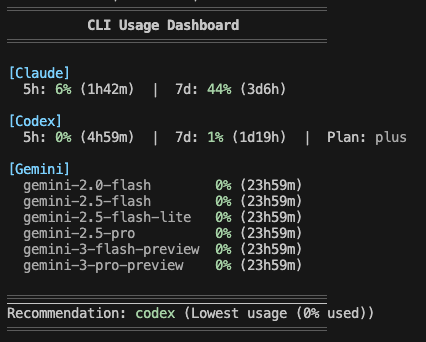
/claude-dashboard:check-usage
Check usage limits for all AI CLIs (Claude, Codex, Gemini, Antigravity, z.ai) at once and get a recommendation for which CLI has the most available capacity.
/claude-dashboard:check-usage              # Interactive output with colors
/claude-dashboard:check-usage --json       # JSON output for scripting
/claude-dashboard:check-usage --lang ko    # Specify language
/claude-dashboard:setup-alias
Add a check-ai shell alias to quickly check all AI CLI usage from your terminal. Supports macOS/Linux (zsh/bash) and Windows (PowerShell).
/claude-dashboard:setup-alias
After setup:
check-ai          # Pretty output
check-ai --json   # JSON output for scripting
/claude-dashboard:update
Repair or verify the statusLine shim. Usually unnecessary — after /plugin update, the
status line picks up the new version on its own. Use this if you have hooks disabled or the
status line stops updating.



 @obra


