

playwright
MCPDrives a real browser so the agent can open pages, click, fill forms and read what actually rendered.
 @windmill-labsInstall MCP
Ships with jobpilot: An AI agent that applies to jobs for you, using the Claude or Codex subscription you already have. Open JobPilot → · Docs · How it works · Changelog Watch it full size →…
Claude Code
$ claude mcp add --transport http upwork https://mcp.upwork.com/mcp
Codex
$ codex mcp add upwork --url https://mcp.upwork.com/mcp
Cursor
{
  "mcpServers": {
    "upwork": {
      "url": "https://mcp.upwork.com/mcp"
    }
  }
}
Add it to mcp.json.
Gemini CLI
$ gemini mcp add --transport http upwork https://mcp.upwork.com/mcp
GitHub Copilot
$ copilot mcp add --transport http upwork https://mcp.upwork.com/mcp
OpenCode
{
  "mcp": {
    "upwork": {
      "type": "remote",
      "url": "https://mcp.upwork.com/mcp"
    }
  }
}
Add it to opencode.json.
Windsurf
{
  "mcpServers": {
    "upwork": {
      "serverUrl": "https://mcp.upwork.com/mcp"
    }
  }
}
Add it to mcp_config.json.
Security report
Low risk
Known flaws
Not published
Signed build
Not published
Maintained
Nov 1, 2026
Last push
Licence
MIT
Runs as
Remote
mcp.upwork.com
Deprecated
Not published
Signals from public registries, not an audit. Checked Nov 11, 2026.

An AI agent that applies to jobs for you, using the Claude or Codex subscription you already have.



Open JobPilot → · Docs · How it works · Changelog
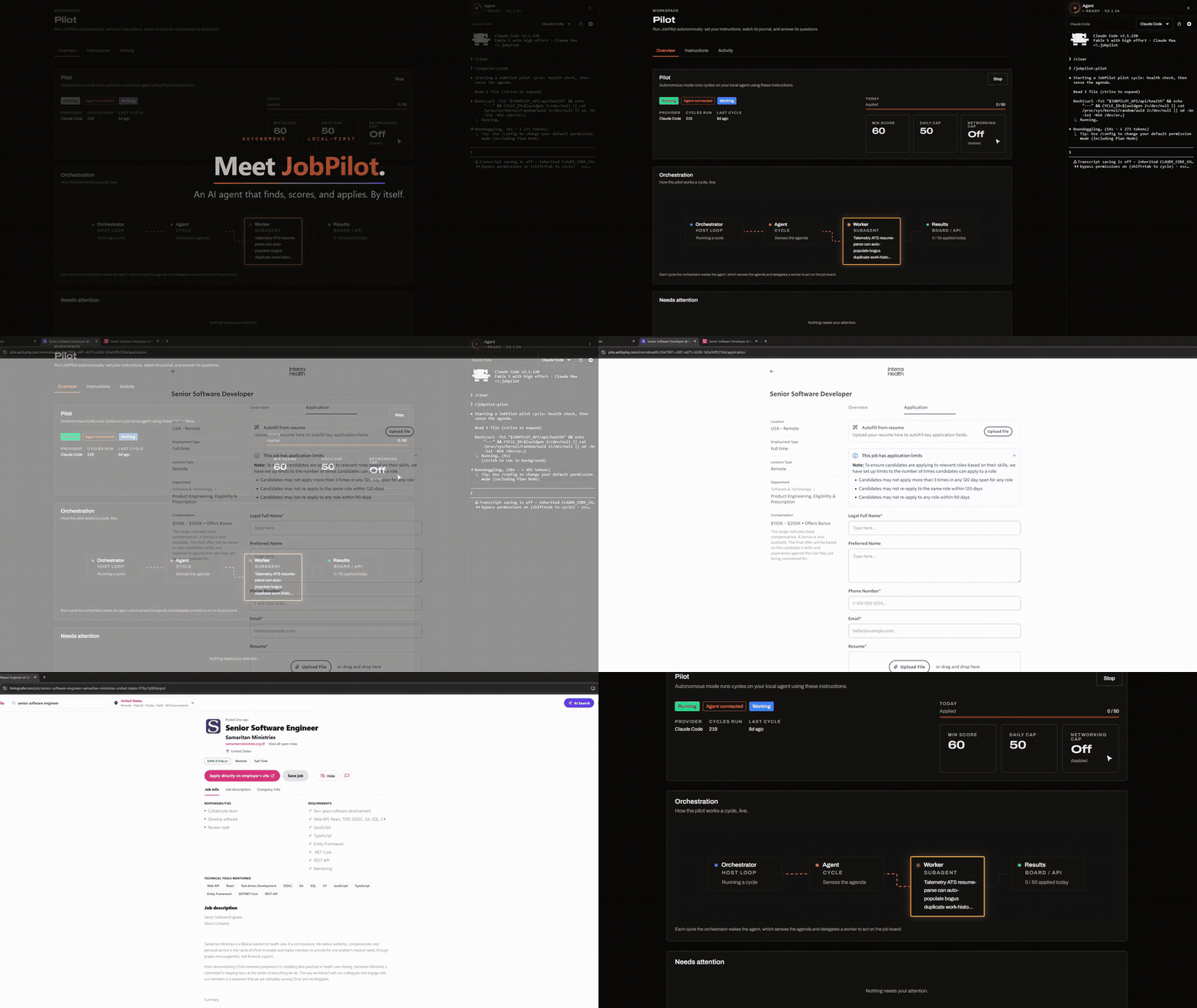
Applying for jobs takes hours. You fill in the same forms, adjust your resume for every posting, and keep track of who replied. JobPilot gives that work to an AI agent on your computer. You tell it what kind of job you want. It searches job boards, tailors your resume for each posting, fills in and sends the application, writes to recruiters, and keeps track of the replies. The JobPilot website shows where every application stands.
You don't need an API key, and there's no usage bill. The agent runs inside Claude Code or Codex, so it uses the subscription you already pay for.
The agent works in a normal browser window on your computer, signed in as you. You can watch it, or leave it alone and check what it did later.
You need a Claude Code or Codex subscription and Node.js 22 or newer.
Claude Code starts on the latest Sonnet model and Codex on GPT 6 Luna. Bigger models use up your weekly limit much faster and don't send any more applications. Here's why.
Run these in Claude Code:
/plugin marketplace add https://github.com/suxrobGM/claude-plugins
/plugin install jobpilot@sukhrob-claude-plugins
/jobpilot:setup
Run these in a terminal:
codex plugin marketplace add suxrobGM/codex-plugins
codex plugin add jobpilot@sukhrob-codex-plugins
Then start a new Codex session and run:
$setup
Once setup is done, you can start the agent from the dock on the right side of the dashboard.
Install the terminal host without the plugin
Use one of these to install or repair the terminal host without running setup. The host ships with all the skills and the browser settings the agent needs. The plugin from the marketplace only exists to run setup the first time.
Windows (PowerShell):
irm https://raw.githubusercontent.com/suxrobGM/jobpilot/main/apps/terminal/install.ps1 | iex
macOS / Linux:
curl -fsSL https://raw.githubusercontent.com/suxrobGM/jobpilot/main/apps/terminal/install.sh | bash
For a step-by-step walkthrough, read the getting started guide.
You only ever type one command:
/jobpilot:setup     # Claude Code
$setup              # Codex
It installs the terminal host, starts the agent, and opens the dashboard. If the host is already installed, it updates it, so you can run it again whenever you want to update or fix your install.
Everything else starts from a button in the dashboard. JobPilot passes the matching skill to the agent, and you can watch it work in the dock:
| In the dashboard | What the agent does |
|---|---|
New campaign → Search only (search) | Searches a board and scores every job against your resume. |
New campaign → Auto-apply (auto-apply) | Searches, then applies to matches one at a time, up to your limit. |
New campaign → Networking (networking) | Finds the recruiter or hiring manager and drafts a message to each. |
New campaign on Upwork (upwork-search) | Searches Upwork, drops low-quality clients, and ranks the rest. |
New campaign → Apply to links (apply) | Checks the fit of each job link you paste, then applies. |
Campaign → Resume (resume-campaign) | Restarts a paused campaign and finishes its approved jobs. |
Campaign → Rescan skipped (rescan-skipped) | Checks skipped jobs again in case they were skipped by mistake. |
Campaign → Retry failed (auto-apply) | Tries the failed applications again. |
Inbox → Scan pending (scan-inbox) | Sorts new email, matches it to applications, suggests status changes. |
Networking → Regenerate (networking) | Writes a new version of a draft message. |
Resume → Extract from PDF (extract-resume) | Reads an uploaded PDF into your resume editor. |
Resume → Tailor (tailor-resume) | Rewrites a copy of your resume for one job posting. |
Upwork → Proposal (upwork-proposal) | Drafts a proposal for one job. |
Upwork → Submit (upwork-submit) | Sends a draft proposal after showing you the Connects cost. |
Upwork → Profile (upwork-profile) | Suggests a better title, overview, and skills; saves them if you agree. |
Upwork → Inbox sync (upwork-sync) | Brings in invitations, offers, messages, and your Connects balance. |
Pilot → Start (pilot) | Hands your whole job search to the agent until you stop it. |
Some skills run in the middle of other work, and you never start them yourself. The agent uses them to tailor your resume before applying, write a cover letter, solve a captcha, or read a sign-in code from your email. The full list covers every skill.
Reading replies, picking up sign-in codes, and sending networking emails all need a Google OAuth client that you create. The email setup guide walks you through it.
MIT. The humanizer skill in plugin/skills/humanizer/ is adapted from blader/humanizer (MIT) and keeps its own LICENSE file.

Stars on GitHub
Drives a real browser so the agent can open pages, click, fill forms and read what actually rendered.
@windmill-labsInstall MCPShips with open-computer-use: open-computer-use is an open-source Computer Use service wrapped as MCP. Any AI agent or MCP client…
 @ifurystInstall MCP

