
Development
Plugin
ralph-tui
AI Agent Loop Orchestrator - A terminal UI for orchestrating AI coding agents to work through task lists autonomously.

Plugin Signal73/100Solid
maintained90
capable34
documented100
adopted72
Install
$ npx -y skills add subsy/ralph-tui --agent claude-code
Stats
2,448
Stars
238
Forks
Active
Maintenance
TypeScript
Language
MIT
License
19d ago
Last commit
8mo ago
Created
Repo: subsy/ralph-tui
What's inside
Skill(4 skills)
/ralph-tui-create-beads-rustConvert PRDs to beads for ralph-tui execution using beads-rust (br CLI). Creates an epic with child beads for each user story. Use when you have a PRD and want to use ralph-tui with beads-rust as the task source. Triggers on: create beads, convert prd to beads, beads for ralph,/ralph-tui-create-beadsConvert PRDs to beads for ralph-tui execution. Creates an epic with child beads for each user story. Use when you have a PRD and want to use ralph-tui with beads as the task source. Triggers on: create beads, convert prd to beads, beads for ralph, ralph beads./ralph-tui-create-jsonConvert PRDs to prd.json format for ralph-tui execution. Creates JSON task files with user stories, acceptance criteria, and dependencies. Triggers on: create prd.json, convert to json, ralph json, create json tasks./ralph-tui-prdGenerate a Product Requirements Document (PRD) for ralph-tui task orchestration. Creates PRDs with user stories that can be converted to beads issues or prd.json for automated execution. Triggers on: create a prd, write prd for, plan this feature, requirements for, spec out.
Badges


README
Ralph TUI
AI Agent Loop Orchestrator - A terminal UI for orchestrating AI coding agents to work through task lists autonomously.
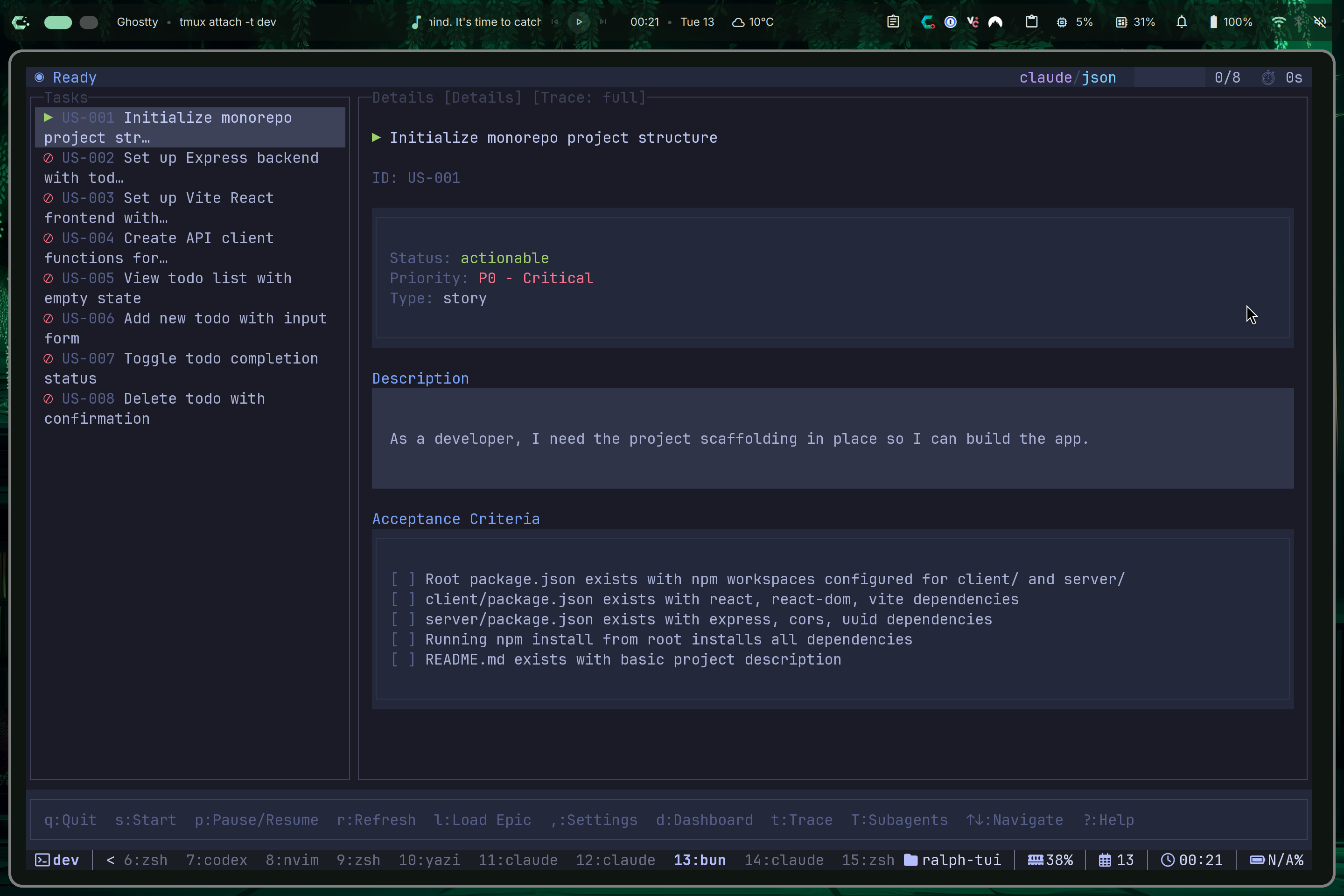
Ralph TUI connects your AI coding assistant (Claude Code, OpenCode, Factory Droid, Cursor CLI, Gemini CLI, Codex, Kiro CLI) to your task tracker and runs them in an autonomous loop, completing tasks one-by-one with intelligent selection, error handling, and full visibility.
Quick Start
# Install
bun install -g ralph-tui

# Setup your project
cd your-project
ralph-tui setup

# Create a PRD with AI assistance
ralph-tui create-prd --chat

# Run Ralph!
ralph-tui run --prd ./prd.json
That's it! Ralph will work through your tasks autonomously.
Documentation
ralph-tui.com - Full documentation, guides, and examples.
Quick Links
- Quick Start Guide - Get running in 2 minutes
- Installation - All installation options
- CLI Reference - Complete command reference
- Configuration - Customize Ralph for your workflow
- Troubleshooting - Common issues and solutions
How It Works
┌─────────────────────────────────────────────────────────────────┐
│                                                                 │
│   ┌──────────────┐     ┌──────────────┐     ┌──────────────┐   │
│   │  1. SELECT   │────▶│  2. BUILD    │────▶│  3. EXECUTE  │   │
│   │    TASK      │     │    PROMPT    │     │    AGENT     │   │
│   └──────────────┘     └──────────────┘     └──────────────┘   │
│          ▲                                         │            │
│          │                                         ▼            │
│   ┌──────────────┐                         ┌──────────────┐    │
│   │  5. NEXT     │◀────────────────────────│  4. DETECT   │    │
│   │    TASK      │                         │  COMPLETION  │    │
│   └──────────────┘                         └──────────────┘    │
│                                                                 │
└─────────────────────────────────────────────────────────────────┘
Ralph selects the highest-priority task, builds a prompt, executes your AI agent, detects completion, and repeats until all tasks are done.
Features
- Task Trackers: prd.json (simple), Beads (git-backed with dependencies)
- AI Agents: Claude Code, OpenCode, Factory Droid, Cursor CLI, Gemini CLI, Codex, Kiro CLI
- Session Persistence: Pause anytime, resume later, survive crashes
- Real-time TUI: Watch agent output, control execution with keyboard shortcuts
- Subagent Tracing: See nested agent calls in real-time
- Cross-iteration Context: Automatic progress tracking between tasks
- Flexible Skills: Use PRD/task skills directly in your agent or via the TUI
- Remote Instances: Monitor and control ralph-tui running on multiple machines from a single TUI
CLI Commands
| Command | Description |
|---|---|
ralph-tui | Launch the interactive TUI |
ralph-tui run [options] | Start Ralph execution |
ralph-tui resume | Resume an interrupted session |
ralph-tui status | Check session status |
ralph-tui logs | View iteration output logs |
ralph-tui setup | Run interactive project setup |
ralph-tui create-prd | Create a new PRD interactively |
ralph-tui convert | Convert PRD to tracker format |
ralph-tui config show | Display merged configuration |
ralph-tui template show | Display current prompt template |
ralph-tui plugins agents | List available agent plugins |
ralph-tui plugins trackers | List available tracker plugins |
ralph-tui run --listen | Run with remote listener enabled |
ralph-tui remote <cmd> | Manage remote server connections |
Common Options
# Run with a PRD file
ralph-tui run --prd ./prd.json

# Run with a Beads epic
ralph-tui run --epic my-epic-id

# Run one parallel session across multiple Beads epics
ralph-tui run --parallel --epic ui-epic --epic backend-epic
ralph-tui run --parallel --epics ui-epic,backend-epic

# Override agent or model
ralph-tui run --agent claude --model sonnet
ralph-tui run --agent opencode --model anthropic/claude-3-5-sonnet

# Limit iterations
ralph-tui run --iterations 5

# Run headless (no TUI)
ralph-tui run --headless

# Reset accumulated progress before starting a new session
ralph-tui run --reset-progress

# Run agent in isolated sandbox (bwrap on Linux, sandbox-exec on macOS)
# Requires bwrap to be installed and on PATH (Linux) or uses built-in sandbox-exec (macOS)
ralph-tui run --sandbox

# Use a bundled color theme by name
ralph-tui run --theme dracula
Create PRD Options
# Create a PRD with AI assistance (default chat mode)
ralph-tui create-prd
ralph-tui prime  # Alias

# Use a custom PRD skill from skills_dir
ralph-tui create-prd --prd-skill my-custom-skill

# Override agent
ralph-tui create-prd --agent claude

# Output to custom directory
ralph-tui create-prd --output ./docs
TUI Keyboard Shortcuts
| Key | Action |
|---|---|
s | Start execution |
p | Pause/Resume |
d | Toggle dashboard |
g | Cycle scope filter in multi-epic sessions |
G | Reset scope filter to All |
T | Toggle subagent tree panel (Shift+T) |
t | Cycle subagent detail level |
o | Cycle right panel views |
a | Open agent/model picker (local tab only) |
, | Open settings (local tab only) |
C | Open read-only config viewer (Shift+C, works on local and remote tabs) |
Alt+C (Linux) / Cmd+C (macOS) / Ctrl+C (Windows) | Copy selected text |
Ctrl+C | Interrupt (with confirmation) |
q | Quit |
? | Show help |
1-9 | Switch to tab 1-9 (remote instances) |
[ / ] | Previous/Next tab |
A | Add new remote instance |
e | Edit current remote (when viewing remote tab) |
x | Delete current remote (when viewing remote tab) |
Multi-epic sessions: Repeated --epic and comma-separated --epics create one Ralph session across all selected hierarchy-tracker epics. Ralph uses one scheduler, one repo lock, one session branch, one merge queue, and task-scoped worktrees. The TUI scope filter (g/G) is only a local view filter over that session.
Dashboard (d key): Toggle a status panel showing:
- Current execution status and active task
- Agent name and model (e.g.,
claude-code,anthropic/claude-sonnet) - Tracker source (e.g.,
prd,beads) - Git branch with dirty indicator (repo:branch*)
- Sandbox status (🔒 enabled, 🔓 disabled) with mode
- Auto-commit setting (✓ auto, ✗ manual)
- Remote connection info (when viewing remote tabs)
See the full CLI reference for all options.
Custom Themes
Ralph TUI supports custom color themes via the --theme option:
# Use a bundled theme by name
ralph-tui run --theme dracula

# Or use a custom theme file
ralph-tui run --theme ./my-custom-theme.json
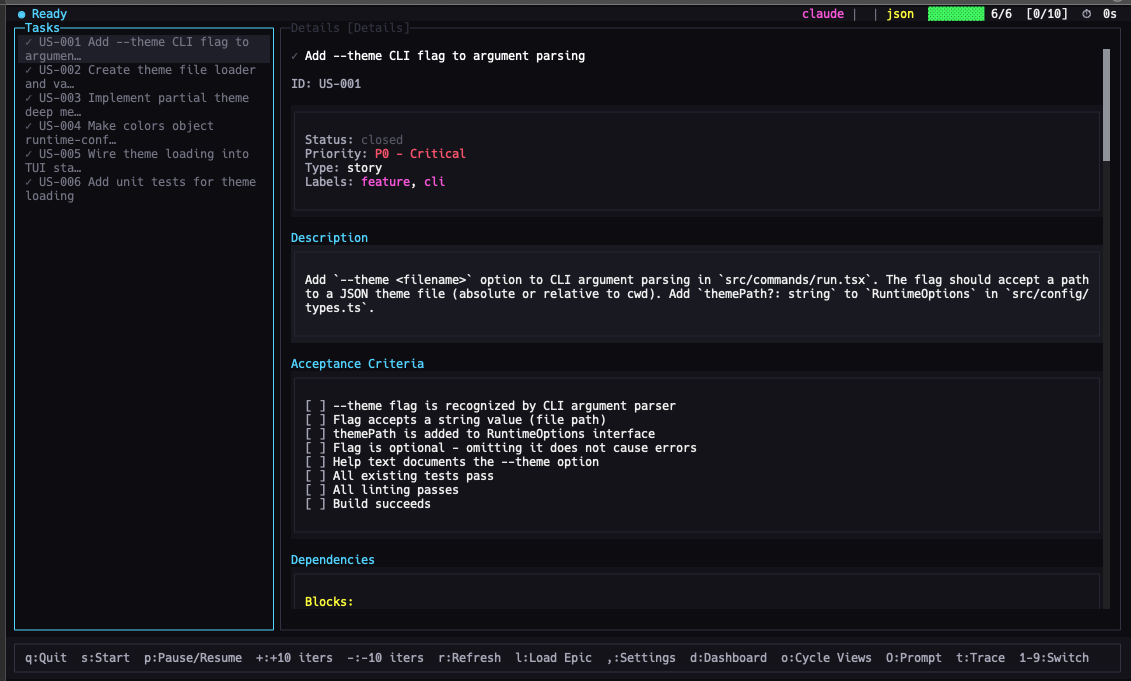
Bundled themes: bright, catppuccin, dracula, high-contrast, solarized-light
See the Themes documentation for the full theme schema and creating custom themes.
Using Skills Directly in Your Agent
Install ralph-tui skills to your agent using add-skill:
# Install all skills to all detected agents globally
bunx add-skill subsy/ralph-tui --all

# Install to a specific agent
bunx add-skill subsy/ralph-tui -a claude-code -g -y
bunx add-skill subsy/ralph-tui -a kiro-cli -g -y

# Or use the ralph-tui wrapper (maps agent IDs automatically)
ralph-tui skills install
ralph-tui skills install --agent claude
ralph-tui skills install --agent kiro
# If symlinked installs are problematic, copy files instead:
ralph-tui skills install --copy
Use these slash commands in your agent:
/ralph-tui-prd           # Create a PRD interactively
/ralph-tui-create-json   # Convert PRD to prd.json
/ralph-tui-create-beads  # Convert PRD to Beads issues
This lets you create PRDs while referencing source files (@filename) and using your full conversation context—then use ralph-tui run for autonomous execution.
Custom Skills Directory
You can configure a custom skills_dir in your config file to use custom PRD skills:
# In .ralph-tui/config.toml or ~/.config/ralph-tui/config.toml
skills_dir = "/path/to/my-skills"

# Then use custom skills
ralph-tui create-prd --prd-skill my-custom-skill
Skills must be folders inside skills_dir containing a SKILL.md file.
Remote Instance Management
Control multiple ralph-tui instances running on different machines (VPS servers, CI/CD environments, development boxes) from a single TUI.
┌─────────────────────────────────────────────────────────────────┐
│  LOCAL [1]│ ● prod [2]│ ◐ staging [3]│ ○ dev [4]│      +       │
├─────────────────────────────────────────────────────────────────┤
│                                                                 │
│   Your local TUI can connect to and control remote instances    │
│                                                                 │
└─────────────────────────────────────────────────────────────────┘
Quick Start: Remote Control
On the remote machine (server):
# Start ralph with remote listener enabled
ralph-tui run --listen --prd ./prd.json

# First run generates a secure token - save it!
# ═══════════════════════════════════════════════════════════════
#                    Remote Listener Enabled
# ═══════════════════════════════════════════════════════════════
#   Port: 7890
#   New server token generated:
#   OGQwNTcxMjM0NTY3ODkwYWJjZGVmMDEyMzQ1Njc4OQ
#   ⚠️  Save this token securely - it won't be shown again!
# ═══════════════════════════════════════════════════════════════
On your local machine (client):
# Add the remote server
ralph-tui remote add prod server.example.com:7890 --token OGQwNTcxMjM0NTY3...

# Test the connection
ralph-tui remote test prod

# Launch TUI - you'll see tabs for local + remote instances
ralph-tui
Remote Listener Commands
Recommended: Use run --listen (runs engine with remote access):
# Start with remote listener on default port (7890)
ralph-tui run --listen --prd ./prd.json

# Start with custom port
ralph-tui run --listen --listen-port 8080 --epic my-epic
Token management:
# Rotate authentication token (invalidates old token immediately)
ralph-tui run --listen --rotate-token --prd ./prd.json

# View remote listener options
ralph-tui run --help
Remote Configuration Commands
# Add a remote server
ralph-tui remote add <alias> <host:port> --token <token>

# List all remotes with connection status
ralph-tui remote list

# Test connectivity to a specific remote
ralph-tui remote test <alias>

# Remove a remote
ralph-tui remote remove <alias>

# Push config to a remote (propagate your local settings)
ralph-tui remote push-config <alias>
ralph-tui remote push-config --all  # Push to all remotes
File tree
FAQ
ralph-tui is a Claude Code plugin with 4 hand-picked skills for development work, indexed on Flowy. Install it with the command on its page. It includes ralph-tui-create-beads-rust, ralph-tui-create-beads, ralph-tui-create-json. Its skills do not fire on their own yet. Request auto-invocation to have Flowy route them as you prompt. Free and open source.
- What is ralph-tui?
- AI Agent Loop Orchestrator - A terminal UI for orchestrating AI coding agents to work through task lists autonomously.
- How do I install ralph-tui?
- Run these in Claude Code: npx -y skills add subsy/ralph-tui --agent claude-code. Then prompt normally.
- Does ralph-tui auto-invoke its skills?
- Not yet. It is indexed on Flowy as a plain plugin. Request auto-invocation on its page and Flowy will route its skills for you as you prompt.
- Is ralph-tui free?
- Yes. Flowy is free and open source, with nothing gated. You can read every skill in full before you install.
Is this plugin yours?
Claim it with GitHubSubmit a pluginPromote it