










Auto-invoked
Development
MCP
mirage
Ships with mirage: The World's First Virtual Terminal for AI Agents
Claude Code
> /plugin marketplace add strukto-ai/mirage> /plugin install mirage@mirage
Codex
$ codex mcp add mirage -- npx -y @struktoai/mirage-cli mcp
Cursor
{
  "mcpServers": {
    "mirage": {
      "command": "npx",
      "args": [
        "-y",
        "@struktoai/mirage-cli",
        "mcp"
      ]
    }
  }
}
Add it to mcp.json.
Gemini CLI
{
  "mcpServers": {
    "mirage": {
      "command": "npx",
      "args": [
        "-y",
        "@struktoai/mirage-cli",
        "mcp"
      ]
    }
  }
}
Add it to settings.json.
GitHub Copilot
$ copilot mcp add mirage -- npx -y @struktoai/mirage-cli mcp
OpenCode
{
  "mcp": {
    "mirage": {
      "type": "local",
      "command": [
        "npx",
        "-y",
        "@struktoai/mirage-cli",
        "mcp"
      ]
    }
  }
}
Add it to opencode.json.
Windsurf
{
  "mcpServers": {
    "mirage": {
      "command": "npx",
      "args": [
        "-y",
        "@struktoai/mirage-cli",
        "mcp"
      ]
    }
  }
}
Add it to mcp_config.json.
Security report
Found
Low risk
Known flaws
None known
Signed build
No
No build provenance published
Maintained
Nov 1, 2026
Last push
Licence
Apache-2.0
Runs as
npx
On your machine
Deprecated
No
Signals from public registries, not an audit. Checked Nov 11, 2026.
mirage README




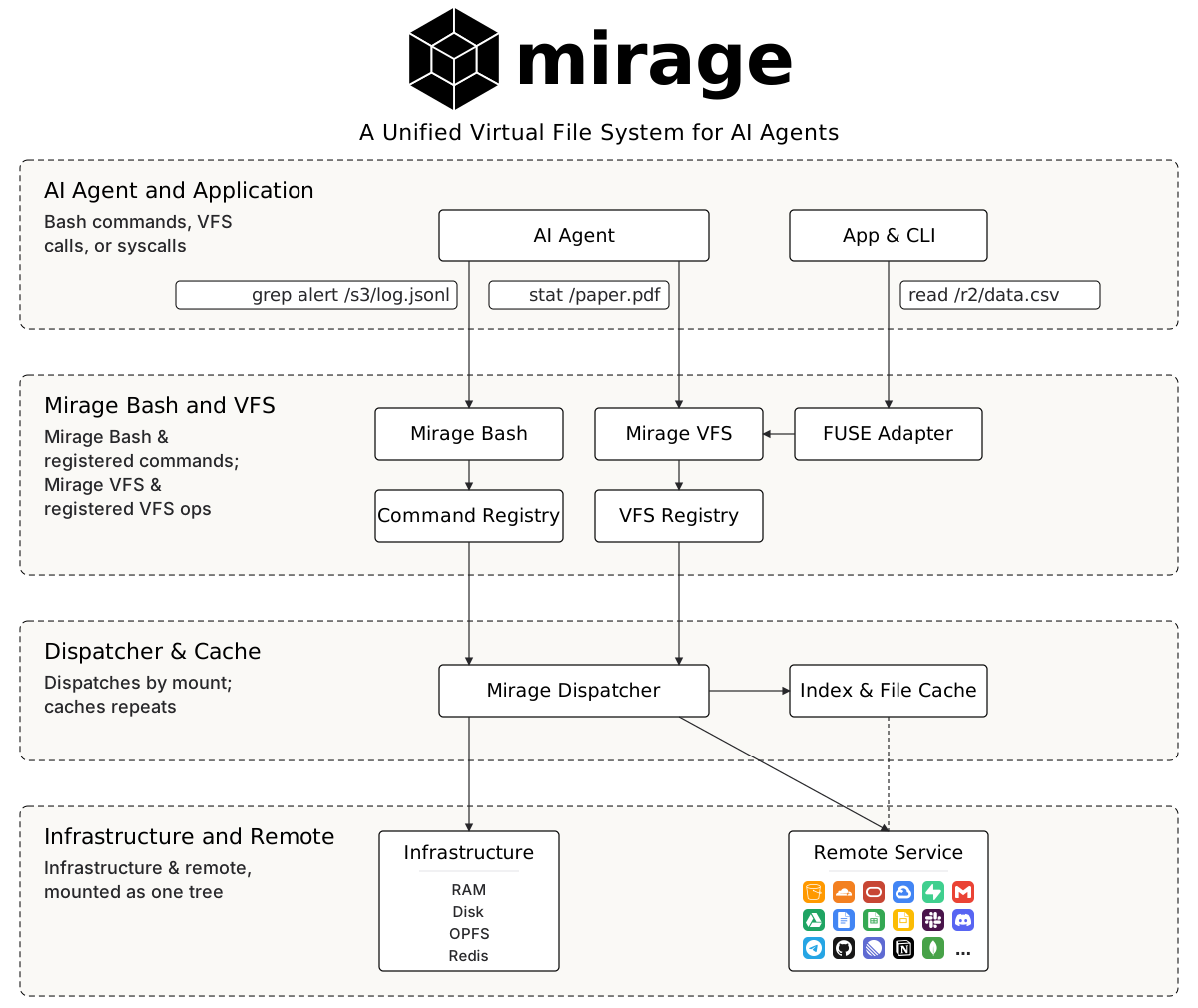
Mirage is a Virtual Terminal for AI Agents: one shell over data, CLIs and runtimes. Unix tools reach every service, and grep runs on each service's own search, such as Gmail's or Slack's. Mirage routes each command to the runtime that fits it, so most lines run in-process and only heavy work reaches a sandbox, which cuts infrastructure cost and tokens. The terminal itself is light: a workspace takes about 100 KB of memory and each new session about 10 KB, so one process serves many agents at once. Profiles decide what an agent can run and even what it can see, and scriptable policies refuse anything those rules cannot express.
Here is an example of launching Mirage inside an application:
ws = Workspace(
    {
        "/s3":    (S3VFS(S3Config(bucket="my-bucket")), MountMode.WRITE),
        "/slack": (SlackVFS(SlackConfig(token=slack_bot_token)), MountMode.EXEC),
        "/gmail": (GmailVFS(GmailConfig(**google_credentials)), MountMode.READ),
    },
    # Install the Slack CLI, run by name and listed by `man` and `which` like any program
    clis={"slack": (SLACK, {"token": slack_bot_token})},
    # the analyst profile hides /s3/secrets and denies posting to Slack and curl
    profiles={
        "analyst": {
            "paths": {"hide": ["/s3/secrets"]},
            "commands": {"deny": ["slack send-message", "curl"]},
        },
    },
    runtimes=[
        MontyRuntime(captures=["python", "python3"]),
        E2BRuntime(
            captures=["python", "python3"],
            config={"sandbox_id": sandbox_id, "mount_type": "ssh"},
        ),
    ],
    # route the underlying computation: numpy lines run in the e2b sandbox, the rest on monty
    route_policy=lambda ctx: "e2b" if "numpy" in ctx.line else None,
)

# Add an agent using the analyst profile
alice = await ws.session("alice", profile="analyst")

# one grep sweeps S3, Slack and Gmail, on each service's own search where it has one
await alice.shell("grep -rlw invoice /s3 /slack /gmail")

# run a script that lives in Slack on monty, file the report into S3
await alice.shell("python3 /slack/channels/general__C0123/2026-10-21/files/report__F0456.py > /s3/report.txt")

# numpy is not in monty, so the route policy sends this line to e2b
await alice.shell("python3 -c 'import numpy; print(numpy.arange(10).sum())'")
And what alice sees in the shell:
$ grep -rlw invoice /s3 /slack /gmail
/s3/billing/2026-10.csv
/gmail/INBOX/2026-10-21/Invoice_1042__18f3a9c2b7d1e0f4.gmail.json
$ ls /s3
billing
report.txt
$ cat /s3/secrets/aws.txt
cat: /s3/secrets/aws.txt: No such file or directory
$ slack send-message --channel general --text "report is up"
slack: Permission denied
About
- Unified virtual terminal interface, not N SDKs and M MCPs. Every backend speaks the same filesystem semantics, so pipelines compose across services.
- A virtual filesystem over every source. S3, Google Drive, Slack, Gmail, Redis and the rest mount side by side under one root, so an agent reaches all of them through a unified interface with the unix tools it already knows, like
ls,grep,findandjq. - Virtual command line tools (CLIs).
git,slackandntnare answered by Mirage itself, so an agent drives the service with nothing installed, across different runtimes and machines, and one tool can be virtualized into two or more, each under its own name with its own credentials. - Routed, dynamic runtimes. Python, JavaScript and any other command can be sent to a configured runtime, in process, sandboxed or remote, which decouples computation from storage and lets either change without touching the other.
- The virtualized Mirage shell. It binds the filesystem, the CLIs and the runtimes into one command line, so pipes, redirection, variables, jobs and history work across all three.
- Lightweight by design. A workspace, the virtual terminal itself, takes about 100 KB of memory and each new session about 10 KB, so one process serves many agents without a container or VM per agent.
- Profiles designed for agents.
allow,askanddenygovern commands and CLIs, whilehideandshowgovern files and folders, so a hidden path is not merely unreadable but absent from the filesystem the agent sees. - A scriptable policy engine. A policy script can prohibit any dangerous action before it runs, and the same stack gates every VFS op and session write, so neither a file nor an environment variable leaks.
- Notifications wired into the VFS and agents. External changes become an event stream on the mount, so a new Slack reply surfaces as a change to the chat file in the virtual filesystem, and the agent reacts to it instead of rescanning the tree.
Virtual Filesystem
Everything Mirage "mounts" as one unified virtual filesystem for AI agents. Each service sits side-by-side under a single root and answers the same POSIX semantics.
Stats
3,783
Stars
284
Forks
Active
Maintenance
TypeScript
Language
Apache-2.0
License
Last commit
Created

Ships withmirage
3.8k2 skills1 MCP
Stars on GitHub
Momentum
- stars in total
- 3.8k
More MCP servers from other plugins.




Questions about mirage.
- Which coding agents can use mirage?
- mirage works in any agent that reads an MCP config file: Claude Code, Codex, Cursor, Gemini CLI, GitHub Copilot, OpenCode and Windsurf. Each agent reads it from its own file; this page names the file for each one.
- How do I add mirage to Claude Code?
- Run these in order, one at a time. 1. In Claude Code: /plugin marketplace add strukto-ai/mirage 2. In Claude Code: /plugin install mirage@mirage
- Is mirage safe to install?
- Low risk. Signals from public registries, not an audit.