
少盯终端,少切窗口。
在一个悬浮工作台里处理 Agent 会话、审批与提问,并统一管理 Hooks、Skills、MCP、插件、API 供应商和远程主机。
官网
·
下载
·
隐私
·
English




支持 macOS 与 Windows,接入 Claude Code、Codex、Gemini CLI、Cursor、Copilot、Kimi、OpenCode、ZCode 等 AI 编程 Agent。
下载与开始使用
安装后打开 Island -> Integration,先运行 Hook Doctor,再给正在使用的 Agent 安装 Hook。Windows 安装包目前属于早期 MVP;核心悬浮窗、Hook 传输、路径探测和 Agent 管理已经可用,未签名安装包可能触发 SmartScreen 提示。
AgentBro 解决什么问题?
AI 编程 Agent 已经能连续工作很久,但人仍要守着终端:等权限、回答问题、看任务有没有卡住,还要分别维护每个工具的 Hooks、Skills、MCP 和插件。AgentBro 把这些分散的操作放到一个桌面入口里。
| 你正在做的事 | AgentBro 提供的能力 |
|---|
| 同时跑多个 Agent 会话 | 灵动岛聚合状态、工具调用、Subagent、Token 和完成提醒。 |
| Agent 等待审批或输入 | 直接批准权限、回答问题、确认计划或快速回复,不必找回原终端。 |
| 维护多套 Agent 环境 | 扫描安装状态、版本、路径和 Hook,并集中管理 Skills、MCP、插件与配置文件。 |
| 切换模型或 API 供应商 | Agent Switch 管理 Claude、Codex、Gemini、OpenCode 和 Hermes 的供应商配置、测速与切换。 |
| 在服务器上跑 Agent | 通过 SSH 把远程会话和 Hook 事件带回本机,并在同一处诊断连接。 |
Agent 会话事件和本地配置不需要云端中转。Hook Server 默认监听当前用户的本地 Unix Socket,Windows 使用本地 TCP 端点;更新检查、市场下载、SSH 和 Webhook 只会在你使用相应功能时访问对应服务。
演示视频
交互演示
多主题演示
核心能力
灵动岛:把等待你的事情浮到桌面上
- 会话有紧凑、悬停、展开和详情视图;只想在关键时刻出现,也可以使用“安静助手”模式。
- 权限请求、问题、计划审批、完成结果和错误都能在浮窗里处理;支持的 Agent 还可以直接快速回复。
- 工具调用、文件 Diff、Subagent、任务摘要、上下文压力、Token 和 Rate Limit 会跟随会话更新。
- 支持全局快捷键、通知音、勿扰时段、多显示器位置和终端聚焦降噪。
- 除了系统通知,关键事件也可以转发到钉钉或飞书 Webhook。
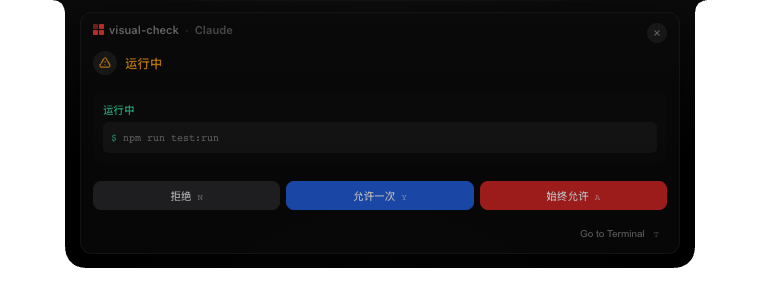
审批、提问和计划确认不必切回终端。
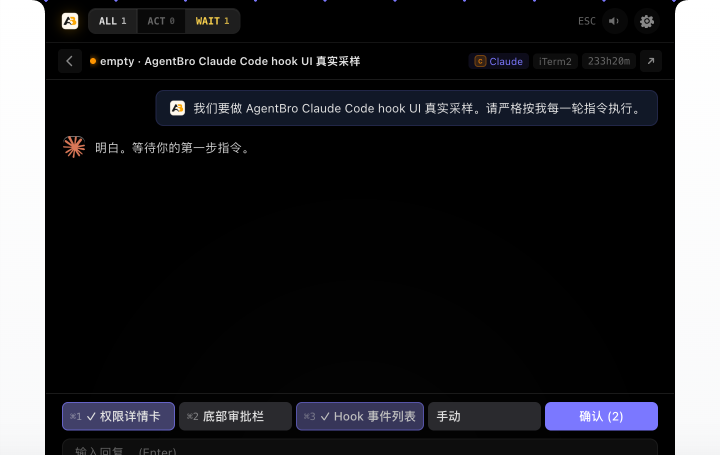
查看任务、工具调用、Token 和会话详情。
Agent Monitor:看清 Agent 到底在做什么
Agent Monitor 汇总当前和历史会话,可以按项目查看运行阶段、工具时间线、审批、问题、对话与原始 Hook 事件。手动开启 Claude Code 网络监控后,还能在本地 Inspector 中检查 system prompt、messages、tools、response、Token 用量和 KV cache,并按模型与项目汇总统计。网络监控默认关闭。
宠物市场
除了灵动岛,AgentBro 还可以把浮窗切换成宠物状态面板。一只桌面宠物会跟随当前活跃的 Agent,它的活力会随上下文压力和 Token 用量实时变化,让你一眼看出会话是轻松还是吃紧。
宠物市场支持浏览和一键安装社区宠物,整个流程由 abpets CLI 驱动(Node.js v18+)。在设置面板的 Island -> 宠物市场 即可打开,也可以在网页上预览:
👉 www.agentbro.net/pets
想自己创作宠物,可以使用 shirenchuang/agentbro-pet Skill:它会把角色概念、品牌线索或参考图生成 AgentBro 可用的 pet.json + spritesheet.webp 宠物包,并支持接入不同的生图后端。可通过 npx skills add https://github.com/shirenchuang/agentbro-pet.git 安装,也可以直接克隆;Codex、Claude Code、Cursor、Gemini CLI 等任意能运行脚本和生成图片的 Agent 都可以使用。


灵动岛目前内置午夜、AgentBro 经典、磨砂玻璃、苹果、烟灰、海雾、暖纸和柔薰衣草等主题,也可以跟随系统自动切换浅色与深色外观。
Agent 管理:一处管理所有 Agent 能力
如果你同时在用 Claude Code、Codex、Gemini CLI、Cursor、Kimi、豆包、Qoder、OpenCode 等工具,Agent管理 可以把它们的安装、接入和本地配置收进同一个工作台。
- 自动发现 CLI 与桌面 App,显示当前版本、可用更新、可执行文件、配置目录和官方安装页;支持的 CLI 可以直接安装、更新或卸载。
- 按 Agent 安装和修复 Hook,查看 Bridge 命令与配置路径,并分别控制审批、通知、生命周期和活动事件。
- 扫描散落在不同目录中的 Skills,接管到中心库后,用软链接或副本分发给 Agent 与项目;批量操作、冲突处理和诊断状态都有记录。
- 把常用 Skills 组合成技能包,一键应用到多个 Agent,也能安全撤销。
- 管理 stdio、HTTP 和 SSE MCP 服务,检查 tools、resources、prompts 与连接日志;调用工具前会显示参数和风险确认。
- 查看 Codex、Claude Code、WorkBuddy、ZCode、Kimi 等 Agent 的插件,搜索、启停、检查清单和内置能力,并预览插件文件。
- 在校验后编辑支持的 JSON 或文本配置文件;项目页可以导入仓库,检查项目级指令、Skills、MCP 和插件。

Skill 库:集中查看中心库 Skills、分发状态和诊断问题。

安装 Skill:从市场、Agent、本地目录或 Git 仓库导入。

技能包:把一组 Skills 应用到多个 Agent,并保留可撤销记录。

Agent 管理:按 Agent 查看 Skills、MCP、插件、Hooks 和路径。
Agent Switch
Agent Switch 用来管理 Claude、Codex、Gemini、OpenCode 和 Hermes 的 API 供应商配置。你可以添加或复制供应商、切换当前配置、检测连通性与延迟,也可以从 CC Switch 预览并导入已有的供应商、MCP、Prompt 和 Skill 数据。
SSH 远程
远程开发不需要再开一套监控界面。AgentBro 可以从 ~/.ssh/config 导入主机,通过 SSH 隧道接收远端 Hook 事件,并在本机查看远程会话、安装或修复 Hooks、运行诊断。连接信息和会话来源会保留主机标识,便于同时区分本地与多台服务器上的任务。
支持的 Agent
AgentBro 的支持分为两层。运行时 Hook 适配器负责把会话事件送进灵动岛;Agent 管理还会扫描更大范围的 CLI、桌面 App、Skills、MCP、插件和路径。各 Agent 公开的 Hook 能力不同,因此事件和交互深度会有差异。
| 范围 | Agent |
|---|
| 灵动岛 / Hook 接入 | Claude Code、Codex、Gemini CLI、Cursor / Cursor CLI、GitHub Copilot、Cline、Qoder / Qoder CLI、CodeBuddy / CodeBuddy CN、Qwen、Kimi、DeepSeek、OpenCode、Factory Droid、StepFun、AntiGravity、WorkBuddy、Hermes、Pi、Kiro、ZCode |
| Agent 管理扫描 | 上面所有 Agent,另支持豆包、.agents 共享目录、Junie、Windsurf、Augment、KiloCode、OB1、Amp、Aider、OpenClaw / QClaw / EasyClaw / AutoClaw,以及自定义 Agent |
| 项目级扫描 | 目前聚焦 Claude Code 与 Codex 常见项目配置:项目级 Skills、MCP、插件和指令文件 |
豆包 macOS 支持会检测 /Applications/Doubao.app、管理 ~/Doubao/skills,并继续通过中心库覆盖豆包兼容的 ~/.agents/skills。由于豆包目前没有公开 Hook,灵动岛中的任务状态来自本机进程与两个任务存储目录的只读元数据关联,不读取聊天内容;该状态属于尽力推断,页面同步可能造成短暂误报。
路线图
AgentBro 会继续坚持本地优先。接下来的重点包括:
- 远程同步:跨设备同步设置、Hook、主题、Prompt、Skills 和远程主机配置。
- 技能社区:发现、安装、分享和更新面向不同 Agent 的 Skill Pack。
- Windows:完善代码签名、自动更新和更多 Agent 的深度交互。
- 宠物生态:上架更多社区宠物,完善自定义宠物的创作与分享流程。
- 团队协作:共享配置、团队 Skill 包、权限控制和更清晰的协作视图。
加入交流群
如果你正在使用 AgentBro,或者想讨论 Windows 体验、更多 Agent 适配、Agent Monitor、Agent Switch 和 Skills 社区,可以扫码添加微信,备注 AgentBro 交流群,或直接扫码加入 AgentBro 开源社区 群聊。

添加微信备注 AgentBro 交流群

群聊:AgentBro 开源社区(二维码 7 天有效,过期后请联系微信邀请)
平台支持
macOS 与 Windows 都会随正式版本发布可下载产物:
| 平台 | 当前状态 | 发布形式 |
|---|
| macOS | 主要开发与签名发布平台,功能覆盖最完整 | Apple Silicon / Intel 通用 DMG、Homebrew Cask、应用内更新 |
| Windows x64 | 早期 MVP,悬浮窗、TCP Hook、Windows 路径探测、Agent 管理、Skills 和安装包已可用 | NSIS .exe、MSI |
| Linux | 暂无正式版本 | 尚未进入当前发布计划 |
Windows 仍在完善代码签名、SmartScreen 体验、自动更新和部分 Agent 的深度交互。Codex Desktop 的自由文本回复等少数能力会因 Windows 客户端接口限制而不可用,但不会影响会话观察和基础 Hook 交互。
本地开发
环境要求
- macOS 或 Windows
- Node.js 20+ 与 pnpm
- Rust toolchain + Cargo
- Tauri CLI:
cargo tauri --version
- macOS 需要 Xcode Command Line Tools;Windows 需要 Microsoft C++ Build Tools 与 WebView2
启动项目
git clone https://github.com/shirenchuang/agentbro.git
cd agentbro
pnpm install
pnpm tauri:dev
pnpm tauri:dev 会启动 http://localhost:1423 上的 Vite 开发服务,并打开 AgentBro 原生窗口。
只调试浏览器 UI
pnpm dev
打开:
- 灵动岛 UI:
http://localhost:1423
- 设置面板:
http://localhost:1423/#settings
浏览器开发模式内置了 Claude Hook UI Lab,可以切换权限请求、计划审批、问题、完成提醒、紧凑模式、列表模式和详情模式等静态场景。
常用命令
pnpm test:run                                      # 运行测试
pnpm test                                          # 监听模式运行测试
pnpm lint                                          # ESLint
pnpm build                                         # 类型检查并构建前端
cargo check --manifest-path src-tauri/Cargo.toml   # 检查 Rust 后端
pnpm tauri:build                                   # 构建 macOS app / DMG
pnpm tauri:build:windows                           # 构建 Windows NSIS / MSI
./build.sh                                         # 构建通用 macOS DMG
接入 Agent
- 打开 AgentBro 设置。
- 如果只想接入灵动岛,进入 Island -> Integration,运行 Hook Doctor。
- 点击 Install All Hooks,或只安装你正在使用的 Agent Hook。
- 如果想统一管理 Agent、Skills、MCP 和插件,进入 Agent管理,再选择 Agent 管理 页。
- 选择一个 Agent,安装或更新它;再按需进入 Hooks、Skills、MCP 或 插件 页完成配置。
- 重启对应的 CLI 会话,再启动 Claude Code、Codex、Gemini CLI 或其他支持的 Agent。
之后 AgentBro 会在灵动岛中展示会话状态、工具调用、权限请求、问题、计划和完成提醒。
参与贡献
欢迎提交 Issue 和 Pull Request!
PR 请提到 dev 分支,提交前跑一遍 pnpm lint && pnpm test:run && pnpm build && cargo check --manifest-path src-tauri/Cargo.toml。
发布
发布说明和签名要求见 docs/release.md。
- 官网:www.agentbro.net
- 国内直链:
https://agentbro.oss-cn-hangzhou.aliyuncs.com/AgentBro_latest_universal.dmg
- GitHub Releases:
https://github.com/shirenchuang/agentbro/releases
开源协议
AgentBro 代码基于 Apache License 2.0 开源。
AgentBro 名称、Logo、应用图标、官网视觉和其他品牌资产不随代码授权开放。修改版或分发版请使用不同名称,避免和官方项目产生混淆,并遵守 NOTICE 和 TRADEMARKS.md。


 @shirenchuang



