







Quick Start •
How It Works •
Commands •
Dashboard •
Configuration •
Troubleshooting •
License
claude-smart learns from your corrections and from what's already working — so the assistant stops repeating mistakes and reuses proven paths. Project-specific skills capture repo-local rules, and shared skills roll up durable patterns for reuse across projects.
vs claude-mem: ~3× better at turning your corrections into rules Claude follows, ~50% more of your guidance is retained. Read the benchmark →
⭐ Built on the open-source reflexio engine — if claude-smart helps you, star reflexio on GitHub.
Quick Start
Requires Node.js 20+ (for npx) and the host CLI you're installing into (claude, codex, or opencode) on PATH.
Guided installation
npx claude-smart install
Choose one or more detected coding agents with the arrow keys and Space, then
press Enter. Single-choice settings use the arrow keys and Enter. Esc or Ctrl+C
cancels before configuration is saved.
The guide asks where to store and process your data:
- Local Reflexio: starts a background backend on this machine. Choose which
available agent CLI powers background learning; it can analyze interactions
from every installed integration.
- Managed Reflexio: enter an HTTPS endpoint and a hidden API key. No local
backend starts; memory storage and background learning run in Reflexio cloud.
The local dashboard connects to that cloud backend by default.
In local mode, Claude Code learning defaults to the sonnet alias, which Claude
Code resolves independently of the coding model. Codex and OpenCode keep their
provider-configured defaults. An explicit supported model ID overrides these
choices. For unattended installs, use
--model <model-id> with --provider. The chosen model is applied to extraction
and optimizer calls. Managed mode reports the server-configured model when
available, otherwise explicitly reports that its default model is not exposed.
After install, update, or setup, the summary includes the Claude-smart version,
learning provider, provider CLI version when available, and model selection.
Configured aliases/defaults are distinguished from a reported model version;
unknown versions are shown as “not reported.” Run npx claude-smart setup to
change the learning settings.
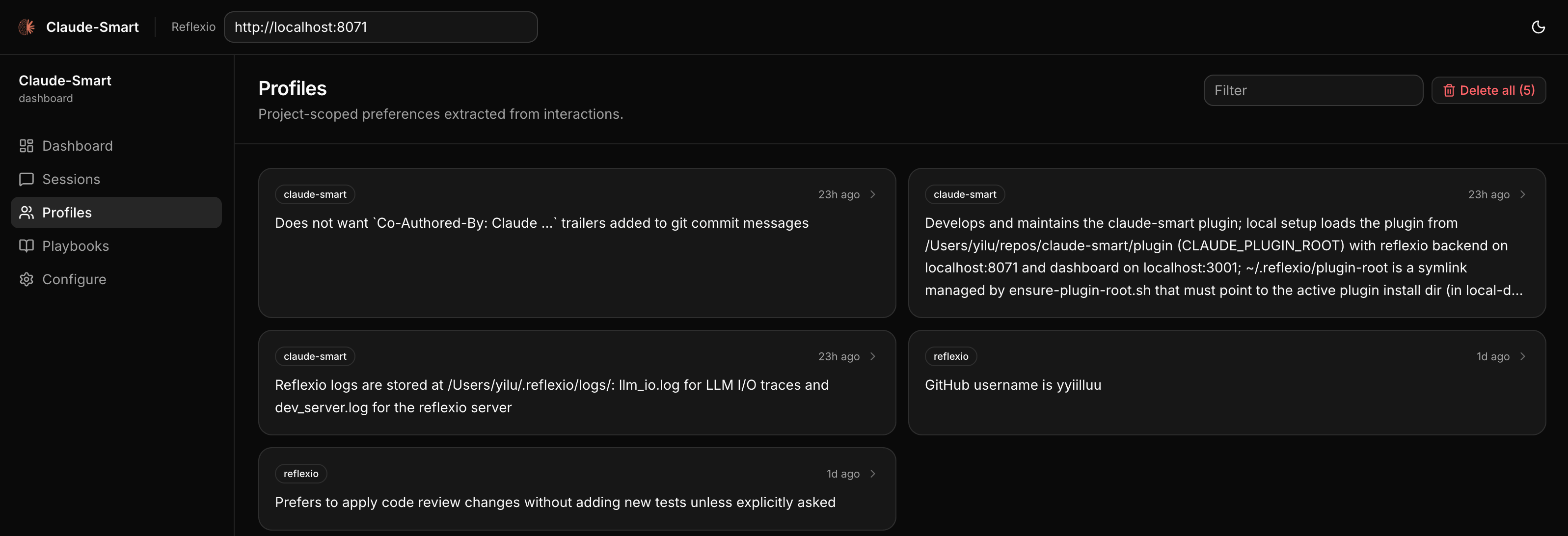
The dashboard's Data source dropdown selects Local or Managed Reflexio.
It defaults to the saved runtime mode. Its endpoint, overview totals, preferences,
skills, and backend sessions follow the selected source; viewing another source
does not change learning/storage settings. The header shows the selected endpoint
as a read-only connection label, with an Open cloud dashboard link in Managed
mode. Change connection settings in Configure. Overview metrics use backend summary
counts for the last 30 days, rather than list limits. Connection failures are
shown explicitly. Older skill citations without a project/shared identity remain
visible under Legacy skill usage; exact per-skill counts use identified citations.
A backend must be configured and reachable to view its data.
The dashboard follows the managed Reflexio workspace style: neutral light/dark
surfaces, green accents, flat metric bands, and consistent page spacing. The
theme switch applies across dashboard, sessions, preferences, skills, and settings.
Previously configured connections are retained privately when changing modes.
The dashboard currently trusts local OS users: other accounts on a shared machine
can access its configured backend connections. Per-user dashboard authentication
requires a separate change.
This device lists local session buffers and hook activity separately. Those
counts can differ between machines connected to the same managed account.
Review the configuration before installation starts. Saved settings and installed
agents are preselected on subsequent runs. Preparation and service startup show
phase and elapsed progress; detailed logs live in ~/.claude-smart/install-logs/.
If an integration fails, the others still install and the summary reports each result.
Runtime environments remain separate so an agent's rollback cannot break another.
Explicit installation
For an unattended first install, specify the backend. Multiple agents can be
installed in one command:
npx claude-smart install --host claude-code,codex --backend local --provider codex
npx claude-smart install --host opencode --backend local --provider opencode --global
For managed mode, supply the API key through a named environment variable rather
than a command-line argument:
npx claude-smart install --host claude-code,codex --backend managed \
  --url https://www.reflexio.ai/ --api-key-env REFLEXIO_API_KEY
Existing --host codex and --host opencode commands still work. Without a terminal,
saved backend/provider settings are reused; a fresh install requires --backend.
Use --yes to skip interactive questions when all required settings are supplied
or saved. For multiple local agents, specify --provider unless one is already saved.
Use --read-only to retrieve memories without publishing interactions, or --learn
to resume learning. The interactive guide offers both modes for either backend.
Activate each integration
Run /reload-plugins in your existing Claude Code session, or use the update in your next session.
Start a new Codex session to load the update; you can finish your existing session first. If hook trust needs review, use /hooks.
Then restart OpenCode in your project so it loads the plugin. The installer writes a loader into the selected scope's plugins directory — the project's .opencode/plugins/ for a project install — and both OpenCode lines load the plugin from there: OpenCode 1.x auto-loads the plugins directory, and OpenCode V2 rejects the old file:// config-entry shape. Any legacy opencode.json entry is removed so the package loads exactly once. --global installs for all OpenCode projects on this machine instead, writing the loader under your user config directory.
Check an update
npx claude-smart status
npx claude-smart status --host codex
Shows the installed version and the version each recent session last used in a hook. Historical observations do not confirm that a session is still active. Codex uses CODEX_HOME when set; run installation and status with the same account home as your session. status --host codex also warns when a claude-smart hook is disabled in Codex's config.toml and says how to re-enable it; it never edits that file.
Uninstall
npx claude-smart uninstall                    # Choose integrations interactively
npx claude-smart uninstall --host claude-code,codex  # Remove multiple integrations
npx claude-smart uninstall --host claude-code  # Claude Code
npx claude-smart uninstall --host codex       # Codex
npx claude-smart uninstall --host opencode    # OpenCode
Afterward, use /reload-plugins in Claude Code, start a new Codex session, or restart OpenCode. Learned data under ~/.reflexio/ and ~/.claude-smart/ is preserved and shared across hosts, so you can uninstall or switch hosts without losing skills or preferences.
Uninstall keeps saved configuration and the chosen background learning provider.
Removing an integration does not uninstall its agent CLI. Remaining integrations
can continue using the same learning provider. OpenCode removal applies to the
current project config, or its global config with --global.
For per-host details — what the installers and uninstallers touch, OpenCode config resolution and model/env overrides, and Windows notes — see Host install notes in DEVELOPER.md. Developing the plugin itself? See Developing locally.
Not supported: Claude Code Cowork, claude.ai/code web, or remote Codex environments without local plugin hooks — they run outside your local machine, so the local backend/dashboard and ~/.reflexio/ aren't reachable.
Why Learning, Not Memory
Most memory tools just record. Claude remembers what happened, but doesn't change what it does next.
claude-smart focuses on learning instead.
Four things this changes:
-
💡 Stop repeating the same mistakes: Produces actionable skills Claude can follow next time; memory only records what happened.
Example: a deploy fails after Claude bumps prisma from 5.x to 6.0; you tell it to roll back because 6.0 breaks nested writes in your order flow.
Memory: “deploy broke after prisma bump; user rolled back”
Learning: “treat major-version bumps of ORMs/DB drivers as breaking — verify with integration tests, not just unit tests”
-
🚀 Start from the optimized path: Records and optimizes the steps that worked so Claude can reuse them, instead of re-exploring each session.
Example: Claude spends several iterations trying to start the local dev environment before discovering that this repo requires pnpm dev:all instead of the usual npm run dev.
Memory: “user mentioned that npm run dev did not work”
Learning: “for this repo, always use pnpm dev:all to start the full local stack — npm run dev only starts the frontend and causes missing service errors”
Instead of re-exploring, Claude Code starts from the proven path—reducing planning steps, latency, and token usage.
-
🌐 Project-specific and shared skills: Session memory disappears with the conversation. Project-specific skills preserve repo-local rules, while shared skills roll up patterns that should transfer across projects. Preferences stay scoped to the current project so per-repo preferences don't leak across projects.
-
🪶 Better context without prompt bloat: Distilled, deduplicated skills stay in dozens of tokens—not thousands—even as the project grows.
Demo
Key Features


 @obra