

Auto-invoked
Development
MCP
paxm
Ships with paxm: Persistent, provider-neutral memory for Codex, Claude Code, OpenCode, Pi, and MCP coding agents.
Claude Code
> /plugin marketplace add pax-beehive/paxm> /plugin install paxm-claude@pax-memory
Codex
$ go run ./cmd/paxm eval run --suite evals/baseline
Cursor
$ go run ./cmd/paxm eval run --suite evals/baseline
Gemini CLI
$ go run ./cmd/paxm eval run --suite evals/baseline
GitHub Copilot
$ go run ./cmd/paxm eval run --suite evals/baseline
OpenCode
$ go run ./cmd/paxm eval run --suite evals/baseline
Windsurf
$ go run ./cmd/paxm eval run --suite evals/baseline
Security report
Info
Not enough data
Known flaws
Not published
Signed build
Not published
Maintained
Aug 28, 2026
Last push
Licence
Apache-2.0
Runs as
Local process
On your machine
Deprecated
Not published
Signals from public registries, not an audit. Checked Nov 11, 2026.
paxm README
PAXM
Stop re-explaining your project to every new coding-agent session.


PAXM carries decisions, conventions, and working context into later Codex, Claude Code, OpenCode, Pi, Cursor, TRAE, Kimi Code, ZCode, Kiro, Cline, and MCP sessions. Start locally with SQLite and no account, API key, embeddings, or extra memory-layer model calls. Change memory providers later without rewiring every agent.
Install for Codex · Install the CLI · See the result · Docs · 中文
Also from us: DSH Plugin Hub — exact versions and one-command installs for DeepSeek Harness plugins.
What changes after installation
In one session, record a decision:
paxm remember --profile ltm --text \
  "Production deploys run through GitHub Actions; never deploy from a laptop"
In a later session, Codex, Claude Code, OpenCode, Pi, or an MCP client can recover it:
paxm recall --query "how do we deploy production?"
With passive integration enabled, paxm recalls relevant context before the agent responds and durably captures completed turns afterward. Provider delays or failures do not block the coding session.
The practical result:
- New sessions resume with project context instead of making you restate architecture decisions, conventions, and operational constraints.
- One memory path works across agents. A decision captured from Codex can be recalled from Claude Code, OpenCode, Pi, or any MCP client.
- Your storage stays your choice. Start with local SQLite, connect Zep, Mem0, MemOS, or OpenViking, or bring a private provider through JSON-RPC.
- You retain control. Credentials, hook trust, routing, data location, disable, uninstall, and rollback remain user-owned.
Quick start
Choose the agent you already use. The Codex plugin is the shortest path to a complete active-and-passive memory loop.
Codex plugin
codex plugin marketplace add pax-beehive/paxm --ref paxm-memory-v0.1.4
codex plugin add paxm-memory@pax-agent-nexus
curl -fsSL https://github.com/pax-beehive/paxm/releases/latest/download/install.sh | bash
paxm setup --integration codex-plugin
Start a new Codex task and trust the Pax Agent neXus hooks when /hooks asks.
The explicit installer downloads the latest published paxm binary. The plugin
registers active-memory skills and owns the passive Codex hooks after setup;
it never installs a binary, writes credentials, or bypasses hook trust on its
own.
Verify the first successful loop before relying on passive memory:
paxm config doctor
paxm remember --profile stm --text "PAXM_FIRST_RECALL_OK"
paxm recall --query "PAXM_FIRST_RECALL_OK"
paxm history --days 1
Set PAXM_VERSION before installation for a reproducible version or rollback.
Provider credentials remain user-managed. Team Memory can derive a scoped
agent credential from a paxl device connection; paxm never writes that secret
to config.yaml.
Claude Code plugin
Install the paxm CLI, then install the Claude Code plugin:
curl -fsSL https://github.com/pax-beehive/paxm/releases/latest/download/install.sh | bash
claude plugin marketplace add pax-beehive/paxm
claude plugin install paxm-claude@pax-memory
paxm setup --integration claude-plugin
The Claude plugin includes active-memory skills, the paxm MCP server, and five
lifecycle hooks: SessionStart, UserPromptSubmit, PostToolUse,
PostToolUseFailure, and Stop.
Session bootstrap injects the configured user, agent, and session identity together with the current local time and time zone. Codex, Claude Code, and Pi use their session-start events; OpenCode performs the same bootstrap before the first message in a session. If a later user input arrives more than 12 hours after the preceding turn activity, paxm refreshes the local-time context before the agent handles that input.
OpenCode, Pi, CLI, or MCP
Install the latest release and run interactive setup. The default SQLite provider makes the adaptor usable without first creating an account or API key.
curl -fsSL https://github.com/pax-beehive/paxm/releases/latest/download/install.sh | bash
paxm setup
paxm config doctor
paxm setup asks only two questions: which providers to enable and which
agents get passive memory. Agents found on the machine are pre-selected and
marked (detected), and cloud provider API keys are masked as they are typed.
Everything else uses the tuned defaults. When Team Memory is selected, setup
first reads the on-prem user ID from paxl device status, with channel status as
a compatibility fallback; otherwise the user ID comes from $USER. Agents get
IDs such as codex-todd, and selected providers route
read/write as required. Use up/down to move, space to toggle, and enter to
confirm. Fine-tuning (paths, profiles, routing policy, per-hook behavior) lives
in the config file; see docs/config.md.
Optional team IDs create explicit durable write profiles such as
team-pax-core; non-interactive setup can pass --user-id todd --team-id pax-core. Scripts can also skip the selection prompts entirely with
repeatable flags, e.g. paxm setup --provider sqlite --agent codex --agent claude.
Active recall skills remain user-installed. SQLite works without an API key; remote providers such as Zep, Mem0, MemOS, and OpenViking require connection details during setup.
SQLite health checks must be allowed to create WAL/SHM files beside the configured database. A sandbox that can read the database but cannot write its parent directory may report SQLite error 14.
Use an isolated writable SQLite path for sandboxed evaluations. The same configuration may be healthy in the real agent process.
When Codex is using the bundled paxm-memory plugin, let the plugin own Codex's
hooks so paxm does not register a duplicate global hook:
Write and recall a memory:
paxm remember --profile ltm --text "We chose SQLite for the local memory layer"
paxm recall --query "local memory layer"
paxm history --days 7
paxm dashboard   # localhost metrics, logs, sessions, and recall inspection
Select OpenCode during setup to install a global local plugin under
~/.config/opencode/plugins/. Select Pi to install its passive extension.
Cursor, TRAE, TRAE CN, Kimi Code, ZCode, Kiro, and Cline selections install a
client-native hook/MCP integration while preserving unrelated client config.
See the agent integration matrix for exact event
mappings, paths, host limitations, verification, and rollback. Any
MCP-compatible client can use paxm mcp serve --agent codex; replace codex
with the configured client identity.
SQLite quality preview
SQLite gives a new user a complete local memory loop before they choose or deploy a dedicated memory system. It uses FTS5 and BM25 retrieval with turn-level memories and deterministic, query-focused excerpts. Memory ingestion and retrieval call no external LLM or embedding service.
In an initial 30-question LoCoMo agent evaluation, SQLite turn memory answered 13 questions successfully, compared with 11 for Mem0 product-default.
| Memory arm | Successful answers | Mean token F1 | External models in memory layer |
|---|---|---|---|
| paxm SQLite turn memory | 13 / 30 | 0.4211 | None |
| Mem0 product-default | 11 / 30 | 0.3811 | GPT-5 mini + OpenAI embeddings |
This is an exploratory result, not an official LoCoMo score or proof that SQLite broadly outperforms Mem0. It covers one balanced conversation with OpenCode and DeepSeek V4 Flash, using deterministic token F1. See the methodology and limitations.
How it works
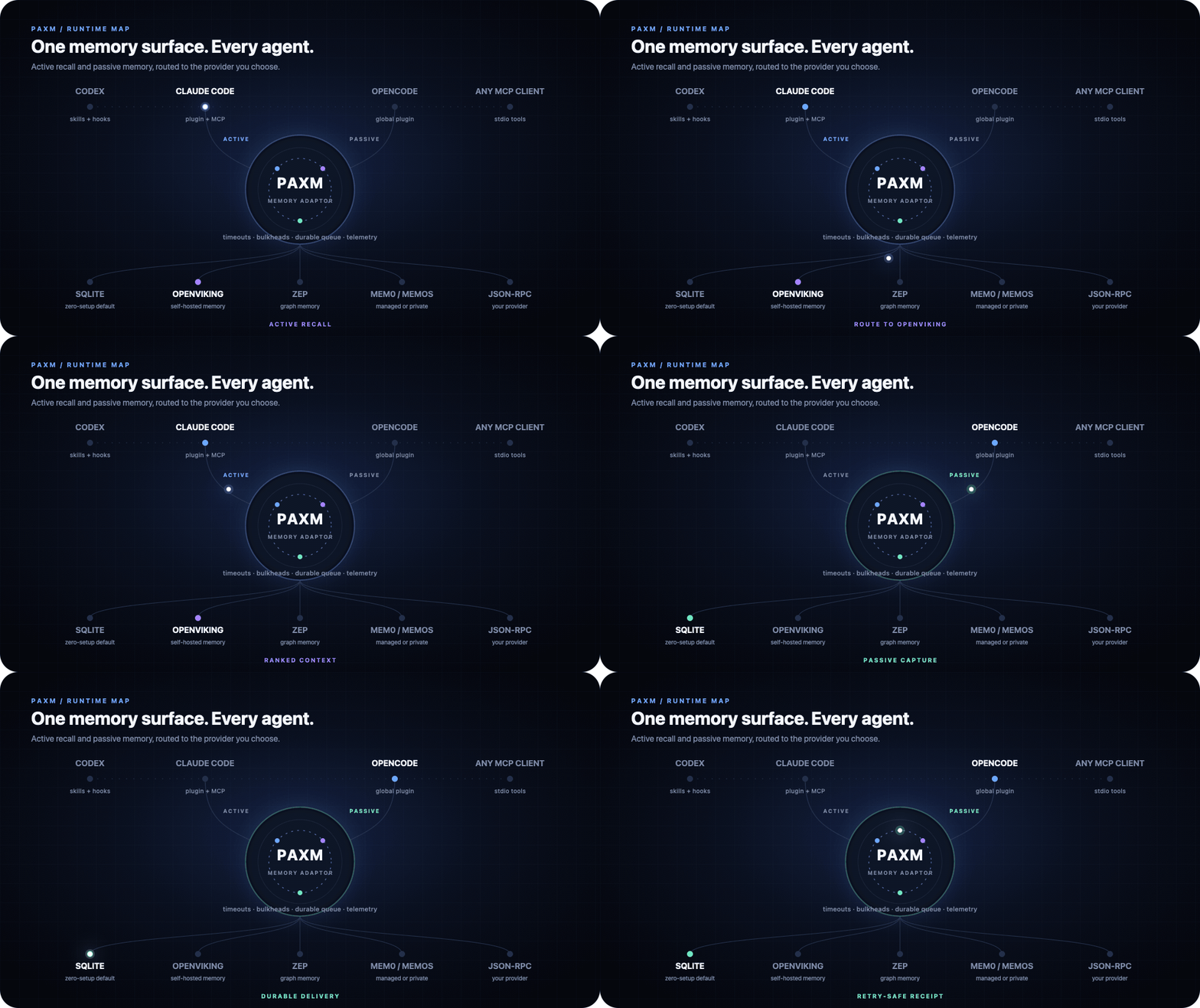
PAXM is a memory adaptor, not another hosted memory service:
AI agents -> CLI / MCP / skills / hooks -> paxm -> any memory provider
Agents reach paxm in two ways:
| Path | Entry points | Best for |
|---|---|---|
| Active | CLI, MCP, skill | Deliberate recall, explicit writes, inspection |
| Passive | Agent lifecycle hooks | Prompt-time recall and automatic turn capture |
Both paths use the same runtime and provider router. Filtering, profiles, ranking, timeouts, telemetry, and provider behavior stay consistent across agent surfaces.
Passive writes commit to a local durable queue before provider delivery. Slow or unavailable providers retry in the background instead of blocking the agent.
Passive recall uses an 800ms overall budget and 250ms per-provider budget
by default. It returns healthy partial results and records downstream
timeouts.
See it in motion
One agent surface, any memory provider
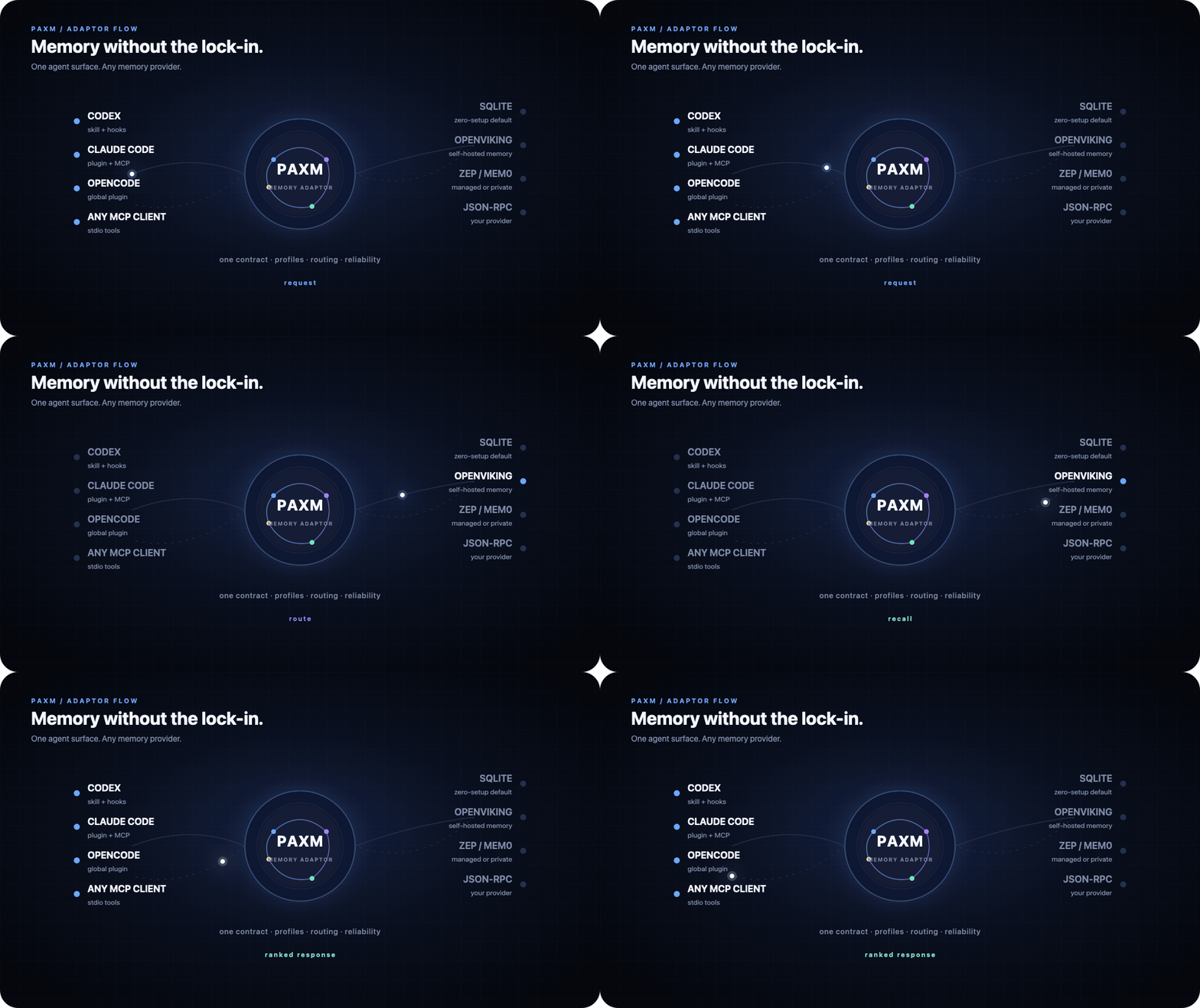
PAXM keeps the agent-facing contract stable while profiles choose providers, failure policy, ranking, and timeouts. SQLite is the zero-setup default, not a required storage backend.
Passive recall and durable background writes
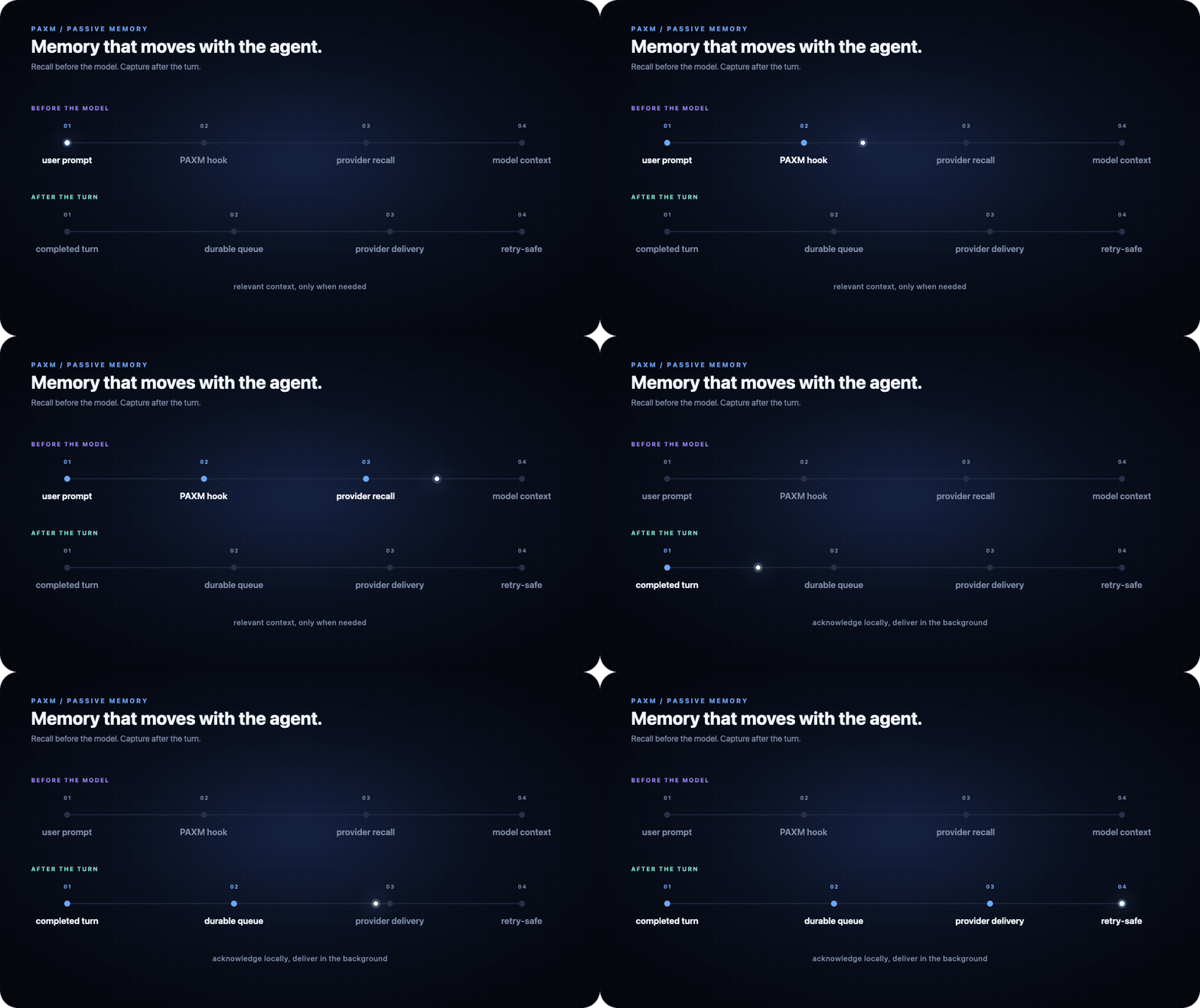
Lifecycle hooks recall context before the model request and capture completed turns afterward. Writes enter a durable local queue before provider delivery, so provider latency does not block the agent.
Read the detailed architecture and provider adapter contract.
Stored memories distinguish their origin (user, agent, session, and turn)
from their visibility scope. Providers that advertise attribution support
must round-trip both values; see the
JSON-RPC provider protocol.
Agents and providers
Agent surfaces
| Agent/client | Active | Passive recall | Passive write |
|---|---|---|---|
| Codex | CLI, MCP, skill | Hook | Hook |
| Claude Code | CLI, MCP, skill | Hook | Hook |
| Pi | CLI, MCP, skill | Extension | Extension |
| OpenCode | CLI, MCP | Plugin | Plugin |
| Cursor | MCP | — | Hook |
| TRAE / TRAE CN | MCP | Hook | Hook |
| Kimi Code | MCP | Hook | Hook |
| ZCode | MCP | Hook | Hook |
Kiro paxm agent | MCP | Hook | Hook |
| Cline | MCP | Hook | Hook |
| Any MCP client | MCP tools | — | — |
Memory providers
| Provider | Mode | Notes |
|---|---|---|
| SQLite | Default, built in | Zero-setup turn memory; no API key, LLM, or embeddings |
| Zep | Built in | User or graph scoped |
Stats
283
Stars
11
Forks
Maintained
Maintenance
Go
Language
Apache-2.0
License
Last commit
Created

Ships withpaxm
2822 skills1 MCP
Stars on GitHub
Momentum
- stars in total
- 282
More MCP servers from other plugins.




Questions about paxm.
- Which coding agents can use paxm?
- paxm works in any agent that reads an MCP config file: Claude Code, Codex, Cursor, Gemini CLI, GitHub Copilot, OpenCode and Windsurf. Each agent reads it from its own file; this page names the file for each one.
- How do I add paxm to Claude Code?
- Run these in order, one at a time. 1. In Claude Code: /plugin marketplace add pax-beehive/paxm 2. In Claude Code: /plugin install paxm-claude@pax-memory