

storybook-mcp
MCPDevelops and visually tests UI components in isolation outside of the full application.
 @storybookjsInstall MCP
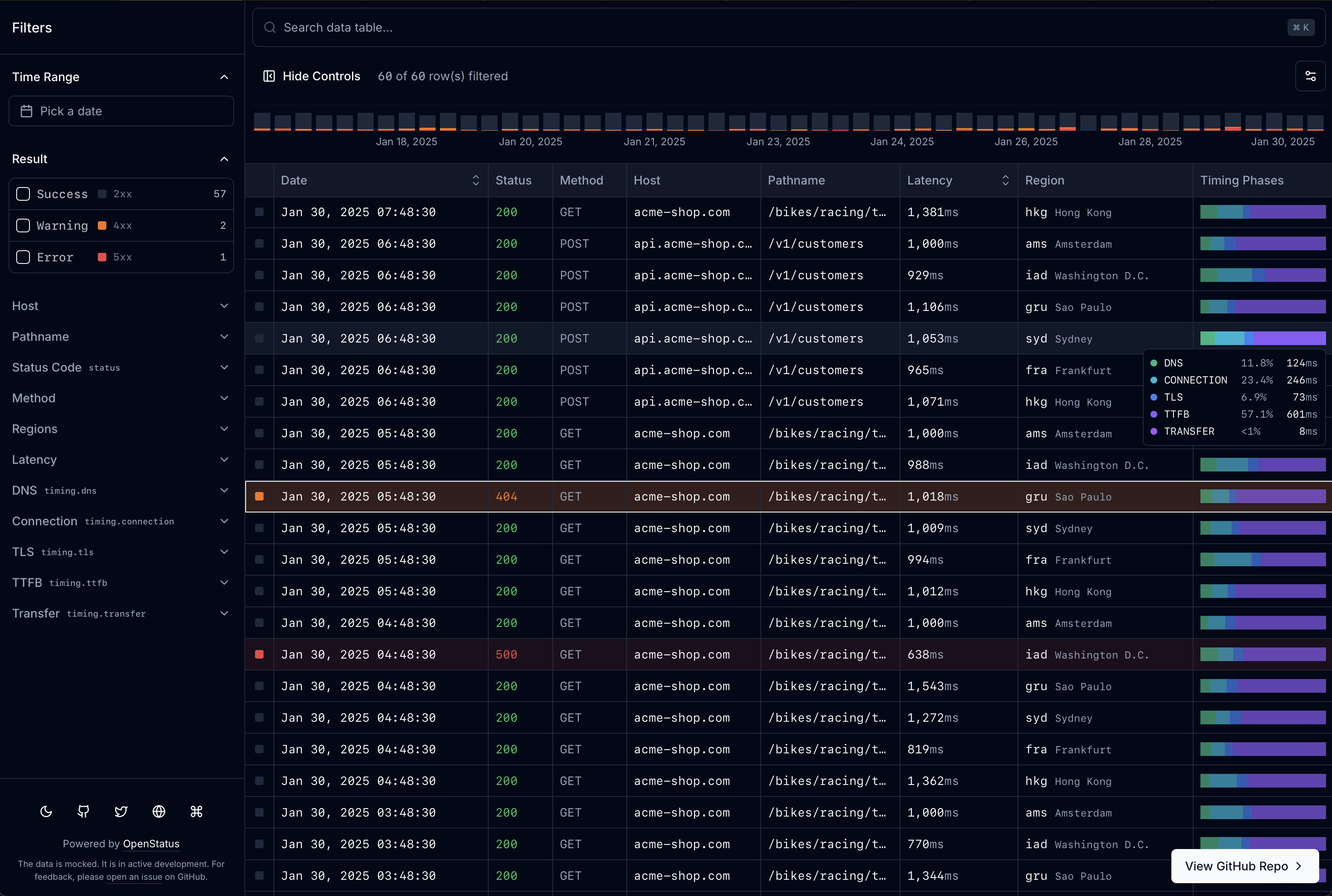
Ships with data-table-filters: React data tables for shadcn/ui: faceted filters, sorting, infinite scroll. Filtering, faceted counts and cursor pagination can run in SQL with Drizzle.
Claude Code
> /plugin marketplace add openstatushq/data-table-filters> /plugin install data-table-filters@openstatus
Codex
$ codex mcp add data-table-infinite --url http://localhost:3000/infinite/api/mcp
Cursor
{
  "mcpServers": {
    "data-table-infinite": {
      "url": "http://localhost:3000/infinite/api/mcp"
    }
  }
}
Add it to mcp.json.
Gemini CLI
$ gemini mcp add --transport http data-table-infinite http://localhost:3000/infinite/api/mcp
GitHub Copilot
$ copilot mcp add --transport http data-table-infinite http://localhost:3000/infinite/api/mcp
OpenCode
{
  "mcp": {
    "data-table-infinite": {
      "type": "remote",
      "url": "http://localhost:3000/infinite/api/mcp"
    }
  }
}
Add it to opencode.json.
Windsurf
{
  "mcpServers": {
    "data-table-infinite": {
      "serverUrl": "http://localhost:3000/infinite/api/mcp"
    }
  }
}
Add it to mcp_config.json.
Security report
Not enough data
Known flaws
Not published
Signed build
Not published
Maintained
Oct 2, 2026
Last push
Licence
MIT
Runs as
Remote
localhost
Deprecated
Not published
Signals from public registries, not an audit. Checked Nov 11, 2026.


Website • Documentation • Quick Start • Live Demo

Built by openstatus, and used in production in the openstatus dashboard.
createTableSchema definition drives the columns, filter controls, row detail sheet, Drizzle route handler, and MCP tool schema.Prerequisite. Works on either shadcn library: the CLI default, Base UI (
npx shadcn@latest init -d), or Radix (npx shadcn@latest init -b radix -p lyra). CI installs into both and typechecks them on every registry change and nightly.
One command installs the core block and the schema system:
npx shadcn@latest add @data-table-filters/data-table @data-table-filters/data-table-schema
Then render a table from any array of objects — columns, filters, and cell renderers are inferred:
import { DataTableAuto } from "@/components/data-table/data-table-auto";

const data = [
  {
    name: "Alice",
    role: "admin",
    rating: 5,
    created_at: "2026-01-15T10:00:00Z",
  },
  { name: "Bob", role: "user", rating: 3, created_at: "2026-02-20T14:30:00Z" },
];

export default function Page() {
  return <DataTableAuto data={data} />;
}
Starting from nothing? One command creates the Next.js app, initializes shadcn, and installs a working example with every block it needs (add -b radix before -p lyra for Radix). Run cd logs-viewer && pnpm dev and open localhost:3000/example:
pnpm dlx shadcn@latest init @data-table-filters/data-table-example-infinite --name logs-viewer --template next -p lyra
Requires pnpm (npm i -g pnpm); npx and npm run dev work the same if you prefer npm.
From create-next-app to a green next build this takes about 30 seconds on a clean machine. See the Quick Start for the full walkthrough, and add any block below as you need it.
| Block | Install | What it adds |
|---|---|---|
data-table | @data-table-filters/data-table | Core: table engine, store, 4 filter types, memory adapter |
data-table-filter-command | @data-table-filters/data-table-filter-command | Command palette with history + keyboard shortcuts |
data-table-cell | @data-table-filters/data-table-cell | 12 cell renderers (text, code, number, bar, heatmap, gauge, badge, boolean, star, status-code, level-indicator, timestamp) |
data-table-sheet | @data-table-filters/data-table-sheet | Row detail side panel |
data-table-nuqs | @data-table-filters/data-table-nuqs | nuqs URL state adapter |
data-table-zustand | @data-table-filters/data-table-zustand | zustand state adapter |
data-table-schema | @data-table-filters/data-table-schema | Declarative schema system with col.* factories |
data-table-drizzle | @data-table-filters/data-table-drizzle | Drizzle ORM server-side helpers |
data-table-query | @data-table-filters/data-table-query | React Query infinite query integration |
data-table-filter-command-ai | @data-table-filters/data-table-filter-command-ai | AI-powered natural language → filter inference |
data-table-mcp | @data-table-filters/data-table-mcp | MCP server endpoint for AI agents |
data-table-actions | @data-table-filters/data-table-actions | Row and bulk actions rendered from server metadata |
data-table-remote | @data-table-filters/data-table-remote | Headless table that renders from an API endpoint's manifest |
data-table-chart | @data-table-filters/data-table-chart | Timeline chart over the table: stacked buckets per level, drag to zoom the time filter |
data-table-example-infinite | @data-table-filters/data-table-example-infinite | Ready-to-run /example route: schema, mock API, infinite table with URL state |
Blocks install by name from the shadcn registry directory; the JSON form https://data-table.openstatus.dev/r/<block>.json works too.
Install the plugin in Claude Code:
/plugin marketplace add openstatushq/data-table-filters
/plugin install data-table-filters@openstatus
Or install the skill with any agent that supports the skills CLI:
npx skills add https://github.com/openstatushq/data-table-filters --skill data-table-filters
Then just say "add a filterable data table" — the skill detects your stack, installs the right blocks, generates a schema, and wires everything up.
Or point any MCP client at the docs and let the agent ask them questions —
search_docs, get_doc, list_blocks, get_install_plan:
claude mcp add --transport http data-table-filters https://data-table.openstatus.dev/api/mcp
Machine-readable docs, for agents without the skill:
| Endpoint | What it is |
|---|---|
/api/mcp | These docs as an MCP server (Streamable HTTP) |
/llms.txt | Index: blocks, install recipes, docs links |
/llms-full.txt | Every documentation page in one file |
/r/index.md | Block catalog with install commands and dependencies |
/docs/<page>.md | Any docs page as raw markdown |
Cursor users can copy .cursor/rules/data-table-filters.mdc into their project; AGENTS.md covers every other agent. See the For AI Agents docs page for the full rundown.
Define your entire table — columns, filters, display, sorting, row details — in one place with createTableSchema and col.* factories.
import {
  col,
  createTableSchema,
  type InferTableType,
} from "@/lib/table-schema";

const LEVELS = ["error", "warn", "info", "debug"] as const;

export const tableSchema = createTableSchema({
  level: col.presets.logLevel(LEVELS),
  date: col.presets.timestamp().label("Date").size(200).sheet(),
  latency: col.presets
    .duration("ms")
    .label("Latency")
    .sortable()
    .size(110)
    .sheet(),
  status: col.presets.httpStatus().label("Status").size(60),
  host: col.string().label("Host").size(125).sheet(),
});

export type ColumnSchema = InferTableType<typeof tableSchema.definition>;
Generators produce everything the table components need from a single schema:
const columns = generateColumns<ColumnSchema>(tableSchema.definition);
const filterFields = generateFilterFields<ColumnSchema>(tableSchema.definition);
const sheetFields = generateSheetFields<ColumnSchema>(tableSchema.definition);
Presets cover common patterns: logLevel, httpStatus, httpMethod, duration, timestamp, traceId, pathname.
/default — client-side pagination (nuqs or zustand)/infinite — infinite scroll with server-side filtering, live mode, row details/drizzle — Drizzle ORM + Supabase PostgreSQL with cursor-based pagination, faceted search, and live data via Vercel cron/light — OpenStatus Light Viewer (UI for vercel-edge-ping)/builder — interactive schema builder (paste JSON/CSV, live table preview, export TS)
Stars on GitHub
Develops and visually tests UI components in isolation outside of the full application.
@storybookjsInstall MCPRenders interactive 3D globes and streams geospatial terrain, imagery and vector data in a mapping engine.
 @gaopengbinInstall MCP
Inspects routing, rendering and build diagnostics for apps built with the Next.js framework.
 @vercelInstall MCP
