Every limit, cost and agent, live under your prompt in Claude Code and GitHub Copilot CLI. Plus every other AI subscription you pay for.







Install •
Demos •
Providers •
Copilot CLI •
Themes •
Widgets •
Agents •
Flags •
Changelog
Tip
One minute from zero to a live bar: /plugin install usage-pulse --marketplace NoobyGains/usage-pulse, then /usage-pulse:setup, then restart Claude Code.
Note
Works in GitHub Copilot CLI too (3.9.0). One command puts the same bar, in your theme, in Copilot CLI's footer, with your plan budget: premium requests or AI credits used, the allowance, what is left and when it resets. It reads only what Copilot CLI already keeps on your machine: no token, no network call. Claude Code is not required. See Inside GitHub Copilot CLI.
Plan ━━━───────── 23% 69/300 req · 231 left · R:1 Dec Pro | Session 3 req | Context ━━━━━─────── 42% | GPT-5.4 · medium | main
Why Usage Pulse
Install
As a Claude Code plugin
/plugin install usage-pulse --marketplace NoobyGains/usage-pulse
/usage-pulse:setup
A plugin cannot register a status line by itself, so /usage-pulse:setup writes it into settings.json with safe defaults. Afterwards /usage-pulse:pulse setup chooses hooks, providers, theme and widgets. On Claude Code older than 2.1.275, add the marketplace first with /plugin marketplace add NoobyGains/usage-pulse, then /plugin install usage-pulse.
One line
# macOS, Linux, Git Bash
curl -fsSL https://raw.githubusercontent.com/NoobyGains/usage-pulse/main/install.sh | bash
# Windows PowerShell
irm https://raw.githubusercontent.com/NoobyGains/usage-pulse/main/install.ps1 | iex
Both clone the repo to ~/.usage-pulse and open the setup wizard. Then restart Claude Code.
GitHub Copilot CLI
With usage-pulse installed any of the ways above, add the bar to Copilot CLI's footer and restart Copilot CLI:
python3 ~/.usage-pulse/claude_status.py --install-copilot
Inside Claude Code, /pulse copilot does the same. If you only use Copilot CLI, the clone under "By hand" below followed by this command is all you need: nothing of Claude Code's is read or written. What each kind of account shows is under Inside GitHub Copilot CLI.
By hand, installer variables, and what the plugin's hook does
git clone https://github.com/NoobyGains/usage-pulse.git ~/.usage-pulse
python3 ~/.usage-pulse/claude_status.py --setup
USAGE_PULSE_DIR picks another install folder, USAGE_PULSE_REPO_URL another source, and USAGE_PULSE_NONINTERACTIVE=1 (dotfiles, CI) takes the defaults without a terminal. The older CLAUDE_PULSE_* names still work.- An install from before the rename stays in
~/.claude-pulse; the installers update it in place.
- The plugin ships exactly one hook, on
SessionStart: plugin updates land in a new version folder and Claude Code deletes the old one two weeks later, so the hook re-points settings.json at the current folder when it is stale. It never touches a git or manual install and prints nothing otherwise.
python3 ~/.usage-pulse/claude_status.py --update brings the next release to a git install; plugin installs update with /plugin update usage-pulse.
See it in action
Two minutes of setup, nothing to edit
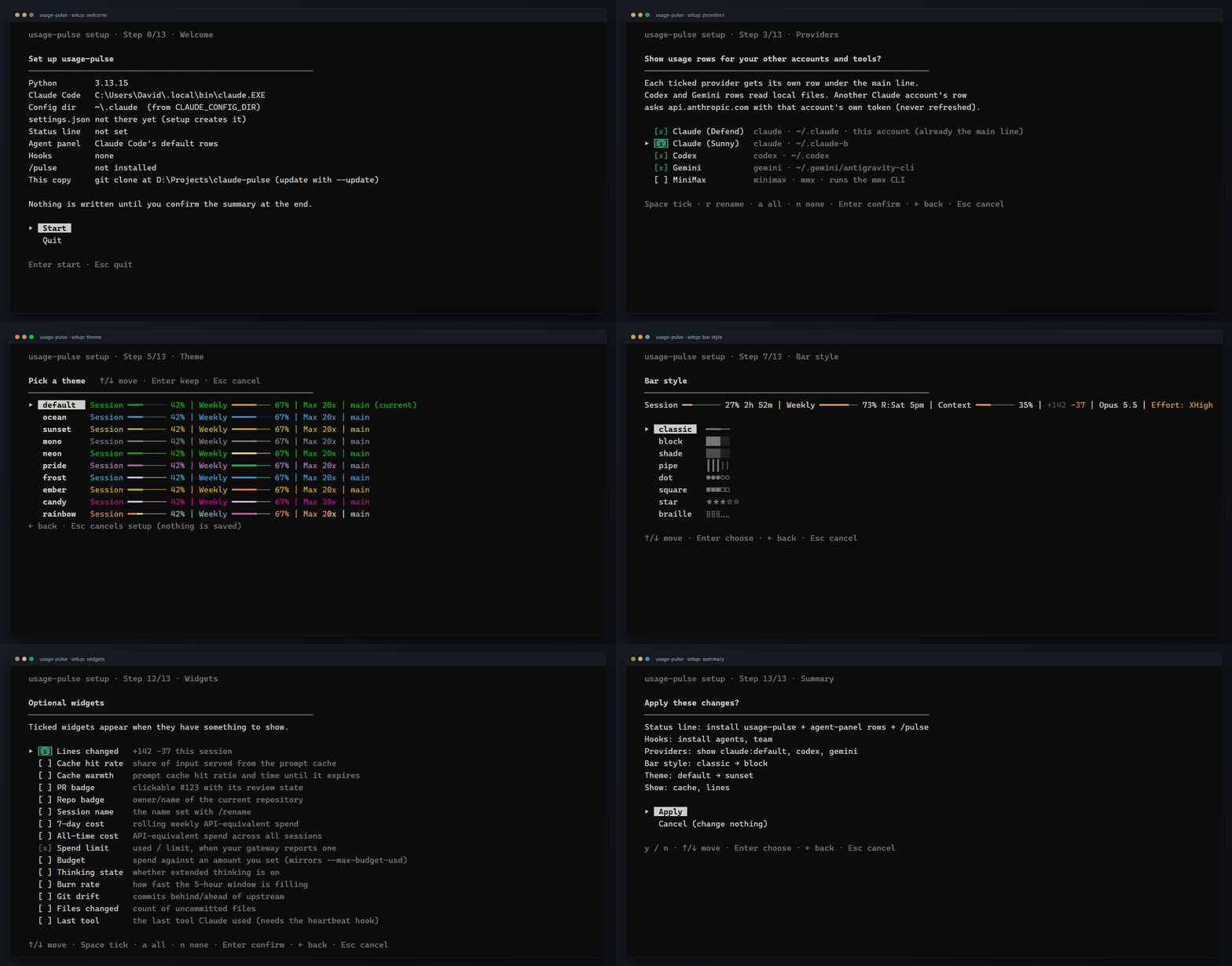
--setup is a full-screen wizard with 14 screens. It reports what it found (Python, Claude Code, your config folder, a status line it can replace), then walks through hooks, the providers on this machine, per-model caps, theme, bar size, bar style, layout, currency, clock, effort format and widgets. Every choice that changes the look has a live preview, nothing is written until you confirm the summary, Esc anywhere changes nothing, and settings.json is backed up before the first write. Inside Claude Code, /pulse offers the same choices as a menu, and /pulse setup, /pulse providers, /pulse hooks, /pulse show and /pulse ocean jump straight to a part.
Ten themes, five animations


Bars shift from each theme's low colour through mid to high as a window fills. The rainbow, pulse, glow and shift animations advance on every repaint, so the bar keeps moving while you think.
Four layouts, forty-eight widgets


Switch any widget on or off, reorder by priority, split the bar over two rows, and it still fits a narrow terminal by dropping the least important widgets first.
Agents and teams, as they happen
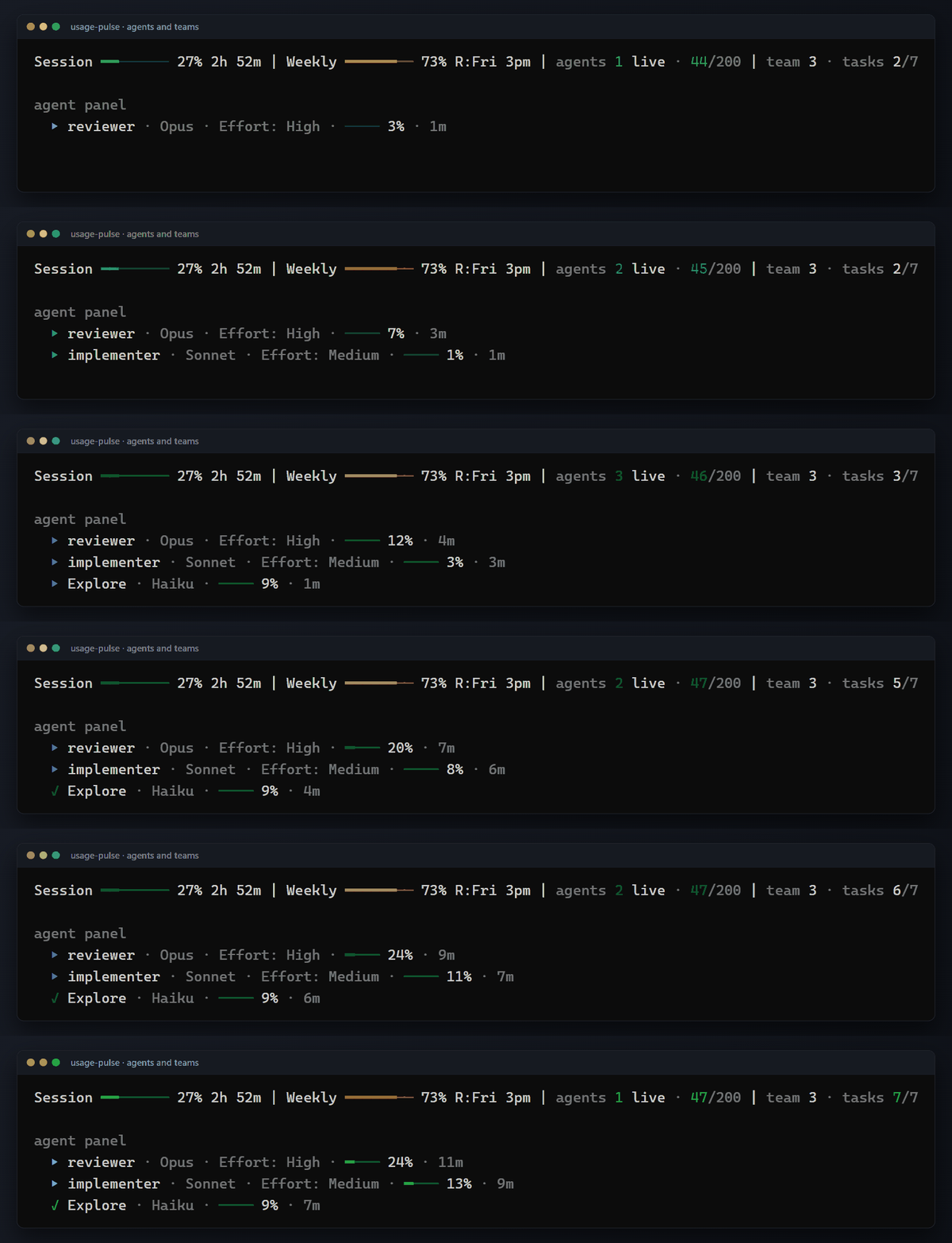
The counter and the team segment come from two optional hook groups. The agent panel rows need no hook at all: Claude Code asks Usage Pulse to draw each subagent's row.
It tells you when there is something new

Once an hour the bar checks for a new Usage Pulse release and a new Claude Code release. --update pulls the new version, verifies the commit against GitHub, rolls back if they differ and prints what changed.
What's on the bar
Session ━━━───────── 27% 2h 53m | Weekly ━━━━━━━━━─── 73% R:Fri 3pm | Context ━━━━──────── 35% | $38.75 | +142 -37 | Opus 5.5 | Effort: XHigh | ⚡fast | main
- Session: the 5-hour window, with the time until it resets.
- Weekly: the 7-day window, with the day and time it resets.
- Context: how full the context window is. A
⚠ Context label appears above 90%, or above 70% while it fills quickly.
- Cost: what this session would cost at API prices, in your currency.
- Lines changed, Model, Effort, Fast mode and Branch.
That is the default. Everything on it can be hidden, reordered or swapped for one of the widgets below.
Every subscription, one screen
Providers add one row per other subscription under the main line. --detect-providers lists what this machine has, and the wizard or /pulse providers switches rows on.
| What | Id | Where it is read from |
|---|
| Other Claude Code accounts | claude:default, claude:<suffix> (for example claude:b for ~/.claude-b) | Every ~/.claude* folder that holds a .credentials.json |
| Codex CLI | codex | ChatGPT's usage API with the Codex CLI's own login (~/.codex/auth.json); the session files under ~/.codex when that is not possible |
| Google Antigravity (Gemini) | gemini, gemini:<suffix> | statusline_last_live.json under ~/.gemini/antigravity-cli* |
| GitHub Copilot CLI | copilot | Copilot CLI's own record of the signed-in account, a local file. No token, no network call |
| MiniMax | minimax | The mmx CLI on your PATH. Never switched on automatically |
| Anything else | file:<name> | A JSON file that any tool can write |
python3 ~/.usage-pulse/claude_status.py --detect-providers          # what is here
python3 ~/.usage-pulse/claude_status.py --providers enable claude:b,codex
python3 ~/.usage-pulse/claude_status.py --providers label claude:b Work
python3 ~/.usage-pulse/claude_status.py --providers list




 @mattpocock


