

playwright
MCPDrives a real browser so the agent can open pages, click, fill forms and read what actually rendered.
 @windmill-labsInstall MCP
Ships with claudectl: Hive compute for coding agent swarms - expand your personal compute by adding on-demand agentic swarms
Claude Code
> /plugin marketplace add mercurialsolo/claudectl> /plugin install claudectl@claudectl
Codex
$ claude plugin marketplace add mercurialsolo/claudectl
Cursor
$ claude plugin marketplace add mercurialsolo/claudectl
Gemini CLI
$ claude plugin marketplace add mercurialsolo/claudectl
GitHub Copilot
$ claude plugin marketplace add mercurialsolo/claudectl
OpenCode
$ claude plugin marketplace add mercurialsolo/claudectl
Windsurf
$ claude plugin marketplace add mercurialsolo/claudectl
Security report
Not enough data
Known flaws
Not published
Signed build
Not published
Maintained
Oct 23, 2026
Last push
Licence
MIT
Runs as
Local process
On your machine
Deprecated
Not published
Signals from public registries, not an audit. Checked Nov 12, 2026.






~6 MB binary (full features, Homebrew bottle). Sub-50ms startup. Zero config required.
Website | Docs | Blog: Why a local brain? | Releases

Run claudectl --brain-stats impact to see your numbers:
  ╔════════════════════════════════════════════════╗
  ║              IMPACT SCORECARD                  ║
  ║             1200 decisions tracked             ║
  ╠════════════════════════════════════════════════╣
  ║  Auto-handled                             71%  ║
  ║  ████████████████████░░░░░░░░  847/1200        ║
  ║                                                ║
  ║  Brain accuracy                          96.2%  ║
  ║  ███████████████████████████░  1154/1200       ║
  ║                                                ║
  ║  Coverage vs static rules               2.9x  ║
  ║  brain ████████████████████████████  100%      ║
  ║  rules █████████░░░░░░░░░░░░░░░░░░░  34%      ║
  ║                                                ║
  ║  Dangerous ops blocked      12  Time saved 42m  ║
  ║  2 critical | 10 high-risk | 847 auto x 3s    ║
  ║                                                ║
  ║  Learning: correction rate 8.4% ↓ 2.1% (-6pp) ║
  ╚════════════════════════════════════════════════╝
brew install mercurialsolo/tap/claudectl     # Homebrew (macOS / Linux)
cargo install claudectl                       # Cargo (any platform)
Both produce the same ~6 MB binary with bus/coord/relay/hive enabled — claudectl bus, coord, relay, and hive work out of the box. For the minimal ~3.5 MB sync-only build, opt out with cargo install claudectl --no-default-features --features hive.
Building from source (Cargo) requires rustc 1.88+. Older toolchains fail with an opaque transitive-dependency error before the build starts — run rustup update stable first. The Homebrew bottle ships prebuilt and has no toolchain requirement.
Other methods
curl -fsSL https://raw.githubusercontent.com/mercurialsolo/claudectl/main/install.sh | sh
nix run github:mercurialsolo/claudectl
git clone https://github.com/mercurialsolo/claudectl.git && cd claudectl && cargo install --path .
claudectl demo                # Guided first-value tour — no live sessions needed
claudectl init                # Onboarding wizard (budget, brain, hooks, bus, skills)
claudectl doctor              # Verify install + runtime health (✓ checklist)
claudectl                     # Live dashboard — see all sessions at a glance
claudectl --brain             # Enable local LLM auto-pilot
After brew upgrade claudectl, run claudectl init --upgrade to re-sync hook entries, plugin files, and DB migrations to the new binary. claudectl doctor's plugin version row will tell you when this is needed.
The init wizard walks five phases — weekly budget, local-LLM brain detection, Claude Code hook install, agent-bus role, and curated skill suggestions. Run claudectl doctor to verify every piece is wired up, or claudectl init --check for the drift report against the onboarding marker.
To use claudectl from inside Claude Code (the hive and session-monitoring skills, slash commands, the supervisor agent, the brain gate and the bus MCP server), install the plugin from this repo's marketplace:
claude plugin marketplace add mercurialsolo/claudectl
claude plugin install claudectl@claudectl
Then ask Claude to "start a hive" or "invite my other machine". The plugin's brain gate hook runs on every Bash, Write, Edit and NotebookEdit call and answers for you: with no local LLM configured it falls back to built-in rules, auto-approving calls it rates low-risk (Claude Code does not prompt for those) and denying ones it rates critical. claudectl --mode off turns it off; set up a local LLM with claudectl --brain before relying on it for anything the rules do not cover.
The brain observes all your sessions and makes real-time decisions:
ollama pull gemma4:e4b && ollama serve    # One-time setup
claudectl --brain                         # Advisory mode (default)
claudectl --brain --auto-run              # Auto mode: brain executes without asking
claudectl --mode auto                     # Or toggle mid-session (Ctrl+b in TUI)
Works with any OpenAI-compatible endpoint: ollama, llama.cpp, vLLM, LM Studio.
The brain learns from everything you do — not just brain-involved decisions, but every manual approve, reject, rule execution, and conflict resolution. All data stays on your machine.
| Level | What it learns | Example |
|---|---|---|
| Conditional preferences | Context-dependent rules via decision tree splits | approve [Bash] "git push" when cost<$5 (n=8) |
| Outcome tracking | Correlates decisions to detect "approved but broke" | Downweights false-positive approvals |
| Temporal patterns | Behavioral sequences and time-of-day behavior | After 3+ errors: user usually denies |
| Per-project models | Separate preferences per project | [Read] always approve in frontend, usually deny in infra |
| Adaptive thresholds | Per-tool confidence requirements based on accuracy | 90%+ accurate on Read = auto-execute at 0.5 confidence |
To leave the brain unattended you need to trust and audit it. Every decision now carries a "why" — the source (rule, few-shot, or LLM), the confidence, and the past examples that informed it — surfaced inline in --brain-query output and the Brain Review panel.
claudectl --brain-review           # Triage decisions; press [c] to correct-and-learn in one keystroke
claudectl --brain-export           # Export the decision timeline as Markdown (paste into a PR)
claudectl --brain-export json --project acme   # …or JSON, filtered to one project (or --pid <n>)
A one-key correct-and-learn in the review view records the right answer as canonical training material, so the next similar decision improves.
The brain automatically detects friction patterns and suggests workflow improvements:
claudectl --brain --insights on     # Enable auto-generation (every 10 decisions)
claudectl --brain --insights        # View current insights
Detects: friction patterns, error loops, context blowouts, missing rules, accuracy gaps, cost trends. Only new insights are surfaced — the system tracks what you've already seen. Use /auto-insights in the Claude Code plugin.
The brain distills your decisions into shareable knowledge. Connect instances across machines to build a convergent hive mind — then move work, or a whole conversation, to whichever machine is free.
# Hive knowledge is built-in — view what the brain has learned
claudectl hive status
claudectl hive knowledge
claudectl hive distill                # Condense archive into curriculum

# Relay for cross-machine networking is enabled by default
claudectl relay invite                # Generate an invite code
claudectl relay join YCU-AIG-EAH-CC7-GUK-RYW-ZB4  # Join from another machine
claudectl relay discover              # Scan LAN for nearby instances
claudectl relay install-agent         # Keep the relay running across logout

# Run a relay on each machine, then see every session on either one
claudectl relay serve                 # leave running on both machines
claudectl relay fleet                 # every session across the cluster
claudectl relay delegate mac-mini "run the full test suite" --cwd ~/code/app

# Move a conversation to another machine and carry on there — or press `S`
# on the session in the TUI and pick the machine from the list
claudectl relay send-session mac-mini <session-id>
claudectl relay sessions              # what went where, and how to resume it

# Remote sessions also appear in the TUI as [worker-id] project-name.
# Tab on one sshes in and attaches to its tmux pane on that machine.
# The coordinator's HTTP API serves the same unified view to a dashboard:
claudectl relay serve --http-port 9876 --auth-token secret
# GET /api/sessions across all workers. Binds 127.0.0.1 — it is plaintext with
# a bearer token, so forward the port for an off-machine dashboard.
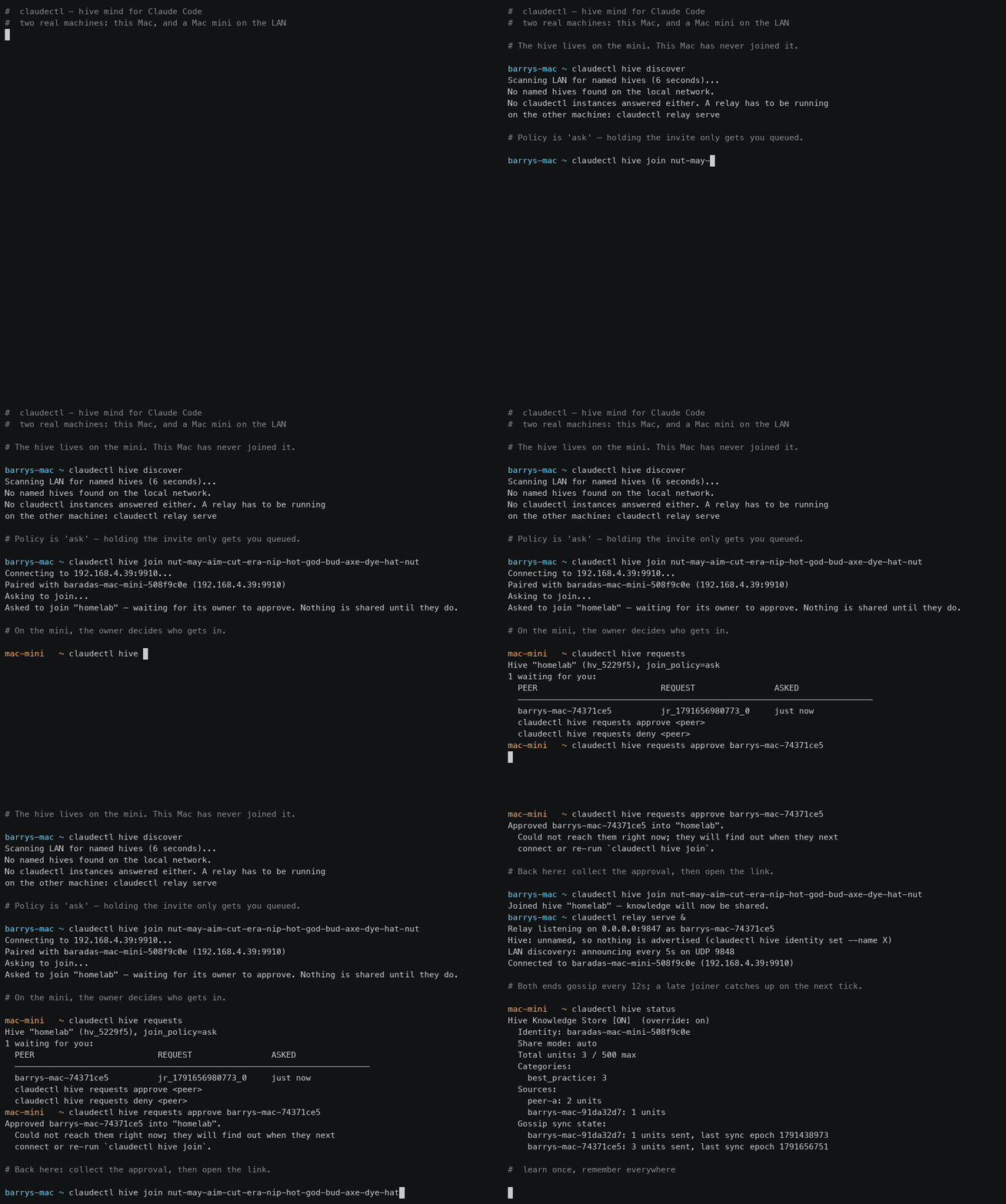
By default a hive has no name — it is whatever your relay peers happen to be. Naming one makes it something you can advertise, find and join as such, and lets you decide who gets in:
claudectl hive identity set --name barrys-hive --join-policy ask
claudectl hive discover               # named hives on the LAN, with peer/unit counts
claudectl hive invite                 # a link, a code, or a word phrase (--qr, --words)
claudectl hive join cctl://hive/hv_3a9f21?a=...   # from another machine
claudectl hive requests               # who is waiting; approve <peer> / deny <peer>

Stars on GitHub
Drives a real browser so the agent can open pages, click, fill forms and read what actually rendered.
@windmill-labsInstall MCPShips with open-computer-use: open-computer-use is an open-source Computer Use service wrapped as MCP. Any AI agent or MCP client…
 @ifurystInstall MCP

