
Development
Plugin
memov
Give git-like & traceable memory to OpenClaw and any coding agents. By https://memov.ai/ aka Entire CLI for every coding agents by MCP. Self-evolution for skills.

Plugin Signal37/100Fair
maintained15
capable14
documented100
adopted49
Install
$ npx -y skills add memovai/memov --agent claude-code
Stats
193
Stars
23
Forks
Quiet
Maintenance
Python
Language
MIT
License
7mo ago
Last commit
1y ago
Created
Repo: memovai/memov
What's inside
README




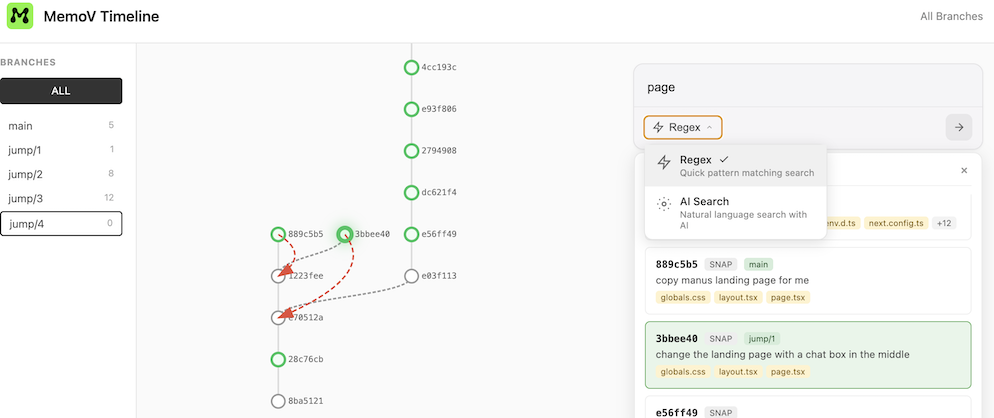
MemoV is a memory layer for AI coding agents that provides traceable, Git-powered version control for prompts, context, and code diffs. It enables VibeGit - automatic versioning of AI coding sessions with branch exploration, rollback capabilities, and zero pollution to the standard .git repository.
| MemoV | Checkpoints |
|---|---|
| Branch exploration | Linear timeline |
| Cross-session | Session-bound |
| Rollback preserves all | Rollback erases history |
| Every jump tracked | No trajectory |
- 💬 Join our Discord and dive into smarter vibe engineering
Features
- One-click MCP: Works with any AI coding agent
- VibeGit for Agents: Auto-trace prompts, context, and code diffs before git commits
- Version Control: Branch, rollback, replay any interaction
- Keep Git Clean: Shadow
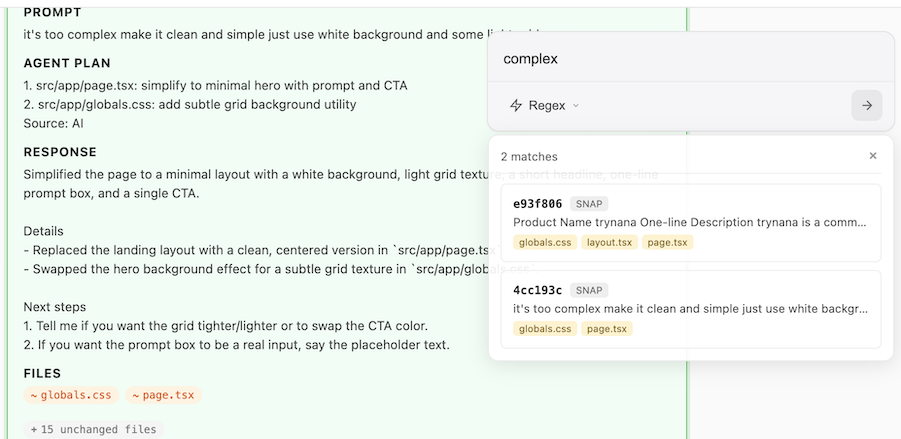
.memtimeline, files as context, zero pollution on.git - Visual UI: Say "mem ui" in chat, and view at http://localhost:38888
- Private-first — Local, no database, no overhead. Use .memignore to exclude
Quick Start (MCP Installation)
Prerequisites
Install uv first:
# macOS / Linux
curl -LsSf https://astral.sh/uv/install.sh | sh

# Windows
powershell -ExecutionPolicy ByPass -c "irm https://astral.sh/uv/install.ps1 | iex"

# Install Git (if not installed)
winget install --id Git.Git -e --source winget
Claude Code
Run in your project root directory:
claude mcp add mem-mcp --scope project -- uvx --from git+https://github.com/memovai/memov.git mem-mcp-launcher stdio $(pwd)
Codex
Run in your project root directory:
codex mcp add mem-mcp -- uvx --from git+https://github.com/memovai/memov.git mem-mcp-launcher stdio $(pwd)
Create .vscode/mcp.json in your project root:
{
  "servers": {
    "mem-mcp": {
      "type": "stdio",
      "command": "uvx",
      "args": [
        "--from",
        "git+https://github.com/memovai/memov.git",
        "mem-mcp-launcher",
        "stdio",
        "${workspaceFolder}"
      ]
    }
  }
}
Go to Files > Preferences > Cursor Settings > MCP, then add:
{
  "mcpServers": {
    "mem-mcp": {
      "command": "uvx",
      "args": [
        "--from",
        "git+https://github.com/memovai/memov.git",
        "mem-mcp-launcher",
        "stdio",
        "${workspaceFolder}"
      ]
    }
  }
}
Note: Antigravity does not support
"${workspaceFolder}"variable. Please manually enter the absolute path to your project directory.
Go to Settings > MCP, then add:
{
  "mcpServers": {
    "mem-mcp": {
      "command": "uvx",
      "args": [
        "--from",
        "git+https://github.com/memovai/memov.git",
        "mem-mcp-launcher",
        "stdio",
        "/absolute/path/to/your/project"
      ]
    }
  }
}
Replace /absolute/path/to/your/project with the actual absolute path to your project directory (e.g., /Users/username/projects/my-project on macOS/Linux or C:\\Users\\username\\projects\\my-project on Windows).
To enable semantic search, validation, and debugging tools, install with [rag] extras:
Claude Code:
claude mcp add mem-mcp --scope project -- uvx --from "git+https://github.com/memovai/memov.git[rag]" mem-mcp-launcher stdio $(pwd)
VS Code / Cursor: Change the --from argument to:
"git+https://github.com/memovai/memov.git[rag]"
Important Tips
Add a Rule — To automatically save snapshots after each interaction, add a rule to your coding agents:
- Cursor: Cursor Settings > Rules
- Claude Code:
CLAUDE.md - Or the equivalent in your MCP client
Example rule:
After completing any interaction, always call `use mem snap` to save the snapshot.
Web UI, Just Say Use mem ui🤌
Just say "use mem ui" in the chat — opens at http://localhost:38888 with timeline view, branch filtering, diff viewer, and jump to any snapshot.
CLI Installation (Optional)
If you want to use the mem CLI tool directly (for manual tracking, history viewing, etc.):
One-Line Install
curl -fsSL https://raw.githubusercontent.com/memovai/memov/main/install.sh | bash
Or with wget:
wget -qO- https://raw.githubusercontent.com/memovai/memov/main/install.sh | bash
Package Managers
brew tap memovai/mem
brew install memov
echo "deb [trusted=yes] https://memovai.github.io/memov/apt stable main" | sudo tee /etc/apt/sources.list.d/mem.list
sudo apt update
sudo apt install mem
sudo curl -o /etc/yum.repos.d/mem.repo https://memovai.github.io/memov/yum/mem.repo
sudo dnf install mem
Download the latest release for your platform:
| Platform | Download |
|---|---|
| Linux x86_64 | mem-linux-x86_64.tar.gz |
| macOS Intel | mem-macos-x86_64.tar.gz |
| macOS Apple Silicon | mem-macos-arm64.tar.gz |
| Windows x86_64 | mem-windows-x86_64.exe.zip |
Linux / macOS:
curl -LO https://github.com/memovai/memov/releases/latest/download/mem-linux-x86_64.tar.gz
tar -xzf mem-linux-x86_64.tar.gz
sudo mv mem-linux-x86_64 /usr/local/bin/mem
mem --help
Windows (PowerShell):
Invoke-WebRequest -Uri "https://github.com/memovai/memov/releases/latest/download/mem-windows-x86_64.exe.zip" -OutFile "mem.zip"
Expand-Archive -Path "mem.zip" -DestinationPath "."
New-Item -ItemType Directory -Force -Path "$env:ProgramFiles\mem"
Move-Item -Path "mem-windows-x86_64.exe" -Destination "$env:ProgramFiles\mem\mem.exe"
[Environment]::SetEnvironmentVariable("Path", $env:Path + ";$env:ProgramFiles\mem", "Machine")
mem --help
Requires Python 3.10+ and uv:
git clone https://github.com/memovai/memov.git
cd memov
uv sync
uv pip install -e .
mem --help
Installation for Contributors
Please see docs/installation_for_dev.md for detailed installation instructions.
Architecture
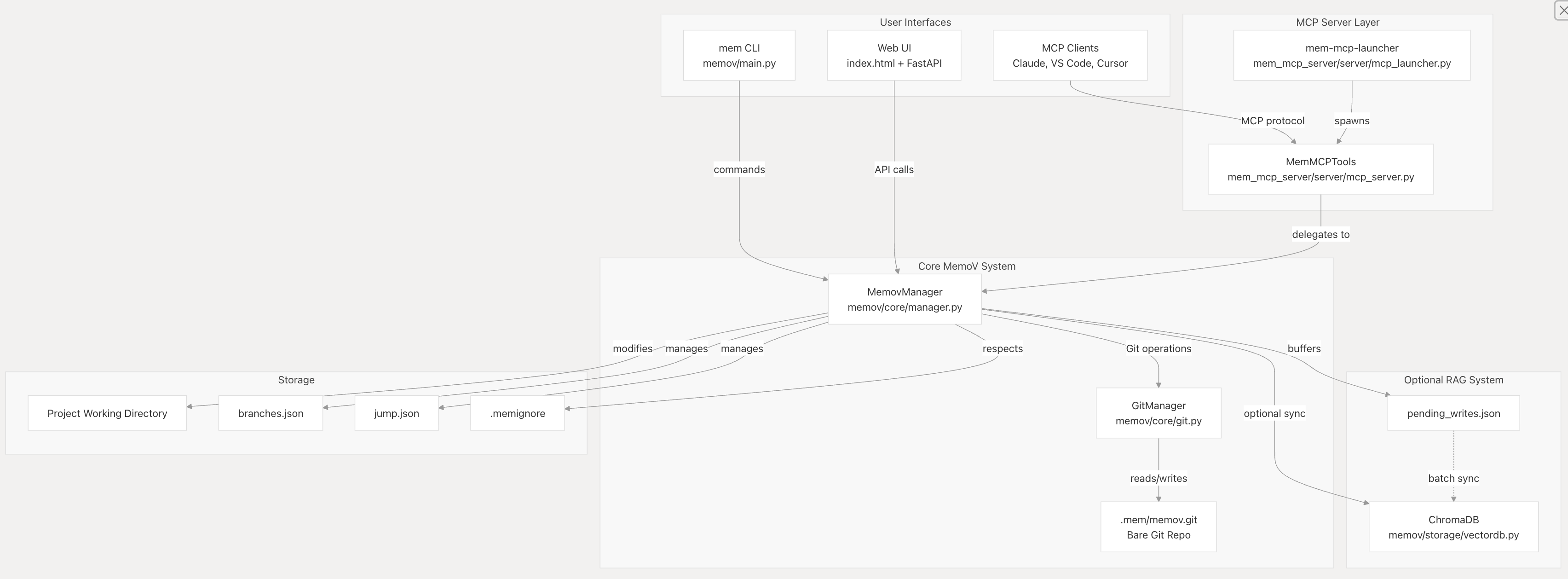
MemoV follows a three-tier architecture with MemovManager as the central orchestrator, the MCP Server as an adapter layer for AI agents, and an optional RAG system for semantic search.
Core Operations
-
snap(user_prompt: str, original_response: str, agent_plan: list[str], files_changed: str)- Record every user interaction with automatic file tracking. Handles untracked vs modified files intelligently.
-
mem_ui(port: int = 38888)- Launch the Web UI at
http://localhost:38888to visually browse history, view diffs, and jump to any snapshot.
- Launch the Web UI at
-
mem_history(limit: int = 20, commit_hash: str = "")- View memov history with prompts, responses, and file changes.
-
mem_jump(commit_hash: str)- Jump to a specific snapshot, restoring all tracked files and creating a new branch.
RAG Tools (requires [rag] extras)
These tools are only available when installed with [rag] extras.
-
mem_sync()- Sync all pending operations to VectorDB for semantic search capabilities.
-
validate_commit(commit_hash: str, detailed: bool = True)- Validate a specific commit by comparing prompt/response with actual code changes. Detects context drift and alignment issues.
-
validate_recent(n: int = 5)- Validate the N most recent commits for alignment patterns. Useful for session reviews and quality assurance.
-
vibe_debug(query: str, error_message: str = "", stack_trace: str = "", user_logs: str = "", models: str = "", n_results: int = 5)- Debug issues using RAG search + multi-model LLM comparison. Searches code history for relevant context and queries multiple AI models (GPT-4, Claude, Gemini) in parallel for diverse debugging insights.
-
vibe_search(query: str, n_results: int = 5, content_type: str = "")- Fast semantic search through code history (prompts, responses, agent plans, code changes) without LLM analysis. Perfect for quick context lookup.
Health Check
GET /health- Returns "OK". Useful for IDE/agent readiness checks.
License
MIT License. See LICENSE.
File tree
FAQ
memov is a Claude Code plugin with 1 hand-picked skill for development work, indexed on Flowy. Install it with the command on its page. It includes vibegit. Its skills do not fire on their own yet. Request auto-invocation to have Flowy route them as you prompt. Free and open source.
- What is memov?
- Give git-like & traceable memory to OpenClaw and any coding agents. By https://memov.ai/ aka Entire CLI for every coding agents by MCP. Self-evolution for skills.
- How do I install memov?
- Run these in Claude Code: npx -y skills add memovai/memov --agent claude-code. Then prompt normally.
- Does memov auto-invoke its skills?
- Not yet. It is indexed on Flowy as a plain plugin. Request auto-invocation on its page and Flowy will route its skills for you as you prompt.
- Is memov free?
- Yes. Flowy is free and open source, with nothing gated. You can read every skill in full before you install.
Is this plugin yours?
Claim it with GitHubSubmit a pluginPromote it