
Development
Plugin
claude-mem-sync
Team memory sharing for claude-mem — sync AI memories across developers via git.

Plugin Signal53/100Fair
maintained57
capable29
documented100
adopted31
Install on Claude Code
> /plugin marketplace add lopadova/claude-mem-sync> /plugin install claude-mem-sync@claude-mem-sync
Stats
27
Stars
4
Forks
Maintained
Maintenance
TypeScript
Language
MIT
License
3mo ago
Last commit
6mo ago
Created
Repo: lopadova/claude-mem-sync
What's inside
README
claude-mem-sync
Team memory sharing for claude-mem — sync AI memories across developers via git.

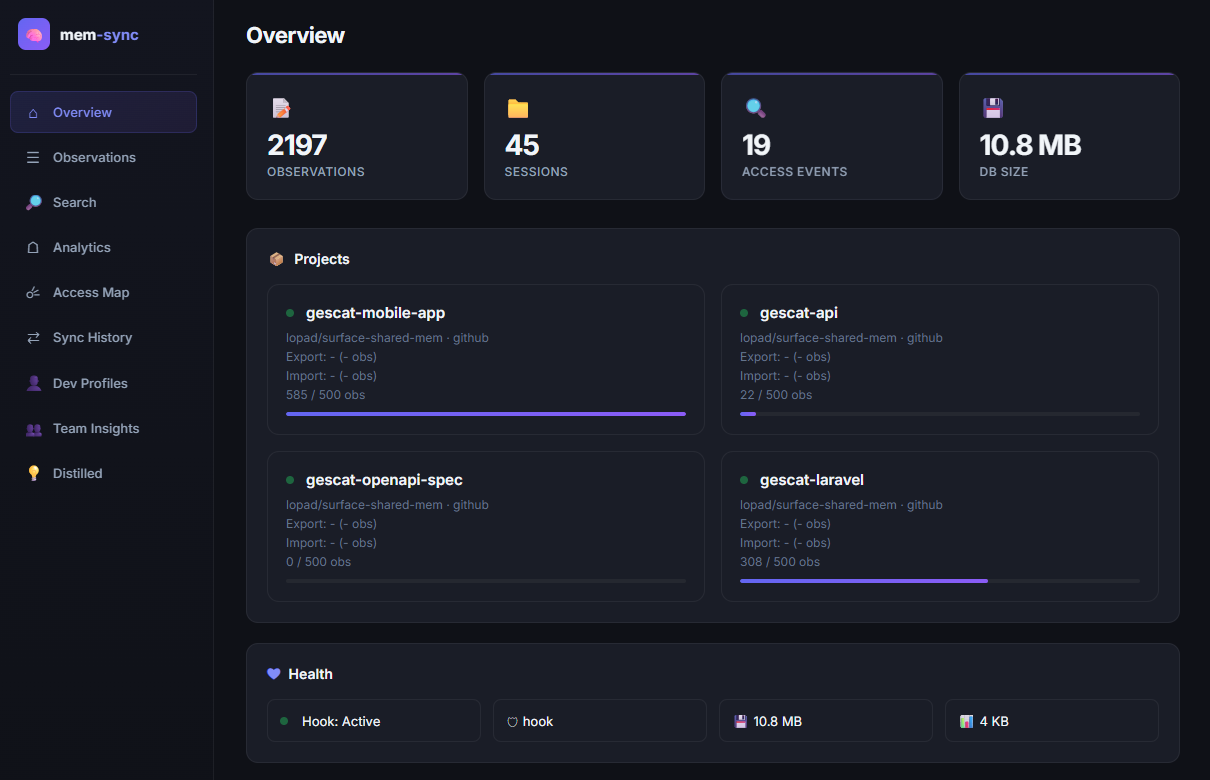
Table of Contents
- Why This Exists
- What It Does
- Step-by-Step Setup Guide
- Step 1: Install Prerequisites
- Step 2: Install the Claude Code Plugin
- Step 3: Run the Setup Wizard
- Step 4: Create the Shared Team Repository
- Step 5: Set Up GitHub Actions (CI/CD)
- Step 6: Your First Export
- Step 7: Import Team Memories
- Step 8: Enable Developer Profiles
- Step 9: Enable Knowledge Distillation (optional)
- Step 10: Launch the Dashboard
- Step 11: Set Up Automatic Scheduling (optional)
- Configuration Reference
- CLI Reference
- Web Dashboard
- Developer Knowledge Profiles
- Knowledge Distillation
- Eviction & Scoring
- Destination Patterns
- Maintenance
- Security & Privacy
- Architecture
- Publishing a Release (maintainers)
- Troubleshooting
- License
Why This Exists
claude-mem gives Claude persistent memory across sessions, storing observations (decisions, bugfixes, discoveries) in a local SQLite database. But it's designed for single-user, per-machine usage.
When a team works on the same project:
- Each developer has their own isolated memory database
- Developer A discovers a critical pattern — developers B through L never learn about it
- The same bugs get rediscovered, the same decisions re-debated
- There is no native team mode, no shared database, no automatic sync
claude-mem-sync bridges this gap with filtered, scored, deduplicated team memory sharing using git as the transport layer.
What It Does
Developer A                    GitHub (shared repo)              Developer B
┌──────────┐    export         ┌──────────────────┐    import   ┌──────────┐
│ claude-   │ ──────────────►  │ contributions/   │  ◄───────── │ claude-  │
│ mem.db    │    (filtered)    │   dev-A/         │  (merged)   │ mem.db   │
│           │                  │   dev-B/         │             │          │
│           │    import        │                  │   export    │          │
│           │ ◄──────────────  │ merged/          │ ──────────► │          │
│           │    (deduped)     │   latest.json    │  (filtered) │          │
└──────────┘                   └──────────────────┘             └──────────┘
                                    ▲
                               GitHub Action
                               (merge + dedup + cap)
                                    │
                          ┌─────────┴──────────┐
                          ▼                    ▼
                    ┌────────────┐      ┌────────────┐
                    │  profiles/ │      │ distilled/ │
                    │  per-dev   │      │ rules.md   │
                    │  metrics   │      │ kb.md      │
                    └────────────┘      └────────────┘
                    (deterministic)     (LLM-powered)
Features:
- Filtered export — only share what matters (by type, keyword, or tag)
- Intelligent eviction — scoring system prevents unbounded DB growth
- Deduplication — composite key dedup across developers
- Access tracking — PostToolUse hook tracks which memories Claude actually uses
- Cross-platform scheduling — automatic export/import via cron, launchd, or Task Scheduler
- PR review mode — optional human review before memories enter the shared repo
- Multi-provider support — GitHub, GitLab, and Bitbucket (including self-hosted)
- CI merge bot — templates for GitHub Actions, GitLab CI, and Bitbucket Pipelines
- Web dashboard — 9-tab dark-theme UI with charts, heatmaps, profiles, and analytics
- Rich analytics — type distribution, access patterns, developer contributions, observation scoring
- Developer knowledge profiles — per-dev metrics: knowledge spectrum, concept map, file coverage, temporal patterns, survival rate
- Knowledge distillation — LLM-powered extraction of CLAUDE.md rules and knowledge docs from team observations
- Team insights — knowledge gaps detection, concept coverage heatmaps, bus-factor risk analysis
- Configurable cleanup — automatic retention policy for old contribution files
Step-by-Step Setup Guide
This guide walks you through the complete setup of claude-mem-sync, from zero to a fully working team memory sharing pipeline. Follow each step in order.
Step 1: Install Prerequisites
Before you start, make sure you have these tools installed on your machine.
1.1 — Install Bun (recommended)
You need one of these runtimes. Bun is recommended because it's faster and has built-in SQLite.
Option A: Install Bun (recommended)
# macOS / Linux
curl -fsSL https://bun.sh/install | bash

# Windows (PowerShell)
powershell -c "irm bun.sh/install.ps1 | iex"

# Verify it works
bun --version   # Should print 1.x.x or higher
1.2 — Install Git
# macOS (Homebrew)
brew install git

# Ubuntu/Debian
sudo apt install git

# Windows — download from https://git-scm.com/

# Verify it works
git --version
1.3 — Install GitHub CLI (required for PR mode and repo creation)
# macOS (Homebrew)
brew install gh

# Ubuntu/Debian
sudo apt install gh

# Windows (winget)
winget install GitHub.cli

# Log in to GitHub
gh auth login

# Verify it works
gh --version
1.4 — Install claude-mem
claude-mem-sync reads from claude-mem's database. You need claude-mem installed and already generating observations.
Follow the claude-mem installation guide to set it up.
After installation, verify you have a database file at:
- Default location:
~/.claude-mem/claude-mem.db
# Check the file exists
ls -la ~/.claude-mem/claude-mem.db
Don't have observations yet? Use Claude Code for a few sessions first. claude-mem automatically records decisions, bugfixes, and discoveries as you work.
Step 2: Install the Claude Code Plugin
This single step installs both the plugin (PostToolUse hook for access tracking) and the CLI tool (mem-sync command) automatically.
# Add the claude-mem-sync marketplace
claude plugin marketplace add lopadova/claude-mem-sync

# Install the plugin (this also installs the mem-sync CLI globally)
claude plugin install claude-mem-sync@claude-mem-sync
The setup hook will automatically:
- Build the project (if needed)
- Install the
mem-syncCLI globally vianpm link - Skip installation if
mem-syncis already available
Note: The setup hook runs via
node(seehooks.json), so you must have Node.js ≥ 18 installed and on yourPATH, even if you primarily use Bun. Without Node ≥ 18, the automatic CLI installation will fail. Verify everything is working:
# Check the plugin is active
claude plugin list
# You should see claude-mem-sync@claude-mem-sync with status: ✔ enabled

# Check the CLI is available
mem-sync --help
Local development: If you cloned the repo locally, you can add it as a local marketplace instead:
claude plugin marketplace add /path/to/claude-mem-sync
claude plugin install claude-mem-sync@claude-mem-sync
Already installed the CLI manually? No problem — the setup hook detects existing installations and skips automatically.
What does the hook do? Every time Claude reads a memory (via the
mcp__plugin_claude-mem_mcp-search__*tools), the hook records which observations were accessed. This data is used to compute more accurate eviction scores — memories that are actually used by Claude get higher scores and survive longer.
If the automatic setup doesn't work, you can install the CLI manually:
# Option A: Install from GitHub (Bun)
bun add -g @lopadova/claude-mem-sync

# Option B: Install from GitHub (npm — requires GitHub Packages auth)
# 1. Create a PAT at github.com/settings/tokens with read:packages scope
# 2. Configure registry:
echo "@lopadova:registry=https://npm.pkg.github.com" >> ~/.npmrc
echo "//npm.pkg.github.com/:_authToken=YOUR_TOKEN" >> ~/.npmrc
# 3. Install:
npm install -g @lopadova/claude-mem-sync
Step 3: Run the Setup Wizard
The interactive wizard creates your configuration file at ~/.claude-mem-sync/config.json.
mem-sync init
The wizard will ask you:
-
Your developer name — a unique identifier (e.g.,
alice,bob). This appears in contribution file paths and exported JSON. -
claude-mem database path — press Enter to accept the default (
~/.claude-mem/claude-mem.db), or provide a custom path if you installed claude-mem elsewhere. -
Project configuration — for each project you want to sync:
- Project name — a short identifier (e.g.,
my-app,backend-api) - Remote repo — the GitHub repo in
owner/nameformat (e.g.,my-org/dev-memories) - Auto-merge —
yesto push directly,noto create Pull Requests for review - Export filters — which observation types/keywords/tags to export
- Project name — a short identifier (e.g.,
Here's what a typical config looks like after the wizard:
{
  "global": {
    "devName": "alice",
    "claudeMemDbPath": "~/.claude-mem/claude-mem.db",
    "evictionStrategy": "passive",
    "evictionKeepTagged": ["#keep"],
    "mergeCapPerProject": 500,
    "exportSchedule": "friday:16:00",
    "logLevel": "info",
    "profiles": { "enabled": false, "anonymizeOthers": true },
    "distillation": { "enabled": false, "allowExternalApi": false }
  },
  "projects": {
    "my-app": {
      "enabled": true,
      "remote": {
        "type": "github",
        "repo": "my-org/dev-memories",
        "branch": "main",
        "autoMerge": true
      },
      "export": {
        "types": ["decision", "bugfix", "feature", "discovery"],
        "keywords": ["architecture", "breaking"],
        "tags": ["#shared"]
      }
    }
  }
}
Tip: You can edit
~/.claude-mem-sync/config.jsonmanually at any time to change settings.
Step 4: Create the Shared Team Repository
You need a private repository where all team members push their memory exports.
Recommended: Use setup-repo
mem-sync setup-repo my-team-memories
This interactive wizard will:
- Create the directory structure (
contributions/,merged/,profiles/,distilled/) - Copy CI workflow templates for your provider (GitHub Actions, GitLab CI, or Bitbucket Pipelines)
- Configure the LLM provider for distillation (GitHub Copilot or Anthropic)
- Optionally create the GitHub repo via
gh repo create - Generate a README and
.gitignore - Make the initial commit
Manual alternative
If you prefer to set things up manually:
File tree
FAQ
claude-mem-sync is a Claude Code plugin with 1 hand-picked skill for development work, indexed on Flowy. Install it with the command on its page. It includes docmd-docs. Its skills do not fire on their own yet. Request auto-invocation to have Flowy route them as you prompt. Free and open source.
- What is claude-mem-sync?
- Team memory sharing for claude-mem — sync AI memories across developers via git.
- How do I install claude-mem-sync?
- Run these in Claude Code: /plugin marketplace add lopadova/claude-mem-sync then /plugin install claude-mem-sync@claude-mem-sync. Then prompt normally.
- Does claude-mem-sync auto-invoke its skills?
- Not yet. It is indexed on Flowy as a plain plugin. Request auto-invocation on its page and Flowy will route its skills for you as you prompt.
- Is claude-mem-sync free?
- Yes. Flowy is free and open source, with nothing gated. You can read every skill in full before you install.
Is this plugin yours?
Claim it with GitHubSubmit a pluginPromote it