
leeguooooo-image-use
Generates raster images and looping GIF or WebP animations from a local one-file Python CLI, using the user's existing ChatGPT subscription instead of an OpenAI API key. Usable by Claude Code as a skill.
1 skill410
 @leeguooooo
Generates new raster images and looping GIF or WebP animations from Claude Code using the local image-use CLI, with your existing ChatGPT subscription and no API key. It is a single stdlib-only Python file.
Claude Code
$ npx -y skills add leeguooooo/image-use --agent claude-code
Codex
$ npx skills add leeguooooo/image-use -a codex
Cursor
$ npx skills add leeguooooo/image-use -a cursor
Gemini CLI
$ npx skills add leeguooooo/image-use -a gemini-cli
GitHub Copilot
$ npx skills add leeguooooo/image-use -a github-copilot
OpenCode
$ npx skills add leeguooooo/image-use -a opencode
Windsurf
$ npx skills add leeguooooo/image-use -a windsurf

English | 中文
Generate images with the subscriptions you already have — no OPENAI_API_KEY.
A tiny zero-dependency Python CLI (and AI-agent skill): one file, stdlib only. It uses your ChatGPT subscription by default, falls back to Codex, and can use a Gemini subscription instead. Works on a free ChatGPT account too — the default backend just drives the normal ChatGPT web chat, where even free-tier users get image generation.
Formerly
chatgpt-imagegen. It was renamed once it grew non-ChatGPT backends. Thechatgpt-imagegencommand still works as an alias, and everyCHATGPT_IMAGEGEN_*environment variable is still honoured (the newIMAGE_USE_*name wins if both are set). Your saved styles are untouched.
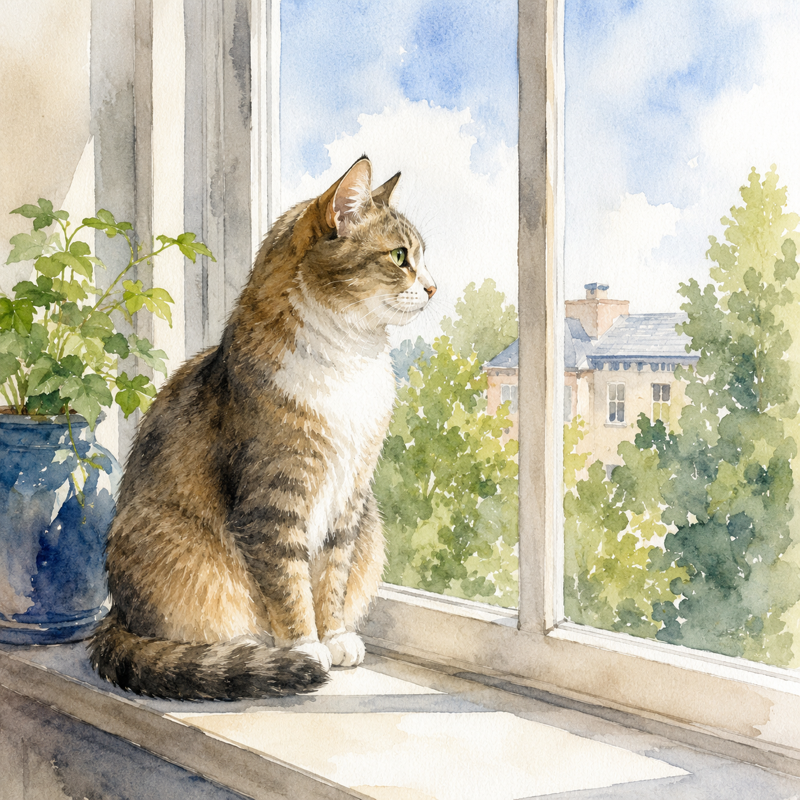
image-use "a watercolor cat sitting on a windowsill" -o cat.png
# -> saved: cat.png  (812,344 bytes)  size=1024x1024  quality=medium
Needs Python 3.10+ and a ChatGPT subscription (free tier works).
For AI agents (recommended) — drops the skill into Claude Code, Codex, Cursor, etc.:
npx skills add leeguooooo/image-use -g
Then just ask: "画一张 …" / "generate a hero banner for the README".
Standalone CLI — no pip, no virtualenv, no sudo. Keeps a git checkout under ~/.agents/use-family/image-use, links image-use into ~/.local/bin and the skill for Claude Code / Codex; re-run to update:
curl -fsSL https://raw.githubusercontent.com/leeguooooo/image-use/main/install.sh | sh
Or by hand:
git clone https://github.com/leeguooooo/image-use
sudo install image-use/image-use /usr/local/bin/image-use
sudo ln -sf image-use /usr/local/bin/chatgpt-imagegen   # optional: keep the old command name
You also need one backend — web (default, drives your logged-in Chrome, spends no Codex-usage) or codex (headless fallback). image-use doctor shows what's ready, and names a backend pinned by IMAGE_USE_BACKEND (or legacy CHATGPT_IMAGEGEN_BACKEND). → Backends & troubleshooting
Got a Gemini subscription too? Two more backends use it instead of OpenAI: --backend gemini (drives a logged-in gemini.google.com Chrome) and --backend agy (the Antigravity CLI, headless). They bill separate quotas from each other, so either can cover for the other. Neither is ever chosen automatically — ask by name. Pin the subscribed Chrome profile with --gemini-profile, since most profiles are signed in to some Google account. Note that Gemini text-to-image output carries a visible watermark in the bottom-right corner (image-to-image does not), and --size steers the aspect ratio there rather than the exact pixel count.
image-use upgrade            # install the latest release and refresh the skill
image-use upgrade --check    # only report: image-use 0.29.2 -> 0.30.0
image-use upgrade --json     # the same as JSON
upgrade (alias update) installs the newest GitHub release the same way this copy was installed — skills update for an npx skills add install, git pull --ff-only for a clone, a fresh copy of the script for a standalone file — then refreshes every other copy of the skill it finds (Claude Code plugin, clones and copies under ~/.agents/skills, ~/.claude/skills, ~/.codex/skills). Any other command checks for a newer release at most once a day and prints one line to stderr when there is one. IMAGE_USE_NO_UPDATE_CHECK=1 or the family-wide USE_NO_UPDATE_CHECK=1 turns the check off; it is also skipped when CI is set. Nothing is installed until you run upgrade.
On 0.23.1 or earlier? That self-update only looked for a global skills and gave up when it was missing, so it cannot deliver its own fix. Bootstrap once with (installs from before the rename are registered as chatgpt-imagegen):
npx -y skills update chatgpt-imagegen
After that image-use upgrade works on its own.
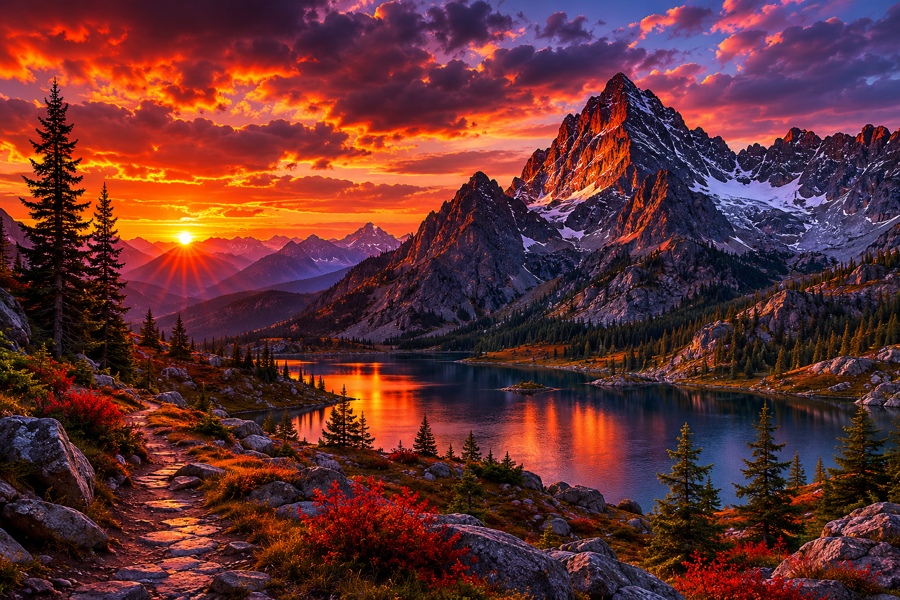
image-use "moody mountain sunset" -o web/hero.png --size 1536x1024
image-use "make it a warm golden-hour photo, cinematic 35mm" -i photo.jpg   # reference the subject
image-use "a different fictional person" --composition-ref photo.jpg        # borrow the framing, not the face
image-use "a robot mascot" --style doodle                                    # apply a gallery style (auto-pulled + saved)
image-use animate "a dog happily wagging its tail" --style-online snoopy --also-gif
OUT=$(image-use "icon" --quiet)                                              # capture the path
image-use "product hero" --backend codex --image-model gpt-image-2.5-sunburst --quality xhigh
The last line opts into the GPT Image 2.5 knobs — --image-model
(sunburst for precise editing, flare for fast high quality), --quality
(low→max), --background transparent, --compression, --action,
--partial-images. They are codex-only (the web/gemini surfaces have no
such controls), all optional, and are requests — the saved line prints the
model=/quality=/size= the backend actually used. Note: the codex
backend rewrites these server-side (observed gpt-image-2-codex / auto), so
they rarely survive there; what does matter on codex is --model, the driver
model that calls the tool (default gpt-5.6-luna, a fast/affordable Codex model
— a frontier coding model just burns the metered Codex bucket). Every run prints
the tokens= it cost.
All three below came straight out of the commands above — no retouching:
animate asks the image model for a strict 4×2 sprite sheet, crops eight equal
frames, rejects obvious subject drift, and writes a smooth ping-pong loop. It
defaults to animated WebP; pass --animation-format gif or --also-gif when
GIF compatibility matters. The source sprite PNG is always kept beside the
animation. Animation post-processing needs
ImageMagick (magick); WebP output additionally
needs libwebp (img2webp).
image-use doctor reports whether both are installed.
Full options: image-use --help. → Generate images · Styles
To organize web runs, --project accepts an exact name (found or created;
default imagegen) or an existing Project landing URL such as
https://chatgpt.com/g/g-p-<32-hex-id>/project. URL targets open directly by ID,
without listing or creating projects; localized display slugs, query strings,
and fragments are accepted and discarded when opening the canonical URL.
Malformed URL targets are rejected. --project "" uses a plain chat.
Project routing is best-effort by default: an unavailable project warns and
continues in a plain chat. Add --require-project (or IMAGE_USE_REQUIRE_PROJECT=1)
when that fallback would be unwanted. It requires a non-empty target and
--backend web or auto, verifies Project identity after opening and again in
a capture guard on the native Send click, and disables Codex fallback even when
the browser is unavailable. IMAGE_USE_PROJECT can supply either a name or URL.
Use --no-require-project to override the environment default for one run,
restoring best-effort routing and ordinary backend/fallback rules without
changing the exported variable.
Required-mode failures before Send retain the current draft for inspection. Inspect it in ChatGPT and manually clear the composer before the next run; ChatGPT can restore unsent drafts in new chats.
image-use "a watercolor cat" --project "Art" --require-project --keep-conversation
# To target an existing project exactly, set PROJECT_URL to its browser URL:
image-use "a watercolor cat" --project "$PROJECT_URL" --require-project --keep-conversation
Routing and retention are independent: the conversation is deleted by default,
including with --require-project. Use --keep-conversation (or
IMAGE_USE_KEEP_CONVERSATION=1) to retain it; --keep-tab also retains it.
The ChatGPT browser backend pastes multiline prompts, checks the exact editor text, and waits for every reference upload to finish before clicking Send once. Incomplete uploads or altered text stop the run. If a send cannot be confirmed, it reports the uncertainty without sending again. Start with an empty composer; an existing draft is preserved. A run that stops before sending clears the text it pasted, except in required Project mode: it preserves the current draft for inspection because the route or draft ownership may have changed.
After sending, the web backend waits up to --timeout for a fresh image confirmed
in two consecutive page reads. Assistant text or a missing Stop control does not
prove image generation has finished. Detected rate-limit dialogs stop the run
immediately. When no image or streaming control is present, explicit English
reply prefixes such as "You've hit the image generation limit" or "I can't
generate that image." also fail immediately. Quoted mentions, vague "try again
later" text, and unrecognized replies keep waiting until the deadline; this is
not a complete quota/refusal detector for every wording or language. Timeout and
recognized reply-body errors include assistant text (up to 240 characters);
timeouts retain the last nonempty text through interrupted page reads.
On timeout, check the original conversation before retrying: the image may still
appear there, and auto does not fall back to Codex after submission. The error
names the conversation; once the image shows up, collect it without prompting
again:
image-use recover https://chatgpt.com/c/<id> -o out.png
recover uses the chatgpt/images adapter from
chrome-use-sites (chrome-use site update
installs it) and the same single chatgpt.com tab and lock as a web run.
Browse and reuse art styles other people tuned — a public gallery at drawstyle.leeguoo.com. No script update needed:
image-use "a fox barista" --style-online doodle  # generate with a gallery style, nothing saved
image-use style search "watercolor mascot"       # search the gallery
image-use style publish mystyle --category cute --from-last   # share yours (one-time login)
image-use upload out.png --style doodle                      # share a result to the style's player gallery (no login, on request)
A style can pin a character, not just a look. Style assets carry reference images, so the same character comes back in a brand-new scene:
image-use style add pip --kind character --ref pip-ref.png
image-use "a fox barista" --style pip
Stars on GitHub
View @leeguooooo’s profileGenerates raster images and looping GIF or WebP animations from a local one-file Python CLI, using the user's existing ChatGPT subscription instead of an OpenAI API key. Usable by Claude Code as a skill.
@leeguooooo@leeguoooooYour Claude Code usage, at a glance. 5h / 7d rate-limit bars, reset countdowns, model, context window, and prompt-cache freshness, inline in Claude Code's status line. Claude Code tells you almost nothing about where you stand against your rate limits.
@leeguooooo @freestylefly
An open-source tool to remove Gemini watermarks from AI-generated images with high-fidelity, reproducible results on supported outputs.
 @gargantuax
A skill that turns natural language descriptions of workflows, architectures, or concepts into Excalidraw diagram JSON files. Useful for coding agents that support skills.
 @coleam00
A one-ink and controlled two-ink editorial image skill for posters, zines, portraits, packaging, and visual field notes. Turn a theme, sentence, object, or supplied photograph into an original editorial image.
 @yanliudesign
Install it with the command on its page. It includes image-use. Its skills do not fire on their own yet. Free and open source.
Is this plugin yours?
Claim it with GitHubSubmit a pluginPromote it