
Development
Plugin
codex-collab
Collaborate with Codex from Claude Code. Run tasks, get code reviews, do parallel research, all without leaving your Claude session. codex-collab is a Claude Code skill that drives Codex through its app server JSON-RPC protocol.

Plugin Signal61/100Solid
maintained100
capable14
documented75
adopted42
Install
$ npx -y skills add Kevin7Qi/codex-collab --agent claude-code
Stats
96
Stars
8
Forks
Active
Maintenance
TypeScript
Language
MIT
License
2h ago
Last commit
7mo ago
Created
Repo: Kevin7Qi/codex-collab
What's inside
Badges




README
codex-collab
Collaborate with Codex from Claude Code. Run tasks, get code reviews, do parallel research, all without leaving your Claude session.
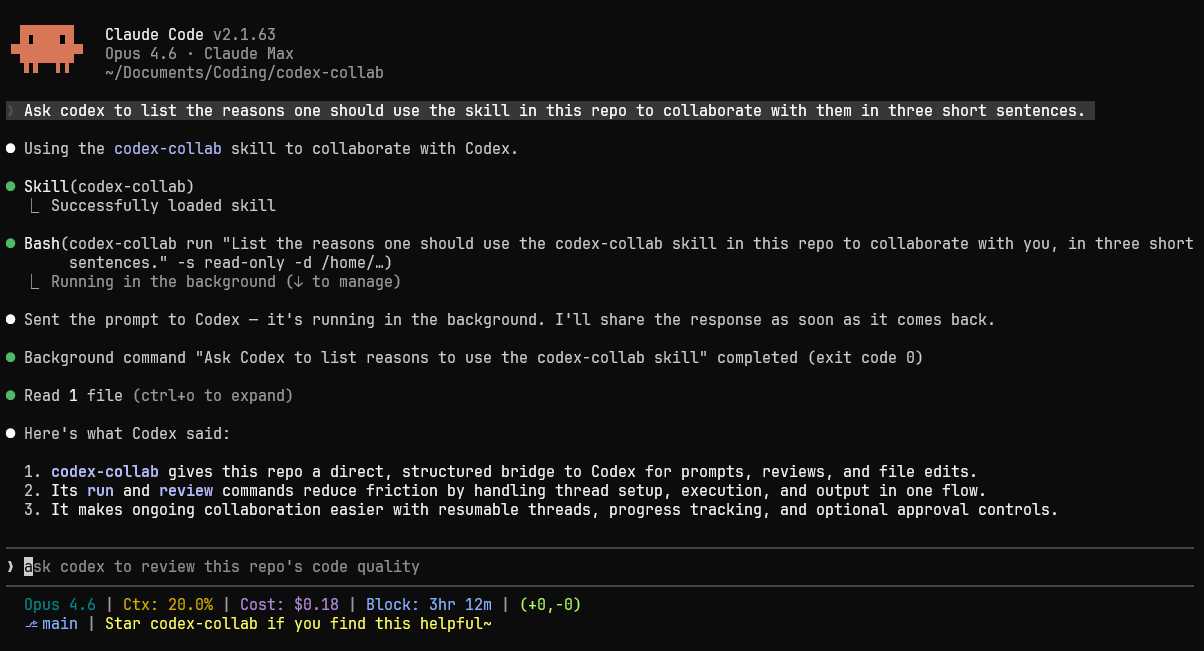
codex-collab is a Claude Code skill that drives Codex through its app server JSON-RPC protocol. It manages threads, streams structured events, handles tool-call approvals, and lets you resume conversations.
Why
- Native peer messaging — The workspace broker registers Codex as a peer in Claude Code's cross-session messaging, so Claude sessions message Codex directly (
SendMessage) and Codex answers back — including asking Claude questions mid-task via acollab.consulttool. No CLI in the hot path. - Structured communication — Talks to Codex via JSON-RPC over stdio. Every event is typed and parseable.
- Event-driven progress — Streams progress lines as Codex works, so Claude sees what's happening in real time.
- Review automation — One command to run code reviews for PRs, uncommitted changes, or specific commits in a read-only sandbox.
- Thread reuse — Resume existing threads to send follow-up prompts, build on previous responses, or steer the work in a new direction.
- Approval control — Configurable approval policies for tool calls: auto-approve, interactive, deny, or Codex's Guardian auto-reviewer (
--approval auto). - Two-way ask channel — Codex can ask a question mid-turn (
ask) and keep working once the answer arrives (answer);nextblocks until something needs attention. Fail-open: an unanswered question never stalls a run. - Live observability —
run --detachhands a long task to a detached runner;follow --watchis a purpose-built live view that tracks every run in a terminal pane. - Memory isolation — Threads created by codex-collab are excluded from Codex's memory feature by default, so agent-driven sessions don't shape Codex's learned picture of how you work. Opt back in with
--memory(see Options for details).
Installation
Requires Bun >= 1.0 and Codex CLI (npm install -g @openai/codex) on your PATH. Tested on Linux (Ubuntu 22.04), macOS, and Windows 10.
git clone https://github.com/Kevin7Qi/codex-collab.git
cd codex-collab
Linux / macOS
./install.sh
Windows
powershell -ExecutionPolicy Bypass -File install.ps1
After installation, run codex-collab health to verify. If the command is not found, ~/.local/bin is not on your PATH yet: reopen your terminal, add the export line the installer prints, or use the full path ~/.local/bin/codex-collab health.
[!TIP] You can hand the install to an agent. Running it outside Claude Code, for example from Codex, means the skill is ready the next time you start Claude. It will ask permission to write outside the repository.
The installer builds a self-contained bundle plus a binary shim. On Linux and macOS these go to ~/.claude/skills/codex-collab/ and ~/.local/bin. On Windows they go to %USERPROFILE%\.claude\skills\codex-collab\, and install.ps1 adds the shim to your PATH.
Claude discovers the skill automatically, including in a session that is already running. The exception is your first skill: if ~/.claude/skills/ did not exist before, restart Claude Code once so the new directory is watched.
Upgrading
An installed codex-collab can update itself — no manual git pull needed:
codex-collab update            # show the latest release and changelog, confirm, then install
codex-collab update --check    # report only, install nothing
update fetches the latest release, rebuilds it locally, and reinstalls. Nothing is installed without your confirmation: an interactive y/N prompt, or an explicit --yes when there is no terminal to ask. run, review, and health print a one-line notice when a newer release exists, but never install anything themselves.
Upgrading manually still works, and is the only way to update a dev install (install.sh --dev):
git pull
./install.sh    # Windows: powershell -ExecutionPolicy Bypass -File install.ps1
codex-collab health
update --skip mutes notices for one release, and CODEX_COLLAB_NO_UPDATE_CHECK=1 turns the release check off entirely. The local skill-drift check is offline and stays on regardless.
If the installed SKILL.md falls out of step with the binary or your template set, codex-collab skill sync shows the pending diff and applies it once you confirm.
Both upgrade paths replace the skill bundle and the binary shim. Everything under ~/.codex-collab/ is preserved: configuration, templates, thread history, and run logs. Treat ~/.claude/skills/codex-collab/ as installer-managed, since manual edits there can be overwritten on upgrade.
Use --dev to symlink source files for live-reloading instead of building a bundle:
# Linux / macOS
./install.sh --dev

# Windows (may require Developer Mode or an elevated terminal for symlinks)
powershell -ExecutionPolicy Bypass -File install.ps1 -Dev
Quick Start
# Run a prompted task
codex-collab run "what does this project do?" -s read-only --content-only

# Code review
codex-collab review --content-only

# Resume a thread
codex-collab run --resume <id> "now check error handling" --content-only

# Long task: detach it, watch it live in another pane
codex-collab run "large refactor" --detach --approval auto
codex-collab follow --watch
Native Peer Messaging
On macOS/Linux with a messaging-capable Claude Code, the workspace broker registers Codex in Claude Code's session registry:
codex-collab peer up # start the broker + peer; `peer` alone shows status
From then on, any Claude session's ListAgents shows a codex(myproject-a1b2c3) peer — message it and Codex picks up the task, replying as a peer message when done. Each conversation also appears as its own peer. A topic: first line selects one — topic: auth refactor continues the conversation named codex(auth-refactor-a1b2c3) or starts it if new, so several conversations can run in parallel and you switch between them by topic (the line is stripped before Codex sees the message). Further header lines set the conversation's model:, effort:, timeout: (seconds per turn; an overdue turn is stopped and the sender told), sandbox: and approval:. With no topic line you continue your most recent conversation, and an unnamed conversation takes its name from the message text plus the thread's short ID. Replies come from that conversation's address, and replying to it continues that conversation.
Mid-task, Codex can ask its Claude peer a question through a collab.consult tool call; the question arrives as a [consult] message, and the next reply from that session is delivered back into Codex's running turn. Consults are fail-open: unanswered questions time out and Codex proceeds on its own judgment.
Claude Code gates inbound peer messages on the sender's attested permission class. A conversation attests bypass only when it runs with sandbox: danger-full-access, otherwise prompting — so a Claude session running with bypassPermissions holds Codex's replies for review unless its crossSessionInbound setting is accept. A held reply is still readable with codex-collab output <id> --last. A CLI turn on a messaged conversation with an explicit -s changes the sandbox that conversation runs and attests from then on, since Codex keeps a per-turn override for the turns that follow.
The peer degrades cleanly: on Windows, without a session registry, or with CODEX_COLLAB_PEER=off, everything below works exactly as before (CODEX_COLLAB_PEER=on insists on the peer for one invocation, as config mode peer does persistently). The broker stays resident while any Claude session is running and retires on its usual idle timeout once the last one exits.
Codex's App-Server
Codex can run one shared, multi-client app-server per machine. codex app-server daemon start binds it at ~/.codex/app-server-control/app-server-control.sock; the codex terminal UI and the Codex desktop app (on Linux hosts it reaches over SSH) attach to it automatically. On a Mac the desktop app runs a private server of its own that nothing can join.
When that socket answers, codex-collab's workspace broker attaches to it instead of spawning a private codex app-server. Everything on a shared server is one space: turns codex-collab starts render live in the Codex app or terminal UI, threads --discover marks threads other clients have open or running, and run --resume <id> joins such a thread. A prompt sent to a thread whose turn is already running is folded into that turn rather than starting a second one, and that turn stays the other client's: its approvals are answered where the user is looking, never by codex-collab. If the prompt carries overrides (-m, -s, --approval, --dir) or --goal, codex-collab refuses instead — those settings cannot apply to someone else's turn. The codex terminal UI declines every dynamic tool call on a thread it watches, which means a mid-turn consult to Claude is declined before Claude can answer; codex-collab delivers Claude's answer into the running turn as an injected message. A turn codex-collab starts on an idle thread is its own, as always. health prints which server the broker is on. Not available on Windows.
Without a shared server, Codex 0.145+ allows one writer per thread. A thread open in the Codex app or a codex session cannot be resumed by codex-collab until that process lets go — reported as exit code 8 with a message listing the kinds of process that can hold a thread, though it cannot tell which one actually does. A thread the broker has used frees up about seven minutes (0.153.4) after the broker lets go of it — at turn end for a CLI run, when its thread peer retires after 30 idle minutes for a messaged conversation. Sharing one app-server removes the conflict entirely.
CLI Commands
| Command | Description |
|---|---|
run "prompt" [opts] | Start a thread, send a prompt, wait, print the output (run - reads the prompt from stdin) |
review [opts] | Code review (PR, uncommitted, or a specific commit) |
threads [--json] [--all] | List threads (--discover scans the server and marks threads open or active on the app-server, --session limits to this session) |
follow [id] | Live view of a running thread in your own terminal pane. Without an ID it attaches to the active run; --watch keeps following each new run |
output <id> [--last] | Full log for a thread (--last: only the latest turn's output) |
kill <id> [--clear] | Stop a running thread. An active goal is paused first; --clear abandons it |
peer [up] | Show the native-messaging peer's status; peer up starts the broker (and with it the peer) |
| Command | Description |
|---|
File tree
FAQ
codex-collab is a Claude Code plugin with 1 hand-picked skill for development work, indexed on Flowy. Install it with the command on its page. It includes codex-collab. Its skills do not fire on their own yet. Request auto-invocation to have Flowy route them as you prompt. Free and open source.
- What is codex-collab?
- Collaborate with Codex from Claude Code. Run tasks, get code reviews, do parallel research, all without leaving your Claude session. codex-collab is a Claude Code skill that drives Codex through its app server JSON-RPC protocol.
- How do I install codex-collab?
- Run these in Claude Code: npx -y skills add Kevin7Qi/codex-collab --agent claude-code. Then prompt normally.
- Does codex-collab auto-invoke its skills?
- Not yet. It is indexed on Flowy as a plain plugin. Request auto-invocation on its page and Flowy will route its skills for you as you prompt.
- Is codex-collab free?
- Yes. Flowy is free and open source, with nothing gated. You can read every skill in full before you install.
Is this plugin yours?
Claim it with GitHubSubmit a pluginPromote it