
mulch
Mulch gives AI coding agents a persistent memory of learnings across sessions. Agents record what they discover with a command and query those notes at the start of later sessions.
4 commands337
 @jayminwest
Runs coding agents on compute you control, handling isolation, recovery, spend and Git delivery so you don't manage terminal sessions by hand. Also files and dispatches GitHub issues from a backlog.
Claude Code
$ npx -y skills add jayminwest/warren --agent claude-code
Codex
$ npx skills add jayminwest/warren -a codex
Cursor
$ npx skills add jayminwest/warren -a cursor
Gemini CLI
$ npx skills add jayminwest/warren -a gemini-cli
GitHub Copilot
$ npx skills add jayminwest/warren -a github-copilot
OpenCode
$ npx skills add jayminwest/warren -a opencode
Windsurf
$ npx skills add jayminwest/warren -a windsurf





Live runs · Quickstart · Documentation · Demo · Roadmap
Warren runs agent harnesses as isolated, observable workloads on infrastructure you control. It owns the workspace, run lifecycle, spend limits, live events, intervention, recovery, and Git delivery.
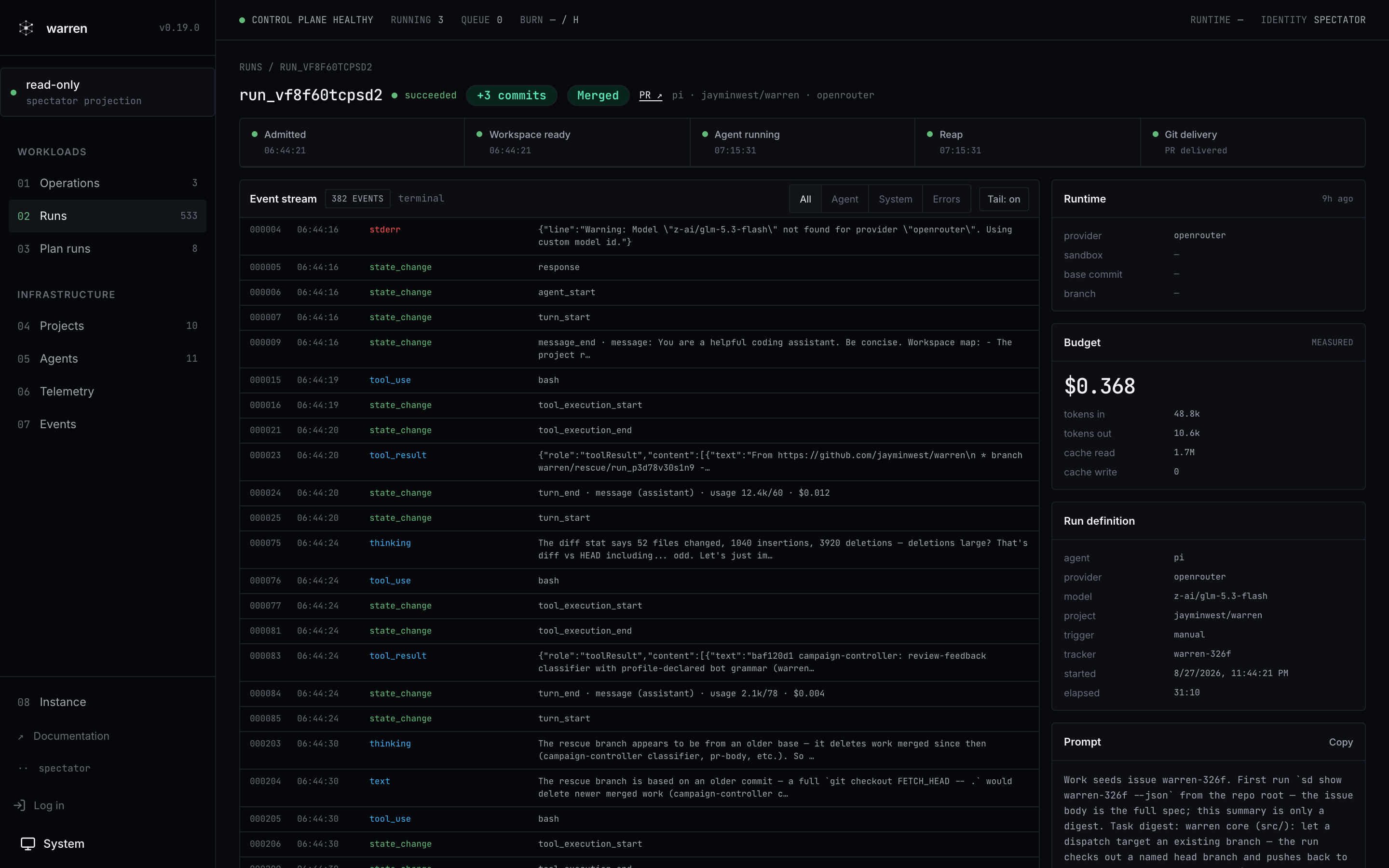
One run, end to end: lifecycle pipeline, live event stream, measured spend, merged PR. From the live public instance.
Warren becomes useful when an agent run stops being a terminal session and starts being a workload. The run may need to continue unattended, repeat on a schedule, survive failure, or become visible to someone besides the person who started it.
You can run warren alone. A small, trusted engineering team can share one deployment and one trust boundary today.
repository + task
       │
       ▼
isolated agent workload
       │
       ├── live events
       ├── spend and concurrency limits
       ├── steering and cancellation
       └── recovery and cleanup
       │
       ▼
pushed branch ──► optional pull request
The core guarantee is a pushed workspace branch. Project settings can add PR creation, tracker updates, previews, and other reactions.
Every screenshot below is the live public instance at app.warren.run, running warren's own development: agents working the warren backlog, on warren.
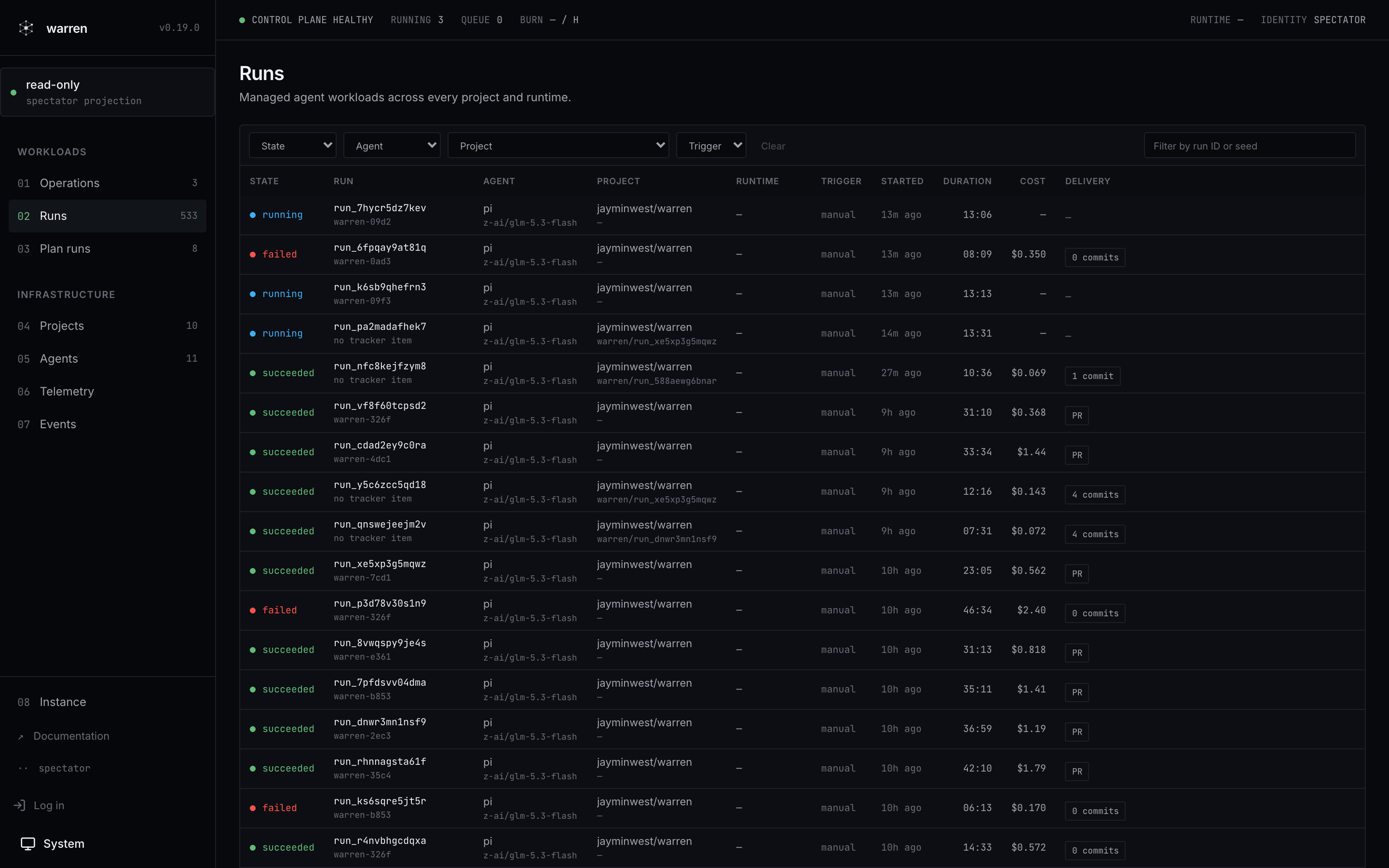 | |
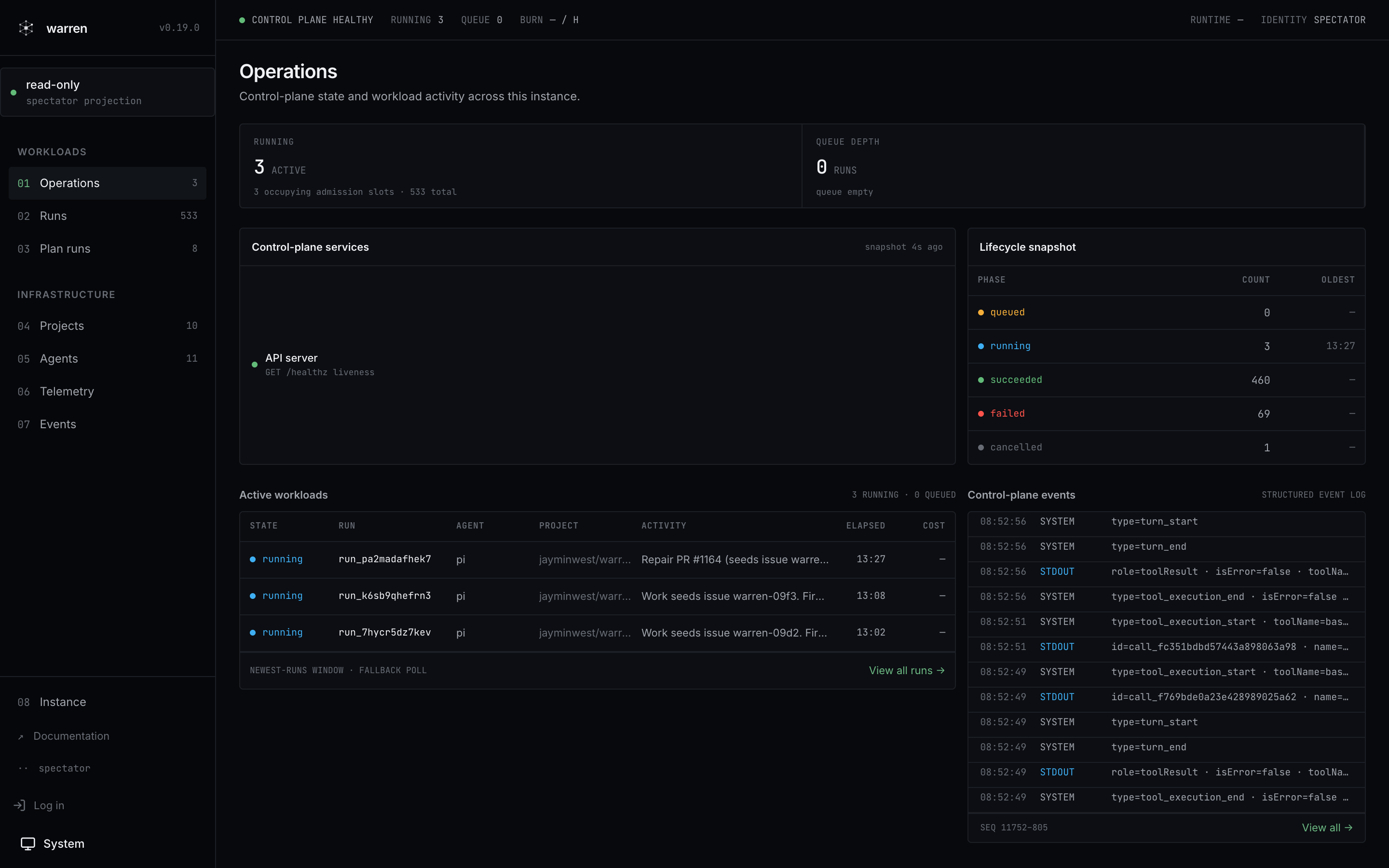
| Operations: control-plane health, lifecycle snapshot, active workloads, structured event log | Runs: every workload with state, duration, cost, and Git delivery |
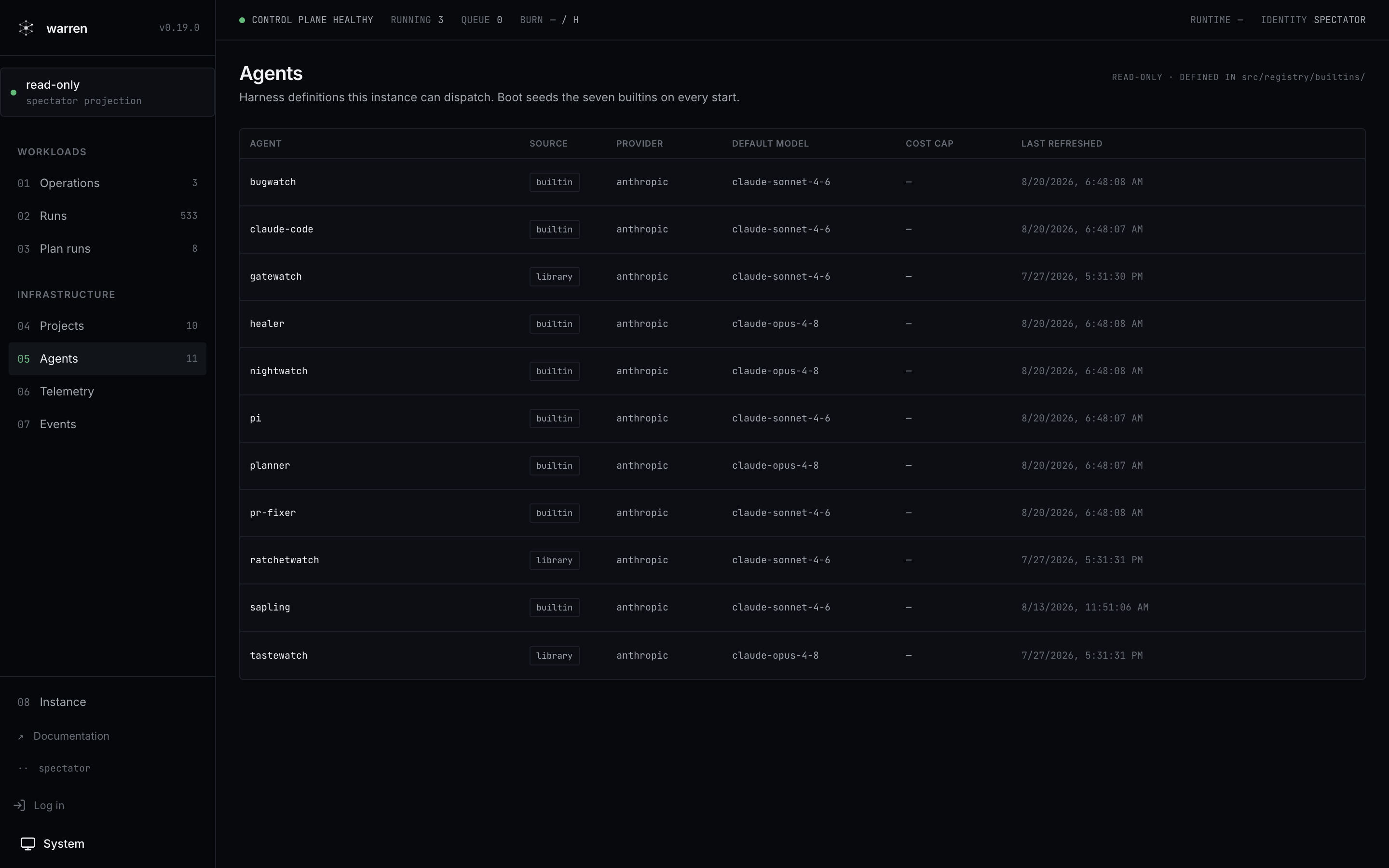 | |
| Run detail: lifecycle pipeline, live event stream, budget, and the merged PR | Agents: the harness definitions this instance can dispatch |
A harness is the coding-agent process warren drives. A runtime is the place where that workload runs.
Warren's run model supports any harness with a Warren runtime adapter. The current distribution includes adapters for Pi and Claude Code. Agent roles such as planner, healer, and PR fixer compose prompts and policy on top of those harnesses.
Three runtime providers implement the same lifecycle. A casual install never picks one. warren up detects the machine and picks for you. Operators choose explicitly. See Operators for the topology table.
Warren fits individual operators and small, trusted teams that already use coding agents and want the runs off a developer terminal. It is especially useful when code, model credentials, compute, and run history must remain on infrastructure the operator controls.
The current boundary is explicit:
WARREN_FORGE.See Security for the full threat model and Roadmap for future work.
Two commands take a fresh macOS or Linux machine to a running warren:
curl -fsSL https://warren.run/install | sh
warren up
The install script puts Bun and the warren CLI on your PATH when they are missing. warren up detects the sandbox runtime for your machine, asks for the one credential it still needs, and boots the server. Your browser opens already logged in. From there the UI walks you through the rest: connect GitHub, pick a repository, and dispatch the prefilled starter run.
Warren stores everything under ~/.warren/. Stop the server with Ctrl-C and restart it with warren up again.
Read the first-run guide for the full walkthrough, including the subscription-versus-API-key choice.
Casual installs stop at the Quickstart. Deployments that serve a team, run in Docker or a cluster, or need explicit credentials start here.
| Runtime | Isolation boundary | Best fit |
|---|---|---|
local | bwrap on Linux, sandbox-exec on macOS | One host |
docker | Sibling container | Docker hosts and custom agent images |
k8s | Pod per run | Cluster scheduling and admission control |
All three providers implement the same run lifecycle.
The shortest operator path uses the shipped Compose file and the local runtime on a Linux Docker host. Compose includes the security flags that nested bwrap needs.
git clone https://github.com/jayminwest/warren
cd warren
cp .env.example .env
$EDITOR .env                 # set two secrets plus WARREN_GIT_AUTHOR_NAME/EMAIL
docker compose up -d
docker compose logs warren | grep mintedOperatorToken
Open http://localhost:8080, paste the minted token, add a GitHub repository, and dispatch a run. Warren streams the events and pushes the result branch.
A fresh install needs no other os-eco tool. Projects can opt into persistent Mulch memory or the Seeds issue tracker by committing their data directories.
The extensions are optional, out-of-process packages built on the HTTP surface. None of them runs in a base warren installation:
extensions/audit-log/ exports append-only JSONL run activity.extensions/judge/ scores finished runs against a versioned rubric and stores verdicts separately.extensions/campaign-controller/ runs long-lived upstream contribution campaigns under an operator-approved policy.extensions/tracker-jira/ and extensions/tracker-ado/ connect Jira Cloud and Azure DevOps Boards through the warren-tracker/v1 protocol.See Extensions for their contracts and current packaging limits.
ROADMAP.md owns warren's direction and sequencing. It tracks what is in flight, what comes next, what has shipped, and what stays out of core.
Stable (0.19.3). The run lifecycle is in continuous use on GKE. It operates against real repositories, including this one. app.warren.run exposes the read-only run history and event streams without a login.
Warren is pre-1.0. Unit, integration, and scenario tests exercise the run lifecycle. The current shared-token trust model remains a deliberate limit.
MIT. See LICENSE.
Stars on GitHub
View @jayminwest’s profileMulch gives AI coding agents a persistent memory of learnings across sessions. Agents record what they discover with a command and query those notes at the start of later sessions.
@jayminwestA development methodology for coding agents that makes the agent brainstorm before building, follow plans, run parallel work and finish branches in a disciplined way. You get fewer skipped steps and more consistent results from your coding assistant.
 @obra
Helps you take a change from a rough idea or bug report through to a tested, reviewed result, with each step handled by a focused skill. Its skills cover pinning down domain terms, designing module interfaces, diagnosing hard bugs, and reviewing changes against your repo's coding standards.
 @mattpocock
Gives your coding agent a planning, testing and review routine to follow on every task. It plans before building, checks changes with tests, has a fresh reviewer look for regressions, and saves repeated wins as reusable skills.
 @affaan-m
Developer tools for working on the React codebase itself. Provides skills for extracting error messages, managing and debugging feature flags across release channels, running Flow type checks, and fixing lint and formatting issues before committing.
 @facebook
Runs coding agents on compute you control, handling isolation, recovery, spend and Git delivery so you don't manage terminal sessions by hand. Also files and dispatches GitHub issues from a backlog. Install it with the command on its page. It includes good-first-issue-batch, ui-design-review, warren-dogfood-pipeline. Its skills do not fire on their own yet. Free and open source.
Is this plugin yours?
Claim it with GitHubSubmit a pluginPromote it