Your AI coding agents, visualized as pixel-art coworkers in a terminal office.
pixel + tui + (agent-)oid






 Live demo ↗
· Architecture
· Configuration
· Contributing
Why?
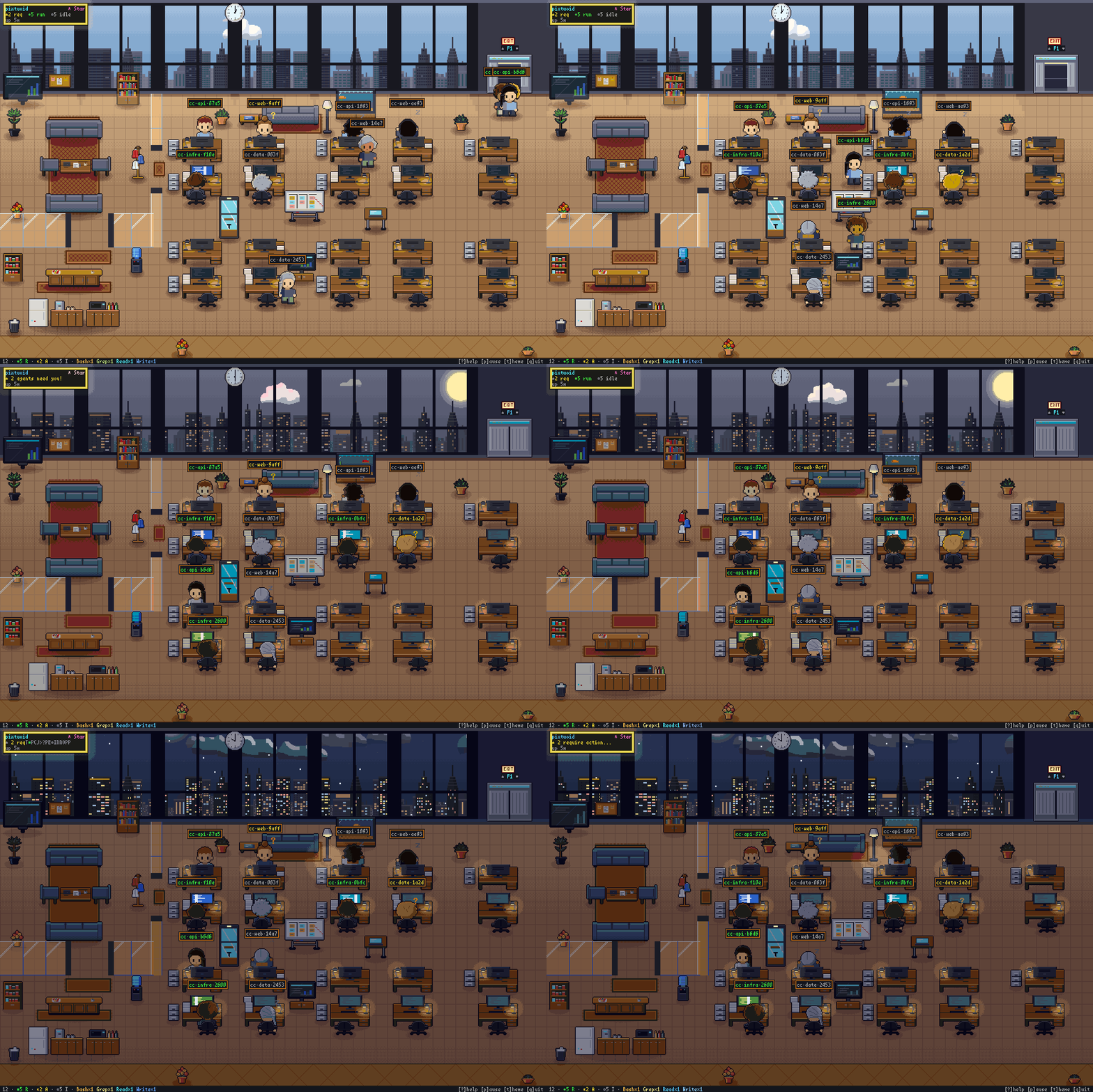
Running several coding agents means alt-tabbing between terminals to find out who's stuck, who's waiting on a permission prompt, and who finished ten minutes ago. pixtuoid puts them all in one tiny pixel-art office you can watch from above — every session is a character at a desk: typing while it works, raising a ? when it needs you, dozing off when it's done.
A little bit Black Mirror, a little bit The Sims — and the most glanceable multi-agent dashboard you'll ever use.
Quick Start
Pick one:
Homebrew (Linux, macOS, or WSL2):
brew install pixtuoid
npm (macOS or Windows):
npm install -g pixtuoid
Then:
- Run
pixtuoid.
- Press s and connect your agent CLI — pixtuoid sets it up for you, and
pixtuoid doctor checks it if something's off.
- Start that agent in another terminal — a coworker walks in from the elevator within a second.
Tab agent dashboard · t themes, and the look where the terminal draws the cutaway · m sound · click a coworker to bring its terminal to the front · ? every other key
More ways to install are on the install guide ↗.
Features
| | Feature | Description |
|---|
 | Cutaway office | Terminals that can show images (kitty, iTerm2, or SIXEL) can draw the cutaway, a detailed pixel view of the office; others get the classic look, drawn with text blocks |
 | Multi-agent office | Every agent session gets its own desk — when a floor fills up, a new floor opens automatically |
 | Office spaces | Cubicles, a meeting lounge, and a pantry — the office is laid out in distinct furnished zones, not just a grid of identical desks |
 | Animated characters | Coworkers type, raise a ? when they need you, nap under little z's, and walk between desks |
 | Team palette | Agents in the same working directory wear the same colors, so you can see who works together at a glance |
 | Per-tool monitor glow | Each desk's monitor glows with the tool in use — Edit blue, Bash orange, Read cyan — so you can read the whole room at a glance |
 | Token meter | Paper piles up on a desk as its session uses tokens, growing at 250K, 2M and 16M; hover for the exact count |
 | Agent tree dashboard | Press Tab to see every agent: which CLI it runs and what it's doing |
 | Office pets | A cat or dog (one per floor) roams desks, pantry, sofas; sleeps near idle agents. Click to pet — pixel-art hearts float up |
 | Office vibes | Day turns to night outside the windows, the weather changes, and each theme gives the office a new look |
 | Lofi soundtrack | A lofi soundtrack, made entirely in code, follows the office's time, weather and activity; m mutes, +/- sets the volume |
| Floating desktop window | pixtuoid floating opens the office in a frameless, always-on-top window — on your desktop, not just in your terminal |
▶ See every feature live — floors, themes, weather, pets, the office tour →
Supported Tools
→ Every tool × OS on the site
Windows support is experimental — limited testing, unsigned binaries.
Configuration
Press t to preview every theme live, and the look where the terminal draws the cutaway; your pick is saved.
Every other setting — desks per floor, pet names, cutaway or classic — lives in ~/.config/pixtuoid/config.toml by default: see docs/CONFIGURATION.md.
How It Works
pixtuoid learns what each agent is doing from a tiny hook it installs, which never holds up your agent, and from the agent's own session logs. It turns that into office life and draws it in your terminal.
Full architecture with diagrams →
Privacy & Security
pixtuoid is telemetry-free and local by default: it makes no outbound connections, and
accepts none unless you run pixtuoid serve, which sends agent status, model, usage, repo names,


 @obra


