
socialforge
Your client wants 30 days of social content across six platforms with brand-faithful imagery, AI-generated video, and provenance signed for EU markets. You have five days.
21 skills5 agents18 commands+2+1+1+142
 @indranilbanerjee
Produces content pieces end to end: drafting, fact-checking, SEO and AI-answer optimization, batch queues, and library audits to refresh stale posts. Built for content teams shipping many articles.
Claude Code
$ npx -y skills add indranilbanerjee/contentforge --agent claude-code
Codex
$ npx skills add indranilbanerjee/contentforge -a codex
Cursor
$ npx skills add indranilbanerjee/contentforge -a cursor
Gemini CLI
$ npx skills add indranilbanerjee/contentforge -a gemini-cli
GitHub Copilot
$ npx skills add indranilbanerjee/contentforge -a github-copilot
OpenCode
$ npx skills add indranilbanerjee/contentforge -a opencode
Windsurf
$ npx skills add indranilbanerjee/contentforge -a windsurf

🌐 Read this in: English · हिन्दी · 中文 · 日本語 · 한국어 · Español · Português · العربية · اردو · தமிழ் · বাংলা · Русский
You need to ship 30 articles this quarter that sound human, cite real sources, link into your funnel, and survive an editor who checks. Your team is three people. You have nine weeks. Your last "AI-written" batch got flagged for hallucinated stats — and the batch before that quietly went stale and nobody noticed.
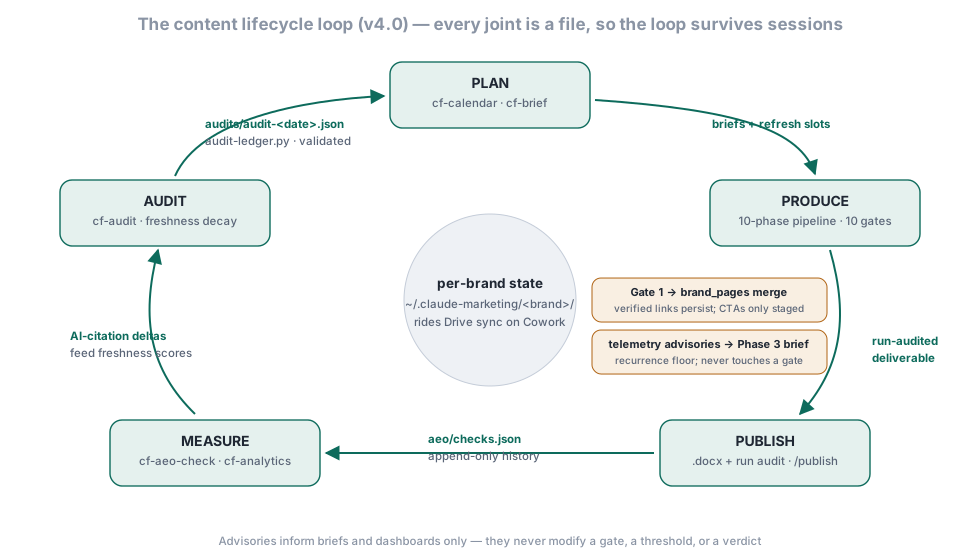
Run /contentforge:create-content against each topic. The 10-phase pipeline produces a publication-ready .docx with a 43-pattern humanizer, a fact-checker subagent, three-category internal linking, and C2PA provenance for EU AI Act compliance — in 30–60 minutes per piece. Then the part single-shot tools skip: the lifecycle loop. Every published piece is measured (cf-aeo-check), audited for decay (cf-audit), and fed back into the next calendar and the next brief — through durable file contracts, so what the system learns about your brand survives the session that learned it.
Open-source enterprise content production system — 22 skills · 13 specialist agents · 10 quality gates · 43-pattern AI-detection humanizer · a run auditor that re-derives every gate before a run may call itself finished · 30 Python scripts (stdlib; the few optional packages are pinned and never auto-installed). Built for marketing teams producing high volumes of long-form content that needs brand voice consistency, citation integrity, and an internal-link strategy that turns content into a funnel. Installs on Claude Code (CLI + IDE), Anthropic Cowork, OpenAI Codex, Cursor 2.5+, GitHub Copilot CLI, Google Antigravity 2.0, Hermes Agent, OpenClaw, and Grok (xAI Build CLI) + 35+ Agent Skills platforms — with hero skills uploadable to claude.ai (web) as .skill release assets. Created by Indranil Banerjee · LinkedIn · X.





🆕 Just shipped — v4.7.0 (November 7, 2026): outside text stays data, and only you start a publish. Release notes · Changelog
# Install in Claude Code 2.1.292 or newer (one command, run in your terminal):
claude plugin install contentforge --marketplace indranilbanerjee/neels-plugins

# Older Claude Code, or inside a session (CLI or VS Code/JetBrains extension):
/plugin marketplace add indranilbanerjee/neels-plugins
/plugin install contentforge@neels-plugins

# Install in Cowork: use the Plugins panel in the UI -- /plugin slash
# commands DON'T work in Cowork (or Claude.ai / Claude Desktop).
# Open Plugins panel -> Add marketplace -> paste indranilbanerjee/neels-plugins
# -> Install ContentForge from the listed plugins.

# Install on Hermes Agent (Nous Research):
hermes plugins install indranilbanerjee/contentforge

# Install on OpenClaw:
openclaw plugins install git:github.com/indranilbanerjee/contentforge

# Install on Grok (xAI Build CLI):
grok plugin install indranilbanerjee/contentforge
If ContentForge saves your team time, give it a star ⭐ — it's the single thing that helps other marketing teams find it.
Install, then ask in plain words. Each of these kinds of request reached the right skill in our trigger tests.
| You type | What happens |
|---|---|
| "write a blog post on your topic" | One fact-checked, brand-compliant article through the full pipeline, delivered as a real .docx with its scorecard |
| "brief me on this topic" | A research-backed content brief: search intent, competitors, outline |
| "which posts need refreshing" | An audit of your library: what is stale, what to refresh, what to retire |
| "turn this article into LinkedIn posts" | Platform-native social posts from a finished piece; it shows the scope and waits for your yes |
| "translate this into Spanish" | A translation that keeps brand voice and citations; it shows the scope and waits for your yes |
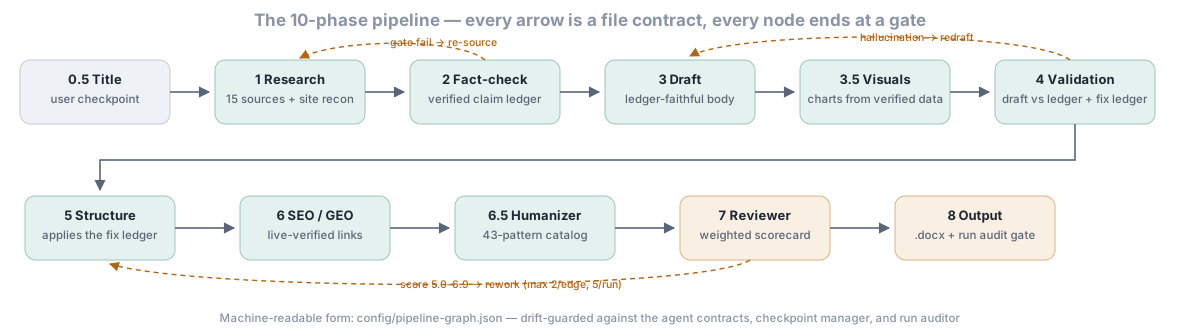
CONTENTFORGE_INSTALL_DEPS=1 consents for a single run.yes. Each of those skills shows what it will do first; any other reply cancels.finalize --status completed refuses a missing, failed or stale audit; the --skip-audit escape stamps audit_skipped: true into the run..docx).Ten phases, each ending in a quality gate that the orchestrator checks with scripts, never from an agent's self-report. A failed gate loops back to the offending phase, with a budget: at most 2 loops per edge and 5 per run. Every phase, in order, is under What ContentForge does.
In Claude Code 2.1.292 or newer, one command in your terminal:
claude plugin install contentforge --marketplace indranilbanerjee/neels-plugins
On an older version, or inside a session (CLI or VS Code/JetBrains extension):
/plugin marketplace add indranilbanerjee/neels-plugins
/plugin install contentforge@neels-plugins
In Anthropic Cowork:
indranilbanerjee/neels-plugins/contentforge:cf-cowork-setup once to wire Google Drive as your team's output destination⚠
/pluginslash commands work only in Claude Code (CLI + IDE extension). They do NOT work in Cowork, Claude.ai web, or Claude Desktop — use UI navigation in those environments. The/contentforge:*skills (like/contentforge:create-content) work in all environments where plugins are loaded; only the/pluginmanagement family is Claude-Code-only.
Third-party marketplaces — including this one — have auto-update OFF by default in Claude Code. When a newer version is on the marketplace and you're still running an older one, nothing tells you. There's no banner, no badge, no notification. So the first thing to do after install is enable updates:
Open /plugin, go to the Marketplaces tab, find neels-plugins, and toggle Enable auto-update. Done — Claude Code will refresh and pull new ContentForge releases at startup from now on, prompting you to run /reload-plugins to pick up changes mid-session (no full restart, conversation context preserved).
If you'd rather update manually each time instead, see the Updating section below.
/contentforge:brand-setup
The agent walks you through brand voice, terminology, guardrails, citation rules, internal-linking site structure, and (if you want commercial impact) the brand_pages block — your product/service URLs, conversion CTAs, and authority pages. When you give it a website, it runs a robots-respecting crawler and harvests a verified page inventory in one confirmation step. It saves a brand-profile.json to ~/.claude-marketing/<brand-slug>/.
/contentforge:create-content
The skill prompts you for content type, brand, topic, target word count, and audience. It then runs 10 phases via specialized subagents (research → fact-check → draft → visuals → validate → proofread → SEO → humanize → review → output), enforces a quality gate after each phase, audits the finished run against its own artifacts, and writes a real .docx you can hand to your editor or design team.
ContentForge writes the finished .docx to two places:
User-visible copy — this is the one to open:
~/Documents/ContentForge/<brand-slug>/<content-type>/<YYYY-MM>/<slug>.docx
This lives in your normal Documents folder, visible in Windows Explorer / macOS Finder / Linux file managers by default. Override the root with the CONTENTFORGE_PUBLISH_DIR env var (e.g. point at a Dropbox or team-share path). Run /contentforge:output-folder any time to print the absolute path and open the folder in the OS file manager.
Internal tracking copy — the system-of-record for analytics/audit skills:
~/.claude-marketing/<brand-slug>/tracking/outputs/<YYYY>/<MM-MonthName>/
└── <slug>_v1.0.docx
The intermediate phase artefacts (research brief, fact-check report, draft, SEO scorecard, review report, etc.) plus rendered chart PNGs land alongside the tracking copy in the run directory. The .docx includes the body, references, and four appendices — A SEO Scorecard, B Quality Scorecard, C Production Details, D Internal Link Map.
Historical note (fixed in v3.12.3): earlier versions only wrote to the hidden
~/.claude-marketing/dotfolder, which Windows Explorer hides by default. Multiple users reported "the file isn't saving on local drive" — it was saving, just somewhere they couldn't see. The dual-copy design is the resolution;/contentforge:output-folderis the quick-reveal command.
The 10-phase pipeline runs 20–60 minutes end to end. If the session terminates partway through (context-window exhaustion, network blip, Ctrl-C, machine sleep), every completed phase is saved to disk via scripts/checkpoint-manager.py. Resume the run with:
Stars on GitHub
View @indranilbanerjee’s profileYour client wants 30 days of social content across six platforms with brand-faithful imagery, AI-generated video, and provenance signed for EU markets. You have five days.
@indranilbanerjeeRuns a consistent marketing strategy process across every brand in a portfolio, producing the same planning files in the same order so agencies and in-house teams can audit depth and catch compliance gaps. Covers SEO audits, ad copy, A/B test planning and AI search visibility.
@indranilbanerjeeGives Claude Code access to the prompts.chat library, letting you search, retrieve and improve AI prompt templates, and find and install Agent Skills from its registry.
 @gh-f
A Claude Code skill for generating editable PPTX presentations and slides from a workflow, with reusable brand, style, layout, and deck workspaces, native charts, speaker notes, and template filling.
 @hugohe3
Gives AI agents control over Word, Excel and PowerPoint files, with skills for building .docx reports, academic papers, Excel dashboards and Morph-style animated slides.
 @iofficeai
A skill that builds animation-rich HTML presentations from scratch or converts PowerPoint files to web slides. Useful for anyone turning a deck into a web presentation.
 @zarazhangrui
Install it with the command on its page. It includes batch-process, cf-add-integration, cf-aeo-check. Its skills do not fire on their own yet. Free and open source.
Is this plugin yours?
Claim it with GitHubSubmit a pluginPromote it