




openclaw
Skills for the OpenClaw personal AI assistant, covering browser automation, routing requests to coding agents, presenting canvas widgets, running apps on temporary machines, and sharing diffs.
78 skills394k
 @steipete
A fast software factory workflow for Claude Code: one approval gate, parallel waves, routed models.
Claude Code
> /plugin marketplace add iha2/superlite> /plugin install superlite@superlite-dev
Codex
$ npx skills add iha2/superlite --skill diagnosis drafting feature-prototype inventing mvp-prototype proof research shipping swarm testing using-superlite writing-specs -a codex
Cursor
$ npx skills add iha2/superlite --skill diagnosis drafting feature-prototype inventing mvp-prototype proof research shipping swarm testing using-superlite writing-specs -a cursor
Gemini CLI
$ npx skills add iha2/superlite --skill diagnosis drafting feature-prototype inventing mvp-prototype proof research shipping swarm testing using-superlite writing-specs -a gemini-cli
GitHub Copilot
$ copilot plugin marketplace add iha2/superlite$ copilot plugin install superlite@superlite-dev
OpenCode
$ npx skills add iha2/superlite --skill diagnosis drafting feature-prototype inventing mvp-prototype proof research shipping swarm testing using-superlite writing-specs -a opencode
Windsurf
$ npx skills add iha2/superlite --skill diagnosis drafting feature-prototype inventing mvp-prototype proof research shipping swarm testing using-superlite writing-specs -a windsurf
A software factory. Approve a plan once, then it builds the code.

Install it (below), open a session in your project, and say what you want. superlite shows a one-screen intro the first time; /superlite:intro brings it back and /superlite:help has every detail.
Each run starts its own session automatically (superlite-cli session ensure): a branch superlite/sessions/<topic> in your checkout, or a parallel worktree if another run is still open. Shipping closes it. See Sessions.
| Situation | Say something like | What happens |
|---|---|---|
| MVP, a new project | "Build me a static site generator from this spec" | One batch of questions, a plan, then parallel tasks on Sonnet and Haiku, package reviews and one fresh final review |
| A feature on existing code | "Add CSV export with column widths to the existing app" | Feature mode: it researches the code (Graphify on a large codebase, never installed without your yes), writes a feature plan you validate, builds a small prototype in its own worktree for you to try, then ports it into your code with frozen interfaces and seam checks. The report shows both builds |
| Debug | "This test fails on leap days: find the root cause and fix it" | diagnosis finds the cause first; fixes go to fix-only agents by tier, each leaving a note, and escalate after two failed rounds |
| Research | "Research the state of the art in vector search, for a VP" | Research mode: parallel researchers fill a sourced ledger, contradictions are listed with causes, and the report is written at your level (Director, VP, Researcher or Simple) with the same claims and citations at every level |
| A small change | "Rename build to render everywhere" | Small work stays inline, with a reviewer always |
| Review and harden | "Review this branch and fix what you find" | Package reviewers fix their own findings; the final reviewer reports findings with tiers and never edits |
| You approve first | "Build X. I will approve the plan" | A human orchestrator: you get a plain-language review plan with diagrams; nothing runs until you say yes |
| Hands off | "Build X. I am away, decide yourself" | The AI orchestrator plans, lints, dispatches and rules on open choices without stopping |
| Ship it | "We are done: finish the branch" | Verification first, then merge or PR options. It never pushes without you |
| Command | What it does |
|---|---|
/superlite:start [mode] [what] | A menu: superlite suggests the mode for your request (regular, MVP, feature, debug, small, review, research), you confirm it and pick who orchestrates |
/superlite:mvp <what> | Plan the smallest working version on a clickable HTML prototype, then build it |
/superlite:feature <change> | Change existing code: a plan you validate, a prototype you try, then the integration with seam checks |
/superlite:debug <bug> | Root cause first, then a fix with a regression test |
/superlite:research <topic> | Research a topic with parallel agents: a sourced ledger, then a report at your level |
/superlite:small <change> | A small change inline, without the planning flow |
/superlite:human, /superlite:ai, /superlite:approve | Choose who orchestrates; approve the review plan |
/superlite:status, /superlite:stop, /superlite:resume | Watch, stop or resume a build |
/superlite:agents, /superlite:tail | Watch a run: the agent map pane, or the same run as a terminal feed without the mod |
/superlite:review, /superlite:report, /superlite:finish | Review a branch, read build reports, finish the branch |
/superlite:setup, /superlite:intro, /superlite:help [section] | First-run check, the intro screen, the detailed help |
Plain words work just as well; the commands are shortcuts.
.review.md, about two pages, with a rough time and cost), and nothing is linted, dispatched or sent to an agent until you reply approve. Any clear approval counts (yes, go ahead, looks good, or similar), including a longer note. After that you are not asked again: any change to scope is recorded as a ruling and listed at the end under "Changed from the approved plan". Small inline work needs only your yes in chat.Both stop for destructive, outward (push, merge, publish) or security-sensitive actions, and superlite never commits during a run: finished tasks are hidden checkpoints. A checkpoint is a hidden save of one task under refs/superlite/*. At session end, shipping asks once: "Commit to " or "Leave uncommitted".
Let it run. Watch .superlite/ in your project: progress.md has the rulings and the log, test-summary.json the latest test result, metrics.jsonl and the run history the time and cost per agent.
flowchart LR
  A([Your request]) --> B[Plan]
  B --> C[Build in parallel]
  C --> D[Review and fix]
  D --> E([Done])
A read-only view, offered when you approve the plan (reply approve map), or opened any time:
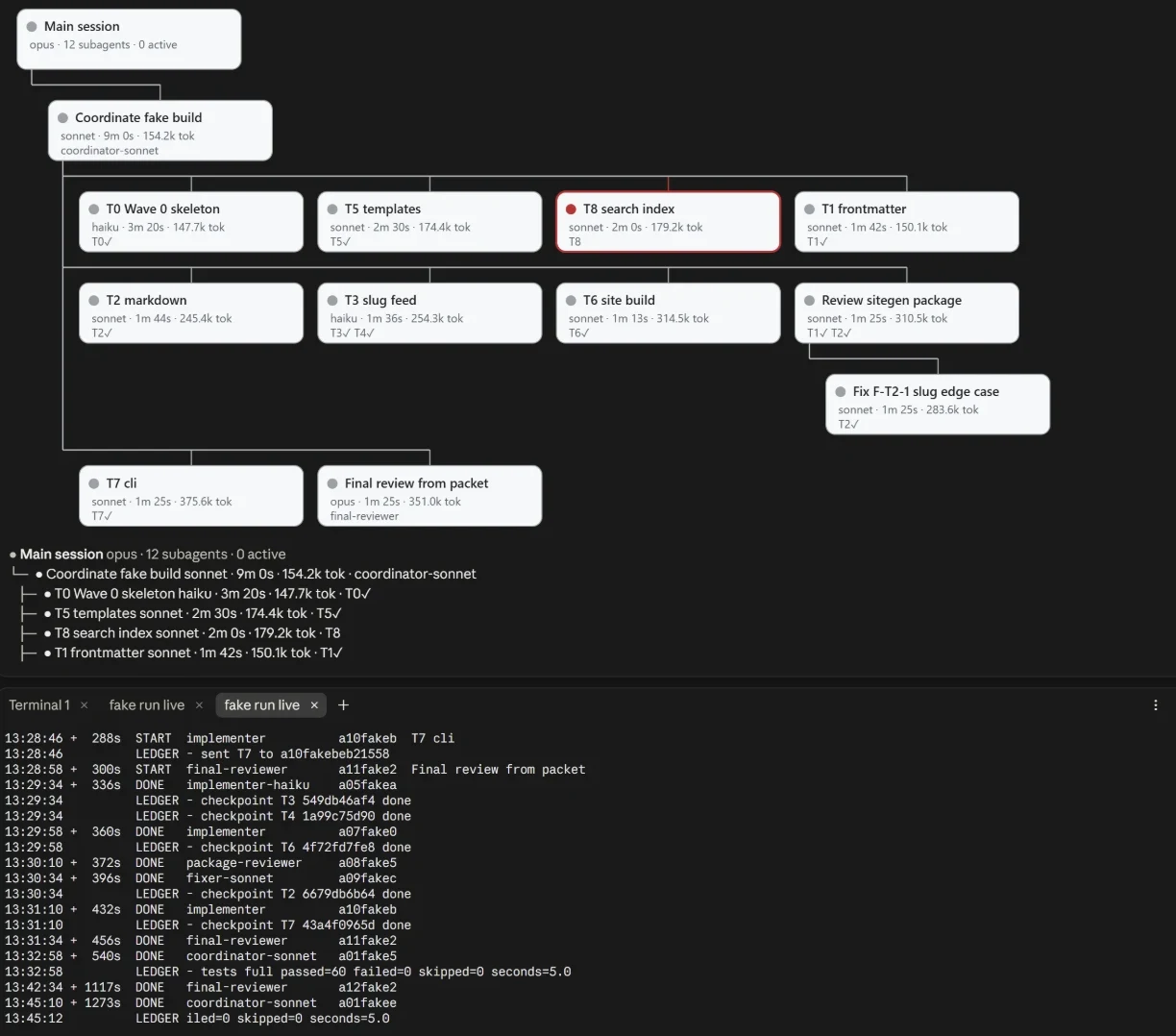
/superlite:agents opens the agent map in Claude Desktop: a tree from the main session down, each agent under the one that spawned it, green while it runs, red if it was aborted or blocked, grey when done. Each node shows its tier, time, tokens and tasks (✓ once checkpointed); click a row for its details and its ledger lines. It needs the claude-agent-map mod: /plugin install claude-agent-map@superlite-dev./superlite:tail prints the same run as a live feed: every agent start and finish from metrics.jsonl and every ledger line from progress.md (superlite-cli tail --dir .superlite).You need Claude Code, git, Python 3.10 or newer (the tools are Python; the project you build can be in any language), and bash (Git Bash on Windows). uv is optional.
/plugin marketplace add iha2/superlite
/plugin install superlite@superlite-dev
Optional, for the agent map pane in Claude Desktop: /plugin install claude-agent-map@superlite-dev. Superlite works without it; in a terminal use /superlite:tail.
Or load a local checkout for one session: claude --plugin-dir <path-to-superlite>
Open a fresh session: the superlite intro appears once. Then send Let's make a react todo list; a working install starts inventing before any code is written. Installs for Codex, Cursor, Gemini CLI, OpenCode and the other harnesses are in Installation below.
superlite plans a build, splits it into tasks that can run side by side, hands each task to the cheapest agent that can do it well, checks the seams, and reviews the result. You decide who orchestrates: you, or the AI.
superlite is not a competitor to superpowers. superpowers is a careful, collaborative workflow that keeps a human close to every step, and it is excellent at that. superlite starts from its ideas (the plugin layout, the session-start hook, the lifecycle skills, with credit) and tunes them for a different job: autonomous development, at speed. If you want to steer each step, use superpowers. If you want to hand over a spec and come back to working code, use superlite. A superlite run suspends superpowers until superlite-cli finish; after that, superpowers can be used again.
Same machine, same task: build a Python site generator and a spreadsheet engine from one spec (sitegen + minisheet, 177 hidden tests), headless on Opus.
| What we measured | superpowers | superlite |
|---|---|---|
| Wall-clock to a finished build | 33.6 min (stock, 3 runs: 21.2 / 31.9 / 47.6)23.5 min (orchestrated, 3 runs) | 16.1 min |
| Faster than superpowers | 52% vs stock, 31% vs orchestrated | |
| Fastest-to-slowest spread, 3 runs | 26.4 min | 9.1 min |
| Agents working at once | 3 to 4 | up to 18 (k1; dispatch now caps at 10 running tasks) |
| Hidden tests passed | 177 / 177 | 177 / 177 (a tie, at higher speed) |
| Earlier 9-module benchmark (1 run each) | 34.4 min | 8.8 min |
| superlite against its own first version | 26.9 min | 16.1 min (40% faster) |
And it is not tied to one language. A TypeScript site generator went from spec to 132 / 132 hidden tests in 8.5 minutes.
The 16.1 min figure is one run of the current build. The superpowers figures, the spread row (3 runs of each, on an earlier superlite build) and the 9-module row (the first version, 1 run each) come from earlier runs on the same machine, so treat the gaps as indications, not a statistical proof. superlite can cost more than superpowers and scores lower on the extra robustness probes (4 of 7 against about 5.7 of 7). Details, runs and caveats: bench/ and the Benchmark section below.
How it works, in docs/: how a run works · skills and agents · hooks · tools · config · language support · how the rules are enforced · an example review plan. Installation for other harnesses, the benchmark harness and the task list follow below.
detail (plan switch). drafting records **Detail:** contracts | tests | full in the plan header, and a task can override it. contracts gives files, signatures and named tests with exact values. tests (the default) adds the test code verbatim and leaves the implementation to the implementer. full includes implementation code too, for tricky algorithms. inventing asks for it in its single batched question, and picks the default itself when unattended.final-reviewer at high effort: one turn, findings only, reading a review packet built from the logs, with a target under 30 s. It is not a fork, so CLAUDE_CODE_FORK_SUBAGENT is not needed.Stars on GitHub
Skills for the OpenClaw personal AI assistant, covering browser automation, routing requests to coding agents, presenting canvas widgets, running apps on temporary machines, and sharing diffs.
@steipeteGives Claude Code users skills to drive Orca-managed worktrees, terminals and the embedded browser through the orca CLI, plus Jira and Linear ticket work and inline HTML chat visuals. Covers chart, table and mockup output.
 @stablyai
Orchestrates teams of AI agents to run work like a company, with a Node.js server and React UI. Adds skills for delegating tasks, following up on results, reviewing team status, and managing Paperclip tasks from Hermes.
 @paperclipai
Organizes your AI agents for round-the-clock operation, with tools to hire, schedule and report on your agent team. Lets you oversee the agents without staying online yourself.
 @lobehub
A fast software factory workflow for Claude Code: one approval gate, parallel waves, routed models. Install it with the command on its page. It includes diagnosis, drafting, feature-prototype. Its skills do not fire on their own yet. Free and open source.
Is this plugin yours?
Claim it with GitHubSubmit a pluginPromote it