
Development
ship
An agentic development harness for Claude Code & Codex: agent-routed workflows from raw requirement to green PR.

Plugin Signal67/100Solid
maintained67
capable58
documented100
adopted42
Install on Claude Code
Auto-invoked ships a router so the right skill fires automatically as you prompt. No remembering which skill to call.
Normal is the plain upstream plugin, installed as-is. You invoke its skills yourself.
The plugin> /plugin marketplace add heliohq/ship> /plugin install ship@heliohqAuto-invocation> /plugin marketplace add flowy-sh/flowy-core> /plugin install flowy-core> /plugin install flowy-ship
What's inside
Skill(11 skills)
/arch-designSystem-design thinking before any doc or code: goals/non-goals, back-of-envelope numbers, components and contracts, failure modes, operability, security, trade-offs. Use for "design this system", "architecture for X", "trade-offs for X", "how should we architect", "API design",/autoRun Ship's full production workflow from raw requirement to PR: design, dev, E2E, review, QA, refactor, and handoff. Use only for explicit /ship:auto, auto pipeline requests, or end-to-end delivery.
Hook(3 hooks)
MCP(1 mcp)
README
Ship: AI-Powered Software Development Harness
An agentic development harness for Claude Code & Codex: agent-routed workflows from raw requirement to green PR.
Ship helps agents choose and run the right amount of software delivery process: one standalone phase, a grouped quality/build bundle, or the full raw-input-to-green-PR flow.
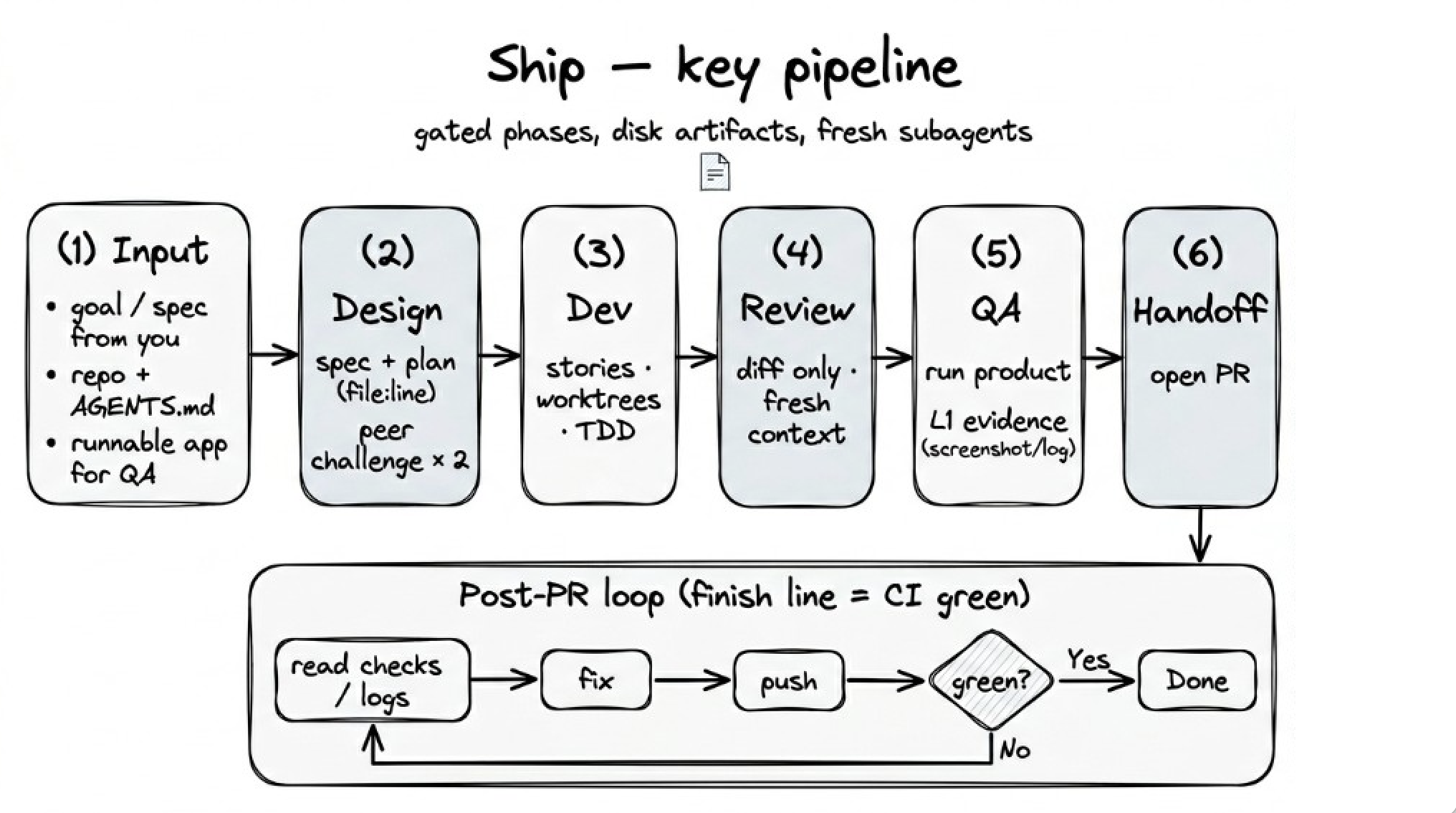
How It Works
Ship is a harness, not a copilot. It doesn't help AI write code — it constrains AI to produce reliable results through mechanically enforced quality gates.
The problem Ship solves: AI coding agents are capable but unreliable. They skip tests, hallucinate about code they haven't read, review their own work and call it good, and declare victory without evidence. Ship makes these failure modes structurally impossible.
- Use Ship chooses the right route.
/ship:use-shipdecides whether the task needs one skill, a phase bundle, or the full/ship:autoworkflow. - Production artifacts stay organized. When a task needs durable docs, agents use the repo's existing convention or create a focused
docs/ship/<task-id>/folder for requirements, design, engineering, quality, delivery, and archive notes. - Atomic skills stay standalone. Focused skills like
/ship:dev,/ship:e2e,/ship:review,/ship:qa,/ship:refactor, and/ship:handoffwork directly without a full workflow. - Input, state, and outputs are separate. Raw requirements live under
input/. The orchestrator keeps only minimal run state. Markdown artifacts and repository code are the deliverables. - Every phase is isolated. The reviewer has never seen the implementation context. The QA evaluator can only see the spec, the diff, and the running application. Fresh context per phase means no accumulated bias.
- Plans are adversarially tested. An independent peer challenger produces code-grounded objections with file paths and snippets. The planner must respond with evidence, not hand-waving. Two rounds before you see anything.
- Evidence is hierarchical. L1 (screenshot, curl response, console log) is the only acceptable proof. L2 (HTTP 200, "tests passed") is insufficient. L3 ("should work based on the code") is an automatic FAIL.
- State lives on disk, not in memory. The current phase is tracked in local state, and dev keeps a per-story ledger. On resume — or after context compaction — the orchestrator reads disk and picks up where it left off instead of redoing finished work. A stop-gate hook blocks session exit while the workflow is active.
- Context moves as files, judgment stays expensive. Story briefs, implementer reports, and review diffs are handed to subagents as file paths, not pasted text — nothing bulky parks in the host's context. Every subagent dispatch names its model tier: mechanical transcription can go a tier down, reviewers have a mid-tier floor, and judgment calls never leave the host (adopted from superpowers v6's measured results).
- The host can't game its own reviewers. Reviewer dispatches carry the spec's constraints verbatim, never "don't flag X" or pre-rated severity. Reviews are read-only, implementer rationales don't downgrade findings, and a defect the plan itself mandates still gets reported — the user decides.
- The finish line is checks green, not PR created. After opening the PR, Ship enters a goal-directed fix loop — read CI failures, fix the smallest real cause, address review comments, resolve merge conflicts — and keeps going while each round makes progress. It escalates on evidence, not a counter: the same failure surviving a fix aimed at it, an issue needing human judgment, or an external blocker.
- Test-driven implementation. Stories follow a RED-GREEN-REFACTOR cycle with per-story code review before merge.
Installation
Claude Code
/plugin marketplace add heliohq/ship
/plugin install ship@heliohq
Codex
/plugins
Search for Ship, then install it. In Codex App, open Plugins in the sidebar and install Ship from there. Codex loads Ship's skills, MCP config, and hooks from .codex-plugin/plugin.json — the same routing hint and quality gates as Claude Code.
Verify Installation
Open a fresh session and confirm the /ship:* skills are available — for example, run /ship:use-ship plan out a user authentication system.
Updating
/plugin update ship
Skills
Run /ship:use-ship when you want the agent to choose the right Ship route. Run /ship:auto when you explicitly want the full staged workflow. Or run individual phases when you only need one; atomic skills do not require an active auto run.
| Skill | Description |
|---|---|
/ship:use-ship | Route the request to a standalone skill, phase bundle, or full flow |
/ship:auto | Staged workflow: input → design/spec+plan → dev → E2E → review → QA → refactor → handoff |
/ship:design | Adversarial spec + plan with peer challenge rounds |
/ship:dev | Host implements, peer cross-validates; parallel waves for file-independent stories |
/ship:e2e | Codify the change's acceptance criteria as persistent E2E tests, detect or scaffold the framework, run them against the real app |
/ship:review | Bug-focused diff review — no style nits |
/ship:qa | Exploratory sweep against the running app, finds what codified tests missed |
/ship:handoff | PR creation + CI fix loop until checks green |
/ship:refactor | Four-lens scan, classify by risk, apply with verification |
/ship:arch-design | System-design thinking — nine falsifiable lenses, self-interview method, red-team pass — hands off to write-docs |
/ship:write-docs | Project documentation with frontmatter, lifecycle, and indexing, incl. design docs and ADRs |
Skills are available through the host plugin catalog and direct /ship:* commands. At startup, Ship injects only a tiny hint to consult /ship:use-ship when Ship may apply; it does not inject docs, memory, or artifact content.
See docs/skills.md for detailed guides.
License
Acknowledgments
Ship is built on ideas from:
- agent-browser — Browser automation CLI for AI agents
- Superpowers — Jesse Vincent's agentic skills framework for Claude Code
- gstack — Garry Tan's opinionated Claude Code setup
- Claude Code — Agent workflows and the cleanup pattern that inspired
/ship:refactor's four-lens scan
File tree
FAQ
ship is a Claude Code plugin of 11 hand-picked skills with a FLOW.md router. Install it once and the right skill fires as you prompt, with no slash command to remember. It is built for development work. It includes arch-design, auto, design. Free and open source.
- What is ship?
- An agentic development harness for Claude Code & Codex: agent-routed workflows from raw requirement to green PR.
- How do I install ship?
- Run these in Claude Code: /plugin marketplace add heliohq/ship then /plugin install ship@heliohq. Then prompt normally.
- Does ship auto-invoke its skills?
- Yes. It ships a FLOW.md router that Flowy's hook fires, so the matching skill runs as you prompt. You never name a skill.
- Is ship free?
- Yes. Flowy is free and open source, with nothing gated. You can read every skill in full before you install.
Is this plugin yours?
Claim it with GitHubSubmit a pluginPromote it