
Development
Plugin
oma
Agents narrate success. oh-my-agent checks the artifacts. Spawning parallel agents is the easy part. The hard part is knowing whether they actually did the work.

Plugin Signal90/100Strong
maintained100
capable83
documented100
adopted66
Install on Claude Code
> /plugin marketplace add first-fluke/oh-my-agent> /plugin install oma@oh-my-agent
Stats
1,314
Stars
149
Forks
Active
Maintenance
TypeScript
Language
MIT
License
8h ago
Last commit
7mo ago
Created
Repo: first-fluke/oh-my-agent
In this plugin
- skills
- oma-academic-writing
- oma-architecture
- oma-backend
- oma-brainstorm
- oma-coordination
- oma-db
- oma-debug
- oma-deepsec
- oma-design
- oma-dev-workflow
- oma-docs
- oma-explanation
- oma-frontend
- oma-hwp
- oma-image
- oma-market
- oma-mobile
- oma-observability
- oma-orchestration
- oma-pdf
- oma-pm
- oma-qa
- oma-recap
- oma-refactor
- oma-scholar
- oma-scm
- oma-search
- oma-skill-creation
- oma-slide
- oma-tf-infra
- oma-translation
- oma-video
- oma-voice
- agents
- MCP
What's inside
Skill(33 skills)
/oma-academic-writingDraft and revise academic prose against a rubric, evidence, and/oma-architectureEvaluate system boundaries and architectural tradeoffs. Use for/oma-backendImplement server APIs, authentication, and application data access.
- /oma-brainstorm
- /oma-coordination
- /oma-db
- /oma-debug
- /oma-deepsec
- /oma-design
- /oma-dev-workflow
- /oma-docs
- /oma-explanation
- /oma-frontend
- /oma-hwp
- /oma-image
- /oma-market
- /oma-mobile
- /oma-observability
- /oma-orchestration
- /oma-pdf
- /oma-pm
- /oma-qa
- /oma-recap
- /oma-refactor
- /oma-scholar
- /oma-scm
- /oma-search
- /oma-skill-creation
- /oma-slide
- /oma-tf-infra
- /oma-translation
- /oma-video
- /oma-voice
Agent(12 agents)
architecture-reviewerArchitecture review and recommendation. Use for system design, module boundaries, ADRs, and tradeoff analysis.backend-engineerBackend implementation. Use for API, authentication, DB migration work.db-engineerDatabase design and implementation specialist. Use for schema, ERD, migration, query tuning, vector DB work.
Hook(4 hooks)
MCP(3 mcp)
Badges





README
oh-my-agent: The Multi-Agent Harness That Checks the Work
한국어 | 中文 | Português | 日本語 | Français | Español | Nederlands | Polski | Русский | Deutsch | Tiếng Việt | ภาษาไทย
Agents narrate success. oh-my-agent checks the artifacts.
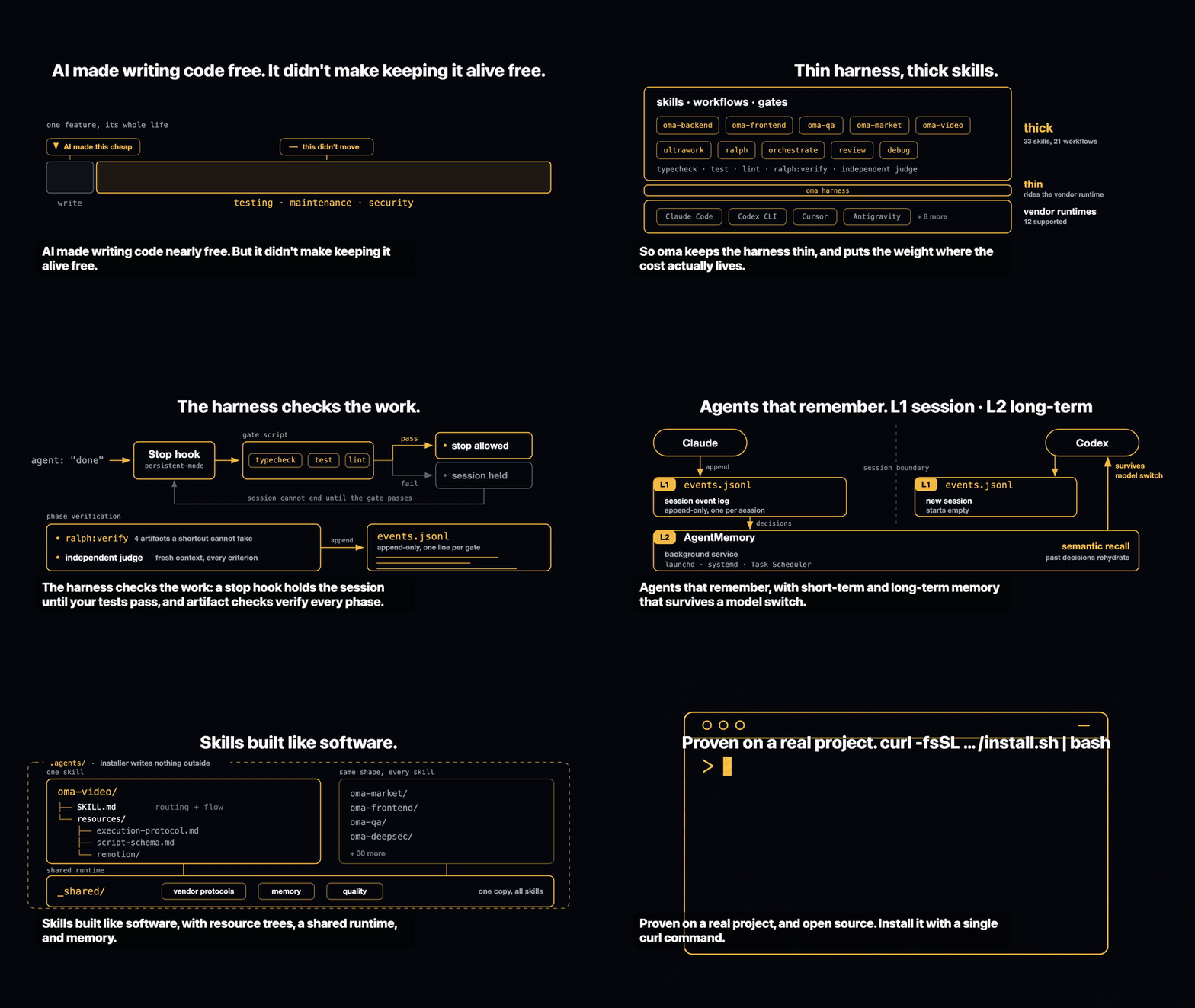
Spawning parallel agents is the easy part. The hard part is knowing whether they actually did the work. "Tests pass, all criteria met" costs an agent nothing to say, and nothing inside that same session can contradict it.
oh-my-agent makes the claim falsifiable. A Stop hook refuses to end your session until your project's own typecheck / test / lint script exits 0. A gate command decides whether a workflow really ran by looking for the artifacts it must have left behind — and its JSON verdict, not the agent's summary, is the result. An independent judge with a fresh context re-verifies every criterion each round, including the ones that already passed. Every gate decision lands on an append-only event log you can read after the fact. Then it runs that same discipline across a dozen agent runtimes from one portable .agents/ directory.
Quick Start
The install scripts below auto-install bun, uv, and serena if they're missing.
# macOS / Linux — auto-installs bun, uv & serena if missing
curl -fsSL https://raw.githubusercontent.com/first-fluke/oh-my-agent/main/cli/install.sh | bash
# Windows (PowerShell) — auto-installs bun, uv & serena if missing
irm https://raw.githubusercontent.com/first-fluke/oh-my-agent/main/cli/install.ps1 | iex
# Or manual (any OS, requires bun + uv + serena)
bunx oh-my-agent@latest
Not to be confused with
oma-observability's APM (Application Performance Monitoring).
# All skills, deployed to every detected runtime
# (.claude, .cursor, .codex, .opencode, .github, .agents)
apm install first-fluke/oh-my-agent

# A single skill
apm install first-fluke/oh-my-agent/.agents/skills/oma-frontend
APM ships skills only. For workflows, rules, oma-config.yaml, keyword-detection hooks, and the oma agent spawn CLI, use bunx oh-my-agent@latest. Pick one distribution per project to avoid drift.
Pick a preset and you're ready:
| Preset | What You Get |
|---|---|
| All | Every agent and skill |
| Backend | architecture + backend + brainstorm + db + debug + dev-workflow + pm + qa + scm |
| Content | academic-writer + design + image + scm + translator + voice |
| DevOps | architecture + brainstorm + debug + dev-workflow + observability + pm + qa + scm + tf-infra |
| Frontend | architecture + brainstorm + debug + design + frontend + pm + qa + scm |
| Fullstack | architecture + backend + brainstorm + db + debug + design + dev-workflow + frontend + mobile + pm + qa + scm + tf-infra |
| Fullstack Mobile | architecture + backend + brainstorm + db + debug + design + dev-workflow + mobile + pm + qa + scm |
| Fullstack Web | architecture + backend + brainstorm + db + debug + design + dev-workflow + frontend + pm + qa + scm |
| Mobile | architecture + brainstorm + debug + mobile + pm + qa + scm |
| Research | academic-writer + hwp + market + pdf + scholar + scm + search + translator |
Works With Every Agent
Verification is worth little if it's locked to one vendor. oh-my-agent keeps .agents/ as the single source of truth and projects it into each runtime's native layout, so every supported tool shares the same skills, workflows, rules, and gates — and switching vendors is a config change, not a migration.
Your Engineering Team
Instead of one AI doing everything (and getting confused halfway through), oh-my-agent splits work across specialized agents. Each one knows its domain deeply, has its own tools and checklists, and stays in its lane.
| Agent | What They Do |
|---|---|
| oma-architecture | Weighs architecture tradeoffs and draws module boundaries, with ADR/ATAM/CBAM analysis. |
| oma-backend | Builds and secures your APIs in Python, Node.js, or Rust. |
| oma-brainstorm | Explores ideas with you before you commit to building. |
| oma-db | Designs your schema, migrations, indexes, and vector stores. |
| oma-debug | Finds the root cause, fixes the bug, and writes a regression test. |
| oma-deepsec | Scans your code for security holes and blocks risky pull requests. |
| oma-design | Builds design systems with tokens, accessibility, and responsive layouts. |
| oma-dev-workflow | Automates your CI/CD, releases, and monorepo tasks. |
| oma-docs | Checks your docs for broken references and flags ones a code change touched. |
| oma-explanation | Turns a diff, PR, or branch into a self-contained interactive HTML explainer with a quiz. |
| oma-frontend | Builds your UI with React/Next.js, TypeScript, Tailwind CSS v4, and shadcn/ui. |
| oma-mobile | Builds cross-platform mobile apps with Flutter. |
| oma-observability | Routes observability work across metrics, logs, traces, SLOs, and incident forensics. |
| oma-orchestration | Runs multiple agents in parallel from the CLI. |
| oma-pm | Plans tasks, breaks down requirements, and defines API contracts. |
| oma-qa | Reviews your code for OWASP security, performance, and accessibility issues. |
| oma-refactor | Refactors code without changing its behavior, using hotspot targeting, characterization-test safety nets, and refactor-only commits. |
| oma-scm | Manages your branches, merges, worktrees, and Conventional Commits. |
| oma-search | Routes each query to the best source and scores how much you can trust the result. |
| oma-tf-infra | Provisions multi-cloud infrastructure with Terraform. |
| Agent | What They Do |
|---|---|
| oma-coordination | Guides manual step-by-step coordination of PM, frontend, backend, mobile, and QA agents. |
| oma-skill-creation | Writes and audits new OMA skills in the SSL-lite format. |
Beyond Code: Content & Research Pipelines
Separate from the engineering team, oma ships content and research pipelines built to the same engineering discipline: deterministic replay from fixtures, manifests for reproducibility, and honest degradation reporting when a source or vendor key is unavailable rather than a silently thinner result.
| Agent | What They Do |
|---|---|
| oma-academic-writing | Drafts, revises, and audits academic prose to publication quality. |
| oma-hwp | Converts HWP, HWPX, and HWPML files to Markdown. |
| oma-image | Generates images through several AI providers at once. |
| oma-market | Researches your market from community signals and frames it with SWOT, 5F, and PESTEL. |
| oma-pdf | Converts PDF files to Markdown. |
| oma-recap | Recaps your conversation history into themed work summaries. |
| oma-scholar | Searches academic literature and helps you run peer review. |
| oma-slide | Generates distinctive, animation-rich HTML presentation decks and exports to PDF/PNG/PPTX. |
| oma-translation | Translates between languages so it reads like a native wrote it. |
| oma-video | Generates short-form, explainer, and demo videos through a key-optional Remotion pipeline. |
| oma-voice | Generates voiceovers and transcribes audio on-device, no cloud needed. |
Orca IDE
OMA for Orca adds a sidebar panel and command-palette actions for project setup, review, debugging, verification, and local results. It uses your existing Orca agent terminal and project OMA installation. Requires Orca 1.4.197+ with experimental plugins enabled.
How It Works
Just chat. Describe what you want and oh-my-agent figures out which agents to use.
File tree
Showing a partial view of a very large repo.
FAQ
oma is a Claude Code plugin with 33 hand-picked skills for development work, indexed on Flowy. Install it with the command on its page. It includes oma-academic-writing, oma-architecture, oma-backend. Its skills do not fire on their own yet. Request auto-invocation to have Flowy route them as you prompt. Free and open source.
- What is oma?
- Agents narrate success. oh-my-agent checks the artifacts. Spawning parallel agents is the easy part. The hard part is knowing whether they actually did the work.
- How do I install oma?
- Run these in Claude Code: /plugin marketplace add first-fluke/oh-my-agent then /plugin install oma@oh-my-agent. Then prompt normally.
- Does oma auto-invoke its skills?
- Not yet. It is indexed on Flowy as a plain plugin. Request auto-invocation on its page and Flowy will route its skills for you as you prompt.
- Is oma free?
- Yes. Flowy is free and open source, with nothing gated. You can read every skill in full before you install.
Is this plugin yours?
Claim it with GitHubSubmit a pluginPromote it