
Development
Plugin
claude-code-staff-engineer
The difference between a Junior and a Senior engineer isn’t syntax, it’s predictability, risk management, and discipline under pressure.

Plugin Signal43/100Fair
maintained31
capable37
documented75
adopted42
Stats
90
Stars
23
Forks
Maintained
Maintenance
Shell
Language
MIT
License
5mo ago
Last commit
5mo ago
Created
Repo: FareedKhan-dev/claude-code-staff-engineer
What's inside
Hook(1 hook)
README
Building a Senior Staff Engineer Agent with Claude Code
The difference between a Junior and a Senior engineer isn’t syntax, it’s predictability, risk management, and discipline under pressure. AI agents struggle with exactly this: they skip reviews, rationalize shortcuts, and ship work they are proud of but nobody actually verified. Anthropic shows agents collaborate well but without structure, more agents just mean more chaos and wasted compute. What you need is what real companies have: a Staff Engineer orchestrating specialized sub-agents through a disciplined pipeline from design to deployment, and that is exactly what we are going to build …
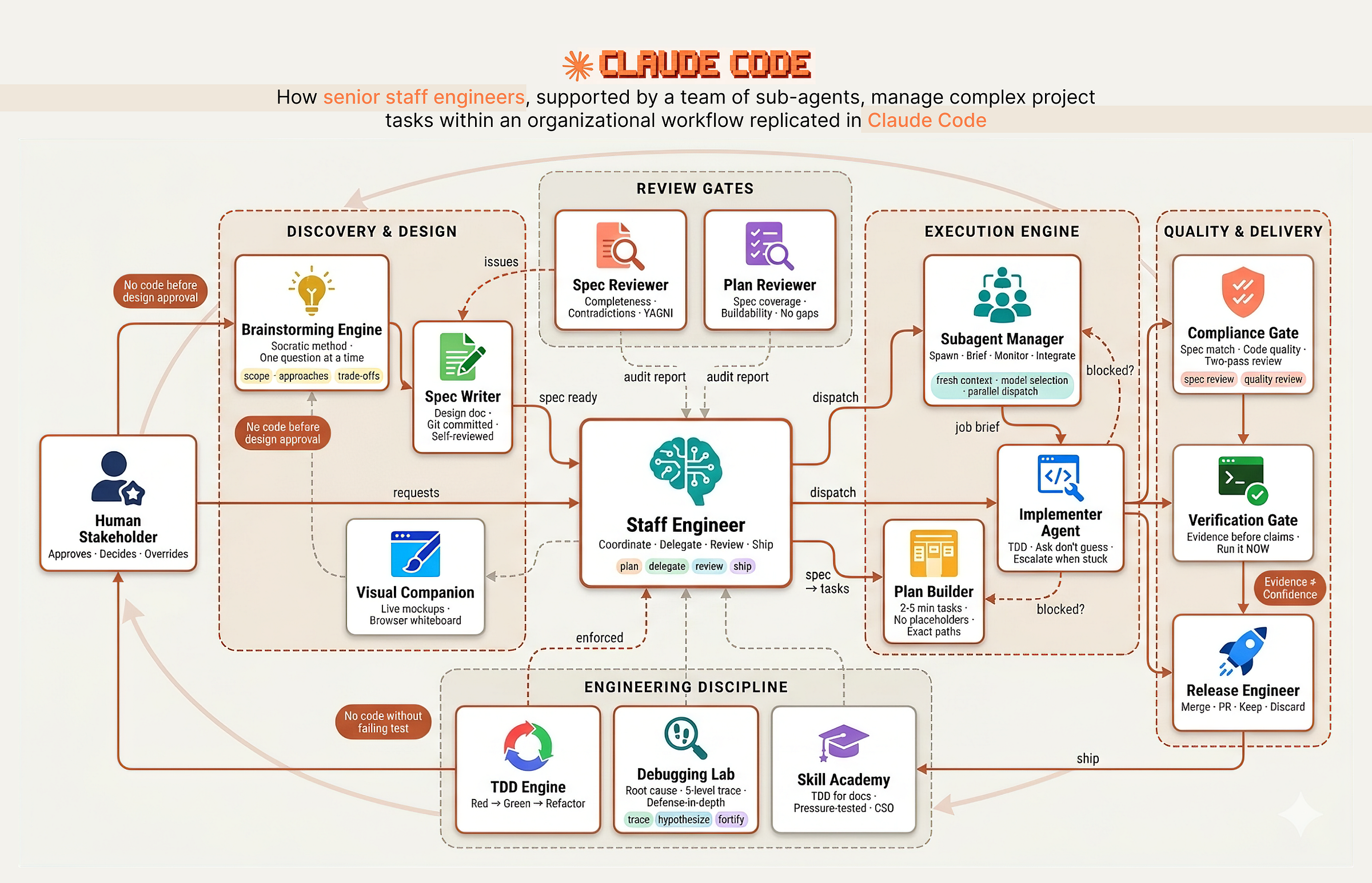 Senior Staff Engineer with teams of sub-agents (Created by Fareed Khan)
The system works like a real engineering organization with clear separation of responsibilities:
- Discovery & Design: The Architect asks questions one at a time, explores 2–3 approaches with trade-offs, and produces a design spec committed to git. No code before human approval.
- Planning & Review: The Tech Lead breaks the spec into 2–5 minute tasks with exact file paths and complete code. A fresh sub-agent audits the plan against the spec to catch gaps and scope creep.
- Execution Engine: The Manager dispatches a fresh sub-agent per task with isolated context. Stuck agents escalate. Bad work gets terminated and re-dispatched.
- Quality Gates: Two sequential reviews: spec compliance (right thing?) then code quality (built well?). A verification gate demands fresh terminal output before any completion claim.
- Engineering Discipline: TDD enforced as iron law. Debugging follows a four-phase forensic process. Root cause tracing goes five levels deep. Skills themselves are pressure-tested against real agents before deployment.
In this blog we are going to …
visually walk through each stage of this workflow, build every component step by step from hooks to skills to agents, and see how they work together as a disciplined engineering team using Claude Code.
Table of Contents
- Creating the Team Codebase
- Hooks (The Management Layer)
- Brainstorming & Design (Planning Phase)
- Finding Logical Loopholes (Spec Review)
- Visual Companion (Whiteboarding Sessions)
- Writing Plans (Backlog Grooming)
- Plan Review (The Grooming Gatekeeper)
- Subagent-Driven Development (Delegation)
- The Implementer Prompt (Developer Job Description)
- Spec & Code Quality Reviewers (Compliance Officers)
- Test-Driven Development (The Iron Law)
- Testing Anti-Patterns (Lazy QA Training)
- Systematic Debugging (Forensic Engineering)
- Root Cause Tracing & Defense in Depth
- Verification Before Completion (Final Sign-off)
- The Peer Review Meeting (Code Review)
- Using Git Worktrees (Bio-hazard Containment)
- Writing Skills (The Academy)
- Agents & Commands (Team Directory)
- Testing the Senior Staff Engineer
- How to Improve It Further
Creating the Team Codebase
In every engineering organization, before the first line of product code is written, someone has to set up the infrastructure. At companies like Spotify, Shopify, and Stripe, this is the staff engineer’s first job on a new initiative.
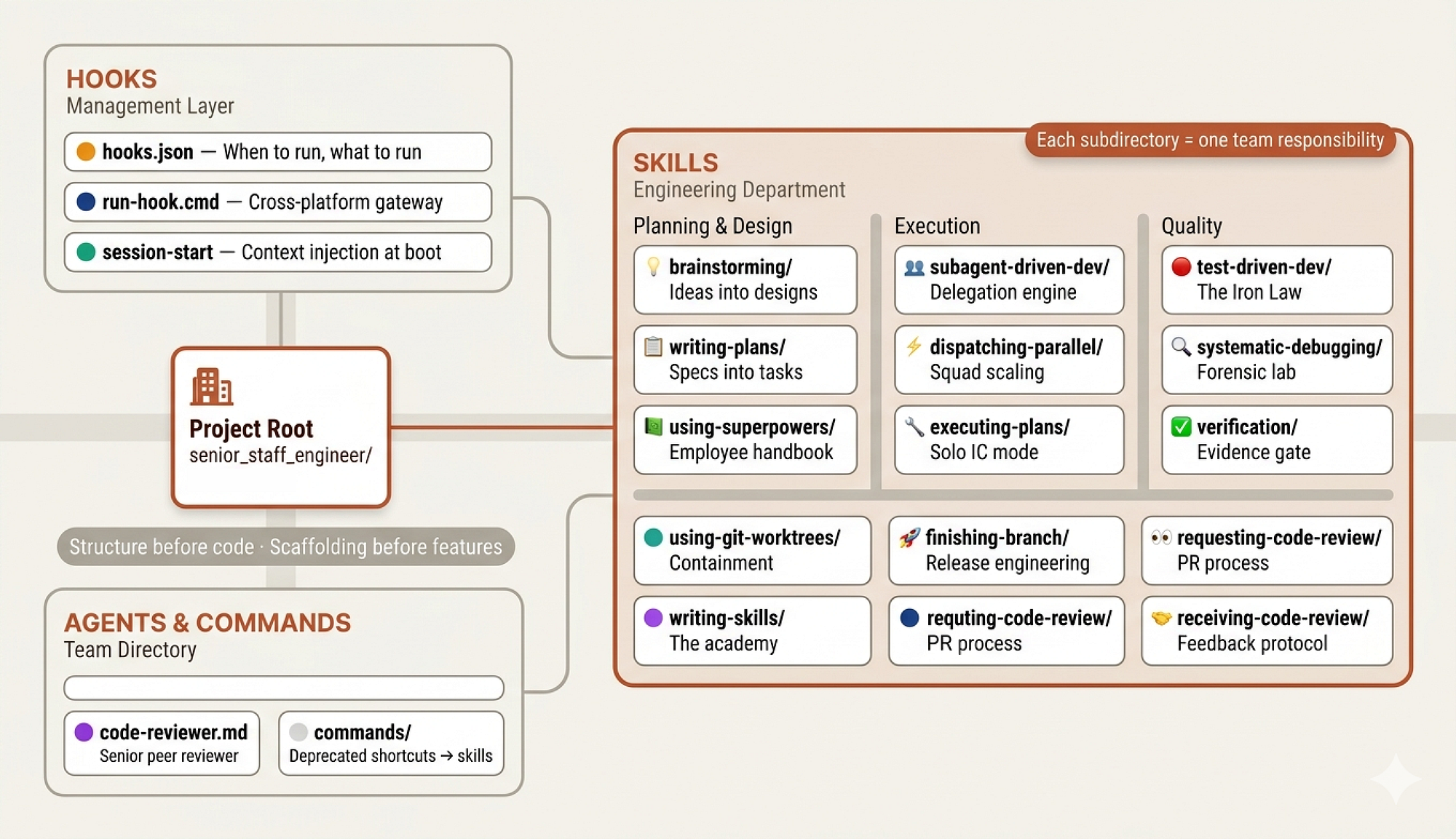 Team Codebase (Created by Fareed Khan)
They don’t start coding features. They establish the project structure, the development workflows, the CI/CD pipelines, and the team norms. They build the organizational scaffolding that makes everyone else’s work possible.
When you work with Claude Code normally, you might use a few skills, an MCP server, maybe some tool scripts, or even start from scratch and let Claude figure it out.
But we are not building a solo developer. We are building a team of agents that need to collaborate, follow processes, and hold each other accountable. That requires structure, the same way a 10 person engineering team requires structure that a solo freelancer doesn’t.
So before we write any skills or define any agents, we need to create the organizational scaffolding:
senior_staff_engineer/
├── agents/                             # agent + sub-agent definitions
├── commands/                           # custom CLI-style agent commands
├── hooks/                              # lifecycle hooks (events, workflow control)
├── skills/                             # core capability modules
│   ├── design-and-discovery/           # idea generation & design
│   │   └── scripts/                    # visual/interactive brainstorming
│   ├── delegation/                     # delegate to sub-agents
│   ├── evidence-verification/          # final validation before completion
│   ├── execution-engine/               # step-by-step plan execution
│   ├── forensic-debugging/             # root-cause analysis
│   ├── orchestration/                  # coordinate multiple agents
│   ├── planning-and-backlog/           # plan creation
│   ├── release-engineering/            # finalize work before merge
│   ├── review-reception/               # process feedback & iterate
│   ├── review-requesting/              # prepare PRs + request reviews
│   ├── skill-academy/                  # authoring new skills
│   ├── tdd-discipline/                 # write tests → implement → validate
│   ├── using-senior-staff-engineer/    # configure & optimize this system
│   └── worktree-management/            # isolate work via worktrees
It might seem complex at first, but each directory maps to a role or function in a real engineering organization.
- The
agents/directory is the team roster, defining who does what. - The
skills/directory is the employee handbook, containing the processes and standards every team member follows. - The
hooks/directory is the management layer, controlling the flow of information and ensuring everyone starts aligned.
We will build each of these one by one and make them act as a cohesive team that handles complex development tasks from planning through deployment.
Hooks (The Management Layer)
In every company, there’s a layer of management infrastructure that operates invisibly. Before the first meeting of the day, the office is already open, the coffee machine is running, the shared calendar is synced, and the team’s Slack channels are populated with overnight updates. Nobody thinks about this infrastructure until it breaks.
In our system,
hooks/is this management layer.
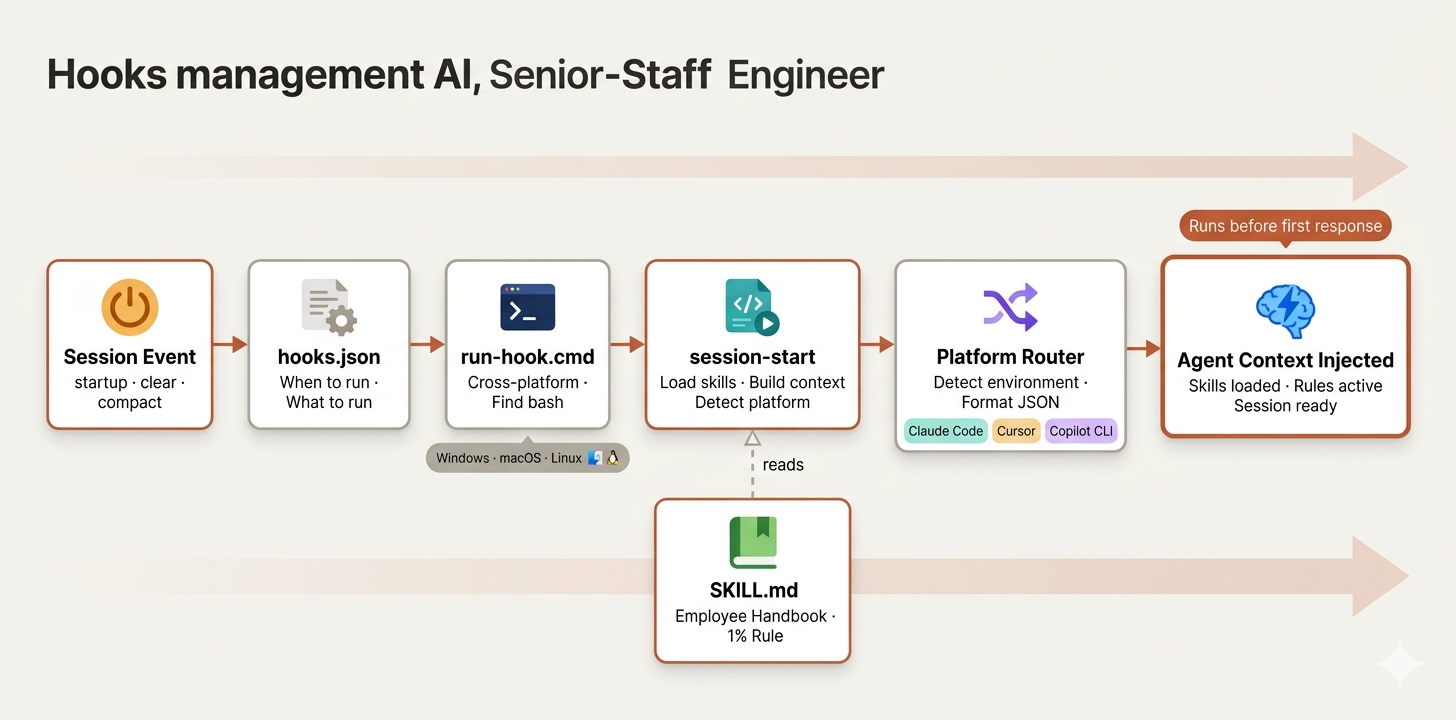 Hooks Management (Created by Fareed Khan)
In Claude Code, hooks let you control what happens at specific lifecycle events, like when a session starts, when context is cleared, or when the agent compacts its memory. For a single developer, hooks are optional. For a team of agents that need to start every session with shared context and consistent rules, hooks are essential.
We start with three files:
hooks/
├── hooks.json    # main configuration file
├── run-hook.cmd  # cross-platform script executor
├── session-start # session initialization logic
The hooks.json is simple. It defines one rule: every time a session starts, run the initialization script.
{
  "hooks": {
    "SessionStart": [
      {
        "matcher": "startup|clear|compact",
        "hooks": [
          {
            "type": "command",
            "command": "\"${PROJECT_ROOT_DIR}/hooks/run-hook.cmd\" session-start",
            "async": false
          }
        ]
      }
    ]
  }
}
The matcher triggers on three scenarios:
startup(fresh session),clear(context reset), andcompact(memory compression).- In organizational terms, this is like having an onboarding checklist that runs not just on day one, but every time someone context-switches back to this project.
Because in AI agent terms, every session IS day one. The agent has no memory of yesterday's session. It needs to be re-onboarded every time.
The async: false flag ensures the hook completes before the agent starts responding. This is the equivalent of saying "the morning standup must finish before anyone opens their laptop." You can learn more about how Claude automates workflows with hooks.
In real companies, not everyone runs the same OS. The engineering team might have Mac users, Linux servers, and the occasional Windows machine. We need to create run-hook.cmd script that handles this by being a polyglot, a script that works on both Windows and Unix:
if "%~1"=="" (
    echo run-hook.cmd: missing script name >&2
    exit /b 1
)

set "HOOK_DIR=%~dp0"

REM Try Git for Windows bash in standard locations

if exist "C:\Program Files\Git\bin\bash.exe" (
    "C:\Program Files\Git\bin\bash.exe" "%HOOK_DIR%%~1" %2 %3 %4 %5 %6 %7 %8 %9
    exit /b %ERRORLEVEL%
)
On Windows, it searches for bash in common Git installation paths. If bash isn’t found anywhere, it exits silently rather than crashing. On Unix, it simply executes the script directly:
# Unix: run the named script directly
SCRIPT_DIR="$(cd "$(dirname "$0")" && pwd)"
SCRIPT_NAME="$1"

shift

exec bash "${SCRIPT_DIR}/${SCRIPT_NAME}" "$@"
The agent doesn’t need to know what OS it’s running on. The gateway script figures it out and routes accordingly. It’s the same principle behind Docker and Kubernetes: abstract away the environment so the application logic doesn’t need to care.
The session-start script is where the actual onboarding happens. When a new session begins, this script loads the squad's core skill file and injects it into the agent's context.
Think of it as the morning standup where the staff engineer reminds everyone of the team's operating principles before work begins.
The script starts by resolving paths and checking for legacy configurations:
#!/usr/bin/env bash
set -euo pipefail

SCRIPT_DIR="$(cd "$(dirname "$0")" && pwd)"
PLUGIN_ROOT="$(cd "${SCRIPT_DIR}/.." && pwd)"

# Legacy config check
warning_message=""

legacy_skills_dir="${HOME}/.config/staff_engineer/skills"

if [ -d "$legacy_skills_dir" ]; then
    warning_message="\n\n<important-reminder>⚠️ **WARNING:**
    staff_engineer now uses Claude Code's skills system.
    Move custom skills to ~/.claude/skills instead.</important-reminder>"
fi
Then it loads the core skill file, which is the employee handbook every agent must read:
using_staff_engineer_content=$(
    cat "${PLUGIN_ROOT}/skills/using-staff_engineer/SKILL.md" 2>&1 \
    || echo "Error reading using-staff_engineer skill"
)
The content gets escaped for JSON and wrapped in a context payload:
File tree
FAQ
claude-code-staff-engineer is a Claude Code plugin with hand-picked skills for development work, indexed on Flowy. Install it with the command on its page. Its skills do not fire on their own yet. Request auto-invocation to have Flowy route them as you prompt. Free and open source.
- What is claude-code-staff-engineer?
- The difference between a Junior and a Senior engineer isn’t syntax, it’s predictability, risk management, and discipline under pressure.
- How do I install claude-code-staff-engineer?
- Run these in Claude Code: . Then prompt normally.
- Does claude-code-staff-engineer auto-invoke its skills?
- Not yet. It is indexed on Flowy as a plain plugin. Request auto-invocation on its page and Flowy will route its skills for you as you prompt.
- Is claude-code-staff-engineer free?
- Yes. Flowy is free and open source, with nothing gated. You can read every skill in full before you install.
Is this plugin yours?
Claim it with GitHubSubmit a pluginPromote it