
Development
Plugin
hope
Hope helps people take on more complex work with AI while preserving their judgment and agency.

Plugin Signal71/100Solid
maintained99
capable43
documented100
adopted20
Install on Claude Code
> /plugin marketplace add dkstm95/hope> /plugin install hope@hope
Stats
8
Stars
1
Forks
Active
Maintenance
JavaScript
Language
MIT
License
11d ago
Last commit
2mo ago
Created
Repo: dkstm95/hope
What's inside
Skill(7 skills)
/alignResolve intent, scope, consequential design choices, or important assumptions that need shared understanding before implementation. Use when requested or when an unresolved choice would materially change the result./designDesign or refine interface mockups with people who describe goals and impressions rather than design terminology. Use for UI direction, visual references, alternatives, and design feedback, including visual choices within Align./diagramCreate, refine, or review explanatory diagrams and data charts when relationships or quantitative shape communicate better than prose or a small table. Excludes decorative illustration and UI screen design.
README
As AI becomes more capable of doing the work, how much should people understand about the results they are responsible for, and how should they judge them?
Hope starts with this question. It brings choices that need human judgment into view and helps people understand the evidence and consequences behind them. Its aim is to reduce the effort needed to make informed decisions, so people can take on a wider range of work with AI that they understand and can answer for.
Today, Hope puts this direction into practice in development work: aligning intent, reviewing results, and understanding changes. We judge its progress by whether people can better predict the consequences of important choices, make better decisions, and direct their next steps.
Features
🤝 Align — Share intent and consequential decisions before implementation
Align resolves choices that could materially change the result, using the conversation and project evidence. The AI researches and recommends; the person decides or delegates. Align explores what each answer changes in practice to discover further choices. Before confirmation, Align walks through the combined decisions against the original goal to find gaps that earlier questions missed. Routine implementation details stay with implementation.
It confirms new shared understanding and continues under any implementation authorization already given. An alignment-only request stops at the agreement. When the agreement needs to survive the conversation, Align preserves it in one self-contained project HTML record. Visual choices use Design for images or working mockups, with comparisons when a meaningful choice remains.
See the Align Skill for the conversation and artifact workflow.
[!IMPORTANT] Generated Align records are project documentation. Later version-control work includes them with related project changes unless the person excludes them.
Complete HTML: Open the fan-schedule example agreement created through the standard Align command.
The captures below show the generated HTML in dark and light modes. The agreement uses
sample data for an illustrative rescene.fan concept.
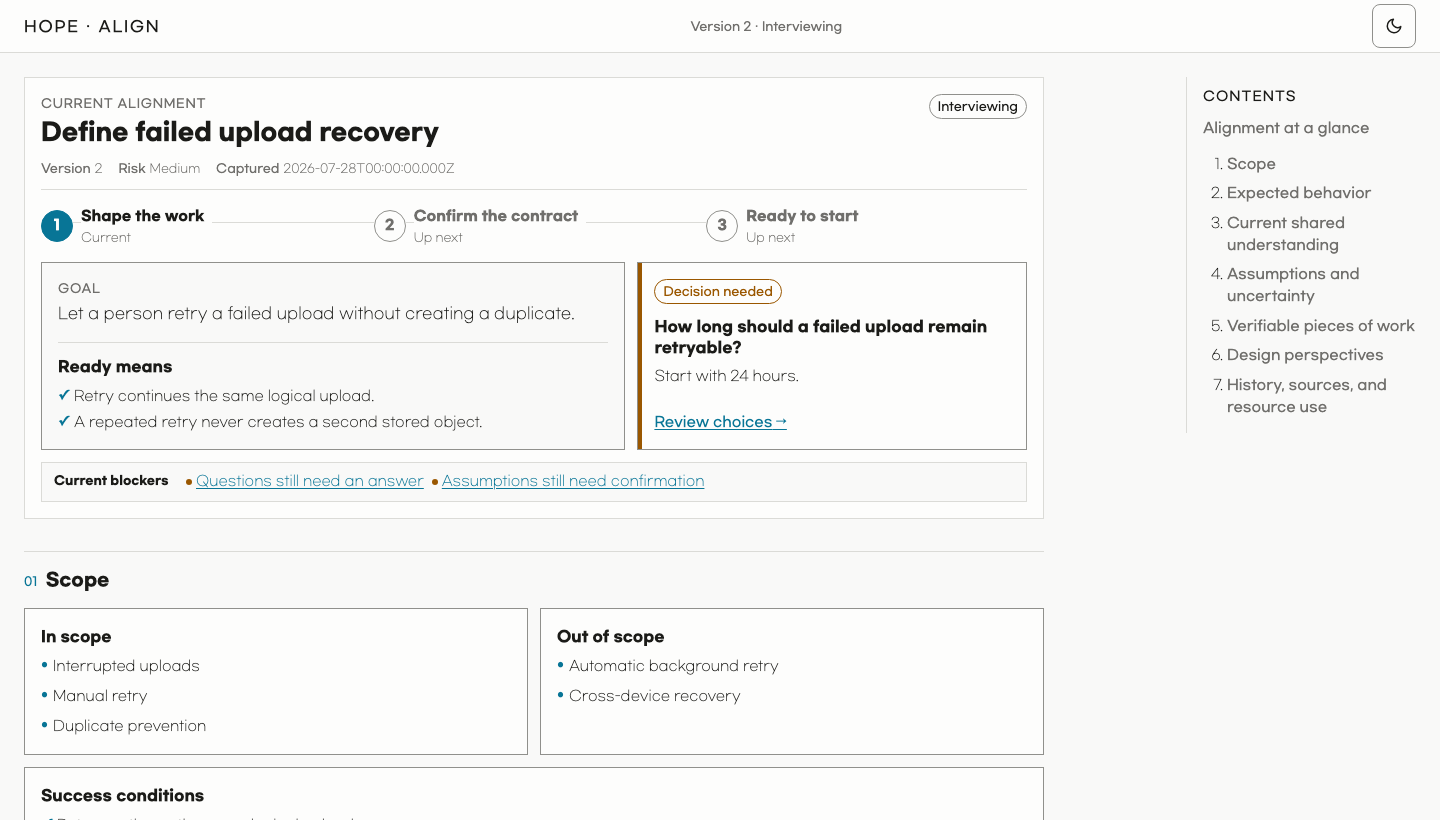
| Light visual directions | Dark shared understanding and judgment markers |
|---|---|
 |  |
🎨 Design — Turn goals and impressions into a considered interface
Describe what you need or what feels wrong without learning design terminology. Design examines the actual task and screen, recommends a direction, and creates image or working mockups suited to the decision. It compares meaningful choices and preserves the parts you accept through feedback and refinement.
It addresses generic composition, excessive headings and labels, and inconsistent visual choices while keeping useful information, controls, and the product's character. Relevant guidance covers typography, color, interaction, accessibility, motion, responsive layouts, localization, assets, and rendered verification.
Use it directly or within Align. For example: $hope:design This screen feels loud. Keep the colors and table, and make daily work easier to scan.
See the Design Skill for the workflow and its source index for the adapted guidance, pinned references, licenses, and limits.
🔎 Diff — Understand code changes and discover what to do next
AI can produce a large code change quickly. Diff gives the engineer a compact way to understand the resulting behavior, conditions, boundaries, and evidence.
Diff creates one HTML artifact that explains behavior before code and links important claims to evidence.
It may use visuals, a microworld, or a quiz when they help explain the change. Analysis can stay in the current conversation; an independent reviewer joins when useful or requested.
The artifact helps the reader build a working mental model of the change and turn that understanding into follow-up questions, decisions, and work ideas.
[!NOTE] With no URL, Diff first looks for the current branch's pull request. If none exists, it selects your latest open pull request in the repository. Run Diff again when the pull request changes.
The captures below show the HTML generated by an actual Diff run on Ky PR #825, viewed in dark and light modes. This result includes a behavior flow and a microworld.
Complete HTML: Open the Diff result explaining the retry time budget in Ky PR #825.
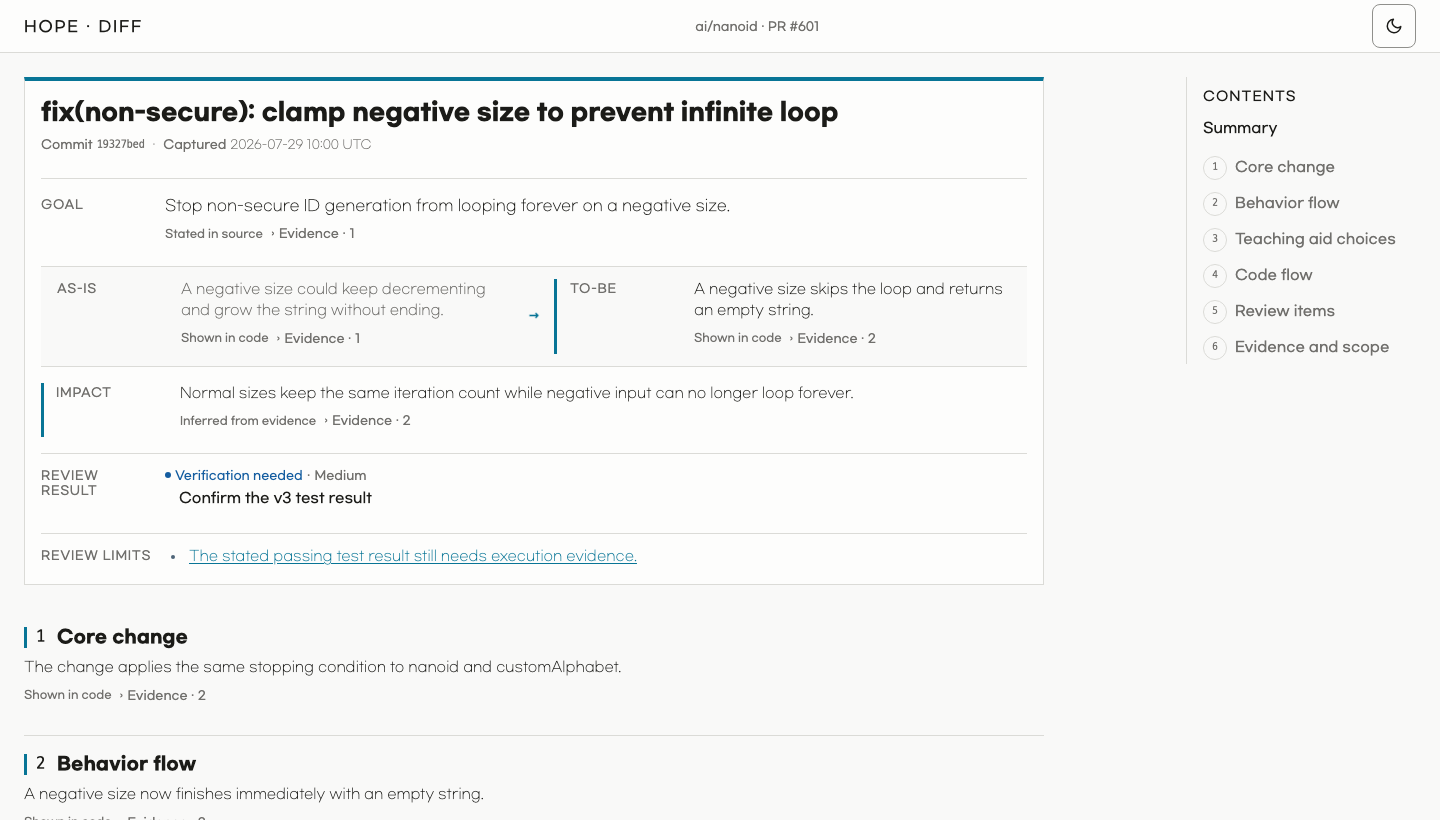
| Light change overview and behavior flow | Dark expanded microworld |
|---|---|
 |  |
⚖️ Toxic Review — Critically examine a work product
Toxic Review challenges important flaws and unsupported assumptions against the work's purpose and evidence. It tests its own criticisms before recommending proportionate changes. The task determines the depth and format; independent reviewers join when their perspective is worth the time or you request them.
See the Toxic Review Skill for its review guidance.
🧹 Sweep — Clean up a codebase
Explicitly invoke Sweep to apply proven, behavior-preserving cleanup across the current repository or a named scope. It removes dead code, duplication, needless work, and their obsolete support material while keeping public behavior unchanged. Bugs, product decisions, and uncertain removals stay outside Sweep.
See the Sweep Skill for scope and verification.
◇ Diagram — Make relationships easier to see
Diagram creates, refines, or reviews explanatory diagrams and data charts when position, connection, sequence, hierarchy, state, or quantitative shape communicates more clearly than prose or a small table.
It works on its own or inside an existing task, preserving that task's evidence and artifact contract. See the Diagram Skill for composition, accessibility, and rendered verification.
Complete example HTML: Open the parcel-handoff visualization created by Diagram.
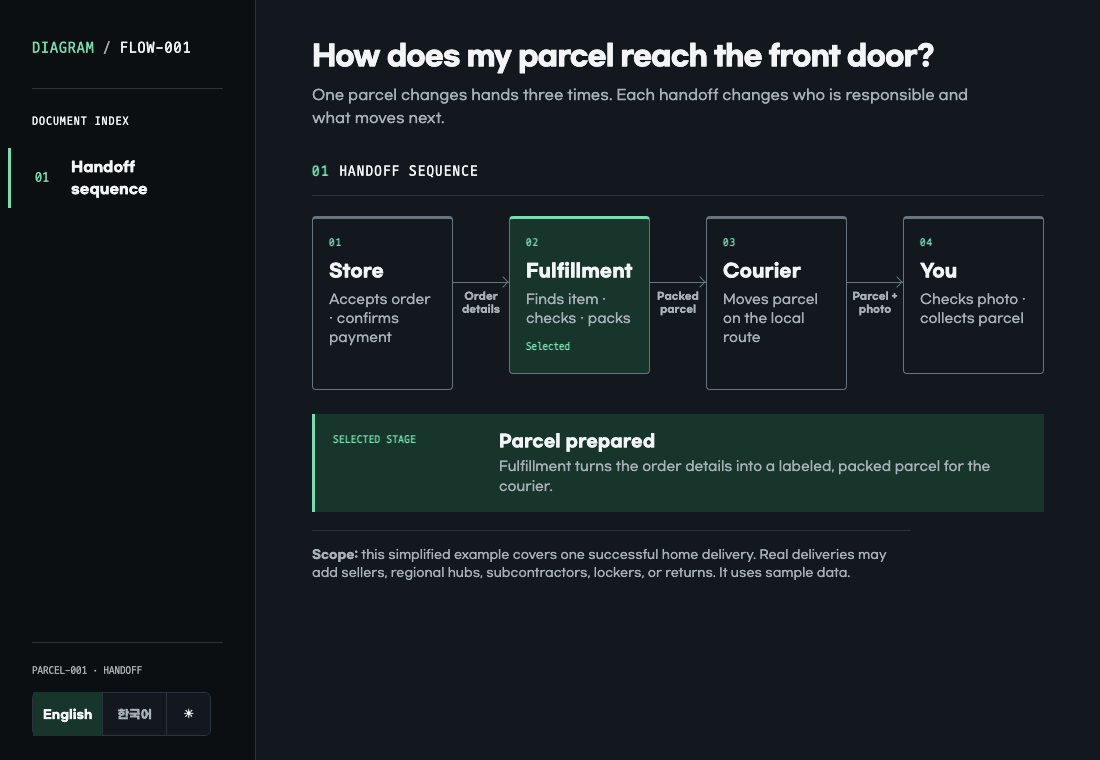
The design standard is adapted from Cathryn Lavery's Diagram Design under the MIT License. Hope includes the required upstream notice, but not Diagram Design's templates, scripts, fonts, gallery, or third-party icons.
✍️ Write — Make language clearer without losing meaning
Hope also uses Write within other tasks, including implementation and other Skills.
Write's shared standard adapts George Orwell's six rules in Politics and the English Language.
Install
You need:
- Node.js 22 or newer
- An authenticated GitHub CLI to use Diff. Run
gh auth loginfirst if needed.
[!TIP] The simplest option is to ask an AI:
Install Hope from https://github.com/dkstm95/hope for this host.
Follow the repository README and tell me if I need to restart.
To install it yourself, run the commands for your host.
For example:
# Codex
codex plugin marketplace add dkstm95/hope
codex plugin add hope@hope
# Claude Code
claude plugin marketplace add dkstm95/hope
claude plugin install hope@hope
License
Diagram also carries the Diagram Design MIT notice for its adapted design guidance.
Design includes adapted MIT and Apache-2.0 guidance with the upstream notices and changes recorded in its source index.
File tree
FAQ
hope is a Claude Code plugin with 7 hand-picked skills for development work, indexed on Flowy. Install it with the command on its page. It includes align, design, diagram. Its skills do not fire on their own yet. Request auto-invocation to have Flowy route them as you prompt. Free and open source.
- What is hope?
- Hope helps people take on more complex work with AI while preserving their judgment and agency.
- How do I install hope?
- Run these in Claude Code: /plugin marketplace add dkstm95/hope then /plugin install hope@hope. Then prompt normally.
- Does hope auto-invoke its skills?
- Not yet. It is indexed on Flowy as a plain plugin. Request auto-invocation on its page and Flowy will route its skills for you as you prompt.
- Is hope free?
- Yes. Flowy is free and open source, with nothing gated. You can read every skill in full before you install.
Is this plugin yours?
Claim it with GitHubSubmit a pluginPromote it