
Auto-invoked
Development
MCP
pywry
Ships with pywry: PyWry is a cross-platform app factory, rendering engine and UI toolkit for Python that produces native desktop, web, and notebook experiences from a single API.
Claude Code
$ pip install pywry
Codex
$ pip install pywry
Cursor
$ pip install pywry
Gemini CLI
$ pip install pywry
GitHub Copilot
$ pip install pywry
OpenCode
$ pip install pywry
Windsurf
$ pip install pywry
From the README
What can you do with pywry?
Toolbar components
Button, Select, MultiSelect, TextInput, SecretInput, SliderInput, RangeInput, Toggle, Checkbox, RadioGroup, TabGroup, Marquee, Modal, and more.
Two-way events
app.emit() and app.on() bridge Python and JavaScript in both directions.
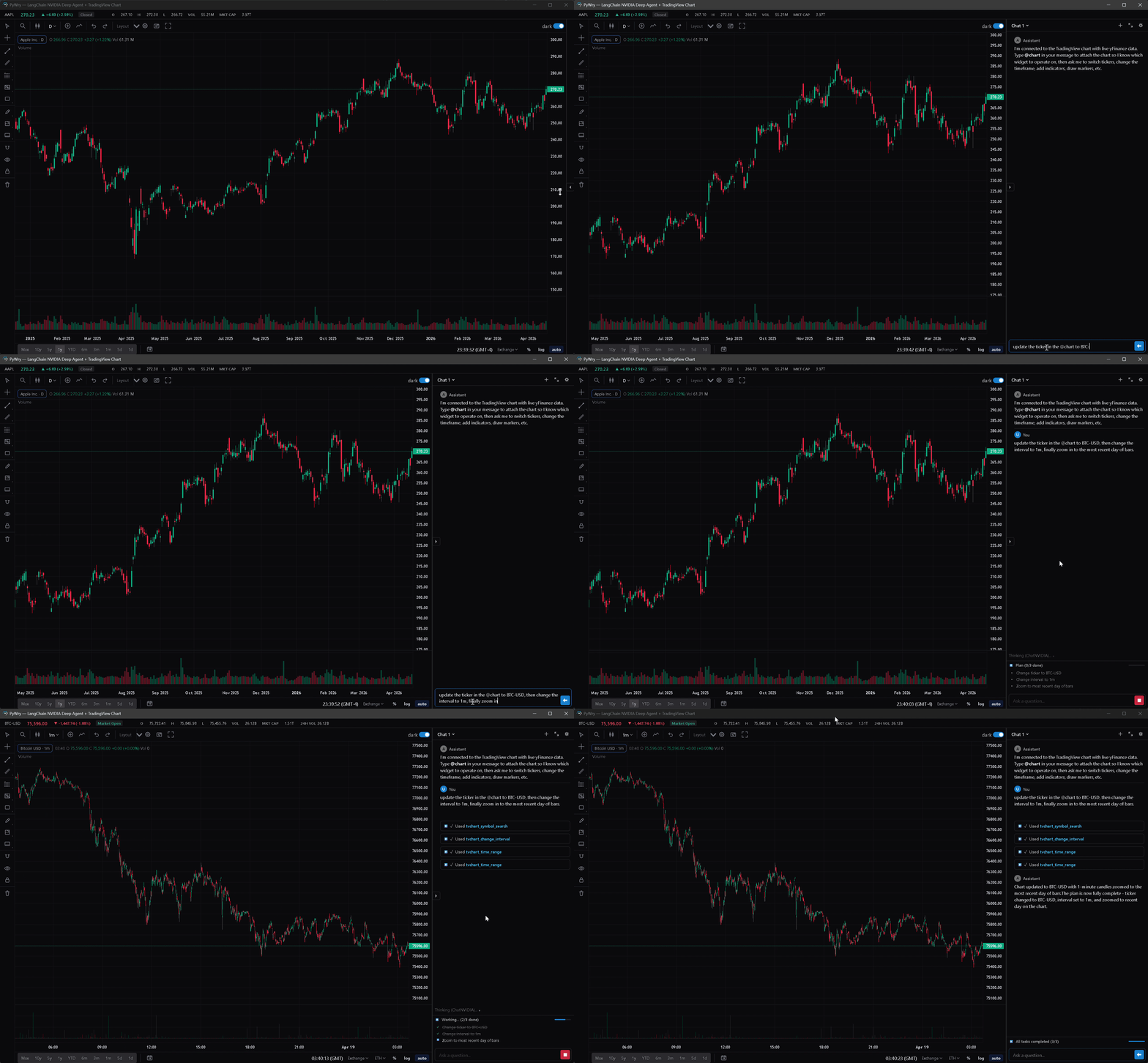
Chat
streaming chat widget with threads, slash commands, artifacts, and pluggable providers: OpenAIProvider, AnthropicProvider, MagenticProvider, CallbackProvider, StdioProvider (ACP subprocess), and…
TradingView charts
extended Lightweight Charts integration with a full drawing surface (trendlines, fib tools, text annotations, price notes, brushes), pluggable datafeed API, UDF adapter for external quote servers,…
Theming
light / dark / system modes, themeable via --pywry-* CSS variables, hot reload during development.
Security
token auth, CSP headers, SecuritySettings.strict() / .permissive() / .localhost() presets.
State backends
in-memory (default), Redis (multi-worker), or SQLite with SQLCipher encryption at rest.
Standalone executables
PyInstaller hook ships with pywry[freeze].
Security report
Info
Not enough data
Known flaws
Not published
Signed build
Not published
Maintained
Oct 13, 2026
Last push
Licence
Apache-2.0
Runs as
Local process
On your machine
Deprecated
Not published
Signals from public registries, not an audit. Checked Nov 12, 2026.
pywry README

PyWry is a cross-platform rendering engine and desktop UI toolkit for Python. One API, three output targets:
- Native window — OS webview via PyTauri. Not Qt, not Electron. Use unrestricted HTML/CSS/JS.
- Jupyter widget — anywidget + FastAPI + WebSocket, works in JupyterLab, VS Code, and Colab.
- Browser tab — FastAPI server with Redis state backend for horizontal scaling.
Build Once, Render Anywhere: Prototype interactive data apps in a Jupyter Notebook, easily deploy them as web apps, and seamlessly compile them into secure, lightweight standalone desktop executables via pywry[freeze].
Installation
Python 3.10–3.14, virtual environment recommended.
pip install pywry
Core extras:
| Extra | When to use |
|---|---|
pip install 'pywry[notebook]' | Jupyter / anywidget integration |
pip install 'pywry[auth]' | OAuth2 and keyring-backed auth support |
pip install 'pywry[freeze]' | PyInstaller hook for standalone executables |
pip install 'pywry[mcp]' | Model Context Protocol server support |
pip install 'pywry[sqlite]' | Encrypted SQLite state backend (SQLCipher) |
pip install 'pywry[all]' | Everything above |
Chat provider extras:
| Extra | When to use |
|---|---|
pip install 'pywry[openai]' | OpenAIProvider (OpenAI SDK) |
pip install 'pywry[anthropic]' | AnthropicProvider (Anthropic SDK) |
pip install 'pywry[magentic]' | MagenticProvider (any magentic-supported LLM) |
pip install 'pywry[acp]' | StdioProvider (Agent Client Protocol subprocess) |
pip install 'pywry[deepagent]' | DeepagentProvider (LangChain Deep Agents — includes MCP adapters and ACP) |
The chat UI itself is included in the base package. Provider extras only install the matching third-party SDK.
Linux only — install system webview dependencies first:
sudo apt-get install libwebkit2gtk-4.1-dev libgtk-3-dev libglib2.0-dev \
    libxkbcommon-x11-0 libxcb-icccm4 libxcb-image0 libxcb-keysyms1 \
    libxcb-randr0 libxcb-render-util0 libxcb-xinerama0 libxcb-xfixes0 \
    libxcb-shape0 libgl1 libegl1
Quick Start
from pywry import PyWry

app = PyWry()
app.show("Hello World!")
app.block()
Toolbar + callbacks
from pywry import PyWry, Toolbar, Button

app = PyWry()

def on_click(data, event_type, label):
    app.emit("pywry:set-content", {"selector": "h1", "text": "Clicked!"}, label)

app.show(
    "<h1>Hello</h1>",
    toolbars=[Toolbar(position="top", items=[Button(label="Click me", event="app:click")])],
    callbacks={"app:click": on_click},
)
app.block()
Pandas DataFrame → AgGrid
from pywry import PyWry
import pandas as pd

app = PyWry()
df = pd.DataFrame({"name": ["Alice", "Bob", "Carol"], "age": [30, 25, 35]})

def on_select(data, event_type, label):
    names = ", ".join(row["name"] for row in data["rows"])
    app.emit("pywry:alert", {"message": f"Selected: {names}"}, label)

app.show_dataframe(df, callbacks={"grid:row-selected": on_select})
app.block()
Plotly chart
from pywry import PyWry
import plotly.express as px

app = PyWry(theme="light")
fig = px.scatter(px.data.iris(), x="sepal_width", y="sepal_length", color="species")
app.show_plotly(fig)
app.block()
Features
- Toolbar components —
Button,Select,MultiSelect,TextInput,SecretInput,SliderInput,RangeInput,Toggle,Checkbox,RadioGroup,TabGroup,Marquee,Modal, and more. All Pydantic models; position them around the content edges or inside the chart area. - Two-way events —
app.emit()andapp.on()bridge Python and JavaScript in both directions. Pre-wired Plotly and AgGrid events included. - Chat — streaming chat widget with threads, slash commands, artifacts, and pluggable providers:
OpenAIProvider,AnthropicProvider,MagenticProvider,CallbackProvider,StdioProvider(ACP subprocess), andDeepagentProvider(LangChain Deep Agents). - TradingView charts — extended Lightweight Charts integration with a full drawing surface (trendlines, fib tools, text annotations, price notes, brushes), pluggable datafeed API, UDF adapter for external quote servers, streaming bar updates, compare overlays, compare-derivative indicators (Spread / Ratio / Sum / Product / Correlation), savable layouts, and a themeable settings panel.
- Theming — light / dark / system modes, themeable via
--pywry-*CSS variables, hot reload during development. - Security — token auth, CSP headers,
SecuritySettings.strict()/.permissive()/.localhost()presets.SecretInputstores values server-side, never in HTML. - State backends — in-memory (default), Redis (multi-worker), or SQLite with SQLCipher encryption at rest.
- Standalone executables — PyInstaller hook ships with
pywry[freeze]. No.specedits or--hidden-importflags required. - MCP server — drive widgets, charts, and dashboards from any Model Context Protocol client (Claude Desktop, Claude Code, Cursor, etc.).
MCP Server
pip install 'pywry[mcp]'
pywry mcp --transport stdio
Widget-creating tools — create_widget, show_plotly, show_dataframe, show_tvchart, create_chat_widget — return an AppArtifact: a self-contained HTML snapshot delivered as an MCP EmbeddedResource with mimeType: text/html and URI pywry-app://<widget_id>/<revision>. Clients that render HTML resources (Claude Desktop's artifact pane, mcp-ui clients, PyWry's own chat widget) show the app inline.
Each render bumps a per-widget revision. The latest revision keeps a live WebSocket bridge to Python; older revisions freeze at their last known state. Call get_widget_app(widget_id) to re-snapshot after a mutation.
See the MCP docs for tool reference and client setup.
Claude Code Plugin
Installable under claude/plugins/pywry/ as one /plugin install unit. Ships:
- MCP server — same 66 tools as above, auto-connected
pywry-orientationskill — teaches the agent when to reach for PyWry tools- Slash commands —
/pywry:doctor,/pywry:scaffold,/pywry:examples pywry-buildersubagent — for multi-step widget construction- Post-edit hook — runs
ruff formaton touched.pyfiles
Install:
/plugin marketplace add deeleeramone/PyWry --path claude/.claude-plugin/marketplace.json
/plugin install pywry@pywry
Prerequisite: pip install 'pywry[dev]' (or pywry[all]). Then /pywry:doctor to verify.
PyPI-bundled install (skips the GitHub round-trip once pywry is already installed):
pywry plugin-path # prints the bundled plugin root
/plugin marketplace add $(pywry plugin-path)
/plugin install pywry@pywry
See claude/README.md for the full install-path matrix, mono-repo layout, and versioning policy.
Standalone Executables
pip install 'pywry[freeze]'
pyinstaller --windowed --name MyApp my_app.py
The output in dist/MyApp/ is fully self-contained. Target machines need no Python installation — only the OS webview (WebView2 on Windows 10 1803+, WKWebView on macOS, libwebkit2gtk on Linux).
Documentation
- Getting Started — installation, quick start, rendering paths
- Concepts — events, configuration, state, hot reload, RBAC
- Components — live previews for all toolbar components
- API Reference — auto-generated docs for every class and function
- MCP Server — AI agent integration
CI and Release Policy
- Protected branches:
mainanddevelop. - Required PR checks:
CI RequiredandDocs Required. - Docs deployment: GitHub Pages redeploys only on post-merge pushes to
main. - SBOM policy:
sbom.xmlandsbom.jsonare produced during release workflows and bundled with release artifacts, not tracked at repository root.
License
Apache 2.0 — see LICENSE.

Ships withpywry
9918 skills1 agent1 MCP
Stars on GitHub
Momentum
- stars in total
- 99
More MCP servers from other plugins.




Questions about pywry.
- Which coding agents can use pywry?
- pywry works in any agent that reads an MCP config file: Claude Code, Codex, Cursor, Gemini CLI, GitHub Copilot, OpenCode and Windsurf. Each agent reads it from its own file; this page names the file for each one.