




Auto-invoked
Development
MCP
nx-mcp
Provides project graph, dependency and build target information for a monorepo build system.
Claude Code
> /plugin marketplace add CopilotKit/CopilotKit> /plugin install copilotkit@copilotkit-plugins
Codex
$ codex mcp add nx-mcp -- npx nx mcp
Cursor
{
  "mcpServers": {
    "nx-mcp": {
      "command": "npx",
      "args": [
        "nx",
        "mcp"
      ]
    }
  }
}
Add it to mcp.json.
Gemini CLI
$ gemini mcp add nx-mcp npx nx mcp
GitHub Copilot
$ copilot mcp add nx-mcp -- npx nx mcp
OpenCode
{
  "mcp": {
    "nx-mcp": {
      "type": "local",
      "command": [
        "npx",
        "nx",
        "mcp"
      ]
    }
  }
}
Add it to opencode.json.
Windsurf
{
  "mcpServers": {
    "nx-mcp": {
      "command": "npx",
      "args": [
        "nx",
        "mcp"
      ]
    }
  }
}
Add it to mcp_config.json.
Security report
Found
Low risk
Known flaws
None known
Signed build
Yes
Build provenance published
Maintained
Nov 10, 2026
Last push
Licence
MIT
Runs as
npx
On your machine
Deprecated
No
Signals from public registries, not an audit. Checked Nov 12, 2026.
copilotkit README


Docs · Examples · Intelligence · OpenBot · Discord

CopilotKit is the open-source stack for putting AI agents in front of real users. Bring the agent you already built, on any framework, and give it chat, generative UI, shared state, and human-in-the-loop in React, Angular, Vue, React Native, Slack, and Microsoft Teams.
When it goes to production, add CopilotKit Intelligence and your agents keep getting better: conversations that pick up where users left off, memory across sessions, and Continual Learning that turns real use into Skills you review and publish.
We're also the team behind AG-UI, the open Agent–User Interaction protocol adopted by Google, Microsoft, AWS, LangChain, Mastra, PydanticAI, and more.
What's new
| What's new | What it is |
|---|---|
| 🪁 CopilotKit Soar | AI coworkers your company owns, running on your own servers. Powered by OpenBot. Now in early access → |
| 🔁 Continual Learning | Agents learn from full-stack trajectories (what the agent did and what your users did), captured over AG-UI. |
| 🤖 OpenBot | Open-source AI coworkers that each get a computer of their own. MIT licensed. Source on GitHub. |
| 🧩 AG-UI 1.0 + A2UI 1.0 | CopilotKit now speaks AG-UI 1.0 and the A2UI 1.0 spec for declarative generative UI. |
| 💬 Channels | Write Channels JSX once. Render native Block Kit in Slack and Adaptive Cards in Microsoft Teams. |
Full changelog in What's New.
Quick start
Let your coding agent do it. Paste this prompt into Claude Code, Cursor, Codex, or any coding agent running in your project. It inspects your app and walks you through the integration.
Help me get started with CopilotKit. From the root of my project, run this
command and follow the instructions:

npx --yes copilotkit@latest onboard start
Start a new project. Scaffolds a fresh app in its own directory. It won't touch an app you already have.
npx copilotkit@latest create
Give your coding agent CopilotKit skills. Helps it build features and debug issues once you're set up (learn more).
npx copilotkit@latest skills install
Prefer to wire it up by hand? Here's a Next.js app in three files.
npm install @copilotkit/react-core @copilotkit/runtime
# .env.local
OPENAI_API_KEY=your_openai_api_key
// app/api/copilotkit/[[...slug]]/route.ts
import {
  CopilotRuntime,
  createCopilotRuntimeHandler,
  BuiltInAgent,
} from "@copilotkit/runtime/v2";

const runtime = new CopilotRuntime({
  agents: { default: new BuiltInAgent({ model: "openai:gpt-6-luna" }) },
});

const handler = createCopilotRuntimeHandler({
  runtime,
  basePath: "/api/copilotkit",
});
export { handler as GET, handler as POST, handler as PATCH, handler as DELETE };
// app/page.tsx
"use client";
import { CopilotKitProvider, CopilotSidebar } from "@copilotkit/react-core/v2";
import "@copilotkit/react-core/v2/styles.css";

export default function Page() {
  return (
    <CopilotKitProvider runtimeUrl="/api/copilotkit">
      <main>
        <h1>Your App</h1>
        <CopilotSidebar />
      </main>
    </CopilotKitProvider>
  );
}
Already running LangGraph, CrewAI, Mastra, or another framework? Swap the Built-in Agent for yours using that framework's quickstart.
https://github.com/user-attachments/assets/4af4c22a-1638-4328-add7-ede088afea64
How it works
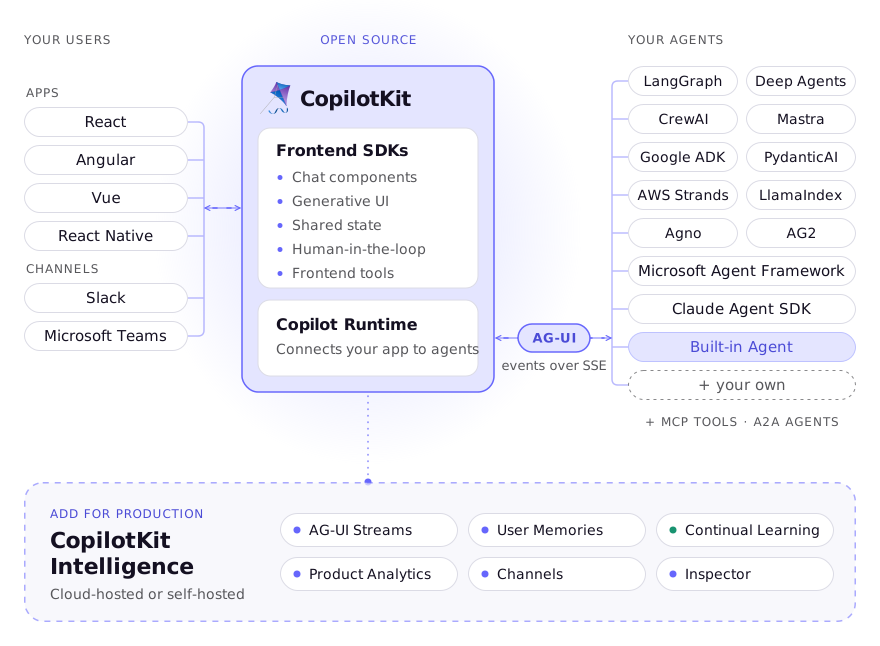
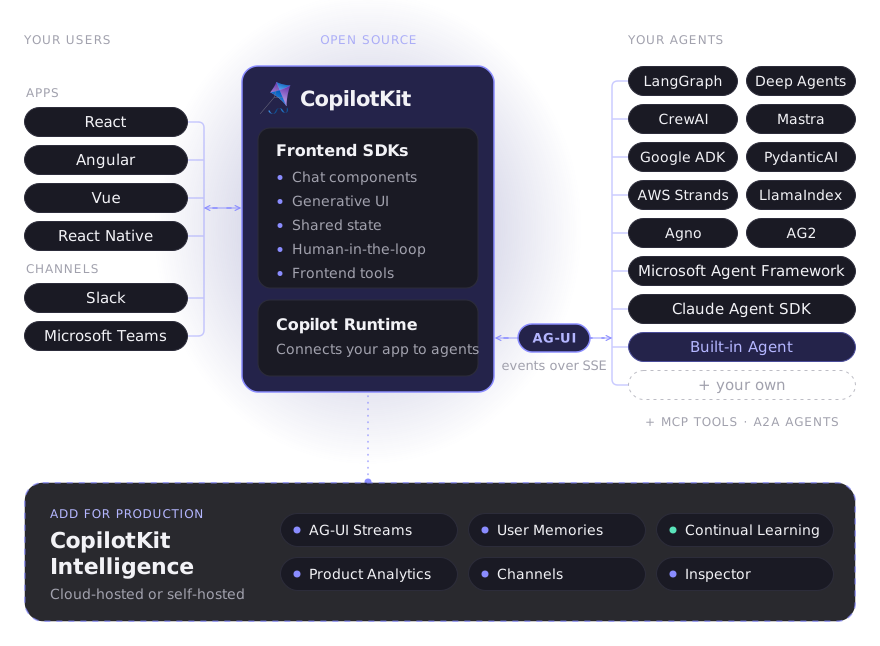
Your agent handles reasoning and execution. CopilotKit turns its work into a product experience. Events stream over AG-UI, so the agent can show its work as it happens, read what the user is looking at, call tools that render UI, and pause for a person to approve the next step. Your agent logic stays the same on every surface.
What you can build
https://github.com/user-attachments/assets/72b7b4f3-b6e7-460c-a932-5746fe3c8db3
| Feature | What it does |
|---|---|
| Chat components | Start with a working chat, replace the parts you need with slots, or go fully Headless UI. |
| Generative UI | Agents render real UI, from your own components to A2UI specs to sandboxed MCP Apps. |
| Shared state | One state layer that both the agent and your UI read and write in real time. |
| Human-in-the-loop | Agents pause for input, confirmation, or edits before they act. |
| Frontend tools | Let the agent take actions inside your app, with your code doing the work. |
| AG-UI Streams | Conversations that survive reloads, devices, and sessions, with generative UI intact. |
| Voice and WebMCP | Talk to your agent, and expose your app's actions to browser agents. |
| Inspector | A localhost overlay that shows threads, agents, and learning as you build. |
Full control with useAgent
Every component is built on hooks you can use directly. useAgent sits right on top of AG-UI and gives you programmatic control of the agent connection.
import { useAgent } from "@copilotkit/react-core/v2";

function CityPicker() {
  const { agent } = useAgent({ agentId: "my_agent" });

  return (
    <div>
      <h1>{agent.state.city}</h1>
      <button onClick={() => agent.setState({ city: "NYC" })}>Set city</button>
    </div>
  );
}
More in the programmatic control docs.
Generative UI, three ways
https://github.com/user-attachments/assets/3cfacac0-4ffd-457a-96f9-d7951e4ab7b6
| Type | The agent… | Built on |
|---|---|---|
| Controlled | picks from components you registered | AG-UI tool calls and state |
Stats
38,655
Stars
4,820
Forks
Active
Maintenance
TypeScript
Language
MIT
License
Last commit
Created

Ships withcopilotkit
The Frontend Stack for Agents & Generative UI. React, Angular, Mobile, Slack, and more. Makers of the AG-UI Protocol
39k9 skills1 agent2 MCP
Stars on GitHub
Momentum
- stars in total
- 38.6k
More MCP servers from other plugins.




Questions about nx-mcp.
- Which coding agents can use nx-mcp?
- nx-mcp works in any agent that reads an MCP config file: Claude Code, Codex, Cursor, Gemini CLI, GitHub Copilot, OpenCode and Windsurf. Each agent reads it from its own file; this page names the file for each one.
- How do I add nx-mcp to Claude Code?
- Run these in order, one at a time. 1. In Claude Code: /plugin marketplace add CopilotKit/CopilotKit 2. In Claude Code: /plugin install copilotkit@copilotkit-plugins
- Is nx-mcp safe to install?
- Low risk. Signals from public registries, not an audit.