Claude Code Workflow Orchestration System
A hook-based framework for Claude Code that enforces task delegation to specialized agents, enabling structured workflows and expert-level task handling through intelligent orchestration.
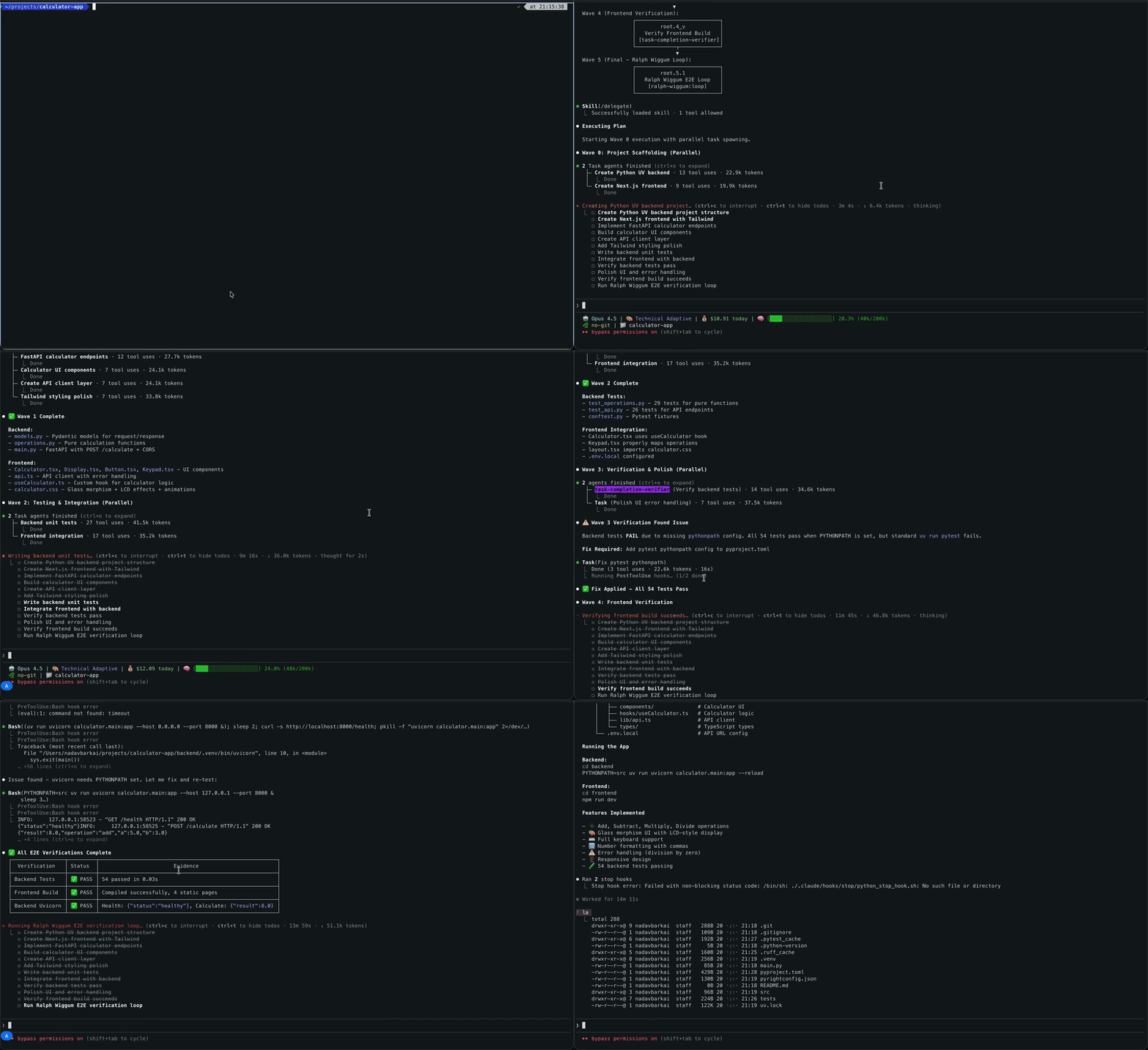
See the delegation system in action:
🆕 What's New
⚡ Soft Enforcement & Lean Startup — Replaces hard-blocking enforcement with adaptive per-turn nudges (silent → hint → warning → strong reminder). SessionStart injection trimmed ~6.6K tokens: stub orchestrator (~1.1KB) injected on startup, full orchestrator loaded only on first delegation. Output style loaded natively from plugin.json (no injection). Net result: lean sessions with automatic escalation when delegation is needed.
🤝 Agent Teams Integration — Native dual-mode execution: workflows automatically select between isolated subagents and collaborative Agent Teams (via TeamCreate + Agent(team_name=...) + SendMessage) based on tool availability. Teammates communicate in real-time, share task lists, and self-coordinate. Enable with CLAUDE_CODE_EXPERIMENTAL_AGENT_TEAMS=1.
Overview
This system uses Claude Code's hook mechanism to create a delegation-enforced workflow architecture that routes tasks to specialized agents for expert-level execution.
Key Features
- Soft Enforcement via Adaptive Nudges - No hard blocks. PreToolUse hook emits per-turn escalating stderr reminders (silent → hint → warning → strong) when main agent bypasses
/workflow-orchestrator:delegate. Subagents immune. Nudge counter resets each turn and zeros when delegation runs.
- Lean SessionStart Injection - Consolidated 3 hooks into 1 Python script. Stub orchestrator (~1.1KB) on startup + optional token-efficient CLI guide, full orchestrator (~7.5KB) loaded on-demand. Output style loaded natively from plugin.json (no injection). Saves ~6.6K tokens off session start.
- 8 Specialized Agents - Each agent has domain expertise (code cleanup, testing, architecture, DevOps, etc.)
- Native Plan Mode - Built-in plan mode (EnterPlanMode/ExitPlanMode) handles planning, agent selection, and execution orchestration
- Intelligent Multi-Step Workflows - Sequential execution for dependent phases, parallel for independent phases
- Dual-Mode Execution - Isolated subagent sessions (default) or collaborative Agent Teams with real-time inter-agent communication (experimental)
- Agent Teams Integration - Native
TeamCreate + Agent(team_name=...) + SendMessage for peer-to-peer collaboration, shared task lists, and coordinated multi-agent workflows
- Tasks API Integration - Native task tracking via TaskCreate, TaskUpdate, TaskList, TaskGet with structured metadata
- Structured Task Metadata - Wave assignments, phase IDs, agent assignments, and dependencies encoded in task metadata
- Async Hook Support - Non-blocking background tasks for reminders and cleanup operations
- Stateful Session Management - Fresh delegation enforcement per user message with per-turn nudge counter
- Smart Dependency Analysis - Automatically analyzes phase dependencies to determine optimal execution mode
- Parallel Execution Support - Executes independent phases concurrently with automatic wave synchronization
- Visualization & Debugging - Comprehensive logging and debug tools for understanding delegation decisions
Execution Model
The system uses a two-stage execution pipeline:
Stage 0: Planning & Analysis (native plan mode)
- Analyzes task complexity (single-step vs multi-step)
- Decomposes complex tasks into atomic phases
- Performs dependency analysis to determine execution mode
- Assigns specialized agents via keyword matching
- Creates wave assignments for parallel/sequential execution
- Creates tasks via TaskCreate with structured metadata
Stage 1: Execution
- Single-Step Tasks: Hook blocks tools → Delegates to specialized agent → Agent executes → Results returned
- Multi-Step Workflows:
- Subagent mode (default): Isolated parallel Agent instances per wave. Agents return
DONE|{path}. Context-efficient, optimal for most workflows.
- Team mode (experimental): Native Agent Teams via
TeamCreate + Agent(team_name=...). Teammates share context, communicate via SendMessage, and self-coordinate through shared task lists. Requires CLAUDE_CODE_EXPERIMENTAL_AGENT_TEAMS=1.
- Results consolidated and summary provided
Execution Mode Selection: If TeamCreate is in available tools → execution_mode: "team". Otherwise → "subagent". Tool availability is the only signal (set CLAUDE_CODE_EXPERIMENTAL_AGENT_TEAMS=1 to enable). For subagent mode, plan mode further selects sequential (context preservation, dependencies) or parallel (time savings, independence) based on phase dependency analysis.
Quick Start
Prerequisites
macOS / Linux
curl -LsSf https://astral.sh/uv/install.sh | sh
curl -fsSL https://bun.com/install | bash
- jq: JSON processor for parallel workflow state tracking.
# macOS
brew install jq
# Linux
sudo apt install jq
Windows
Python 3.12+ is required. All hooks use cross-platform Python scripts.
powershell -ExecutionPolicy ByPass -c "irm https://astral.sh/uv/install.ps1 | iex"
powershell -c "irm bun.sh/install.ps1 | iex"
- jq (optional, for advanced parallel workflow features):
# Using Chocolatey
choco install jq
# Or download from https://jqlang.github.io/jq/download/
Note: The hook system uses Python scripts for cross-platform compatibility. Ensure python is available in your PATH.
Installation
This project provides a comprehensive delegation system for Claude Code with multi-agent orchestration. Choose your preferred installation method:
🔌 Plugin Installation (Recommended)
The easiest way to install is via Claude Code's plugin system:
# Add the marketplace
claude plugin marketplace add barkain/claude-code-workflow-orchestration

# Install the plugin
claude plugin install workflow-orchestrator@barkain-plugins  # user-level
# or
claude plugin install workflow-orchestrator@barkain-plugins --scope project  # project-level
Benefits:
- Automatic setup and configuration
- Easy updates via plugin manager
- No manual file copying required
Optional Settings:
- Run
/workflow-orchestrator:add-statusline after installation to enable workflow status display
- The plugin includes a
technical-adaptive output style optimized for workflow orchestration. To select it, configure outputStyle in your Claude Code settings (project or user level)
Note: Changing the output style requires restarting your Claude Code session for the change to take effect.
🔨 Manual Installation
For development or custom configurations:
# Clone the repository
git clone https://github.com/barkain/claude-code-workflow-orchestration.git
Project-Specific Installation (Recommended)
For project-isolated configurations or version-controlled delegation setups:
cd path/to/project
path/to/repo/install.sh  # follow the installation instructions
Windows users: The install.sh script requires bash (Git Bash or WSL). For Windows, we recommend using the Plugin Installation method above, which works natively on all platforms.
Example Usage - Multi-Step Workflow
Once installed, the delegation hook is automatically active. Simply use Claude Code normally (Opus 4.5 is preferred):
# Multi-step workflow - enable orchestration for context passing
claude
and then prompt claude with:
> create a simple calculator app with basic math operations.
  add a nice UI and use NextJS/Tailwind to build this out.
  the backend should be implemented in python as a modern uv project.
  add verification steps after each phase.
What happens:
-
The main agent enters native plan mode (EnterPlanMode) to decompose the request, assign specialized agents via keyword matching, schedule waves, and select an execution mode. Mode selection is one rule: if TeamCreate is available (CLAUDE_CODE_EXPERIMENTAL_AGENT_TEAMS=1), it picks team mode; otherwise parallel subagents.
-
After ExitPlanMode approval, a dependency graph is rendered showing the parallel waves and the agents assigned to each phase:
-
In team mode, the lead calls TeamCreate once and then spawns each phase as a persistent teammate via Agent(team_name=...). Teammates run concurrently in the swarm session and self-coordinate via SendMessage. Open the swarm view with tmux -L claude-swarm-<id> a to watch them work in real time:

-
As each wave completes, downstream phases unblock automatically. A final integration/verification phase confirms end-to-end correctness, then the team shuts down cleanly:

Soft Enforcement in Action
The delegation system uses adaptive nudges instead of hard blocks:
# 1st direct tool call (imperative STOP)
Read test.py
# stderr: "STOP. This tool call bypasses delegation. Abandon this step and run: /workflow-orchestrator:delegate <your task>"

# 2nd direct tool call (imperative STOP, 2nd-call phrasing)
Read other.py
# stderr: "STOP. 2nd direct tool call this turn. The main agent does not execute work tools. Run: /workflow-orchestrator:delegate <your task>"

# 3rd direct tool call (strong reminder — explains what's being lost)
Edit file.py
# stderr: "STOP. 3 direct tool calls bypassing delegation. You are losing planning, parallelization, and context isolation. Abandon the current plan and run: /workflow-orchestrator:delegate <your task>"

# 4th+ direct tool calls keep the same strong reminder with the updated count
Bash command.sh
# stderr: "STOP. 4 direct tool calls bypassing delegation. ..."

# Delegation resets the counter (state clean)
/workflow-orchestrator:delegate "Create feature"
# Counter zeros. Next turn starts fresh.
Counter resets each user turn and zeros when /workflow-orchestrator:delegate runs. Subagents are immune. Use /workflow-orchestrator:bypass for emergency access without restarting.
Environment Variables
The system supports several environment variables for configuration and debugging:
Tasks API Configuration:
CLAUDE_CODE_ENABLE_TASKS=true              # Enable Tasks API (default: true)
CLAUDE_CODE_TASK_LIST_ID=list_id           # Share task list across sessions
CLAUDE_CODE_DISABLE_BACKGROUND_TASKS=1     # Disable async background tasks
Agent Teams (Experimental):
CLAUDE_CODE_EXPERIMENTAL_AGENT_TEAMS=1 # Enable Agent Teams dual-mode execution
Token Efficiency:
CLAUDE_TOKEN_EFFICIENCY=1 # Enable token-efficient CLI output (default: 1)
Debug & Control:
DEBUG_DELEGATION_HOOK=1                    # Enable hook debug logging
DELEGATION_HOOK_DISABLE=1                  # Emergency bypass (disable enforcement)
CLAUDE_MAX_CONCURRENT=8                    # Max parallel agents per batch (default 8)
CHECK_RUFF=0                               # Skip Ruff validation in PostToolUse
CHECK_PYRIGHT=0                            # Skip Pyright validation in PostToolUse
CLAUDE_SKIP_PYTHON_VALIDATION=1            # Skip all Python validation




 @mattpocock


