
gitnexus
MCPShips with gitnexus: GitNexus indexes a codebase into a knowledge graph of symbols, calls, dependencies and execution flows. Use…
 @abhigyanpatwariInstall MCP
Ships with figwright: Free, two-way Figma MCP server. Turn designs into framework-aware code, and push code back to the canvas. Works with Claude Code, Cursor, Codex, and any MCP client.
Claude Code
$ claude mcp add figwright -- node packages/mcp/dist/index.mjs
Codex
$ codex mcp add figwright -- node packages/mcp/dist/index.mjs
Cursor
{
  "mcpServers": {
    "figwright": {
      "command": "node",
      "args": [
        "packages/mcp/dist/index.mjs"
      ]
    }
  }
}
Add it to mcp.json.
Gemini CLI
$ gemini mcp add figwright node packages/mcp/dist/index.mjs
GitHub Copilot
$ copilot mcp add figwright -- node packages/mcp/dist/index.mjs
OpenCode
{
  "mcp": {
    "figwright": {
      "type": "local",
      "command": [
        "node",
        "packages/mcp/dist/index.mjs"
      ]
    }
  }
}
Add it to opencode.json.
Windsurf
{
  "mcpServers": {
    "figwright": {
      "command": "node",
      "args": [
        "packages/mcp/dist/index.mjs"
      ]
    }
  }
}
Add it to mcp_config.json.
From the README
Read
selection, document and node inspection, styles, variables, components, fonts, prototype reactions and flows, motion (animation) state, screenshots, original image-fill assets, PDF export, and video…
Write
create and edit frames, text, shapes (lines, polygons, stars, boolean operations, flattening), auto-layout, alignment and distribution, effects, images (as a new layer or into an existing layer's…
Grounding
get_design_context for faithful, de-duplicated design context, and component_map / token_map / icon_map, which join Figma data to your codebase so codegen reuses what you already have; plus…
Security report
Not enough data
Known flaws
Not published
Signed build
Not published
Maintained
Oct 31, 2026
Last push
Licence
MIT
Runs as
Local process
On your machine
Deprecated
Not published
Signals from public registries, not an audit. Checked Nov 11, 2026.
A free, two-way Figma MCP server for coding agents.
Pairs with a Figma plugin, not a Dev Mode seat.
About · Setup · Skills · Tools · Plugin · FAQ · Contributing


Figwright connects an MCP server to a Figma plugin over a local WebSocket relay, so an AI agent (Claude Code, Cursor, Codex, or any other MCP client) can work with Figma instead of just looking at it.
It works in both directions:
Read: turn a Figma selection into framework-aware code, grounded on faithful, de-duplicated design context (layout, typography, variables, components).
Write: author and edit the canvas directly, from frames and text to auto-layout, styles, variables, components, whole screens.
Everything runs on your machine: the server, the relay, and the plugin. Your designs are never sent anywhere.
You need an MCP client (Claude Code, Cursor, …), Node.js 20.19+ or 22.12+, and Figma. The free Figma tier is enough, though the desktop app is needed to import the plugin. The server runs via npx as its own process, so its Node version is independent of the one your project builds with; Node 18/21 and 22.0–22.11 are not supported.
For Claude Code, add this to your .mcp.json (other clients use the same shape):
{
  "mcpServers": {
    "figwright": {
      "command": "npx",
      "args": ["-y", "@figwright/mcp@latest"]
    }
  }
}
npx fetches and runs the published server, so no global install is needed.
The plugin isn't on the Figma Community marketplace yet, so install it from the latest release:
manifest.json.Open the Figwright plugin in Figma (Plugins → Development → Figwright). It connects to the local server automatically and shows Connected. Ask your agent to run ping to confirm the link.
The skills make agents reach for Figwright at the right moment and follow the grounded workflows:
npx skills add awdr74100/figwright/skills
With a frame selected in Figma, prompt your agent:
Code this Figma selection as a React component.
or, the other direction:
Build a pricing section in Figma from this spec.
Each release ships the server and the plugin together, so update both. The skills are optional and update the same way you installed them.
1. Restart the server. With the @latest config above there is nothing to install, because every launch fetches the newest release. A session that is already open keeps the server it started with, so new tools don't appear until you restart it: in Claude Code, run /mcp, pick figwright and choose Reconnect (or restart Claude Code); in other clients, restart the client. Do this in each client you use Figwright from.
If you installed the package instead of using @latest (see the FAQ), update it before restarting: npm i -D @figwright/mcp@latest, or npm i -g @figwright/mcp@latest for a global install.
2. Replace the plugin. Download the zip from the latest release, unzip it, and copy its manifest.json and dist into the folder you imported the plugin from, replacing the old ones. Figma runs a development plugin straight from that folder, so you don't import it again. Close the plugin and run it again.
3. Update the skills. Run npx skills update. Agent sessions you start after that use the new version.
To confirm, open the plugin's Debug tab: it lists the server and plugin versions side by side. If the plugin is still too old for the server, the panel header says so, and so does every tool result (see the FAQ).
Agent skills orchestrate Figwright's tools. They are model-invoked: your agent loads one automatically when the task matches its description.
| Skill | What it does |
|---|---|
figma‑codegen | Turn a Figma selection into framework-aware code, grounded on your stack and existing components. |
figma‑build | Build a Figma design from code or a description, reusing the file's existing components and styles. |
Install across any supported agent with the skills CLI:
npx skills add awdr74100/figwright/skills      # both
npx skills add https://github.com/awdr74100/figwright/tree/main/skills/figma-codegen  # one
Note Skills need the
@figwright/mcpserver connected. On their own they have no tools to drive.
Figwright exposes 135 MCP tools in three groups:
list_files / use_file for working across more than one open Figma file at once.batch tool to apply many edits at once.get_design_context for faithful, de-duplicated design context, and component_map / token_map / icon_map, which join Figma data to your codebase so codegen reuses what you already have; plus design_diff, which reports what changed in a design against a saved baseline so you update only the affected code.Tip Your MCP client lists every tool at connect time, which is always the authoritative, up-to-date catalog.
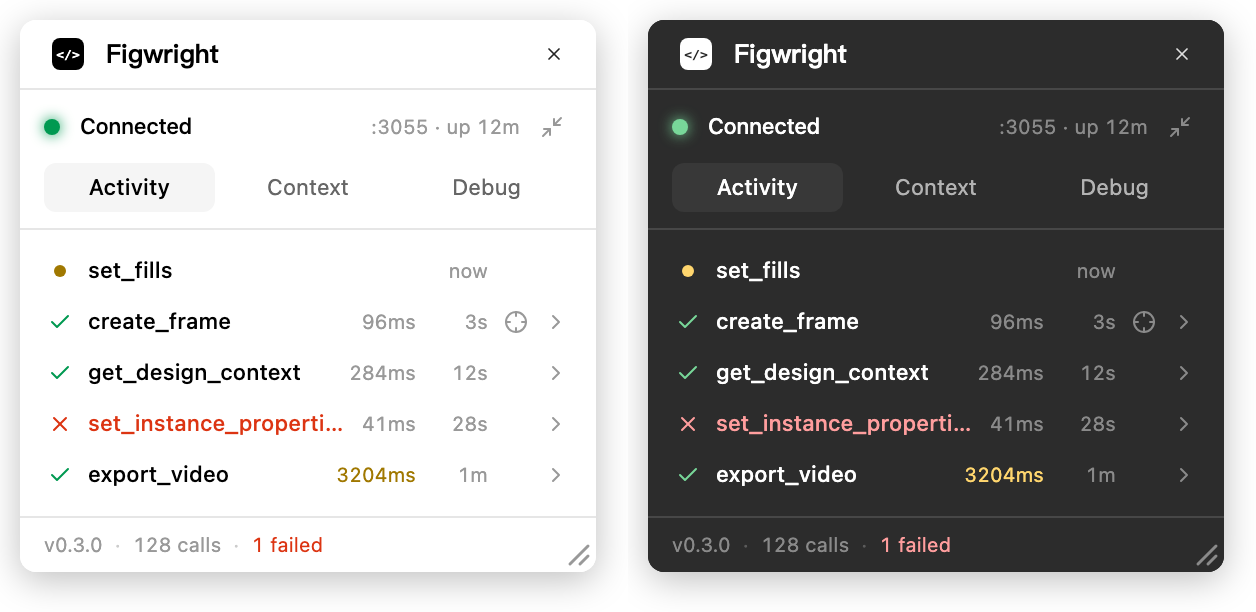
The Figma-side plugin isn't a black box. It shows every call as it happens, lets you inspect the exact payload sent to the model, and surfaces its own connection health.
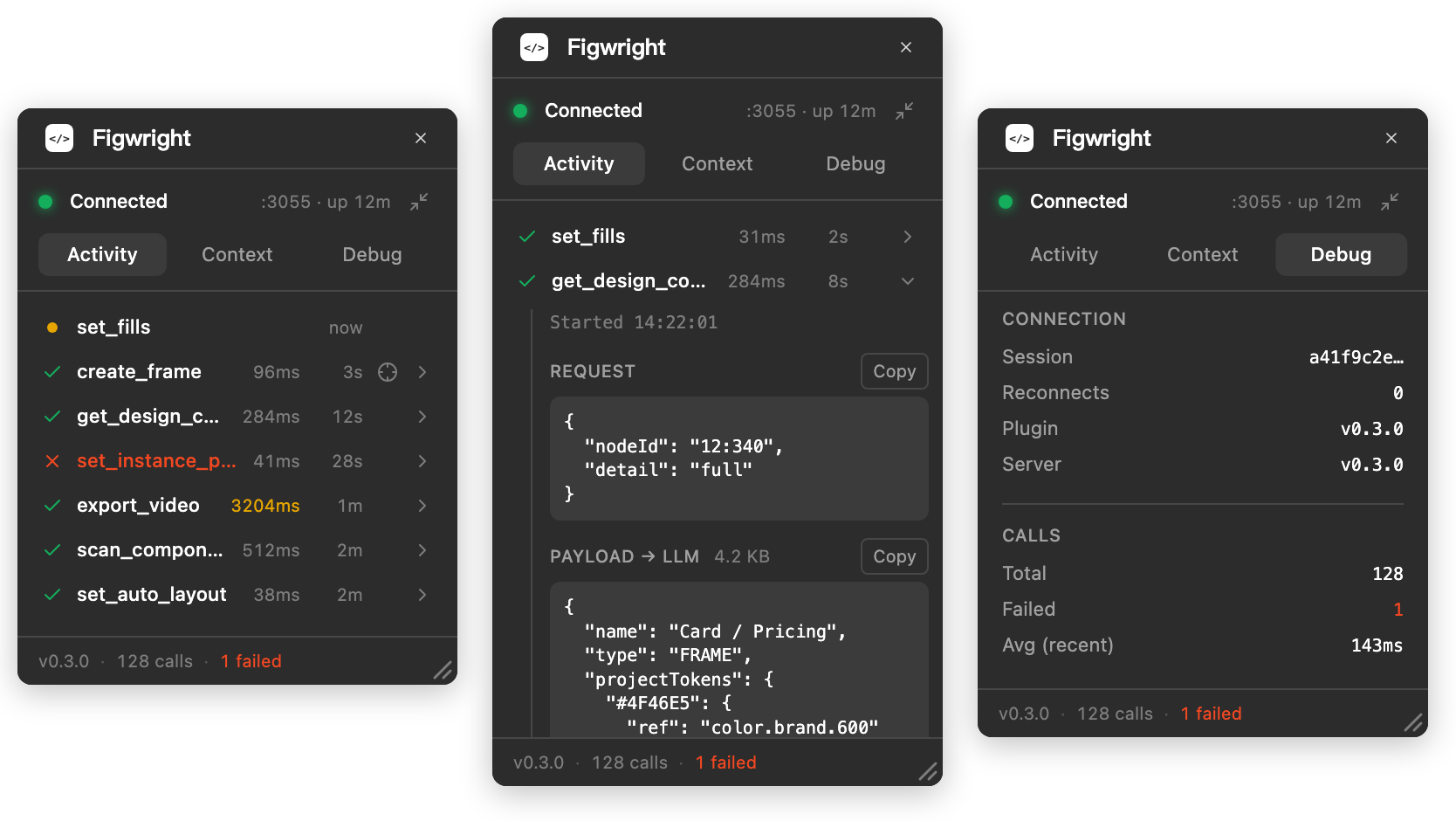
Activity: every call, with timing and a jump to the nodes it touched · Payload: exactly what the model received · Debug: health, versions, and a one-click diagnostic bundle
And it follows your Figma theme, light or dark.
The window is yours to arrange. Drag the bottom-right corner to resize it. A taller panel keeps more of the log in view, and the size is remembered next time you open it. Or put it away: Run in background, in the panel header right under Figma's own ✕, hides the panel while the connection stays live, so a long-running agent keeps working. Run the plugin again to bring it back. The ✕ above it closes the plugin instead, connection and all.
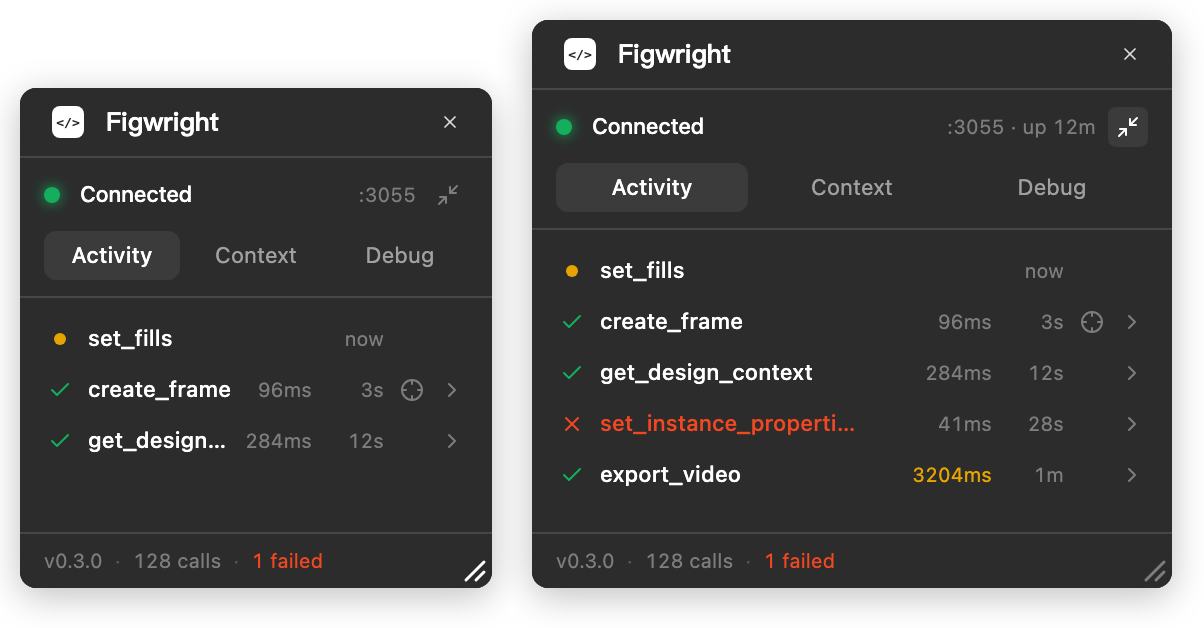
Resize: drag the corner, the size sticks · Background: the panel hides, the relay stays connected
Your MCP client launches the @figwright/mcp server and talks to it over stdio. The server relays each tool call over a local WebSocket to the Figwright plugin, which carries it out through Figma's Plugin API. Every agent runs its own server process; the processes elect a leader that holds the plugin connections, and the rest forward to it. The plugin runs in every file you open it in, so several agents can each work in their own file at once, and the whole path is built to ride out dropped sockets, leader handovers and long reads:

Stars on GitHub
Ships with gitnexus: GitNexus indexes a codebase into a knowledge graph of symbols, calls, dependencies and execution flows. Use…
@abhigyanpatwariInstall MCPShips with cursor-talk-to-figma-mcp: This project implements a Model Context Protocol (MCP) integration between AI agent (Cursor,…
 @grabInstall MCP

